WordPress maintenance is the ongoing programme of updates, security monitoring, backups, and performance checks that keeps a WordPress site secure, fast, and correctly indexed. It covers weekly plugin, theme, and core updates applied after staging verification; daily automated offsite backups; continuous uptime monitoring; monthly Core Web Vitals performance reviews; and regular Google Search Console audits. Without maintenance, WordPress sites accumulate vulnerabilities and performance degradation that compound into costly incidents.
Key Takeaways
- According to Wordfence, 43% of WordPress compromises exploit vulnerabilities in outdated plugins. Weekly plugin updates applied within 48 hours of security patches eliminate the primary attack vector responsible for nearly half of all WordPress security incidents.
- Daily automated backups stored to offsite cloud storage via UpdraftPlus are the only reliable recovery mechanism after a security incident or accidental deletion. Without offsite backups, a successful compromise can result in permanent, irrecoverable data loss.
- Managed WordPress hosting on Kinsta or WP Engine handles server-level infrastructure maintenance, automatic software updates, security patching, uptime monitoring. Application-level WordPress maintenance (plugin updates, content audits, SEO monitoring) remains the site owner responsibility regardless of hosting quality.
- The business case for a professional care plan at £80 to £200 per month is straightforward: a single WordPress security compromise and professional recovery costs £500 to £3,000. One prevented incident per year makes the annual maintenance investment decisively profitable, before accounting for avoided ranking losses.
- Every plugin update and code change must be tested on a staging environment before deployment to the live site. A single untested major update can break a production site. Professional WordPress hosting providers include one-click staging, its use is mandatory in any professional maintenance programme.
- WooCommerce stores require additional maintenance tasks beyond standard WordPress: payment gateway test transactions after every update batch, stock and inventory verification, abandoned cart recovery monitoring, and checkout performance testing. An eCommerce site with a broken payment gateway loses revenue with every failed transaction.
- Monthly Google Search Console review is the earliest warning system for ranking problems, Coverage errors, Core Web Vitals regressions, and manual actions that suppress rankings are all visible in GSC before they manifest as measurable traffic drops. See our technical SEO audit guide for the full monitoring process.
WordPress Care Plans
Professional WordPress Maintenance, Updates, Backups, Security, and Performance
Futuristic Marketing Services provides monthly WordPress maintenance programmes with weekly staged updates, daily offsite backups, security monitoring, Core Web Vitals tracking, and priority support for business sites.
View Maintenance PlansWhat WordPress Maintenance Includes
| Task | Frequency | What It Covers | Why It Matters |
|---|---|---|---|
| Plugin, theme, and core updates | Weekly | Update all plugins, themes, and WordPress core to latest versions; test on staging first; apply to live after verification | 43% of compromises exploit outdated plugins. Updates also deliver performance fixes and new features. See our security guide. |
| Security scan | Weekly | Run Wordfence or Sucuri malware scan; review firewall logs; check for unexpected new admin users or file modifications | Identifies compromises early, before Google detects malware and flags the site in Search Console or Safe Browsing |
| Backup verification | Weekly | Confirm automated daily backups completed without error; check file sizes are consistent; test restoration monthly | Backup systems fail silently. Regular verification ensures a restoration is genuinely possible when needed |
| Uptime monitoring | Continuous (automated) | Monitor site availability every 5 minutes; alert via email or SMS if site goes offline; log downtime duration and frequency | Unmonitored downtime means discovering outages through customer complaints rather than automated alerts, minutes matter for revenue |
| Performance check | Monthly | Run PageSpeed Insights on mobile tab for key pages; review Core Web Vitals in Google Search Console; check for regressions from recent plugin updates | Plugin updates can introduce CSS or JavaScript changes that degrade mobile Lighthouse scores and suppress rankings progressively |
| Broken link audit | Monthly | Crawl all internal and external links; fix 404 errors on internal links; update redirect chains; remove broken external citations | Broken internal links waste PageRank and frustrate users; broken external citations damage E-E-A-T signals for content quality |
| Google Search Console review | Monthly | Check Coverage for new excluded pages; review Core Web Vitals status; check Performance for ranking changes; verify no manual actions. See our technical SEO audit. | GSC is the earliest warning system for indexation problems and ranking suppression, monthly review catches issues before they compound |
| Database optimisation | Monthly | Remove post revisions above defined threshold; clean orphaned post metadata and transients; optimise database tables | WordPress database grows continuously with post revisions and plugin data. Uncleaned databases slow query times and increase hosting overhead |
| User account audit | Quarterly | Review all WordPress user accounts; remove dormant or unrecognised accounts; verify 2FA active on all admin roles | Dormant admin accounts are an attack surface. Compromised sites frequently have unauthorised admin accounts added silently |
| Content accuracy review | Quarterly | Review top-traffic pages for outdated statistics, broken links, or factual inaccuracies; update where needed | Outdated content loses E-E-A-T signals progressively. Google favours regularly maintained content demonstrating current expertise |
The Correct Update Sequence
The Cost of WordPress Maintenance Neglect
| Neglect Category | Timeframe to Impact | Typical Consequence | Recovery Cost |
|---|---|---|---|
| Plugin updates skipped for 4 to 8 weeks | 4 to 12 weeks after vulnerability disclosure | Known exploit used to compromise site: malware injected, data stolen, or site defaced by automated bot | £500 to £3,000 professional malware removal and hardening; potential data breach notification obligations under UK GDPR |
| No offsite backup configured | Triggered by any incident | Security compromise or accidental deletion with no recovery path, all content and customer data permanently lost | Full rebuild at original development cost; irrecoverable customer data loss |
| Performance regressions ignored for 3 to 6 months | 3 to 12 months progressive decline | Core Web Vitals slip from Good to Needs Improvement; organic rankings decline; bounce rate increases; conversion rate falls | 3 to 6 months to recover lost rankings after technical fixes; ongoing revenue loss during the decline period |
| WordPress core outdated by 2 or more major versions | 6 to 18 months | Plugin compatibility failures; PHP version conflicts causing white screen errors; compounding security vulnerabilities | Sequential major version catch-up: 4 to 12 hours of developer time plus plugin compatibility fixes |
| GSC not monitored for 6 or more months | Ongoing, discovered late | Manual actions, coverage errors, and Core Web Vitals failures go undetected, significant traffic drop is the first symptom noticed | Recovery depends on severity; manual action resolution can take weeks after correction is submitted |
The Compound Economics
WordPress Maintenance Care Plan Costs
| Plan Type | Monthly Cost | Includes | Best For |
|---|---|---|---|
| DIY self-managed | £0 direct (2 to 4 hours of your time per month) | You manage all updates, backups, monitoring using free plugin tier | Technical site owners with consistent time availability and lower-stakes sites |
| Plugin-assisted self-managed | £10 to £30 (plugin licences only) | UpdraftPlus Pro automated backups, Wordfence free security monitoring, manual updates by you | Technical owners wanting automated backup safety net but managing updates themselves |
| Freelance developer retainer | £50 to £150 per month | Monthly updates with staging verification, backup monitoring, security scan, 1 to 2 hours support time | Small business sites with an existing trusted developer relationship |
| Agency basic care plan | £80 to £200 per month | Weekly staged updates, daily offsite backups, uptime monitoring, monthly performance report, priority support response | All professional business sites where reliability and ranking performance are commercially important |
| Agency comprehensive plan | £200 to £500 per month | All basic tasks plus monthly GSC audit, quarterly content review, Core Web Vitals monitoring, conversion recommendations | WooCommerce stores and high-traffic sites where maintenance directly affects revenue |
| Enterprise managed programme | £500 to £2,000 per month | All above plus proactive SEO monitoring, A/B testing support, dedicated account manager, 24 or 7 emergency response SLA | Enterprise WordPress installations where site downtime has significant direct revenue impact |
WordPress Maintenance Tool Stack
The Professional WordPress Maintenance Tool Stack
UpdraftPlus (backups)
The professional standard WordPress backup plugin. Configure: daily database backups retained 14 days; weekly full-file backups retained 4 weeks; all stored to Google Drive or S3, never on the same server as the site. UpdraftPlus Pro at £70 per year adds incremental backups and restoration scheduling.
Wordfence Security (security monitoring)
Wordfence provides a Web Application Firewall, real-time malware scanner, and brute force protection. The free tier covers the majority of security requirements. Configure Extended Protection mode and set email alerts for new admin logins and critical security events.
WP Rocket (performance maintenance)
After every update batch, clear the WP Rocket page cache to ensure visitors receive updated files. Monthly review of Core Web Vitals in Google Search Console identifies any performance regressions from plugin updates before they accumulate into ranking impact.
ManageWP or MainWP (multi-site management)
For agencies or owners managing multiple WordPress sites: ManageWP and MainWP provide a single dashboard for updating, backing up, and monitoring all sites simultaneously. ManageWP costs £0.67 per site per month. MainWP is free and self-hosted. Both reduce multi-site maintenance time by 60 to 80 percent.
UptimeRobot (uptime monitoring)
UptimeRobot provides free uptime monitoring with 5-minute check intervals and email or Slack alerts when the site goes offline. Every production WordPress site must have uptime monitoring. Without it, downtime is discovered through customer complaints rather than automated alerts.
Google Search Console (SEO health monitoring)
Free, authoritative, and provides the most accurate data on how Google sees the site. Monthly maintenance review covers: Coverage report for new excluded pages; Core Web Vitals for new Poor-status pages; Performance for keyword ranking changes; Manual Actions for any penalties. See our technical SEO audit guide.
WooCommerce Maintenance: The Additional Requirements
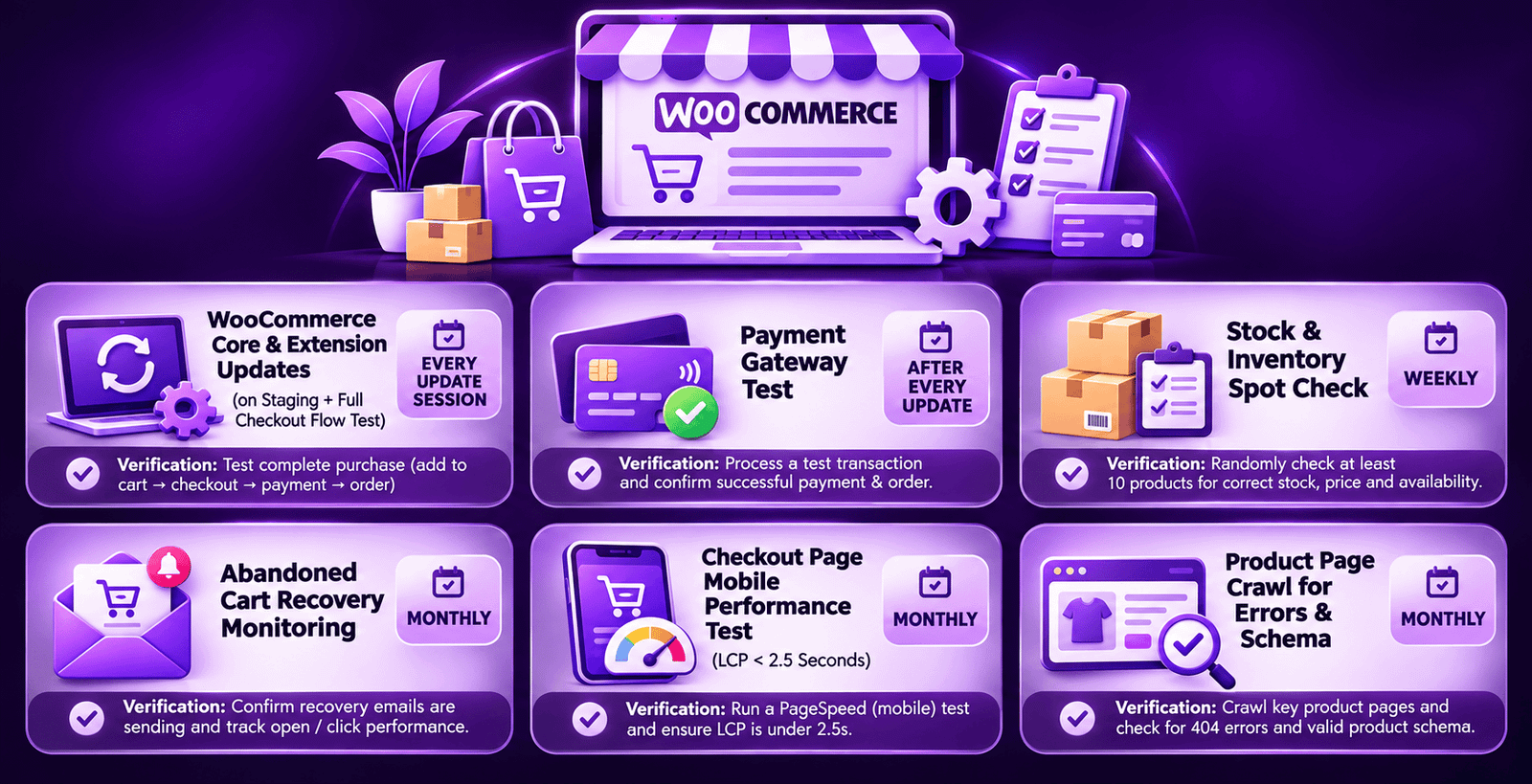
| WooCommerce Maintenance Task | Frequency | Verification Method |
|---|---|---|
| WooCommerce core and extension updates | Weekly (staged) | Test on staging: add item to cart, proceed through checkout, complete test transaction, verify order confirmation email |
| Payment gateway test transaction | After every update session | Process a real test transaction through each active payment gateway; verify order created in WooCommerce admin; confirm confirmation email delivered |
| Stock and inventory verification | Weekly | Spot-check 10 high-selling products for correct stock levels; verify out-of-stock products display correctly and block ordering |
| Abandoned cart recovery monitoring | Monthly | Review abandoned cart email delivery rates; verify emails reach inbox not spam; check recovery rate trend over 3-month rolling window |
| Checkout performance test on mobile | Monthly | Load checkout page on real mobile device; verify LCP under 2.5 seconds; check for layout shift issues on payment form. See our Core Web Vitals guide. |
| Product page crawl for errors | Monthly | Screaming Frog crawl of all product URLs for 404 errors, redirect chains, missing title tags, and missing product schema |
WooCommerce Maintenance
eCommerce Care Plan With Payment Gateway Monitoring Included
Futuristic Marketing Services provides WooCommerce-specific maintenance programmes, update verification with full checkout testing, payment gateway monitoring, abandoned cart optimisation, and monthly performance reporting.
Get Your WooCommerce Care PlanFrequently Asked Questions About WordPress Maintenance
Q. What does WordPress maintenance include?
Q. How much does WordPress maintenance cost?
Q. How often should WordPress plugins be updated?
Q. Do I need a staging environment for WordPress maintenance?
Q. What is the best WordPress backup plugin?
Q. What happens if WordPress maintenance is neglected?
Q. Can I do WordPress maintenance myself?
Q. How do I choose a WordPress maintenance provider?
Q. What is the difference between WordPress hosting support and maintenance?
Q. Does WordPress maintenance affect SEO?
Q. What maintenance does a WooCommerce store need beyond standard WordPress?
Q. How do I know if my WordPress site has been compromised?
Futuristic Marketing Services
WordPress Maintenance That Protects Your Business Asset
Futuristic Marketing Services provides professional WordPress care plans, weekly staged updates, daily offsite backups, Wordfence security monitoring, Core Web Vitals tracking, and priority support, so your site stays secure, fast, and ranking.
Start Your Care Plan Today