WordPress Hosting: The Complete UK Comparison Guide

wordpress hosting

WordPress hosting is the server infrastructure that stores and serves your WordPress website to visitors. The hosting choice is the single most important decision in a WordPress project after the platform itself, it determines page speed (and therefore Core Web Vitals rankings and conversion rate), security infrastructure, uptime reliability, and the scalability ceiling of the site. In 2026, managed WordPress hosting on Kinsta, WP Engine, or Cloudways is the professional standard for any commercial site, shared hosting is appropriate only for personal blogs and low-traffic informational sites.

This guide provides the complete WordPress hosting comparison for UK businesses in 2026, the four hosting types and when each is appropriate, the managed hosting comparison across Kinsta, WP Engine, and Cloudways, performance benchmarks by hosting tier, a WooCommerce-specific hosting section, the cost breakdown, and the practical framework for choosing the right plan for your site. If you are setting up WordPress for the first time or evaluating a hosting migration, this guide gives you everything needed to make the right decision.

Key Takeaways

  • Hosting quality is the performance foundation, all other optimisation is constrained by server response time. Managed WordPress hosting (Kinsta, WP Engine, Cloudways) achieves under 200ms TTFB with Redis caching; shared hosting achieves 400ms to 2,000ms. This gap determines whether Good Core Web Vitals status is achievable.
  • Kinsta and WP Engine are the two industry-leading managed WordPress hosts, both use server-level caching, global CDN, isolated containers, and automatic malware scanning. Cloudways provides managed cloud hosting (DigitalOcean, AWS, Google Cloud) at lower cost with slightly more technical configuration required.
  • WooCommerce stores have specific hosting requirements: Redis object caching for database query performance, ability to handle uncacheable cart and checkout pages, and scalable infrastructure for seasonal traffic spikes. Managed WooCommerce hosting on Kinsta or WP Engine is the correct choice, shared hosting cannot adequately serve any meaningful eCommerce traffic.
  • The managed hosting upgrade produces the single largest performance improvement available to an existing WordPress site, typically a 20 to 30 point increase in mobile Lighthouse score, before any other optimisation is applied. It is the first investment in any site performance improvement programme.
  • Server location matters for UK audiences. Choose a hosting provider with a UK or Western European data centre (London, Frankfurt) as the primary node. Most managed hosts include a global CDN that caches static assets globally regardless of server location.
  • Shared hosting platforms (Bluehost, GoDaddy, SiteGround basic) are appropriate only for personal blogs and low-traffic informational sites. Any business site where performance affects conversions or rankings should be on managed hosting. See our WordPress security guide for the security infrastructure differences.
  • Annual billing on managed hosting saves 15 to 25% versus monthly billing. For a production business site, annual billing is always the correct choice, site infrastructure should not change on short notice, and the saving is significant at managed hosting price points.

WordPress Hosting Setup

Expert Hosting Selection and Migration for WordPress Sites

Futuristic Marketing Services handles WordPress hosting selection, migration, and configuration, ensuring your site launches on the right infrastructure with correct server-level optimisation.

Discuss Your Hosting

The Four WordPress Hosting Types

WordPress hosting spans four distinct infrastructure types, each with different performance characteristics, management requirements, and cost profiles. Understanding what each type provides and what it does not determines the correct choice for any given site.
Hosting TypeTTFB RangeMobile LighthouseMonthly CostManagement RequiredBest For
Shared hosting400ms to 2,000ms25 to 55£3 to £15Low (managed by host)Personal blogs, low-traffic informational sites, first hosting experience
VPS (Virtual Private Server)150ms to 600ms50 to 75£15 to £80High (server management by client)Technically capable teams wanting performance control at lower cost than managed
Managed WordPress hosting80ms to 300ms70 to 92£25 to £200Low (managed by host)All professional business WordPress sites, the correct choice for commercial sites
Jamstack CDN (Vercel, Netlify)30ms to 150ms88 to 98Free to £150Low to mediumNext.js and headless WordPress front-ends requiring maximum edge performance

Why Shared Hosting Fails for Business Sites
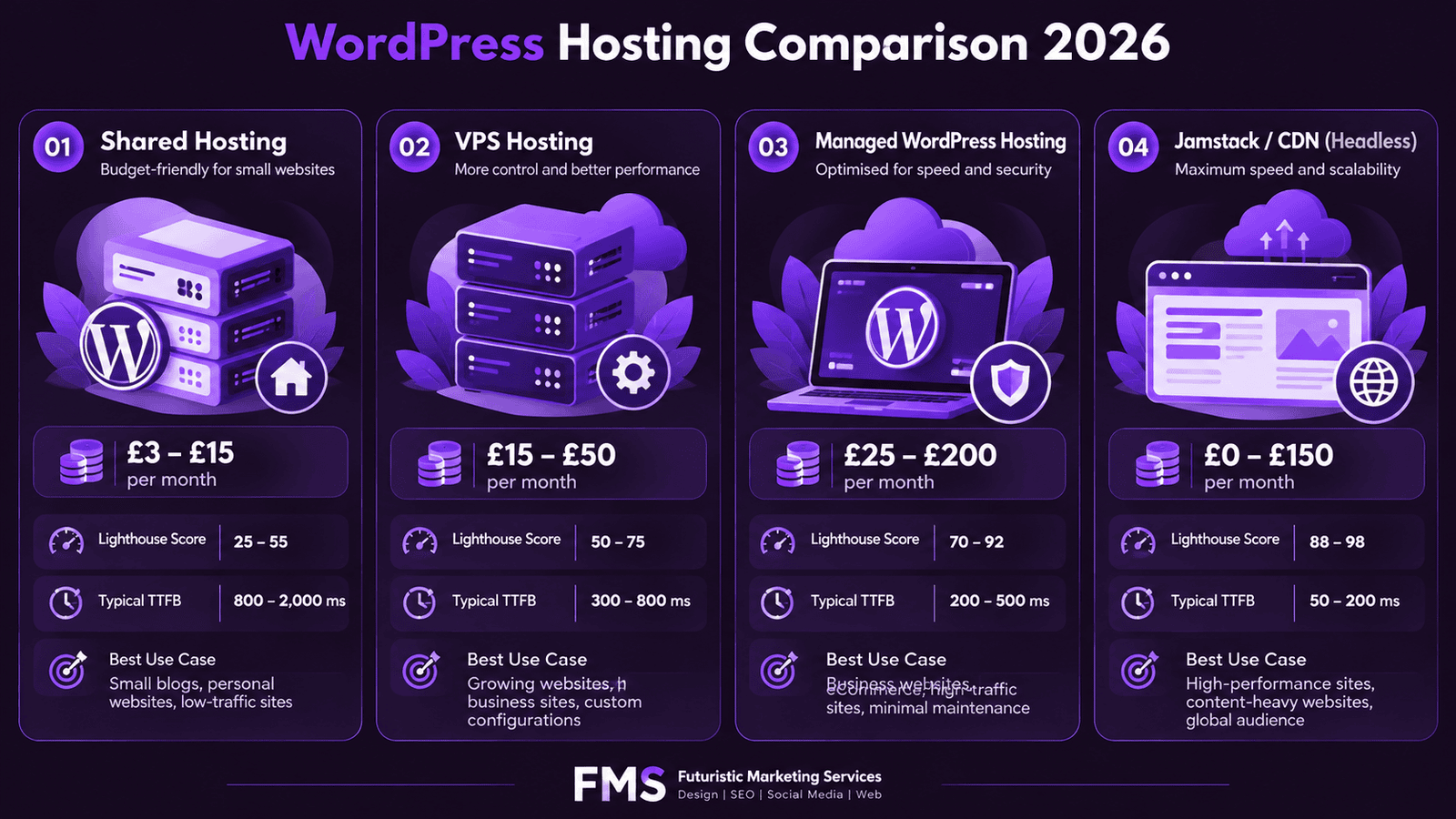
Shared hosting places hundreds or thousands of websites on one server, sharing its resources. When any neighbouring site experiences a traffic spike or resource-intensive process, your site's performance degrades. There is no isolation between sites, a security compromise on one site can affect others on the same server. TTFB on shared hosting ranges from 400ms to 2,000ms, making Good Core Web Vitals status structurally unachievable regardless of plugin configuration. Shared hosting is a false economy for business sites: the money saved on hosting is lost in lower search rankings, higher bounce rates, and reduced conversion rates. See our website speed guide for the performance data.

Managed WordPress Hosting Comparison: Kinsta vs WP Engine vs Cloudways

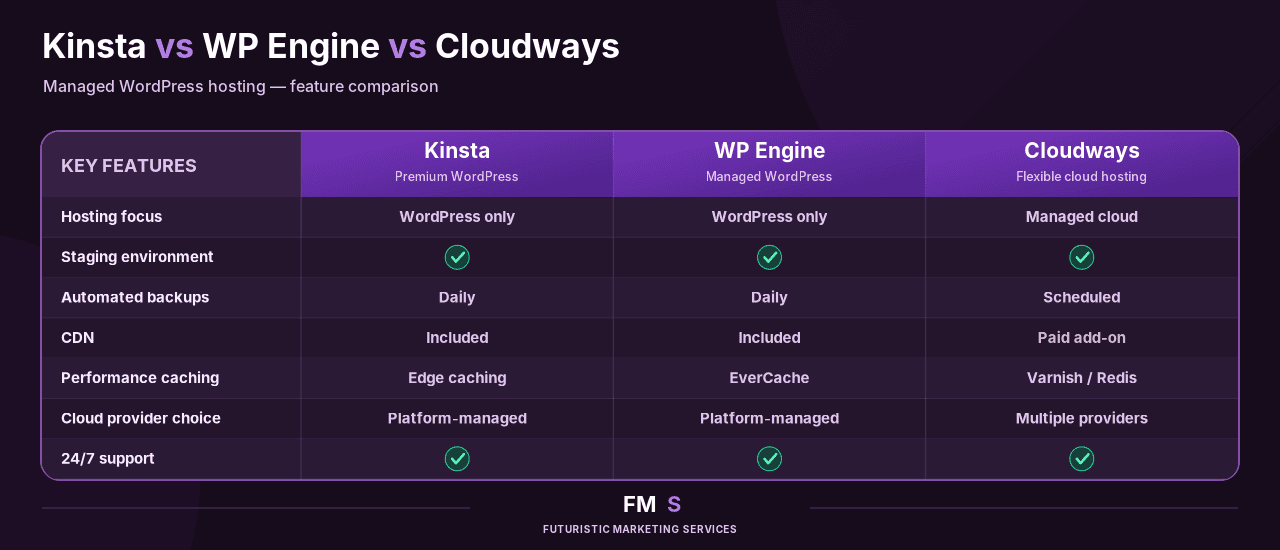
FeatureKinstaWP EngineCloudways
InfrastructureGoogle Cloud Platform (C2 machines)Proprietary EverCache technology on AWS and Google CloudYour choice: DigitalOcean, AWS, Linode, Google Cloud, or Vultr
Server-level cachingFull-page and object caching (Redis)EverCache full-page caching + RedisFull-page caching (Varnish) + Redis object caching
Global CDNCloudflare CDN includedCloudflare CDN includedCloudflare CDN available via add-on
UK/EU data centreLondonLondon, FrankfurtLondon (DigitalOcean), Frankfurt (multiple providers)
Starting price (UK)£32/month (1 site, 25,000 visits)£29/month (1 site, 25,000 visits)£14/month (1 server, unlimited WordPress installs)
Free site migrationYesYesYes
Staging environmentYes, one-click stagingYes, one-click stagingYes, one-click staging
Automatic backupsDaily (retained 14 days)DailyDaily (retained 1 day; upgrades available)
24/7 supportChat and ticketChat and ticketChat and ticket
WooCommerce optimisedYesYesYes (manual Redis configuration)

Which Managed Host Should You Choose?

Choose Kinsta for: the best developer experience and toolset, highest performance ceiling, and a site with significant technical complexity or traffic. Kinsta Google Cloud infrastructure and object cache premium make it the highest-performance option. Choose WP Engine for: excellent performance at a slightly lower entry price, a strong WordPress-specific support team, and the Genesis framework included if you use it. Choose Cloudways for: the best value-for-money managed hosting, particularly for agencies managing multiple WordPress sites, one server hosts unlimited WordPress installations at a fixed monthly cost.

WooCommerce Hosting Requirements

WooCommerce stores have hosting requirements that differ significantly from standard WordPress sites, primarily because cart and checkout pages are dynamic and cannot be served from page cache, they must be generated fresh on every request.
WooCommerce Hosting RequirementWhy It MattersHow to Verify
Redis object cachingWooCommerce makes frequent database queries for product data, pricing, and session data. Redis stores query results in memory, dramatically reducing database load and improving TTFB on uncacheable pagesGSC Core Web Vitals report, TTFB under 200ms on checkout pages indicates Redis is working correctly
Server-level cache exclusion for cart and checkoutCart and checkout pages must bypass full-page caching to serve correct dynamic session data. Managed hosts pre-configure this exclusion; on VPS it must be configured manuallyAdd items to cart and verify cart contents persist across page loads, indicates correct cache exclusion
Scalable infrastructure for seasonal peakseCommerce traffic spikes dramatically during sales events (Black Friday, Christmas). Shared hosting cannot handle these spikes without downtimeKinsta and WP Engine offer auto-scaling. Test with load testing tools (k6, Locust) before peak periods
PHP memory limit 256MB or higherWooCommerce with multiple extensions requires more PHP memory than standard WordPress. Insufficient memory causes white screens during checkoutWooCommerce Status page lists PHP memory limit, increase to 256MB minimum in php.ini or wp-config.php

WordPress Hosting Cost Breakdown

Hosting PlanMonthly CostAnnual CostSites IncludedTraffic Limit
Shared hosting (Bluehost, SiteGround)£3 to £15£36 to £1801 to unlimited (shared resources)Varies, typically throttled above 10,000 visits/month
Cloudways (DigitalOcean 2GB)£14£168Unlimited installs on one serverUnlimited, bandwidth throttled at very high volumes
Kinsta Starter£32£348 (annual)1 WordPress install25,000 visits/month
WP Engine Startup£29£318 (annual)1 WordPress install25,000 visits/month
Kinsta Business 1£80£864 (annual)1 install100,000 visits/month
Kinsta Business 2£130£1,404 (annual)2 installs250,000 visits/month
The performance ROI of managed hosting makes the cost comparison straightforward. A business site receiving 10,000 monthly visits with a 3% conversion rate and £100 average order value generates £30,000 per month. A 7% conversion rate improvement from managed hosting versus shared hosting (common for eCommerce based on performance data) generates an additional £2,100 per month, vastly exceeding the £18/month cost difference between shared and managed hosting.

Hosting Migration

Migrate Your WordPress Site to Managed Hosting Safely

Futuristic Marketing Services handles WordPress hosting migrations, from audit through migration to performance verification, with zero downtime and full SEO preservation.

Plan Your Migration

Frequently Asked Questions About WordPress Hosting

Q.What is the best WordPress hosting in the UK?

A. style="color:rgba(255,255,255,0.85);font-size:15px;line-height:1.8;">Kinsta and WP Engine are the two industry-leading managed WordPress hosts for UK businesses. Both provide London data centres, global CDN, server-level Redis caching, daily backups, staging environments, and 24/7 support. Kinsta uses Google Cloud infrastructure for the highest performance ceiling. WP Engine offers a slightly lower entry price. Cloudways on DigitalOcean London is the best value managed option, particularly for agencies managing multiple sites. Shared hosting is not appropriate for any business site where performance affects rankings or conversions.

Q.What is managed WordPress hosting?

A. style="color:rgba(255,255,255,0.85);font-size:15px;line-height:1.8;">Managed WordPress hosting is a hosting service where the provider handles WordPress-specific infrastructure optimisation, server-level full-page caching, Redis object caching, global CDN, automatic daily backups, staging environments, and automatic malware scanning, so the site owner focuses on the website rather than server management. Kinsta, WP Engine, and Cloudways are the leading managed WordPress hosts. Managed hosting costs more than shared hosting but delivers significantly better performance, security, and reliability.

Q. How much does WordPress hosting cost?

A. style="color:rgba(255,255,255,0.85);font-size:15px;line-height:1.8;">WordPress hosting costs range from £3 to £15 per month for shared hosting (appropriate only for personal blogs) to £25 to £200 per month for managed WordPress hosting (appropriate for all commercial sites). Managed hosting entry plans from WP Engine and Kinsta start at £29 to £32 per month for single sites with up to 25,000 monthly visits. Cloudways starts at £14 per month with unlimited WordPress installations on one server, the best value entry point for agencies managing multiple sites.

Q. What is TTFB and how does hosting affect it?

A. style="color:rgba(255,255,255,0.85);font-size:15px;line-height:1.8;">TTFB (Time to First Byte) is the time from when the browser sends a request to when it receives the first byte of the server response. Good TTFB for Core Web Vitals is under 600ms. Managed hosting with Redis caching achieves under 200ms. Shared hosting achieves 400ms to 2,000ms. TTFB adds directly to LCP (Largest Contentful Paint) time, a slow TTFB makes Good LCP status structurally unachievable regardless of image optimisation or caching plugins. Hosting is the performance foundation.

Q. Is shared hosting good enough for WordPress?

A. style="color:rgba(255,255,255,0.85);font-size:15px;line-height:1.8;">Shared hosting is appropriate only for personal blogs, portfolio sites, and low-traffic informational sites where performance has minimal commercial impact. For any business site where: (1) search rankings matter (Core Web Vitals performance is a ranking signal); (2) conversion rate matters (every second of delay reduces conversions); (3) security matters (shared hosting provides no isolation between co-hosted sites); managed hosting is the correct choice. The cost difference is typically £15 to £20 per month, the performance and security improvements are worth significantly more. See our website speed guide for the conversion rate data.

Q. Does hosting affect WordPress SEO?

A. style="color:rgba(255,255,255,0.85);font-size:15px;line-height:1.8;">Yes, significantly. Hosting determines TTFB (Time to First Byte), which directly affects LCP (Largest Contentful Paint), a confirmed Google Core Web Vitals ranking signal. Managed hosting achieves under 200ms TTFB; shared hosting achieves 400ms to 2,000ms. Pages with Good Core Web Vitals status have a ranking advantage over Poor status pages in competitive niches. Additionally, server uptime affects whether Google can crawl the site consistently, managed hosting provides 99.9% or higher uptime guarantees versus variable uptime on shared hosting.

Q. What is the difference between shared hosting and managed WordPress hosting?

A. style="color:rgba(255,255,255,0.85);font-size:15px;line-height:1.8;">Shared hosting places hundreds of sites on one server sharing resources, performance degrades when neighbouring sites spike in traffic, and there is no isolation between sites for security purposes. Managed WordPress hosting provides isolated containers per site, server-level WordPress-optimised caching (Redis), global CDN, automated daily backups, staging environments, and 24/7 WordPress-specialist support. The performance difference is substantial: managed hosting mobile Lighthouse 70 to 92 versus shared hosting 25 to 55. For commercial WordPress sites, managed hosting is the correct infrastructure choice.

Q. What is Redis object caching for WordPress?

A. style="color:rgba(255,255,255,0.85);font-size:15px;line-height:1.8;">Redis is an in-memory data store that caches the results of frequent WordPress database queries. Instead of querying the database for product data, user sessions, or plugin settings on every page request, WordPress retrieves the cached result from Redis in memory, dramatically reducing database load and improving TTFB, particularly on WooCommerce stores with frequent product and pricing queries. Redis object caching is included in Kinsta and WP Engine plans and is the primary reason managed hosting achieves TTFB under 200ms where shared hosting cannot.

Q. How do I migrate my WordPress site to a new host?

A. style="color:rgba(255,255,255,0.85);font-size:15px;line-height:1.8;">WordPress hosting migration steps: (1) Create a full backup of the current site (database and files) using UpdraftPlus or All-in-One WP Migration. (2) Set up the new hosting account and install WordPress. (3) Restore the backup to the new host, or use the migration tool provided by the new host (Kinsta and WP Engine both provide free migration services). (4) Update the wp-config.php database credentials if restoring manually. (5) Test the site on the new host using the temporary URL before changing DNS. (6) Update DNS (A record or nameservers) to point to the new host. (7) Verify SSL certificate on the new host. Most managed hosts provide free migration assistance, see our WordPress maintenance guide.

Q.What hosting does Futuristic Marketing Services recommend?

A. style="color:rgba(255,255,255,0.85);font-size:15px;line-height:1.8;">For most UK business WordPress sites, we recommend Kinsta for the highest performance and developer experience, or WP Engine for a strong balance of performance and support at a slightly lower entry price. For agencies managing multiple client sites, Cloudways on DigitalOcean London provides the best value, unlimited WordPress installations on one managed server from £14 per month. We configure all client sites with Redis object caching, global CDN, staging environments, and automated daily backups regardless of which managed provider is used.

Q. What is a staging environment in WordPress hosting?

A. style="color:rgba(255,255,255,0.85);font-size:15px;line-height:1.8;">A staging environment is a separate copy of the WordPress site, an identical clone running on a private URL, where development work, plugin updates, and design changes can be tested before being applied to the live site. All professional managed WordPress hosts (Kinsta, WP Engine, Cloudways) include one-click staging environment creation. Testing changes in staging before deploying to production is the professional standard for WordPress development, it eliminates the risk of a plugin update or code change breaking the live site. Never apply untested changes directly to a production WordPress site.

Q. How much traffic can managed WordPress hosting handle?

A. style="color:rgba(255,255,255,0.85);font-size:15px;line-height:1.8;">Managed WordPress hosting plans are priced by monthly visit volume. Kinsta and WP Engine entry plans handle 25,000 monthly visits. Mid-tier plans handle 100,000 to 250,000 visits. Enterprise plans handle millions of monthly visits. Both providers include auto-scaling so traffic spikes do not cause downtime, you may be charged overage fees rather than experiencing outages. For WooCommerce stores expecting significant seasonal traffic spikes (Black Friday, Christmas), verify auto-scaling is enabled and test with load testing before the peak period.

Futuristic Marketing Services

Get Your WordPress Site on the Right Hosting Infrastructure

Futuristic Marketing Services handles WordPress hosting selection, migration, and performance configuration, ensuring your site runs on infrastructure that supports Good Core Web Vitals, maximum uptime, and enterprise-grade security.

Plan Your Hosting Migration

Conclusion: Hosting Is the Performance Foundation

Hosting quality is the most impactful single decision in WordPress performance, and the most commonly underinvested in. The performance difference between shared hosting and managed WordPress hosting is not marginal; it is the difference between mobile Lighthouse scores of 30 to 55 and 70 to 90, between Poor and Good Core Web Vitals status, and between a site that struggles to rank and one that can compete at the top of its target keywords.
The investment is proportionate. For a business site where performance affects rankings and conversions, the £15 to £20 per month cost difference between shared and managed hosting produces returns measured in additional organic visibility, higher conversion rates, and reduced security incidents. Treat hosting as infrastructure investment, not a cost to minimise. For the performance optimisation built on top of managed hosting, see our Core Web Vitals guide and website speed guide.
For the WordPress development context that determines which hosting requirements apply, see our WordPress development guide. For the security infrastructure managed hosting provides, see our WordPress security guide.
Share this post :
Picture of Devyansh Tripathi
Devyansh Tripathi

Devyansh Tripathi is a digital marketing strategist with over 5 years of hands-on experience in helping brands achieve growth through tailored, data-driven marketing solutions. With a deep understanding of SEO, content strategy, and social media dynamics, Devyansh specializes in creating results-oriented campaigns that drive both brand awareness and conversion.


All Posts