How to Create and Optimize a Facebook Business Page for Your Business

Facebook Business Page setup

Creating a Facebook Business Page requires a personal Facebook account, selecting the correct business category, completing every profile field including a professional cover image, keyword-rich About description, website URL, contact details, and a relevant call-to-action button. Optimization after setup, covering content strategy, WhatsApp integration, response settings, and page tabs, determines whether the page produces enquiries and commercial results or simply exists as a digital placeholder.

This guide covers the complete process of creating and optimizing a Facebook Business Page for maximum commercial performance, from the step-by-step creation process through every profile element that requires optimization, how to select and configure the right call-to-action button for the business goal, how to set up WhatsApp integration for Indian businesses, which content types perform best on Facebook pages, and the most common page setup and management mistakes that prevent pages from generating real business outcomes. You will also find a complete Facebook Business Page optimization checklist that covers every element requiring review, whether the page is being created for the first time or being audited and improved after months or years of underperformance.

Key Takeaways

  • Facebook has 3.07 billion monthly active users and over 200 million active Business Pages worldwide, according to Charle Agency's 2026 Facebook statistics research.
  • More than 70% of Facebook users visit a local business page at least once a week, making page completeness and quality a critical first impression for local and service businesses.
  • Facebook Reels generate 22% higher engagement than regular video posts with an average engagement rate of 1.83%, making short-form video the highest-priority content format for business pages.
  • 91% of organizations use Facebook for marketing, and Facebook has 10 million active advertisers, confirming its position as an essential business marketing platform regardless of the organic reach limitations that make paid activity increasingly important.
  • Organic page reach on Facebook currently averages between 1.4% and 5.9% of followers per post, according to AutoFaceless's 2026 data, making a complete page setup that drives direct contact and website visits more valuable than relying on feed reach alone.
  • Businesses that respond to 60% or more of their Facebook comments see a 20% higher engagement rate on average, making active community management a direct performance lever rather than a courtesy practice.
  • A Facebook Business Page is the gateway to the full Meta advertising ecosystem, Meta Business Suite, and WhatsApp Business integration, making correct initial setup the prerequisite for every subsequent commercial capability on the platform.

Want Your Facebook Page to Actually Generate Business?

We Set Up, Optimize, and Manage Your Facebook Business Page

Futuristic Marketing Services creates fully optimized Facebook Business Pages for businesses across India and manages the complete content, advertising, and community engagement strategy that turns pages into genuine lead generation assets.

Get Your Free Facebook Page Audit

Why Your Business Needs a Facebook Business Page

A Facebook Business Page is not simply a social media profile for a company. It is the commercial foundation for everything Meta's business ecosystem offers: Facebook advertising, Meta Business Suite analytics, WhatsApp Business integration, Facebook Shops, Marketplace listings, and the community-building infrastructure of Facebook Groups. A business that operates only a personal Facebook profile to represent its commercial interests forfeits access to every one of these capabilities and operates outside the platform's terms of service, which prohibit using personal profiles for commercial purposes.
The commercial case for a properly set up and maintained Facebook Business Page is substantial. According to Venuelabs' Facebook business statistics, more than 70% of Facebook users visit a local business page at least once a week, and using Facebook's live chat function makes customers 53% more likely to purchase from a business compared to those who only encounter the business through static page content. For Indian businesses, where Facebook has its single largest national user base in the world, a well-optimized Business Page represents the most widely accessible direct marketing touchpoint available on any social platform.

What a Facebook Business Page Delivers That a Personal Profile Cannot

A Facebook Business Page provides six capabilities that a personal profile fundamentally cannot offer. Business analytics through Meta Business Suite's detailed audience demographics, post performance data, and reach metrics, all unavailable on personal profiles. The ability to run paid advertising through Facebook Ads Manager, which is the platform's primary commercial growth mechanism and the reason 10 million businesses actively advertise on the platform. A public business identity that any Facebook user can visit and follow without requiring a friend request, making the page accessible to every potential customer who searches for the business on Facebook regardless of whether they know anyone connected to it.
Page-specific features including the call-to-action button for direct booking, shopping, or contact links, the Services tab for displaying what the business offers with descriptions and pricing, Facebook Shops for product-based businesses, and the ability to create and manage Facebook Events for promotions and product launches. Verified business credibility through the business verification system that places a verification badge on pages that complete the identity confirmation process. And the WhatsApp Business integration that allows the page's visitors to message the business directly through WhatsApp with a single button tap, particularly valuable in the Indian market where WhatsApp is the primary direct messaging platform for both personal and commercial communication.

Why Page Setup Quality Affects Every Subsequent Marketing Decision
A poorly set up Facebook Business Page creates a compounding disadvantage that affects everything built on top of it. An incomplete About section reduces the page's discoverability in Facebook's internal search and in Google's search results. A missing or low-quality cover image reduces the professional impression made on every new visitor. A non-optimized call-to-action button sends visitors to the wrong destination or nowhere at all. Inconsistent contact information across the page and the business website confuses potential customers and damages the local SEO signals that Google uses to rank the business in local search results.
The same setup decisions that affect organic performance also directly affect paid advertising performance. Facebook's ad system uses the Business Page as a trust and quality signal when determining how widely and at what cost to distribute paid campaigns. Pages with complete profiles, active content histories, and strong engagement rates consistently achieve lower cost per result in advertising than pages that were hastily set up with incomplete information and sporadic posting histories. Correct initial setup is the single most cost-effective advertising optimization available to any business before any campaign is launched. Our platform selection guide covers the full context for why Facebook should be in the platform mix for most Indian businesses before deciding whether to invest time in the setup process covered in this article.

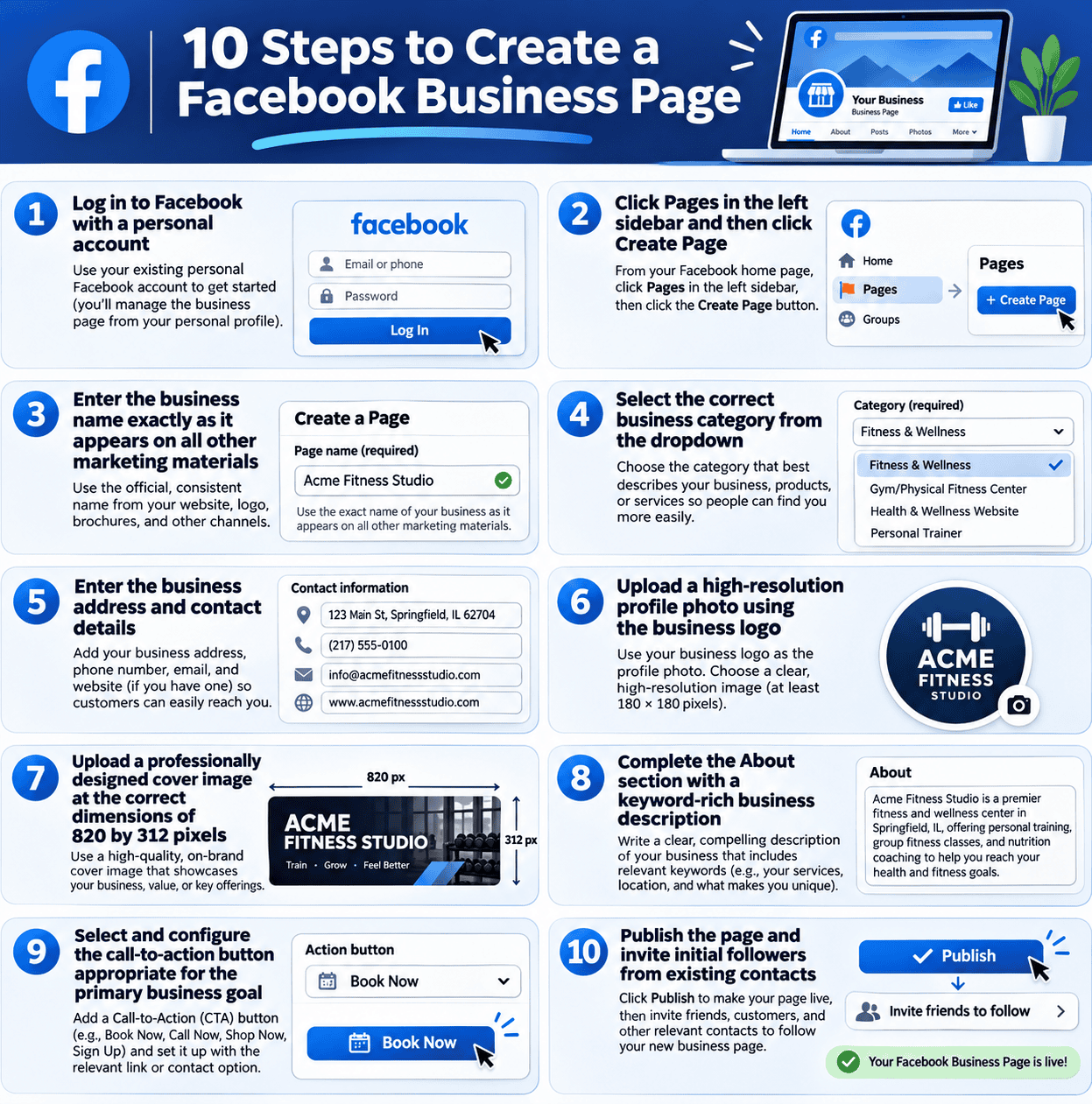
How to Create a Facebook Business Page in 10 Steps

The creation process below covers every required step for setting up a Facebook Business Page correctly from the beginning. If you are working on behalf of a client or creating a page for a business that will eventually have multiple administrators, create the page through a Meta Business Portfolio (formerly Facebook Business Manager) rather than directly from a personal profile, as this provides better long-term access management and separates the page from any individual personal account.

Steps 1 to 5: The Foundation Setup

Log into Facebook using a personal account that will become the page's primary administrator. Click "Pages" in the left sidebar of the Facebook home screen, then click the "Create new Page" button. Enter the business name exactly as it appears on all other marketing materials, the business website, Google Business Profile, and offline materials, to ensure consistent brand identity across all platforms. Inconsistent business names across platforms create confusion for customers and weaker name recognition signals in Facebook's and Google's search systems.
Select the business category by typing a description of the business type into the category field and choosing the most accurate option from the dropdown. Category selection affects how Facebook recommends the page to users browsing by business type and how it appears in local Facebook searches for that category. Add the business contact details in the fields provided, including the physical address for local businesses (which activates Facebook's local discovery features), phone number, website URL, and email address. Complete the business hours field accurately, as visitors who see outdated or missing hours information develop lower confidence in the business's current operational status.

Steps 6 to 10: Profile Completion and Publication

Upload the profile photo, this is the circular image that appears in every post, comment, and search result associated with the page. For business accounts, the profile photo should be the company logo at a minimum of 170 by 170 pixels displayed as a circular crop. The image should be recognizable at small sizes because it appears at 36 by 36 pixels in most notification contexts. Upload the cover photo at the recommended dimensions of 820 by 312 pixels for desktop and 640 by 360 pixels for mobile display. The cover photo is the largest visual space on the page and the first design element new visitors see, use it to communicate the business's primary value proposition or show the product and service in context rather than leaving it as a generic brand color fill.
Complete the About section with a business description of 155 to 255 characters that naturally includes the primary keywords describing what the business does and who it serves. This text appears in search results and on the page itself, making it the highest-visibility piece of text on the entire page. Select the call-to-action button that best matches the primary goal the page is designed to achieve. Options include "Book Now" for appointment-based businesses, "Contact Us" for enquiry-focused service businesses, "Shop Now" for product businesses, "Sign Up" for businesses building email or lead lists, and "Send Message" or "Send WhatsApp Message" for businesses that prioritize direct communication. According to Leadsie's Facebook Page creation guide, connecting a WhatsApp number to the Facebook Business Page is a particularly valuable step for Indian businesses, as it allows visitors to contact the business directly via WhatsApp from a button on the page without requiring any additional app switching.
Click "Done" to publish the page, then invite initial followers from existing contacts by using the "Invite Friends" feature available in the page management tools. Even a small initial follower base from the business's existing network makes the page look established when new visitors or advertising audiences encounter it for the first time, creating a credibility signal that empty pages cannot replicate.

How to Optimize Your Facebook Business Page for Maximum Performance

Page creation is the beginning of the setup process, not the end. A newly created page with only the basics completed leaves significant visibility and conversion potential uncaptured. The optimization steps below address every page element that affects how the page performs in Facebook search, how new visitors respond to the first impression, and how existing followers convert into enquiries and customers through the page's direct contact mechanisms.

Optimizing the About Section for Search and Conversion

The About section of a Facebook Business Page contains several fields beyond the brief description that most businesses complete during initial setup, and each field contributes to the page's findability and professional completeness. The long business description in the full About section allows up to 255 characters and should describe what the business does, who it serves, and what makes it different from competitors in clear, keyword-appropriate language. Avoid using this space for promotional slogans that sacrifice description clarity for brand flair, the About section is read by people who want to understand what the business is and does, not by people who need to be impressed by a tagline.
Complete the founding date, the company overview if the page category requires it, and any service or product keywords in the relevant fields. Every completed field adds to the page's local search visibility on Facebook and contributes to the completeness signal that the algorithm uses when ranking business pages in category search results. For Indian businesses, the "Location" field with a complete, verified address is particularly valuable because it activates the local discovery features that surface the page to users searching for businesses in specific cities or neighborhoods.

Setting Up Page Tabs and Services Listings

Facebook Business Pages include customizable tabs in the left sidebar that visitors can use to navigate to specific sections of the page. The most commercially valuable tabs for service businesses are the Services tab, where each service can be listed with a description, price range, and a booking or enquiry button, and the Reviews tab where customer recommendations build the social proof that influences new visitors' purchasing decisions. For product businesses, the Shop tab allows products to be listed directly on the page with prices and purchase links, enabling direct commerce from the Facebook page without requiring visitors to navigate to the business website.
Enable and configure the Services tab by going to Page Settings and then Templates and Tabs. Add each core service with a title, description of approximately 150 to 200 words, an image, and an approximate price range. These service listings appear in local Facebook searches for the relevant service category, providing an additional discovery pathway beyond page visits from followers and advertising. For many local service businesses, the Services tab is the single most underutilized page feature, it costs nothing to set up and directly improves the page's commercial communication to first-time visitors who want to know immediately whether the business offers what they are looking for.

Facebook Business Page Optimization Checklist

The checklist below covers every element of a fully optimized Facebook Business Page. Use it both when setting up a new page and when auditing an existing page that is underperforming relative to its potential. Mark each item as Complete, Needs Action, or Not Applicable and address every Needs Action item in order of business impact before moving to the next phase of the Facebook marketing strategy.
Category Optimization Item Why It Matters
Profile and Visuals High-resolution logo as profile photo (minimum 170x170px) Appears in every post, comment, and search result; first visual brand impression in all contexts
Professional cover photo at 820x312px with value proposition or product visual Largest visual space on the page; first design element seen by new visitors; must communicate what the business does visually
Business name exactly matching all other brand platforms Consistent naming across platforms strengthens brand recognition and improves discoverability in cross-platform searches
Custom page username (vanity URL) matching business name Creates a clean, shareable URL such as facebook.com/futuristicmarketing rather than a numeric ID string that looks unestablished
Business Information Short description (155 chars) with primary keywords and clear value proposition Appears in search results and page previews; primary text signal for Facebook's category and keyword matching
Complete contact details: phone, email, website, address (for local businesses) Incomplete contact information is the most common reason potential customers leave a page without taking action
Accurate business hours and status Missing hours signal an inactive business; updated hours are a trust signal that the business is currently operational
Correct primary and secondary business categories selected Business category determines which category-based searches the page appears in and which page templates are available
Website URL verified and pointing to correct landing page One of the most direct traffic pathways from Facebook to the business website; a broken or wrong URL wastes every visit it receives
Call to Action and Contact CTA button configured for primary business goal (Book Now, Contact Us, Shop Now, or WhatsApp) The single most direct conversion mechanism on the page; every page visitor who does not tap the CTA is a missed conversion opportunity
WhatsApp Business number connected to the page (Indian businesses) Enables visitors to message via WhatsApp directly from the Facebook page, highest-friction-reduction contact mechanism for the Indian market
Instant reply configured for Messenger with response time target under 1 hour Pages with fast Messenger response times receive a "Very responsive" badge that increases visitor trust and enquiry submission rates
Content and Community Services tab populated with all active service offerings, descriptions, and pricing Appears in local Facebook searches for the service category; provides a comprehensive service reference for visiting potential customers
Minimum 5 recent posts published (no page should be live with an empty feed) An empty or months-old feed signals an inactive business; new visitors assess credibility partly through post frequency and recency
Review section enabled and existing client reviews requested and published Social proof on the page itself reduces the trust-building work every piece of content must otherwise do independently; positive reviews are one of the strongest purchase-confidence signals available on any platform

What Content Works Best on a Facebook Business Page

Understanding which content types perform best on Facebook before building a publishing schedule prevents the wasted effort of repeating formats that generate minimal organic reach while ignoring the formats the algorithm currently favors. Content strategy for a Facebook Business Page must also account for the reality that organic reach averages between 1.4% and 5.9% per post, meaning a page with 1,000 followers can expect each post to reach 14 to 59 people organically, a context that explains why paid amplification and community-driven content are essential complements to standard page posting.
Facebook Reels have become the platform's primary growth format, generating an average engagement rate of 1.83% compared to 0.15% for standard page posts, a 12x difference in engagement rate that makes Reels the clear priority content format for any page focused on organic reach. According to Charle Agency's Facebook statistics research, Facebook Reels generate 22% higher engagement than regular video posts and are growing at double-digit rates for three consecutive years, confirming that Meta's algorithmic prioritization of the Reels format on Facebook mirrors the strategy on Instagram. Publishing three to four short-form videos per week as Facebook Reels is the highest-return organic content investment available on the platform for most business categories.
Facebook Groups represent the other high-performance organic content surface on the platform. With 1.8 billion people using Facebook Groups monthly, businesses that create or actively participate in niche-relevant Groups benefit from significantly higher organic reach than standard page posts because Group content is distributed to all Group members rather than only to the small fraction of page followers the algorithm typically reaches. A social media marketing agency that creates and manages a Group for "Small Business Marketing Tips" reaches an engaged, interested audience with every post in that Group at no organic reach cost, the Group community itself is the distribution mechanism. Connecting Group strategy to the broader social media marketing strategy ensures the Group serves a defined business goal rather than simply generating community activity that never converts to commercial outcomes.

Common Facebook Business Page Mistakes That Prevent Commercial Results

Creating a page and then leaving it incomplete is the most widespread Facebook Business Page mistake. A page missing a cover photo, with an incomplete About section, and without a configured CTA button communicates unprofessionalism to every visitor and generates far fewer enquiries per visitor than a fully completed page, regardless of how the visitor arrived. Complete every field in the optimization checklist above before promoting the page through any other channel, because every visitor who encounters an incomplete page is a potential customer whose impression of the business is damaged by the incompleteness before any content has the opportunity to persuade them.
Using the page only for self-promotional content is the content strategy equivalent of the incomplete setup mistake. The organic reach that most page posts receive is already modest, averaging 1.4% to 5.9% of followers. Applying that modest reach to content that only promotes the business's products and services produces the weakest possible engagement signals because the audience has no reason to comment, share, or save promotional posts that provide them with no value beyond awareness of an offer. Following the same content balance used for Instagram, approximately 80% value-driven educational, community, and behind-the-scenes content and 20% promotional, applies equally to Facebook and produces stronger algorithmic performance, stronger audience relationships, and ultimately more commercial results per post than a feed consisting primarily of promotional announcements.
Neglecting Messenger and ignoring customer messages is a conversion-destroying mistake given that 12 billion business messages are sent through Messenger monthly. A business that responds to Messenger enquiries within 24 hours consistently converts more page visitors into customers than one that allows messages to go unanswered for days. Set up Messenger's instant reply feature with a professional acknowledgment message that confirms the business has received the enquiry and provides a realistic response timeframe. This automated first response maintains the conversation and prevents the potential customer from contacting a competitor before hearing back. Our social media management services include Facebook page management, Messenger monitoring, and community engagement as standard components of every client engagement.

Get Your Facebook Page Working as Hard as Your Business

We Optimize, Manage, and Grow Your Facebook Business Page

From complete page setup and optimization through monthly content planning, Reels production, Messenger management, and performance reporting, our team handles everything your Facebook Business Page needs to generate consistent enquiries and audience growth.

Book Your Free Page Audit

Frequently Asked Questions About Facebook Business Page Setup

What is the difference between a Facebook Business Page and a personal profile?

A Facebook Business Page is a public commercial presence that any Facebook user can visit and follow without a friend connection, provides access to analytics, advertising, and business tools unavailable on personal profiles, and is the correct platform under Facebook's terms for representing a business commercially. A personal profile is intended for individual use, requires mutual friend connections for access to content, and does not offer the advertising, analytics, or business management features that make Facebook commercially valuable for a business. Using a personal profile to represent a business violates Facebook's terms of service and forfeits access to the Meta advertising ecosystem.

How do I create a Facebook Business Page?

Log in to Facebook with a personal account, click "Pages" in the left sidebar on the Facebook home screen, and click "Create new Page." Enter the business name, select the appropriate business category, add contact details including address, phone, and website, upload a profile photo and cover image, complete the About section with a keyword-rich description, configure the call-to-action button for the primary business goal, and publish the page. After publishing, complete the optimization steps covering Services tab, custom username, WhatsApp integration, and Messenger instant reply to maximize the page's commercial effectiveness before promoting it.

What is the correct cover photo size for a Facebook Business Page?

The recommended Facebook Business Page cover photo dimensions are 820 by 312 pixels for desktop display and 640 by 360 pixels for mobile display. Since over 90% of Facebook users access the platform primarily on mobile devices, designing the cover image with mobile display as the primary reference ensures the most important visual elements appear correctly on the majority of the page's visitors. Place the most important design elements, the value proposition text, product visual, or key brand message, in the central portion of the image to ensure they are not cropped on either desktop or mobile display.

What is the best call-to-action button for a Facebook Business Page?

The best CTA button is the one that most directly connects to the primary commercial goal the page is designed to advance. "Book Now" is ideal for service businesses that take appointments such as clinics, salons, and consultancies. "Contact Us" works best for businesses that generate enquiries as the first step in a longer sales process. "Shop Now" is appropriate for product businesses with an active online store. "Send WhatsApp Message" is particularly effective for Indian businesses where WhatsApp is the primary direct communication preference. Review the CTA button quarterly to ensure it still matches the primary conversion goal as the business's marketing strategy evolves.

How often should a business post on its Facebook Business Page?

Three to five posts per week is the optimal frequency for most Facebook Business Pages, balancing posting consistency against the content quality required to generate meaningful engagement within the modest organic reach the platform currently provides. The average Facebook Page posts 7.9 times per week, but research suggests 10 posts per week achieves the highest average engagement rate of 1.61% for pages that can maintain quality at that volume. For most small businesses without dedicated content teams, three to four posts per week of genuinely valuable content consistently outperforms five to ten posts of lower quality driven by posting frequency pressure.

Can I run Facebook ads without a Business Page?

No. A Facebook Business Page is the mandatory prerequisite for running any Facebook advertising campaign. All ads run through Facebook Ads Manager must be associated with a Business Page, as the page provides the identity, imagery, and audience trust signal that makes the ad system function. Without a page, there is no ability to create campaigns, run boosted posts, or access the Facebook Pixel for website remarketing. The Business Page is also the gateway to Meta Business Suite, Meta Business Manager, and the Facebook Pixel setup, all of which are required for any serious paid advertising strategy on the platform.

Why is my Facebook Business Page not getting any reach?

Low or zero reach on a Facebook Business Page is typically caused by one or more of the following: newly created page with no posting history that the algorithm has not yet established a distribution model for, low-engagement content that is generating insufficient interaction signals for the algorithm to justify wider distribution, posting at low-audience-activity times that reduce the early engagement crucial for algorithmic expansion, or posting exclusively promotional content that generates the weakest engagement rates of any Facebook content format. Organic reach on Facebook averages 1.4% to 5.9% of page followers per post even for well-established pages, making modest reach a structural feature of the platform rather than necessarily a performance problem. Paid amplification through boosted posts is the most direct remedy for consistent reach below business requirements.

How do I add a WhatsApp button to my Facebook Business Page?

Add a WhatsApp button to the Facebook Business Page through the page settings. Navigate to the page, click "Edit Page Info" or the CTA button editing option, and select "Send WhatsApp Message" as the button type. Enter the WhatsApp number linked to the WhatsApp Business account and verify it with the confirmation code sent to that number. Once connected, visitors to the Facebook page can tap the WhatsApp button to open a direct WhatsApp conversation with the business without needing to save the number or leave the Facebook app. This integration is particularly valuable for Indian businesses where WhatsApp is the primary customer communication channel across most industry categories.

How do I optimize my Facebook Business Page for local search?

Optimize the Facebook Business Page for local search by completing every location-related field including the physical address, city, and postal code, selecting the most specific and accurate business category, adding the local area name naturally in the About description alongside service keywords, maintaining a consistent Name, Address, and Phone number (NAP) across the Facebook page, the business website, and Google Business Profile, and enabling the Check-in feature that allows customers to tag the business location when visiting. These signals collectively tell Facebook's local search algorithm what business type is at which location, making the page more likely to surface for users searching for services in the specific geographic area.

What is the Facebook Business Page verification badge and how do I get it?

The Facebook Business Page verification badge is a blue or grey checkmark that appears next to the page name, confirming that Meta has verified the page as the authentic official presence of the named business or organization. Blue verification badges are given to notable public figures, brands, and organizations. Grey badges confirm identity for businesses and organizations. To request verification, go to Page Settings, then "General," and find the "Page Verification" section. Submit the verification request with a business document such as a GST certificate, business registration certificate, or phone bill that matches the business name on the page. Verification improves page credibility, helps prevent impersonation, and can improve the page's ranking in relevant searches.

Should I use a Facebook Group alongside my Facebook Business Page?

Yes. Facebook Groups provide significantly higher organic reach than standard page posts because content in a Group is distributed to all Group members rather than only the algorithm-selected fraction of page followers that receives each post. With 1.8 billion people using Facebook Groups monthly, the Group format represents the most active engagement surface on the platform. A Business Page paired with a linked Group creates a two-tier system: the page handles the public-facing commercial presence and advertising while the Group builds the community engagement and organic reach that page posts alone cannot generate reliably under the platform's current organic reach limitations. The Group should serve a specific topic or community interest relevant to the target audience rather than being a simple promotional channel for business announcements.

How do I measure whether my Facebook Business Page is performing well?

Measure Facebook Business Page performance through five monthly metrics tracked in Meta Business Suite's Insights section. Page reach shows the total number of unique accounts that saw any content associated with the page. Post engagement rate measures the percentage of people who saw each post and performed an action on it, a target above 1% is considered strong for most business pages. Page follower growth shows the net change in followers over the period. Website clicks from Facebook tracks how many times the page's website link was clicked, attributable to social referral traffic in Google Analytics. And the number of Messenger conversations initiated shows how directly the page is generating enquiries from interested visitors. Review these five metrics monthly and use the patterns to guide which content types, formats, and posting times to prioritize in the following month's strategy.

Futuristic Marketing Services

A Fully Optimized Facebook Page is the Foundation Every Business Needs.

We create and fully optimize Facebook Business Pages for businesses across India, then manage the complete content strategy, Reels production, community engagement, Messenger responses, and monthly reporting, so your Facebook presence generates consistent, measurable business outcomes from day one.

Talk to a Facebook Marketing Specialist

Conclusion

A Facebook Business Page is not simply an online directory listing for a company's contact details. It is the commercial foundation that unlocks every capability Meta's ecosystem offers, advertising, analytics, WhatsApp integration, Groups, Marketplace, and Shops, and the first impression every potential customer encounters when searching for the business on the world's largest social platform. Creating it correctly from the beginning and optimizing every element in the checklist above costs less time than recovering from the consequences of a poorly set up page that has spent months presenting an unprofessional first impression to every visitor it received.
The most important actions from this guide that produce immediate commercial impact are completing every field in the About section and optimization checklist, configuring the CTA button for the primary conversion goal, integrating WhatsApp for direct customer communication, and establishing a consistent Reels and content publishing schedule that gives the page the ongoing activity signals it needs to remain visible in the platform's local and interest-based search systems.
If you want professional support setting up, optimizing, and managing a Facebook Business Page for your business, Futuristic Marketing Services provides complete Facebook page management for businesses across India, from initial setup and optimization through monthly content creation, Reels production, community management, and performance reporting.
Share this post :
Picture of Devyansh Tripathi
Devyansh Tripathi

Devyansh Tripathi is a digital marketing strategist with over 5 years of hands-on experience in helping brands achieve growth through tailored, data-driven marketing solutions. With a deep understanding of SEO, content strategy, and social media dynamics, Devyansh specializes in creating results-oriented campaigns that drive both brand awareness and conversion.

All Posts