Animated vs Static Banner: Which Drives More Conversions in 2026?

animated vs static banner

The animated versus static banner debate produces strong opinions in digital marketing teams, and the opinions are rarely supported by data from the specific context where the banner will actually be served. The evidence consistently shows that animation improves performance in some banner contexts and reduces performance in others, and the variable that determines which outcome occurs is not the quality of the animation but the banner’s purpose, placement, and audience.

Use up and down arrow keys to resize the meta box pane.

Move upMove downShow or hide panel

Optimize your content for discovery or get new content suggestions.Get content suggestions

Use up and down arrow keys to resize the meta box pane.

Move upMove downShow or hide panel

Optimize your content for discovery or get new content suggestions.Get content suggestions

According to Bannerflow's cross-platform banner performance research, animated HTML5 banners produce 267% more engagement than static banners in display advertising contexts. According to Creatopy's animated vs static ad performance data, animated banners achieve higher CTR in most display advertising placements, but also produce higher bounce rates when the animation creates a misleading impression of the landing page content. These two data points together illustrate the core challenge: animation improves the quantity of engagement while simultaneously creating conditions that can reduce the quality of engagement.
This guide provides the complete framework for making the animated versus static banner decision: the six comparison dimensions, the five contexts where animation genuinely outperforms static, the four contexts where static outperforms animation, the animation format comparison (GIF versus HTML5 versus CSS animation), technical rules and accessibility requirements, and the production cost comparison. For the design tools that produce each type, see our website banner design tools guide.

Key Takeaways

  • Animated HTML5 banners produce 267% more engagement than static in display advertising contexts (Bannerflow), but this advantage applies specifically to display ad placements where the motion creates pattern interruption against static editorial content
  • Animation is decisively harmful for hero banners used as the LCP element, video and animated hero banners routinely produce LCP scores of 4–8 seconds, failing Core Web Vitals and reducing both search rankings and conversion rates
  • HTML5 is the correct animation format for Google Display Network ads; animated GIFs have a hard 150KB file size limit that prevents complex animations at GDN display sizes
  • Google's animation rules limit all display ad animation to a maximum of 30 seconds with a maximum of 3 loops, animations that exceed these limits are rejected by the Google Ads system
  • Animation that serves a commercial purpose (revealing an offer, demonstrating a product feature, displaying a countdown) consistently outperforms decorative animation (rotating backgrounds, aimless particle effects) in A/B tests
  • WCAG 2.1 guideline 2.2.2 requires that all moving content on websites can be paused, stopped, or hidden, animated banners must include a pause mechanism or be designed so the animation stops after the allowed loop count

Need Animated or Static Banners Designed to Specification?

Futuristic Marketing Services designs both animated HTML5 and static banner sets for Indian businesses, with the format decision guided by the specific placement context, performance data, and platform rules rather than aesthetic preference.

Get a Free Banner Design Consultation

The Six Comparison Dimensions

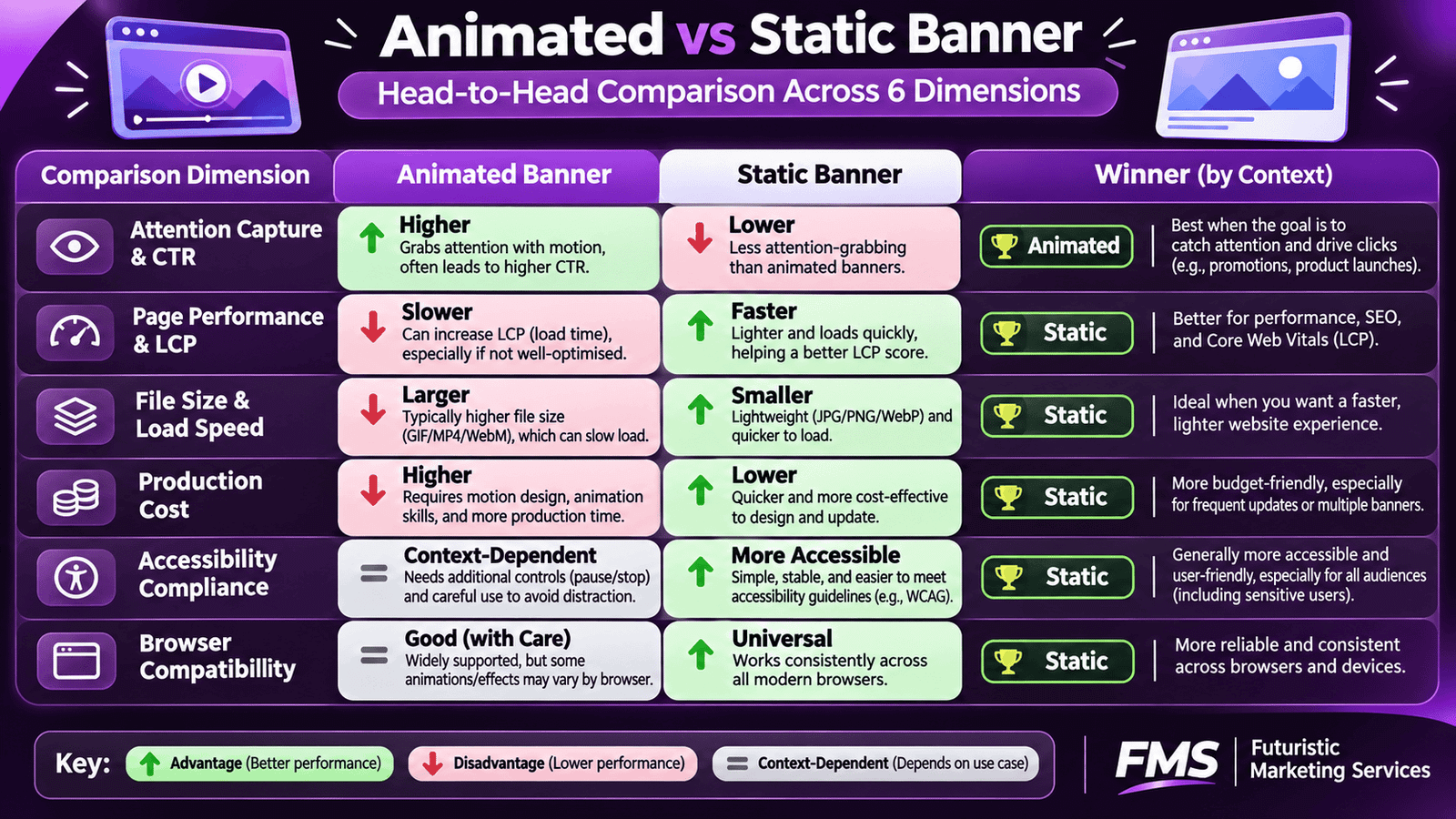
The animated versus static decision must be evaluated across six distinct dimensions. Optimising for only one, typically CTR, while ignoring the others produces banner choices that improve one metric while degrading others that matter more commercially.
Dimension Animated Banner Static Banner Winner by Context
Attention capture (CTR) 267% higher engagement in display contexts; motion triggers pre-attentive visual processing faster than static elements Lower initial attention in display contexts; higher relative attention on pages where animation is common and static is the differentiator Animated wins in static-content environments (news sites, blogs); static wins in high-animation environments (entertainment, gaming sites)
Page performance (LCP) Video hero banners routinely produce LCP of 4–8 seconds; animated GIF hero banners produce similar delays; both fail Core Web Vitals threshold of 2.5 seconds High-quality WebP static hero image under 200KB produces LCP of 1.2–1.8 seconds; consistently passes Core Web Vitals Static wins decisively for hero banners and any above-fold banner that is the LCP element
File size and load Animated GIF: 300KB–2MB for display-quality animation; HTML5: under 150KB initial load (meets GDN limit); CSS animation: negligible file size addition WebP static: 50–200KB for most banner contexts; JPEG: 80–300KB; PNG: 100–500KB; all significantly smaller than animated equivalents Static wins on file efficiency; HTML5 animation is acceptable for GDN display ads (under 150KB); GIF animation has poor size-to-quality ratio
Production cost HTML5 animation: 3–5× more expensive than static; requires motion design or HTML5 coding skills; template-based animation (VistaCreate, Creatopy) reduces cost significantly but limits customisation Static design production is faster, cheaper, and producible by more designers; A/B testing is faster and less expensive because variants cost less to produce Static wins on production economics for most SME budgets; animated only justified when the CTR premium clearly exceeds production cost differential
Accessibility compliance WCAG 2.1 guideline 2.2.2 requires all moving content to be pausable, stoppable, or hideable; animations that flash more than 3 times per second can cause seizures (WCAG 2.3.1); Google Display Network enforces a 30-second, 3-loop animation limit No accessibility constraints specific to static images beyond standard alt text requirements Static wins on compliance simplicity; animated banners require explicit accessibility consideration and testing
Browser / platform compatibility HTML5 animation: requires JavaScript enabled; GIF: universal but poor performance on mobile; CSS animation: broad support but some older browsers; video: excellent modern support JPG, PNG, WebP: universal support across all browsers, email clients, and display contexts; no JavaScript dependency Static wins on compatibility; animated requires fallback planning for contexts where JavaScript is blocked or restricted

Five Contexts Where Animation Outperforms Static

Animation produces measurably better commercial outcomes in specific, identifiable contexts. When the banner is placed in one of these five contexts and the animation is purposeful rather than decorative, animation is the correct format choice.

Context 1: Google Display Network Mid-Content Placements

GDN banners placed within the body of articles on news and content sites, the 300×250 Medium Rectangle in article body positions, the 300×600 Half Page alongside editorial content, sit within a primarily static visual environment. Motion in these placements creates a pre-attentive visual alert that draws the eye from the editorial content to the advertisement before any conscious decision to look at the ad occurs. HTML5 animated display banners in these placements consistently achieve higher CTR than static equivalents. For the complete GDN banner design guide covering both animated and static formats, see our Google Display ad design guide.

Context 2: Social Media Carousel and Video Placements

Social media feeds are by default high-motion environments (videos auto-play, Stories are full-screen motion experiences, Reels are the primary content format), but the Feed between these motion elements is static. A motion graphic, GIF, or short animated clip in the Feed creates the same pattern-interruption effect as HTML5 animation in GDN editorial contexts. The animation must be the correct type: a product reveal, a before/after transition, or a countdown timer communicating a promotional offer all produce conversion-relevant attention. A rotating logo or a aimless background gradient do not.

Context 3: Promotional Countdown Banners

A countdown timer that ticks down in real time is one of the clearest cases where animation produces a definitive performance advantage over static. A static "Offer ends Sunday" statement communicates a deadline; a live countdown timer showing hours, minutes, and seconds remaining makes the deadline visible, real-time, and urgent. The animated countdown converts an abstract future event into a present-tense constraint that accelerates the buying decision. For the complete promotional design framework that governs countdown timer design, see our promotional banner design guide.

Context 4: Product Feature Demonstration Banners

When a product feature is fundamentally better communicated through motion than through a static image, animation is not just appropriate, it is the only format that accurately represents the product. Software products that animate through key interface states, physical products that rotate to show 360-degree views, and services with a multi-step process that cannot be communicated in a single frame all represent contexts where animation serves a genuine communication function rather than an aesthetic one.

Context 5: Retargeting Display Campaigns

Retargeting banner animation serves a specific commercial function: re-engaging a visitor who has already ignored or missed multiple static impressions of the same offer. A visitor who has seen the same static retargeting banner 5 times without clicking has developed effective visual filtering of that specific creative. Introducing an animated version of the same offer breaks the filtering pattern and re-activates attention without requiring a completely new creative concept. For the complete retargeting creative strategy, see our retargeting ad design guide.

Four Contexts Where Static Outperforms Animation

Context 1: Homepage Hero Banners

The homepage hero banner is the LCP element on most websites, the element Google measures to calculate the Core Web Vitals LCP score. Video backgrounds and animated hero banners consistently produce LCP scores of 4–8 seconds on mobile, failing Google's 2.5-second LCP threshold and triggering both search ranking penalties and conversion rate decline (visitors who wait over 3 seconds for a page to load leave at dramatically higher rates than those who see content in under 1.5 seconds). According to Google PageSpeed Insights' LCP guidance, a correctly optimised static WebP hero image produces LCP of 1.2–1.8 seconds, a passing score that is achievable on most properly configured websites. An animated alternative cannot approach this performance target.

Context 2: Email Banner Headers

Animated GIFs in email headers are widely used and work in most modern email clients. The limitation is specific but commercially important: Microsoft Outlook (2007 to 2019) renders only the first frame of any animated GIF. Since Outlook maintains a significant share of business email usage, any animated email banner must have a first frame that communicates the complete message independently, which means the animation does not add commercial value for Outlook users, who represent a meaningful segment of most B2B email audiences. Static email banners work identically across all email clients with no first-frame risk.

Context 3: High-Frequency Ad Campaigns

Animation produces its attention-capture advantage on first or early impressions. A viewer who has seen an animated banner 7 times has built the same filtering mechanism against the animation that they would have developed against a static banner. The production cost disadvantage of animation means that high-frequency campaigns, where creative refresh is required every 2–3 weeks to prevent fatigue, produce more total creative variants from the same budget with static design. More creative variety is a more effective fatigue countermeasure than animation at equal budget.

Context 4: Brand Awareness Campaigns on Premium Placements

Premium publisher placements (major Indian news sites, industry publications, high-credibility editorial environments) have specific quality standards for animation that eliminate the most accessible and most affordable animation formats. In these contexts, the choice is between a high-quality static banner that meets the editorial standard of the placement and a low-quality animated banner that fails to reach that standard. Static design that meets the placement's quality expectations consistently outperforms animation that does not.

Animation Format Comparison: GIF vs HTML5 vs CSS vs Video

Format File Size Compatibility Animation Quality Best Use Case
Animated GIF 300KB–2MB for typical banner animation Universal, works in every browser, most email clients, and every display context; no JavaScript required Limited to 256 colours, produces visible colour banding on photographic content; suitable for simple 2–5 frame animations but not smooth transitions or complex motion Simple email banner animations; social media motion graphics with limited colour range; display contexts where JavaScript cannot be relied upon
HTML5 (ZIP) Under 150KB initial load (meets GDN limit); total asset weight up to 2.2MB Modern browsers universally; requires JavaScript; not supported in email; accepted by Google Display Network and most programmatic ad platforms Full colour range; smooth frame rates; can incorporate interactive elements; the professional standard for display advertising animation Google Display Network animated ads; premium publisher placements; any display advertising context that accepts HTML5 creatives
CSS Animation Negligible addition to page file size, animation defined in CSS, not as an image file Modern browsers universally; requires CSS support (universal in modern browsers); not applicable to display ad contexts Smooth, hardware-accelerated animation for on-site banners; excellent for subtle entrance animations, hover effects, and countdown timers embedded directly in website pages Website-native banners (built within the page rather than uploaded as images); promotional announcement bars with live countdown; on-site hero banner text entrance animations
Video (MP4/WebM) 300KB–10MB+ depending on length and quality; must be heavily compressed for web delivery Modern browsers universally for MP4 (H.264); requires video codec support; not appropriate for email; accepted in most social media and some display ad platforms as video ad format Highest motion quality; full colour range; suitable for any visual content including live action, product shots, and animation; muted autoplay supported in most modern contexts Social media video ad banners (Instagram Reels, Facebook Feed video, YouTube pre-roll); on-site hero sections where performance is carefully managed; requires dedicated LCP performance engineering

Google Display Network Animation Rules

The Google Ads display ad specifications define specific animation rules that apply to all display banners served on the GDN. Violating these rules results in ad rejection without exception.
  • Maximum animation duration: 30 seconds total. The animation must stop at or before 30 seconds from initial display. An animation that continues looping indefinitely will be rejected. The 30-second total can be reached across multiple loops.
  • Maximum loop count: 3 loops. The animation may repeat a maximum of 3 times before stopping. After the third loop completes, the banner must remain static on the final frame. For a 10-second animation, this means a maximum total of 30 seconds of motion.
  • Maximum frame rate: 24 frames per second. Animations above 24fps will be flagged; the 5fps limit applies specifically to animated GIF formats.
  • No flashing content above 3 flashes per second. Flashing animations that exceed 3Hz (3 flashes per second) risk triggering photosensitive seizures and violate both Google's policies and WCAG 2.3.1 accessibility guidelines. Google's ad review system actively checks for this.
  • HTML5 initial load under 150KB. The HTML, CSS, JavaScript, and any assets loaded in the initial ZIP file must collectively weigh under 150KB. Additional assets can be loaded after the initial display (up to 2.2MB total) but the initial ZIP must meet the 150KB limit.

The Decision Framework: Choosing Animation or Static

Decision Question If Yes If No
Is this banner the LCP element (hero banner above fold)? Use static, animation will fail Core Web Vitals Continue to the next question
Will this banner be served via email? Use static or simple 2–3 frame GIF with first frame as standalone; test in Outlook Continue to the next question
Is the animation commercially purposeful (countdown, product reveal, feature demo)? Animation is likely justified, use HTML5 for GDN, MP4 for social, CSS for website If animation is only decorative, choose static, decorative animation adds production cost without commercial benefit
Does this banner placement sit within primarily static editorial content? Animation will produce attention capture advantage, justified for display ad contexts Static may perform comparably or better in high-motion environments; test both
Can the production budget support 3–5× the cost of static production for the animated version? Animation is budgetarily feasible, produce both animated and static variants and A/B test Static is the correct choice, investing the budget in more static creative variants produces better overall campaign performance than a single animated variant

Accessibility Requirements for Animated Banners

Web accessibility standards impose specific requirements on animated content that most banner designers and business owners are unaware of. WCAG 2.1 guideline 2.2.2 requires that any moving, blinking, or scrolling content that starts automatically and lasts more than 5 seconds must include a mechanism for the user to pause, stop, or hide it. This applies to website-embedded animated banners. Animated display ads served via GDN are governed by Google's own animation duration limits rather than WCAG, but website-native animation must meet WCAG standards for any business operating in contexts where accessibility compliance is legally or commercially required.
Additionally, any animation that flashes more than 3 times per second risks triggering photosensitive seizures, WCAG 2.3.1 prohibits this. The practical implication: avoid strobe effects, rapid colour cycling, and high-contrast flashing in animated banners. Google Display Network's ad review system actively checks for flashing animation and will reject banners that violate this standard.

Need Animated or Static Banners Built to the Right Specification?

Futuristic Marketing Services designs animated HTML5 display ad sets, static website banners, and promotional banner systems for Indian businesses, with the format decision driven by placement data, performance requirements, and platform rules.

Start Your Banner Design Project

Frequently Asked Questions

Do animated banners get more clicks than static banners?

In display advertising contexts, specifically GDN banners served within editorial content on news and content sites, animated HTML5 banners produce significantly higher CTR than static equivalents, with research from Bannerflow showing 267% more engagement. This advantage is specific to contexts where animation creates pattern interruption against a predominantly static visual environment. In social media feeds where motion is common, in email contexts where Outlook renders only the first GIF frame, and in hero banner contexts where animation fails Core Web Vitals, static banners often perform comparably or better. The format decision must be made for each specific placement context rather than applied uniformly.

Can I use a video as my website hero banner?

Technically yes, most modern CMS platforms and page builders support video hero backgrounds. Commercially, the decision requires careful consideration of the performance impact. Video hero banners are typically the LCP element on the page and routinely produce LCP scores of 4–8 seconds on mobile without expert performance engineering. Google's Core Web Vitals threshold for a passing LCP score is 2.5 seconds, failure carries both ranking penalties and conversion rate decline from impatient visitors. If a video hero is required for creative reasons, it must be implemented with: a high-quality static poster image displayed until the video loads, compressed video file (under 3MB), and the video deferred to load after the critical rendering path is complete. A high-quality static hero image is the reliable default recommendation for most businesses.

What is an HTML5 banner and how is it different from a GIF?

You can prepare by studying resources available on Google Skillshop, taking online courses, and practicing with sample questions and mock exams.

Is the Google Ads Search Certification free?

An HTML5 banner is an animated display advertisement built using HTML, CSS, and JavaScript files packaged into a ZIP archive. Unlike an animated GIF (which is a single image file that cycles through pre-defined frames), HTML5 banners can incorporate smooth transitions, full colour range, interactive elements, dynamic text (that can be changed without redesigning the banner), and data integration. HTML5 banners are the professional standard for display advertising animation and are accepted by the Google Display Network (under 150KB initial load), most programmatic advertising platforms, and premium publisher ad networks. They cannot be used in email contexts, which require image-based formats (GIF, JPG, PNG).

Are animated GIFs still worth using for banner design?

Animated GIFs remain useful in specific contexts: email banner headers where JavaScript-based alternatives (HTML5) are not supported; simple social media animations where the limited colour palette (256 colours) does not affect the visual quality (text-based or graphic animations without photographic elements); and display contexts where the platform requires an image file rather than an HTML5 ZIP. For any animation that requires smooth motion, full colour photography, or precise timing control, HTML5 is technically superior. For animated social media banners that will be exported as video files (MP4, WebM), video export from Canva or VistaCreate produces significantly better quality than GIF at similar or smaller file sizes.

Does animation affect my website's SEO?

Animation affects SEO through its impact on Core Web Vitals scores, which are a direct Google ranking factor. An animated hero banner or video hero that increases LCP beyond Google's 2.5-second threshold will produce a failing Core Web Vitals score that carries a search ranking penalty. Additionally, Google's JavaScript rendering of HTML5 animated banners can affect crawlability if the animation framework prevents Googlebot from efficiently indexing the page's text content. The simplest SEO-safe approach to animation: use CSS animation for subtle on-site banner effects (entrance animations, hover states), use static images for all above-fold banner placements that will be the LCP element, and reserve HTML5 animation for off-site display ad contexts where Core Web Vitals does not apply.

Get the Right Format Decision and the Right Design

Futuristic Marketing Services helps Indian businesses choose the right banner format for each placement context and then designs it correctly, whether that is a performance-optimised static hero, an HTML5 animated display ad set, or an animated social media promotional banner.

See Our Design Services

Share this post :
Picture of Devyansh Tripathi
Devyansh Tripathi

Devyansh Tripathi is a digital marketing strategist with over 5 years of hands-on experience in helping brands achieve growth through tailored, data-driven marketing solutions. With a deep understanding of SEO, content strategy, and social media dynamics, Devyansh specializes in creating results-oriented campaigns that drive both brand awareness and conversion.

All Posts