A technical SEO audit is a systematic review of a website’s technical infrastructure to identify issues preventing search engines from crawling, indexing, or ranking pages efficiently. It covers site speed, crawl errors, indexation problems, mobile usability, Core Web Vitals, canonical tags, schema markup, and security, producing a prioritised fix list with clear impact ratings for every issue discovered.
Key Takeaways
- A technical SEO audit identifies infrastructure problems creating invisible ceilings on organic rankings regardless of content quality or backlink authority
- Google Search Console is the most authoritative diagnostic tool, it shows problems Google has actually encountered on your site, not simulated issues
- According to Think with Google, 53% of mobile users abandon sites loading over 3 seconds, page speed is simultaneously a technical SEO signal and a direct revenue impact
- Mobile-first indexing means Google evaluates your mobile site for ranking, desktop performance is secondary and desktop-only fixes may produce no ranking improvement
- According to Ahrefs, 5.3% of the top 1 million websites accidentally block Googlebot through misconfigured robots.txt rules
- HTTPS is a baseline ranking requirement, mixed content, expired certificates, and HTTP redirect chains all create measurable trust and ranking suppression
Is a Technical SEO Problem Preventing Your Pages from Ranking?
Futuristic Marketing Services conducts complete technical SEO audits using Screaming Frog, Ahrefs, and Google Search Console, identifying and prioritising every technical issue suppressing your organic performance.
Get a Technical SEO Audit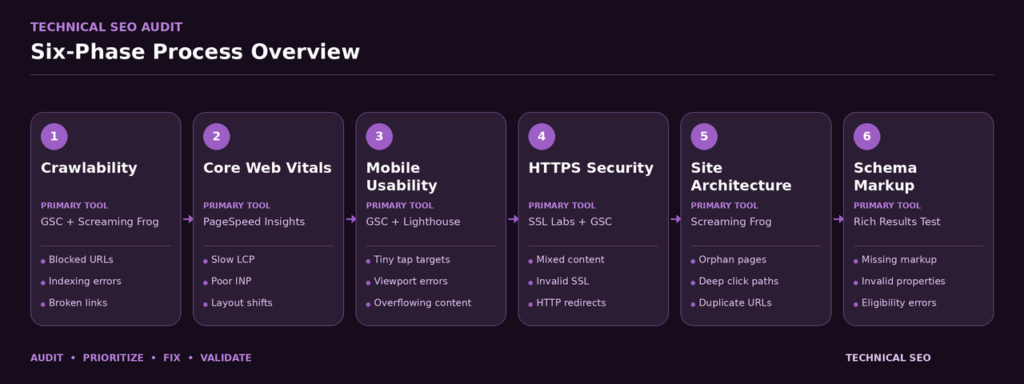
Phase 1, Crawlability and Indexation Audit
Crawlability and indexation are the most foundational technical concerns. Google cannot rank pages it cannot crawl, and it cannot rank pages it cannot index. Both issues create complete ranking failures rather than partial ones. Begin every technical audit here before investigating any other issues.
Phase 2, Core Web Vitals and Page Speed Audit
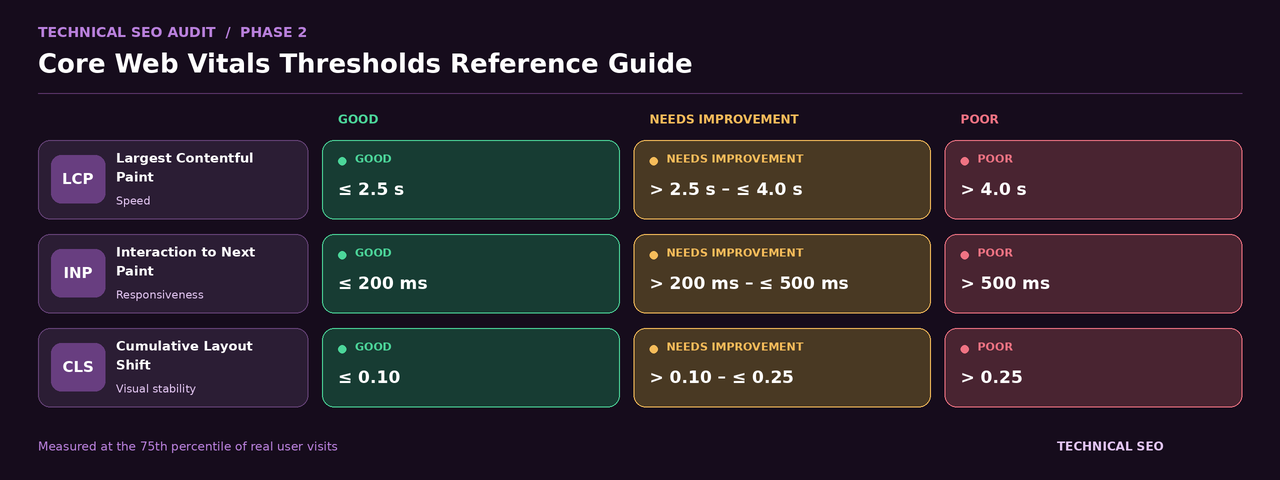
Core Web Vitals are Google’s standardised page experience metrics that function as direct ranking signals. Pages with Poor CWV scores face a systematic ranking disadvantage against equivalent pages with Good scores. The three metrics are: LCP (Largest Contentful Paint, target under 2.5 seconds), INP (Interaction to Next Paint, target under 200ms), and CLS (Cumulative Layout Shift, target under 0.1).
Phase 3, Mobile Usability Audit
Google uses mobile-first indexing for virtually all websites, it crawls and evaluates your mobile site for ranking purposes. A site that works perfectly on desktop but has mobile usability errors faces direct ranking consequences. Check mobile usability in <a href=”https://futuristicmarketingservices.com/Blogs/seo/google-search-console-seo-guide/”>Google Search Console</a> under Experience and Mobile Usability. Common errors: text too small to read (font size below 12px), clickable elements too close together (touch targets below 48×48 pixels), content wider than screen requiring horizontal scrolling, and missing viewport meta tag. Our <a href=”https://futuristicmarketingservices.com/Blogs/seo/mobile-seo-guide/”>mobile SEO guide</a> covers the complete audit process and specific fixes for every error type.
Test mobile experience on an actual mid-range Android device on a cellular connection, not just Chrome emulation. Load your key pages and evaluate load speed, text readability without zooming, navigation with thumbs, and form completion on a touch keyboard. Real device testing reveals usability issues emulators consistently miss because emulators run at desktop-equivalent processing speeds.
Phase 4, HTTPS and Security Audit
HTTPS is a confirmed Google ranking factor and a browser-level trust signal. Chrome displays Not Secure warnings on HTTP pages, significantly increasing bounce rate and suppressing engagement signals. The HTTPS checklist: all pages serve over HTTPS with 301 redirects from HTTP variants, valid SSL certificate not expired and covering all subdomains, no mixed content (no HTTP resources loading on HTTPS pages, check in Chrome DevTools Security panel), and HTTPS used consistently in canonical tags, internal links, and XML sitemaps. Check <a href=”https://futuristicmarketingservices.com/Blogs/seo/google-search-console-seo-guide/”>Google Search Console</a> Security and Manual Actions for any detected security issues, these are emergency situations requiring immediate remediation.
Phase 5, Site Architecture and Internal Linking Audit
Site architecture determines how efficiently link authority flows through your site and how easily Google discovers all important pages. Use Screaming Frog’s crawl diagram: every important page should be reachable in 3 clicks or fewer from the homepage. Pages buried at 5 or more clicks deep receive very little authority and are crawled infrequently. Orphan pages, with no internal links pointing to them, may never be discovered or indexed regardless of their content quality.
Phase 6, Structured Data and Schema Audit
| Audit Phase | Primary Tool | Key Issues to Identify | Priority Level |
|---|---|---|---|
| 1. Crawlability and Indexation | Google Search Console + Screaming Frog | Robots.txt blocks, noindex errors, crawl errors, excluded important pages | Critical |
| 2. Core Web Vitals | GSC + PageSpeed Insights | LCP over 2.5s, INP over 200ms, CLS over 0.1, Poor field data status | High |
| 3. Mobile Usability | GSC Mobile Usability + real device test | Text too small, touch targets close, content wider than screen | High |
| 4. HTTPS and Security | Chrome DevTools + GSC Security tab | Mixed content, expired SSL, HTTP accessible pages, security actions | Critical |
| 5. Site Architecture | Screaming Frog crawl map | Pages over 3 clicks deep, orphan pages, redirect chains, broken links | Medium |
| 6. Structured Data | Google Rich Results Test | Missing schema types, schema errors, rich result ineligibility | Medium-High |
Fix the Technical Issues Holding Back Your Organic Traffic
Our technical SEO specialists diagnose every crawlability, indexation, Core Web Vitals, and architecture issue, then provide the precise developer brief your team needs to fix them.
Start Your Technical AuditFrequently Asked Questions
What is a technical SEO audit?
How often should I run a technical SEO audit?
What tools do I need for a technical SEO audit?
What is the most common technical SEO issue?
How does mobile-first indexing affect technical SEO?
What is crawl budget and when does it matter?
How do I fix Core Web Vitals issues?
Your Technical Foundation Determines Your Ranking Ceiling
At Futuristic Marketing Services, we build the technical infrastructure that allows your content and links to perform at their full potential, because excellent content cannot rank if Google cannot access it.
Talk to a Technical SEO ExpertConclusion
Technical SEO is the invisible foundation determining whether all your other SEO investments, content creation, link building, on-page optimisation, can produce rankings. A single critical issue (a misplaced noindex tag, a blocking robots.txt rule, failing Core Web Vitals) can suppress an otherwise excellent site completely. Running a systematic six-phase technical audit ensures every subsequent SEO action produces its maximum possible ranking return.