
WordPress Theme Development: The Complete Guide

wordpress theme development

WordPress theme development is the process of creating or customising the templates, stylesheets, and PHP functions that control a WordPress site visual appearance and layout. It ranges from adding CSS overrides in a child theme, a 30-minute task, to building a fully bespoke PHP theme from scratch with custom post types, ACF field groups, and performance-engineered templates, a 6 to 12 week project. The approach chosen determines the site performance ceiling, design freedom, and long-term maintenance complexity.

This guide covers the full spectrum of WordPress theme development: the decision framework for choosing between a premium theme, a page builder approach, and a custom theme; the child theme standard that all professional WordPress developers follow; the custom theme development process; performance considerations; Full Site Editing and block themes; and realistic cost benchmarks for each approach in 2026.

Key Takeaways

  • The theme is the architectural foundation of every WordPress site, the decision made here determines the performance ceiling, design freedom, and long-term maintenance overhead of the entire project.
  • Using a child theme for all customisations is the non-negotiable professional standard. Direct modifications to a parent theme are overwritten on every theme update, destroying all custom work.
  • A page builder approach using Elementor Pro over a minimal base theme (Hello Elementor or GeneratePress) provides high design flexibility at a fraction of custom theme development cost and is the correct approach for most SME sites.
  • Custom PHP theme development (£8,000 to £30,000) is justified when: design requirements cannot be met in any page builder; 85 to 95 or higher mobile Lighthouse is a hard requirement; or the site has complex custom post types and data structures.
  • WordPress Full Site Editing (FSE) with block themes is the long-term direction of WordPress core, new projects in 2026 with teams comfortable in Gutenberg should evaluate FSE seriously for the performance and native WordPress integration advantages.
  • Theme performance is primarily determined by hosting quality and CSS and JavaScript architecture. A custom theme on managed hosting achieves 85 to 95 or higher. An Elementor Pro site on managed hosting with WP Rocket achieves 70 to 88. Both can achieve Good Core Web Vitals status.
  • The most common and most expensive WordPress mistake is making CSS and PHP customisations directly in a parent theme file. Always use a child theme. Always. See our hire a WordPress developer guide for the red flags to screen for.
Need a Custom WordPress Theme?

Bespoke Theme Development Built for Performance and Growth

Futuristic Marketing Services builds custom WordPress themes and Elementor Pro sites, designed to your brand, optimised for performance, and maintained with ongoing support.

Get a Free Consultation

Choosing Your WordPress Theme Approach

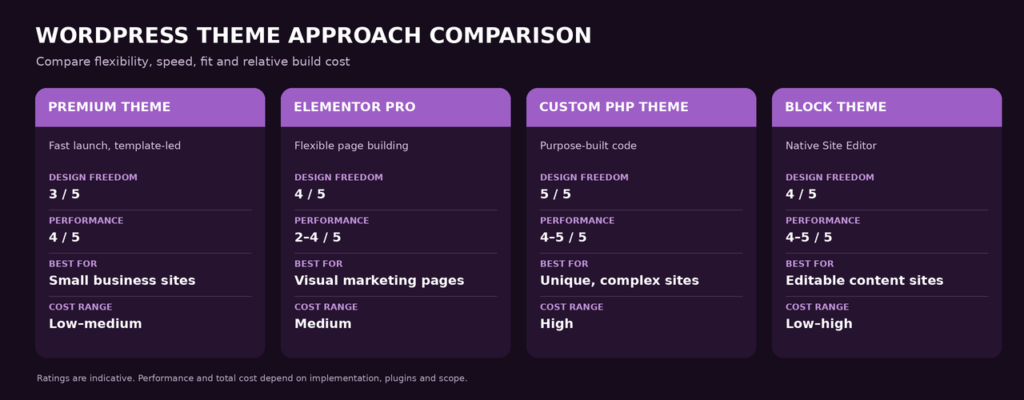
The theme approach decision is the highest-leverage decision in a WordPress project because it determines what all subsequent work is building on. Choose the wrong foundation and constraints compound over time, you pay for them in limited design flexibility, poor performance, or expensive rebuilds. Choose correctly and the foundation supports everything the site needs to grow.

Approach Design Freedom Performance Best For Cost
Premium theme (ThemeForest, Envato) Low to medium, constrained by theme design system Variable, many premium themes are bloated Tight budget, simple sites, tight timelines £0 to £100 theme plus development time
Elementor Pro over minimal base theme High, almost any visual layout without custom code Good with optimisation, 70 to 88 mobile Lighthouse Most SME marketing sites requiring custom design £49 to £200 per year plugin plus £3,000 to £15,000 development
Custom PHP theme from scratch Unlimited, complete control over every element Excellent, 85 to 95 or higher achievable Enterprise builds, unique UX, maximum performance £10,000 to £40,000
Block theme (Full Site Editing) High, full design control using WordPress core blocks Excellent, leaner than page builders New projects with teams comfortable in Gutenberg £4,000 to £20,000

The Minimal Base Theme Approach

The professional standard for Elementor-based development is pairing Elementor Pro with a minimal base theme, Hello Elementor (free, made by Elementor) or GeneratePress (free with premium option). These themes have almost no styling of their own, they provide the WordPress structure while Elementor Pro controls 100% of the visual design through the Theme Builder. This approach avoids CSS conflicts between the theme and Elementor, produces cleaner HTML output, and gives the developer full control without maintaining a custom PHP theme.

Child Themes: The Professional Non-Negotiable

A child theme inherits all functionality and styling of a parent theme while keeping customisations in a separate set of files that are never overwritten when the parent theme updates. Using a child theme for all WordPress customisations is not optional for professional development, it is the baseline standard, and its absence is a red flag that disqualifies any developer from serious consideration.

Why Child Themes Are Mandatory

When a parent theme updates, which it does regularly for security patches and feature improvements, any modifications made directly to the parent theme files are overwritten and permanently lost. A developer who added CSS rules to the parent style.css, modified the header.php template, or added functions to functions.php directly in the parent theme will lose all of that work at the next update. A child theme stores all customisations in its own files, the parent updates safely because the child files are never touched by the update process.

Creating a child theme requires: a new folder in wp-content/themes/ named parent-theme-child, a style.css file with the Template: parent-theme-slug header comment, and a functions.php to enqueue the parent stylesheet. All CSS overrides, PHP template modifications, and new template files go in the child theme. Nothing goes in the parent theme. See our hire a WordPress developer guide for the red flag checklist to verify this before hiring.

What Goes in a Child Theme

Child Theme Customisation Locations

style.css

All CSS overrides and additions, class-specific styles, responsive adjustments, brand colours, go here, never in the parent theme stylesheet.

functions.php

Additional WordPress hooks, custom functions, enqueue additional stylesheets or scripts, register custom post types or sidebars specific to the project.

Template files

Copy any parent theme template file (header.php, footer.php, single.php) to the child theme folder and modify it, the child version takes priority over the parent.

New template files

Create new page templates in the child theme that do not exist in the parent, they appear as template options in the WordPress page editor.

The Custom PHP Theme Development Process

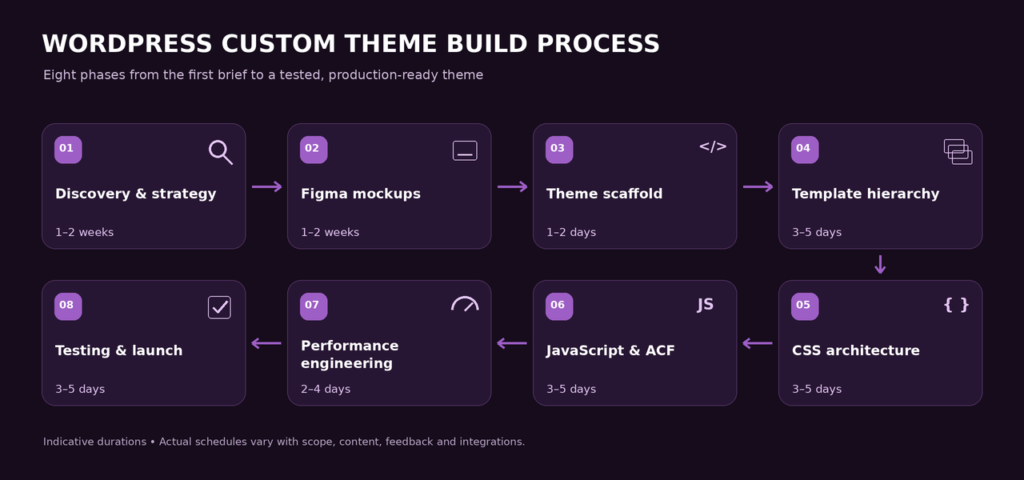
Custom PHP theme development, building a bespoke WordPress theme from scratch, is the highest-investment, highest-output approach. It is justified for enterprise builds, sites with complex data structures, and projects where maximum performance is a hard requirement that no page builder can meet.

Phase Deliverables Duration Key Tools
Discovery and design Wireframes, Figma mockups, component library, responsive designs for all page types 2 to 5 weeks Figma, Adobe XD
Theme scaffold Folder structure, style.css metadata, functions.php, body_class hooks, basic template files 2 to 4 days Local WP, VS Code, Git
Template hierarchy index.php, single.php, page.php, archive.php, 404.php, search.php, taxonomy templates 1 to 2 weeks WordPress template hierarchy documentation
CSS architecture CSS custom properties for design system, BEM naming convention, SCSS compilation, responsive breakpoints 1 to 2 weeks SCSS, PostCSS, Webpack or Vite
JavaScript Navigation behaviour, smooth scroll, lazy load, animations, all deferred or async 3 to 7 days Vanilla JS or Alpine.js for minimal overhead
ACF integration Custom field groups for flexible content blocks, repeater fields, relationship fields, see ACF documentation 1 to 2 weeks Advanced Custom Fields Pro
Performance engineering Inline critical CSS, WebP images, explicit image dimensions, preload LCP image, defer scripts, targeting 85 plus Lighthouse 3 to 5 days Lighthouse, PageSpeed Insights
Testing and launch Cross-browser, cross-device, form testing, speed testing, GSC verification 1 to 2 weeks BrowserStack, Lighthouse, GSC

Performance Anti-Patterns in Custom Themes
Custom themes can underperform if built with common architectural mistakes. Loading an entire CSS framework (Bootstrap, Foundation) for a site that uses 5% of its utility classes adds unnecessary weight. Loading JavaScript in the page head without defer or async attributes blocks page rendering. Serving a 2000px hero image to a 375px mobile viewport downloads 5 to 10 times more data than necessary. Not using font-display: swap on custom fonts causes layout shift as fonts load. Every one of these patterns is a Core Web Vitals failure, and each is preventable with correct theme architecture from the start. See our website speed guide.

Frequently Asked Questions About WordPress Theme Development

What is a WordPress theme?

A WordPress theme is a collection of PHP template files, stylesheets, and JavaScript that controls the visual appearance and layout of a WordPress website. The theme determines how every page type is displayed, the homepage, blog listing, individual posts, category archives, and the 404 page. Themes range from pre-built premium designs (available for purchase on ThemeForest) through to fully bespoke custom-built themes for individual projects. Most professional sites use either a minimal base theme with the Elementor page builder or a custom PHP theme. See our full WordPress development guide.

What is a WordPress child theme and why is it important?

A child theme inherits all the functionality and styling of a parent theme while keeping customisations in separate files that are never overwritten when the parent theme updates. Using a child theme for all WordPress customisations is the professional standard, any CSS or PHP modification made directly in the parent theme files will be permanently overwritten at the next theme update. A developer who works directly in the parent theme is creating a maintenance liability. All professional WordPress development requires a child theme for any site customisation.

When do I need a custom WordPress theme instead of a page builder?

Custom PHP theme development is justified when: design requirements genuinely cannot be achieved in Elementor or any other page builder; the site has a complex custom post type data structure requiring bespoke PHP templates; maximum performance (85 to 95 or higher mobile Lighthouse) is a hard requirement; or the project is a large enterprise platform where a page builder plugin dependency creates unacceptable risk. For most SME and marketing sites, a page builder over a minimal base theme provides 90% of the flexibility of a custom theme at 30 to 50% of the development cost.

How much does custom WordPress theme development cost?

Custom WordPress theme development in the UK costs £10,000 to £40,000 depending on complexity. A mid-complexity custom theme with 8 to 12 page templates, ACF integration, and performance engineering costs £12,000 to £20,000. Enterprise themes with multiple custom post types, complex data relationships, and performance targets above 90 Lighthouse cost £20,000 to £60,000. A page builder approach using Elementor Pro over a minimal base theme costs £3,000 to £15,000 and provides similar design flexibility for most standard requirements.

What is Full Site Editing in WordPress?

WordPress Full Site Editing (FSE), introduced with WordPress 5.9 and expanded significantly since, enables building entire site layouts, including headers, footers, and archive templates, using the Gutenberg block editor without any PHP template files. Block themes use a theme.json file for global styling instead of CSS custom properties in functions.php. FSE is the long-term architectural direction of WordPress core. For new projects in 2026 where the development team is comfortable with Gutenberg, block themes deserve serious evaluation for their performance and native integration advantages.

Can I retake the Google Ads Search Certification exam if I fail?

Yes, if you do not pass the exam on your first attempt, you can retake it after 24 hours.

How long does WordPress theme development take?

A page builder Elementor Pro site over a minimal base theme takes 4 to 8 weeks for a professional marketing site. A custom PHP theme build takes 6 to 12 weeks for a mid-complexity site and 12 to 24 weeks for an enterprise build. The most common cause of timeline overrun is late content delivery, copy and images that are not ready when development is complete. See our WordPress maintenance guide for the post-launch process.

What is ACF (Advanced Custom Fields) and why is it used in theme development?

Advanced Custom Fields (ACF) is a WordPress plugin that adds custom data fields to pages, posts, and custom post types. In custom theme development, ACF creates a structured content editing interface, editors add content to ACF field groups (text fields, image pickers, repeater fields, relationship fields) and the PHP theme templates loop through the field values to render the page. This separates content from presentation cleanly and enables flexible, editor-controlled page layouts without requiring content editors to touch HTML. See the ACF documentation for implementation details.

How do I make my WordPress theme faster?

The highest-impact WordPress theme performance improvements: upgrade to managed hosting on Kinsta or WP Engine; install WP Rocket for caching and JavaScript optimisation; serve all images in WebP format at viewport-correct sizes with explicit width and height attributes; preload the LCP (largest contentful paint) hero image in the page head; use font-display: swap on all custom fonts; and defer or remove all non-critical JavaScript. These steps consistently move a WordPress theme from a 40 to 60 Lighthouse score to 70 to 88 on mobile. See our Core Web Vitals guide.

What is the WordPress template hierarchy?

The WordPress template hierarchy is the system that determines which PHP template file is used to render each type of page. WordPress looks for increasingly specific template files, for a single post, it checks single-{post-type}-{slug}.php, then single-{post-type}.php, then single.php, then index.php, using the most specific file it finds. Custom PHP theme development requires understanding this hierarchy to create the correct template for each page type. A child theme can override any parent theme template by placing a file with the same name in the child theme folder.

Can I build a WordPress theme without coding?

You can build a full-site design without writing PHP using Elementor Pro Theme Builder over a minimal base theme. Elementor Pro handles header and footer design, page templates, blog archive layouts, and single post templates visually, all without touching any PHP files. CSS can also be added through Elementor interface without coding. For truly custom business logic, complex data structures, or performance requirements above 88 Lighthouse, PHP development is required.

What is the difference between a WordPress theme and a plugin?

A WordPress theme controls visual presentation, layout, typography, colours, and template structure. A WordPress plugin adds functionality, features, integrations, and custom business logic. The rule of thumb: if removing it would break the site design, it belongs in the theme. If removing it would remove a feature while leaving the design intact, it belongs in a plugin. In practice, themes and plugins often overlap in capability, but this separation principle keeps codebases maintainable.

How do I update a WordPress theme safely?

Theme updates should always be: tested on a staging site first, never applied directly to the live site; preceded by a full site backup using UpdraftPlus or your hosting backup system; confirmed that you are running a child theme so custom modifications are preserved. Major theme version updates occasionally break functionality, test the staging site thoroughly before deploying to production. Premium theme updates from ThemeForest require downloading the new version and uploading via Appearance, Themes, Add New, Upload Theme.

How to Change my Photo from Admin Dashboard?

Far far away, behind the word mountains, far from the countries Vokalia and Consonantia, there live the blind texts. Separated they live in Bookmarksgrove right at the coast

Futuristic Marketing Services

Custom WordPress Theme Built for Your Brand

Futuristic Marketing Services builds bespoke WordPress themes, custom design, performance engineering to 85 or higher Lighthouse, ACF integration, and full SEO foundations included as standard.

Start Your Theme Project

The Theme Decision Determines Everything That Follows

The choice of WordPress theme approach, premium theme, page builder, custom PHP theme, or block theme, is the most consequential technical decision in a WordPress project. It determines the performance ceiling, the design freedom, the ongoing maintenance requirements, and the total cost of ownership over the life of the site. Make it deliberately, based on the actual commercial requirements of the project, not on what is quickest to set up or most familiar to the developer.
For most professional SME sites, Elementor Pro over Hello Elementor or GeneratePress is the correct choice, high design flexibility, manageable performance with the right hosting and caching,
In all cases, a child theme for customisations is non-negotiable, managed hosting is the performance foundation, and a structured maintenance programme is the investment that protects the build over the years that follow launch. Get these three things right and the theme approach becomes a detail rather than a constraint.
Share this post :
Picture of Devyansh Tripathi
Devyansh Tripathi

Devyansh Tripathi is a digital marketing strategist with over 5 years of hands-on experience in helping brands achieve growth through tailored, data-driven marketing solutions. With a deep understanding of SEO, content strategy, and social media dynamics, Devyansh specializes in creating results-oriented campaigns that drive both brand awareness and conversion.

All Posts