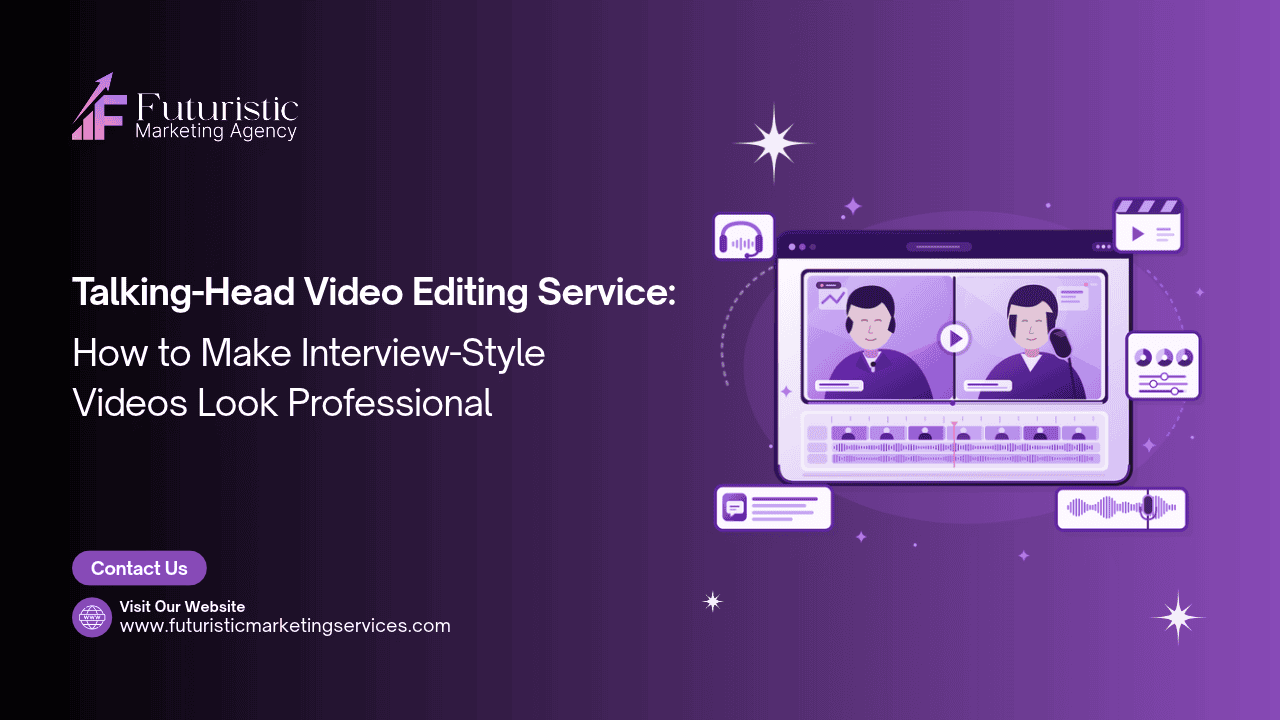
Talking-Head Video Editing Service: How to Make Interview-Style Videos Look Professional

talking head video editing service

Talking-head video — a presenter speaking directly to camera, with or without guests — is the most common format on YouTube and the most demanding to edit for high retention. Unlike faceless content where visual variety comes from B-roll and graphics, or documentary content where archival footage carries the visual track, talking-head content must maintain viewer engagement through a visual environment that is fundamentally static: a person in a frame, speaking. Every retention intervention in talking-head editing — camera switching, B-roll cutaways, text overlays, pacing decisions, jump cut timing — must work within this constraint.

According to VidIQ research, talking-head videos that achieve above 50% average view duration are in the top 20% of their category for YouTube algorithmic recommendation. The editing decisions that move a talking-head video from average to above-average retention are specific and learnable -- and they make a measurable difference to the commercial outcomes of content marketing, YouTube channel growth, and direct-response video programmes. This guide covers what professional talking-head video editing includes, the retention engineering techniques specific to this format, the technical standards, pricing, and when specialist editing produces commercial value that self-editing cannot replicate.

Key Takeaways

  • Talking-head video editing must maintain viewer retention through a fundamentally static visual environment -- a person speaking in a frame -- using camera switching, B-roll cutaways, text overlays, and pacing decisions as the primary retention tools
  • According to VidIQ, talking-head videos achieving above 50% average view duration are in the top 20% for YouTube algorithmic recommendation -- professional retention engineering consistently moves self-edited channels into this top performance tier
  • The single highest-impact retention intervention in talking-head editing is the first 30 seconds: the hook, the opening promise, and the first visual cut set the viewer's expectation for the entire video -- poor first-30-second retention cannot be recovered by excellent middle content
  • Jump cut pacing is the defining stylistic choice in talking-head editing: too infrequent and the viewer perceives dead air and lower energy; too frequent and the viewer perceives choppy, exhausting content -- the correct cadence varies by niche, presenter energy, and content type
  • Multi-camera interview editing requires both technical synchronisation (matching cuts to audio transitions) and editorial judgment (choosing which camera angle serves the content at each moment -- the editing challenge that most clearly separates specialist interview editors from general editors)
  • Professional talking-head editing reduces the gap between a presenter's on-camera energy and the viewer's perception of that energy -- by removing the low-energy moments, tightening the delivery pace, and adding visual variety that amplifies the content's impact

Want Professional Talking-Head Video Editing for Your Channel or Business?

Futuristic Marketing Services edits talking-head and interview-style video to the retention engineering standard -- jump cut pacing, B-roll integration, colour treatment, audio mastering, and the visual polish that makes presenter content look and feel professional.

Get Talking-Head Editing

What Makes Talking-Head Video Editing Different from Other Formats
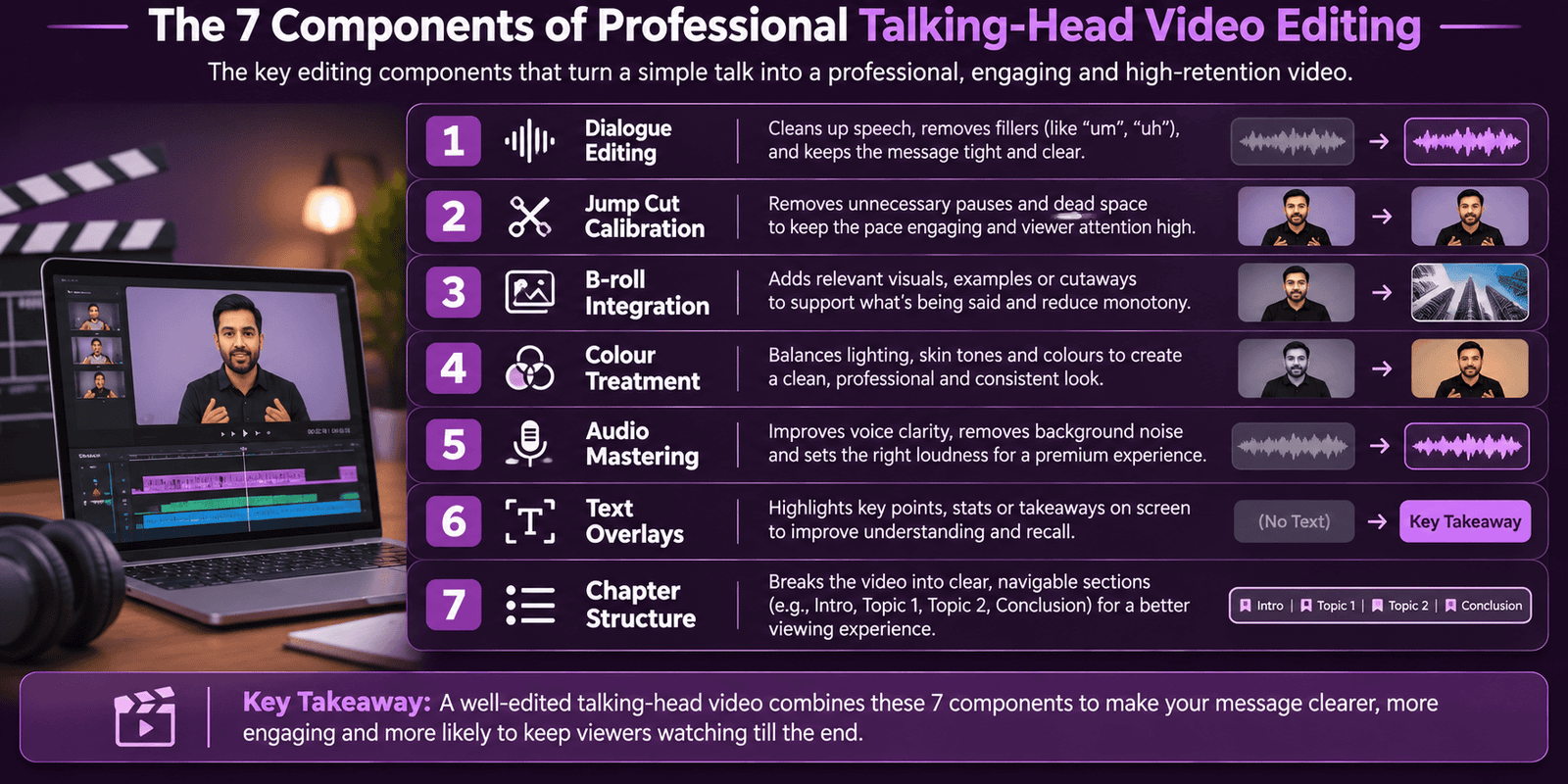
Talking-head video editing requires a different editorial focus from any other video format because the constraints are different. The visual environment is primarily static: the presenter is in a fixed position, with a fixed background, under fixed lighting, for the duration of the recording. This is in contrast to documentary content (where archival and stock footage provides continuous visual variety) or faceless content (where B-roll is freely selected and timed) or promotional content (where multiple locations, actors, and production elements create inherent visual dynamism).
Within this static constraint, the talking-head editor's toolkit for maintaining retention is: dialogue editing (tightening the pacing by removing dead air, filler words, and false starts -- often reducing raw recording time by 15-25%), camera switching (cutting between multiple camera angles to create visual movement without changing the content), B-roll cutaways (inserting footage that illustrates what the presenter is discussing), text overlays (on-screen graphics that add a second information layer), and jump cuts (cutting out pauses to create a faster, higher-energy perceived pace). The skill of talking-head editing is choosing the right tool for each moment and applying it with precision that feels intentional rather than arbitrary.

The Seven Components of Professional Talking-Head Editing

1. Dialogue editing and pacing: The foundation of talking-head editing. Every pause over 0.8 seconds, every um or uh, every false start and repeated sentence should be removed to produce a clean, high-density dialogue edit. The professional standard reduces raw recording runtime by 15-25% while maintaining the natural rhythm and personality of the presenter's delivery -- over-editing produces a mechanical, breathless quality that is as damaging to viewer experience as under-editing produces a slow, low-energy one.
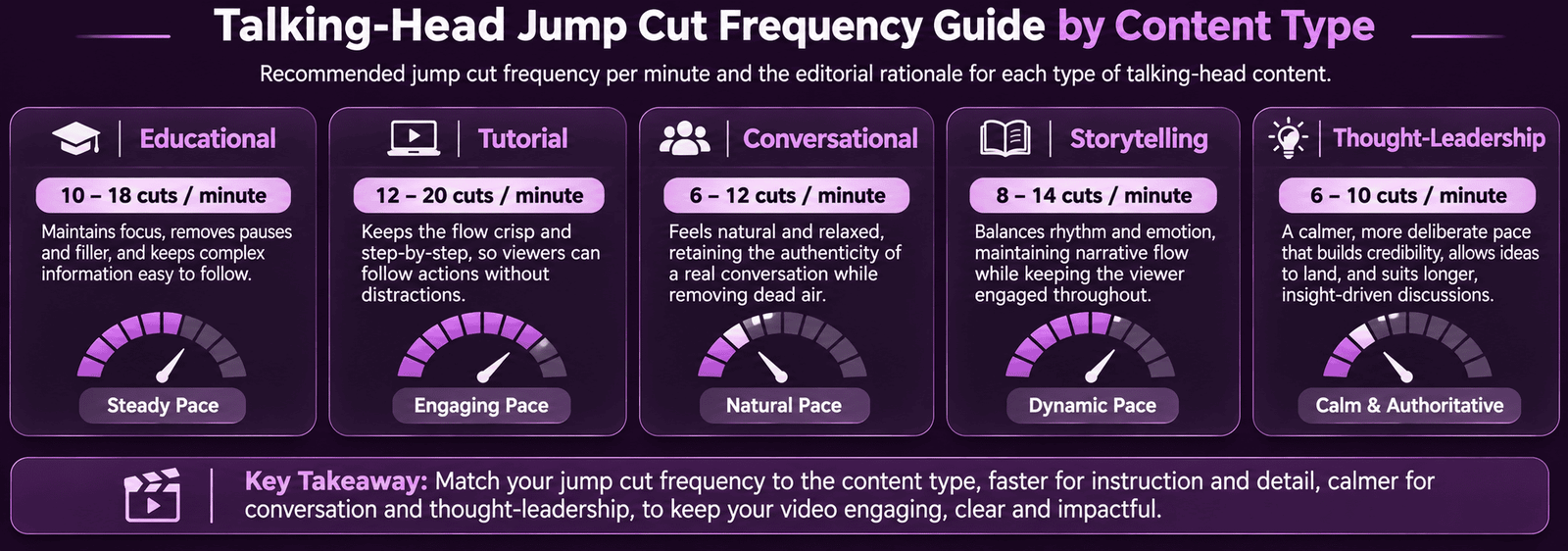
2. Jump cut calibration: Jump cuts -- cuts within a continuous take that create a visual "jump" in the presenter's position -- are the primary pacing tool in talking-head editing. The correct jump cut frequency depends on the presenter's natural delivery pace, the niche's convention, and the content's information density. Educational content benefits from faster jump cuts (every 3-5 sentences) that maintain forward momentum; conversational or storytelling content benefits from slower pacing that allows the presenter's delivery to land before cutting. The wrong jump cut frequency is one of the most common editing quality failures in self-edited YouTube content.
3. B-roll integration: B-roll for talking-head content serves a specific function: it provides visual relief from the static presenter frame at moments where the dialogue references something visual, and it maintains viewer attention during extended passages of spoken explanation. The standard for talking-head B-roll integration is cutting to a relevant clip at every extended descriptive or explanatory passage (typically every 45-60 seconds of unbroken presenter frame) and ensuring the B-roll selection is relevant to the specific point being made rather than generic illustrative footage.
4. Colour treatment and visual consistency: Talking-head video recorded in different sessions, under different lighting conditions, or with different camera settings requires colour matching to produce a visually consistent series. Professional colour treatment for talking-head content targets the skin tone accuracy and background colour consistency that makes a channel visually identifiable across videos -- a small but commercially significant contribution to brand recognition and subscriber loyalty.
5. Audio mastering for voice quality: The presenter's voice is the primary content delivery mechanism in talking-head video. Muddy, inconsistent, or noisy audio is immediately apparent to viewers and creates a perception of lower content quality that degrades even excellent spoken material. Professional audio mastering for talking-head video includes noise reduction, EQ presence boost for voice clarity, dynamic compression for level consistency, and normalisation to -14 LUFS for YouTube compatibility.
6. Text overlays and on-screen graphics: Text overlays in talking-head video serve two functions: providing a second information layer for viewers who missed a spoken point (particularly useful for complex or technical content), and creating visual variety within the static presenter frame. The professional standard is using text overlays strategically -- at key claims, data points, or step introductions -- rather than captioning every sentence, which creates visual clutter.
7. Chapter structure and end screens: Chapter markers in talking-head video reduce the dropout rate at topic transitions by giving viewers who are specifically interested in later topics a direct navigation path. End screens maximise subscriber conversion from viewers who watched to the end -- the highest-intent audience in any talking-head video. Both elements are technically straightforward to add but frequently neglected in self-edited content.

Multi-Camera and Interview Editing: The Specialist Standard
Multi-camera interview content -- a host and one or more guests, each recorded on separate cameras -- introduces a specific editing challenge that single-camera talking-head editing does not have: the continuous editorial decision about which camera angle to use at any given moment. This decision requires understanding not only of the technical synchronisation (matching the cut to audio transitions) but of the interview's dramatic and conversational structure: when the reaction shot of the listening guest adds more value than the active speaker's camera, when a wide two-shot provides better context than a tight close-up, and how to pace the camera switches to feel like a deliberate directorial choice rather than arbitrary switching. The interview video editing service guide covers the complete multi-camera interview editing standard in detail.

Talking-Head Video Editing Pricing

Service LevelPer 10-Min VideoPer 30-Min VideoMonthly Package (4 videos)What Is Included
Standard£80-150£150-280£320-600/moDialogue edit, jump cuts, basic colour, audio clean, captions
Professional£150-300£280-550£600-1,200/moAbove plus B-roll integration, colour grade, text overlays, chapters, thumbnail
Premium£250-500£450-900£1,000-2,000/moAbove plus advanced graphics, motion titles, multi-cam edit, Shorts clips
Agency managed£350-700£600-1,200£1,400-2,800/moFull service including strategy, upload, SEO, channel management

Get a Professional Talking-Head Video Editing Quote

Futuristic Marketing Services edits talking-head and interview videos to the professional retention engineering standard -- dialogue pacing, B-roll integration, colour treatment, audio mastering, and the visual consistency that builds channel identity.

Get Your Editing Quote

When Professional Talking-Head Editing Is Commercially Essential

Self-editing talking-head content with tools like Descript or DaVinci Resolve produces commercially acceptable results for many use cases -- particularly internal communications, educational content where the information value is high regardless of production quality, and early-stage YouTube channels where content strategy is still being validated before production investment scales. Professional talking-head editing becomes commercially essential when the video has direct revenue impact: paid social ad creative where hook rate and click-through rate determine campaign profitability, Video Sales Letter content where conversion rate is the primary metric, and YouTube channels where average view duration and subscriber conversion rate directly determine algorithmic reach and monetisation income.

Frequently Asked Questions

What camera setup is needed for professional-quality talking-head video?

The minimum equipment for professional-quality talking-head source material that editing can elevate to broadcast standard: a dedicated microphone (USB condenser or XLR with interface at £75-200), a camera capable of 1080p at 24 or 30fps (a modern smartphone on a tripod is sufficient), consistent natural or artificial lighting (a £40-80 ring light or softbox), and a clean, visually simple background. These one-off investments produce source material that professional editing can treat to a commercial standard. Poor audio from a built-in laptop microphone is the one element that editing cannot fully correct and that most undermines the perceived quality of talking-head content.

How many jump cuts per minute is the professional standard?

The professional jump cut standard varies by content type: educational and tutorial content typically uses 8-12 jump cuts per minute (approximately every 5-8 seconds) to maintain high information pace; conversational and storytelling content uses 3-6 per minute (approximately every 10-20 seconds) to allow narrative delivery to land; thought-leadership and opinion content uses 4-8 per minute, balancing pace with gravitas. The correct standard for any specific channel is determined by analysing the performance data -- average view duration and dropout graph -- of existing content to identify whether the current pacing is too slow or too fast for the specific audience.

Make Your Talking-Head Videos Look and Perform Like Professional Productions

Futuristic Marketing Services edits talking-head and interview video content to the professional retention engineering standard -- the production quality that builds channel authority, subscriber loyalty, and commercial results.

Start Your Talking-Head Editing

Conclusion

Professional talking-head video editing is the production discipline that closes the gap between a presenter's raw recording and the polished, high-retention video that competitive YouTube channels and commercial video programmes require. The seven editing components -- dialogue pacing, jump cut calibration, B-roll integration, colour treatment, audio mastering, text overlays, and chapter structure -- each contribute to the average view duration and visual quality metrics that determine whether talking-head content earns algorithmic recommendation and commercial performance.
For the broader context of talking-head editing within the complete video editing services landscape, the complete video editing guide covers every format and use case. For specialist interview and multi-camera content editing, the interview video editing service guide provides the detailed multi-camera editing standard.
Share this post :
Picture of Devyansh Tripathi
Devyansh Tripathi

Devyansh Tripathi is a digital marketing strategist with over 5 years of hands-on experience in helping brands achieve growth through tailored, data-driven marketing solutions. With a deep understanding of SEO, content strategy, and social media dynamics, Devyansh specializes in creating results-oriented campaigns that drive both brand awareness and conversion.

All Posts