

Elementor is a visual drag-and-drop page builder plugin for WordPress installed on over 12 million websites worldwide. It replaces the standard WordPress editor with a live visual interface where you design pages by dragging elements onto a canvas and see the result in real time, without writing HTML, CSS, or PHP code. Elementor Free is available at no cost; Elementor Pro starts at £49 per year and adds the Theme Builder, Form Builder, and WooCommerce integration that most professional sites require.
This guide covers everything you need to know about Elementor in 2026, how it works, the difference between Elementor Free and Pro, pricing plans, the most important features, its honest performance impact, how it compares to Gutenberg, and when it is and is not the right choice for a WordPress project. Whether you are evaluating Elementor for the first time or deciding whether to upgrade from free to Pro, this guide gives you the complete picture.
Key Takeaways
- Elementor is a WordPress-only plugin that works on self-hosted WordPress.org sites, it cannot be installed on WordPress.com (free plan), Wix, or Squarespace.
- Elementor Free includes 40 basic widgets and 30 or more templates, sufficient for basic page layouts. Elementor Pro adds 50 or more additional widgets, the Theme Builder for custom headers and footers, the Form Builder with CRM integration, and the full WooCommerce Builder.
- The Theme Builder is the single most valuable Elementor Pro feature, it enables full visual control over every part of the site including headers, footers, archive pages, and single post templates without touching any PHP template files.
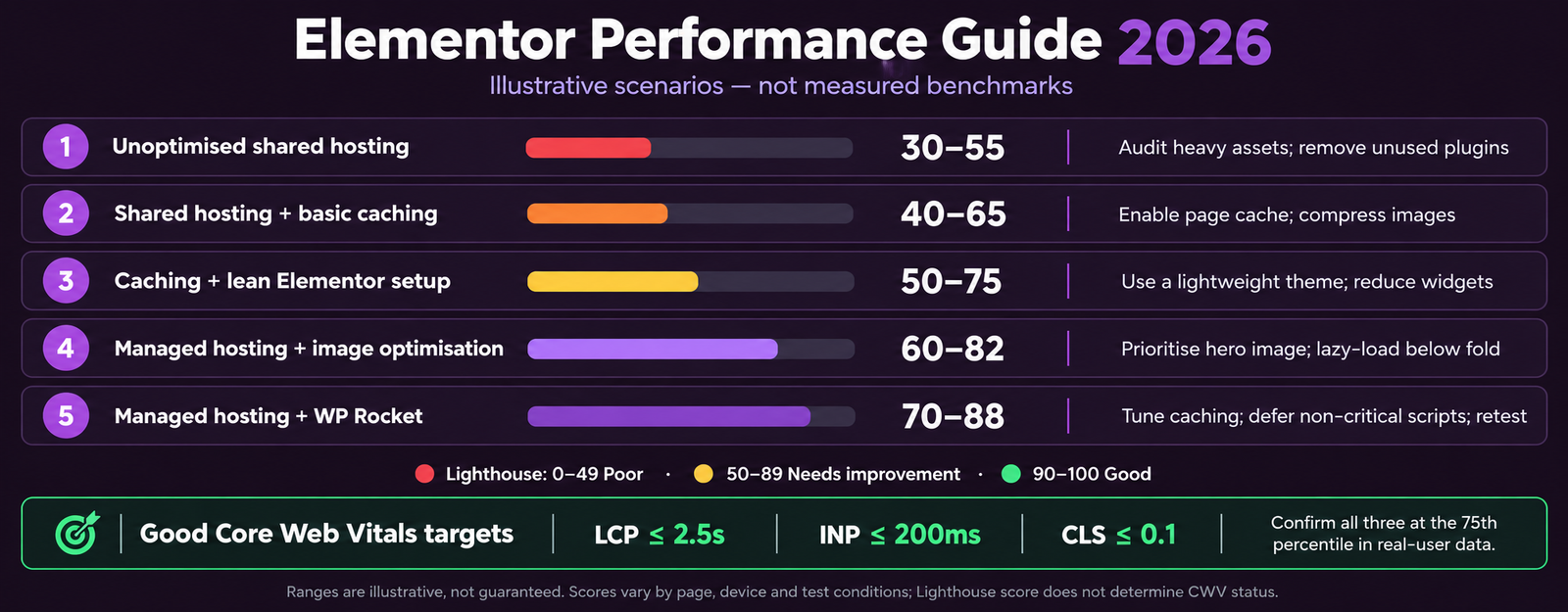
- Elementor can affect page speed if not optimised correctly. With managed WordPress hosting and WP Rocket caching, Elementor sites regularly achieve 75 to 88 mobile Lighthouse, sufficient for Good Core Web Vitals status.
- Elementor Pro at £49 per year for the Essential (1-site) plan replaces the need for a separate header builder plugin, a form plugin with CRM integration, and a pop-up builder, combined replacement value of £150 to £340 per year.
- Responsive design is built into Elementor, you can adjust layouts, font sizes, and spacing independently for desktop, tablet, and mobile viewports. This makes building mobile-first websites visually accessible to non-developers.
- Gutenberg (Full Site Editing) is the long-term direction for WordPress core and is closing the feature gap with Elementor. For new projects in 2026, evaluate both, Elementor remains preferable for complex visual layouts, forms, and WooCommerce customisation.
Building a WordPress Site?
Get Professional Elementor Development From a Team That Knows Performance
Futuristic Marketing Services builds Elementor Pro websites with custom design, optimised performance, and full SEO foundations, delivered in weeks, not months.
Get a Free ConsultationHow Elementor Works
When you install Elementor on a WordPress site and click Edit with Elementor on any page or post, you enter the Elementor editor, a real-time visual interface that replaces the standard WordPress block editor for that page. The left panel shows the widget library and panel settings; the right panel shows a live preview of the page that updates as you make changes.
Elementor structures pages using a three-level hierarchy: Sections (or Containers in the newer Flexbox system) define full-width rows with their own background and padding settings; columns divide sections horizontally; and widgets are the content building blocks placed inside columns. Each element has its own styling settings, colours, typography, spacing, borders, animations, and responsive overrides for tablet and mobile, accessible in the left panel when the element is selected.
The Elementor Widget Library
| Widget Category | Free Widgets | Pro Widgets | Most Important |
|---|---|---|---|
| Basic content | Heading, Text, Image, Button, Divider, Spacer | Same as Free | Heading and Text form the content foundation of every page |
| Media | Image, Video, Image Gallery, Image Carousel | Slides, Media Carousel | Image and Video widgets for visual content sections |
| Forms and conversion | Not included | Form (with CRM integrations), Popup Builder | Form widget replaces need for separate form plugin |
| Theme parts | Not included | Site Logo, Site Title, Nav Menu, Search | Required for Theme Builder header and footer construction |
| WooCommerce | Not included | Products, Add to Cart, Product Title, Price, Reviews, and 20 or more more | Powers custom WooCommerce product and shop page layouts |
| Dynamic content | Not included | Post Info, Post Content, Author Box, Related Posts, ACF fields | Enables fully dynamic blog and archive templates |
Responsive Design Controls
Elementor Free vs Elementor Pro
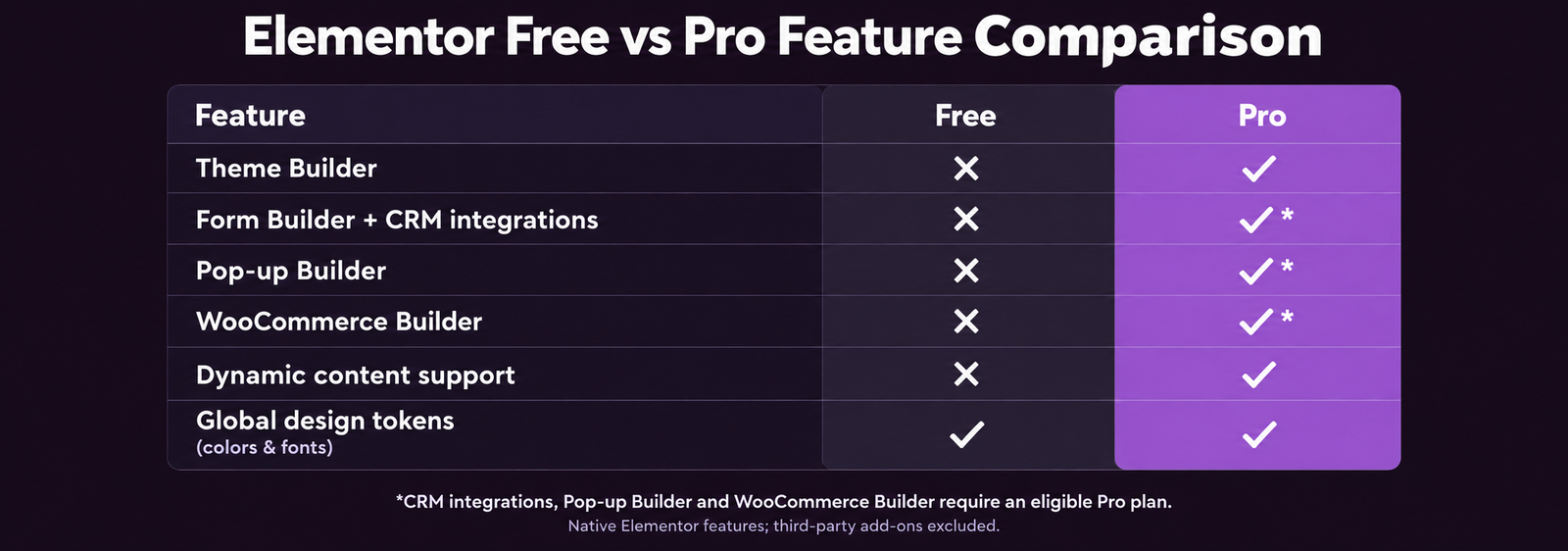
The decision between Elementor Free and Pro depends on what the site needs. Free covers basic page layouts effectively. Pro is required for full-site design control, marketing functionality, and WooCommerce customisation.
| Feature | Elementor Free | Elementor Pro |
|---|---|---|
| Basic page building | Yes, 40 widgets, drag and drop editor | Yes, all Free features included |
| Theme Builder (headers, footers, templates) | No | Yes, complete control over every page type |
| Form Builder with CRM integrations | No | Yes, Mailchimp, HubSpot, Klaviyo, ActiveCampaign, and more |
| Pop-up Builder | No | Yes, full targeting and trigger control |
| WooCommerce Builder | No | Yes, product pages, shop, cart, checkout |
| Dynamic content (ACF, custom fields) | No | Yes, full dynamic content display |
| Global widgets and design tokens | No | Yes, site-wide colour and font variables |
| Custom CSS per element | No | Yes |
| Price | Free | From £49 per year (Essential, 1 site) |
When Elementor Free Is Enough
Elementor Free is sufficient when: the site uses a premium theme that handles its own header and footer design; page layouts are simple and content-focused; form requirements are met by a free plugin such as Contact Form 7; and popup or CRM integration functionality is not needed. Many content-heavy blogs and simple brochure sites operate effectively on Elementor Free.
When Elementor Pro Is Required
Elementor Pro is required when: the site needs a custom header and footer that differs from the active theme; lead capture forms need to connect directly to an email marketing platform or CRM; pop-up functionality is part of the conversion strategy; WooCommerce product pages need a custom layout; or the complete site design, including blog archive templates and single post layouts, needs to be controlled visually. For most professional marketing and business sites, Elementor Pro is the correct choice.
Elementor Pro Pricing Plans
| Plan | Sites | Annual Price | Best For |
|---|---|---|---|
| Essential | 1 | £49 per year | Individual site owners and small businesses with one WordPress installation |
| Advanced | 3 | £99 per year | Freelancers managing a small portfolio of client sites |
| Expert | 25 | £199 per year | Agencies managing multiple client WordPress projects |
| Agency | 1,000 | £399 per year | Large agencies or multi-site networks |
All plans include the complete Elementor Pro feature set, the difference is only the number of WordPress activations. Elementor offers a 30-day money-back guarantee on all plans. The Expert plan at £199 per year provides 25 site licences at £8 per site per year, making it the most cost-effective option for any agency or developer managing 5 or more client sites.
Elementor and Page Performance
| Setup | Mobile Lighthouse | Core Web Vitals Status | Notes |
|---|---|---|---|
| Elementor on shared hosting, no caching | 30 to 55 | Poor | Not a viable production configuration, performance must be addressed |
| Elementor plus WP Rocket on shared hosting | 50 to 70 | Needs Improvement | Budget setup, acceptable for very low-traffic sites |
| Elementor plus WP Rocket on managed hosting | 70 to 88 | Good | Standard professional setup, achieves Good CWV consistently |
| Elementor with heavy animations and many widgets | 55 to 75 | Needs Improvement | Complex pages require more aggressive script optimisation |
| Hand-coded custom theme on managed hosting | 85 to 95 or higher | Good | The performance ceiling Elementor cannot match, see custom development |
Elementor vs Gutenberg (Block Editor)
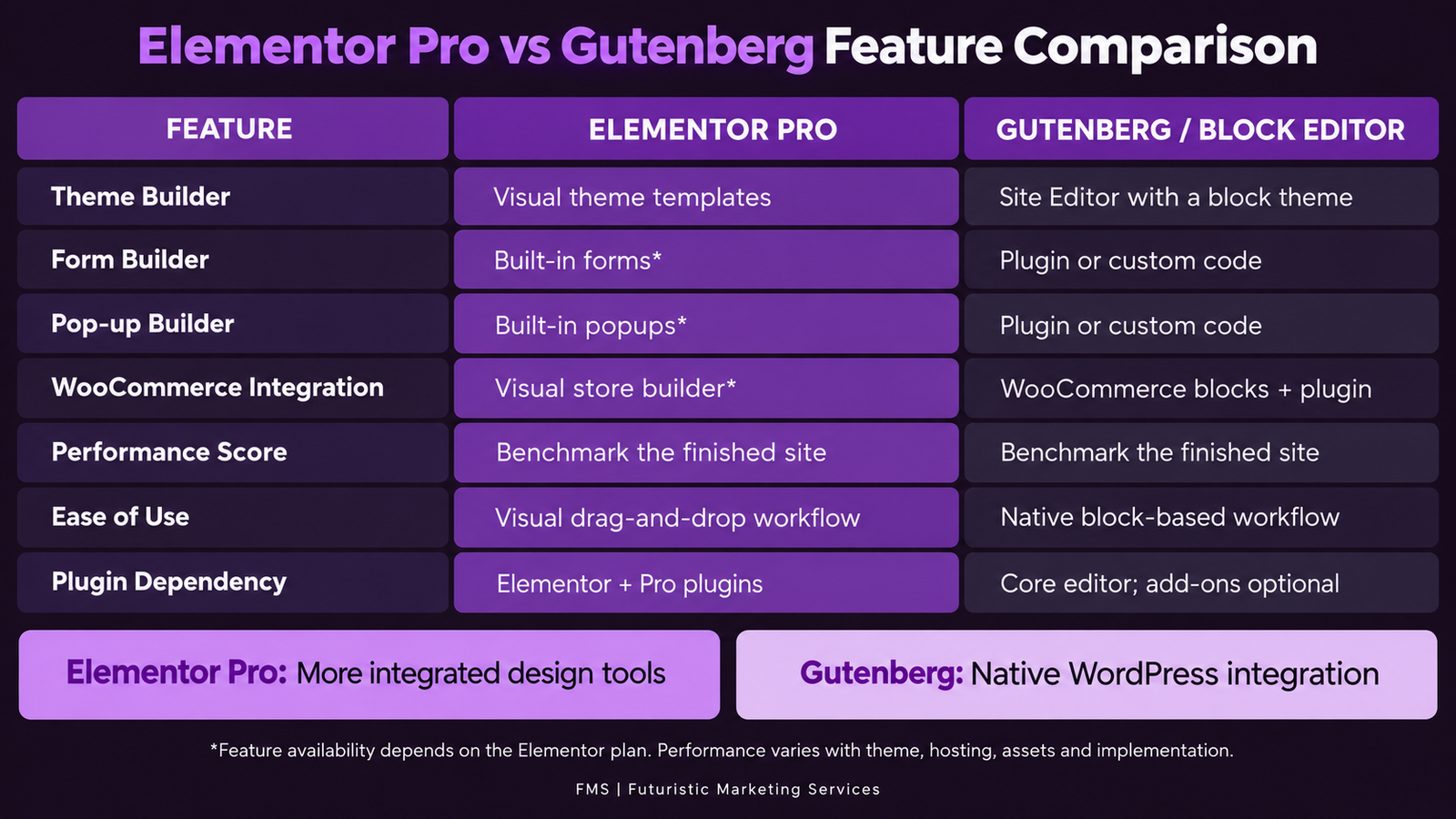
Gutenberg, the native WordPress block editor introduced in 2019 and expanded with Full Site Editing in 2022, is the built-in alternative to Elementor. The comparison is not straightforward, both tools have continued to develop rapidly and each has genuine strengths the other lacks.
Elementor vs Gutenberg: Choose Based on Your Priority
Choose Elementor Pro when
The project needs complex visual layouts with pixel-level control; WooCommerce pages require a custom design; forms with CRM integration are required; pop-up functionality is part of the conversion strategy; or the team needs to manage the full site design without touching PHP.
Choose Gutenberg when
Maximum performance is a hard requirement, Gutenberg produces leaner HTML and CSS output than Elementor; the team is comfortable with the block editor workflow; the project is using a modern block theme for Full Site Editing; or reducing plugin dependencies is a priority.
Performance winner
Gutenberg produces lighter pages on average, no page builder CSS overhead, tighter HTML output. For sites where 90 or higher Lighthouse is a hard requirement, Gutenberg FSE with a block theme is the correct path.
Feature winner
Elementor Pro, the Theme Builder, Form Builder, Pop-up Builder, and WooCommerce Builder remain more mature and more capable than Gutenberg equivalents in 2026, though the gap is narrowing.
Elementor Development Done Right
Professional Elementor Pro Sites Built for Performance and Conversion
Futuristic Marketing Services builds Elementor Pro websites with custom design, managed hosting setup, WP Rocket performance configuration, and full SEO foundations.
Start Your Elementor ProjectFrequently Asked Questions About Elementor
What is Elementor and what is it used for?
Is Elementor free?
Does Elementor slow down WordPress?
Is Elementor Pro worth buying?
What is the Elementor Theme Builder?
Can Elementor be used with WooCommerce?
What is the difference between Elementor sections and containers?
Does Elementor work with any WordPress theme?
How does Elementor compare to Divi?
Can Elementor create pop-ups?
Is Elementor good for SEO?
How do I install Elementor on WordPress?
Futuristic Marketing Services
Build Your Site With Elementor Pro
Futuristic Marketing Services develops professional Elementor Pro websites with custom design systems, performance engineering, and complete SEO foundations, delivered as a production-ready site.
Start Your Elementor Build