

Core Web Vitals optimisation is the process of improving a website’s scores on Google’s three confirmed page experience ranking signals, LCP (Largest Contentful Paint), CLS (Cumulative Layout Shift), and INP (Interaction to Next Paint), to achieve Good status on all three metrics. Good status on all three metrics provides a ranking advantage in competitive search results and produces measurably better user experience outcomes: lower bounce rates, higher conversion rates, and greater organic visibility. Pages with Poor Core Web Vitals status rank below equivalent pages with Good status in all other factors being equal.
Key Takeaways
- Core Web Vitals are confirmed Google ranking signals, LCP under 2.5s, CLS under 0.1, and INP under 200ms constitute Good status. Pages with Good status on all three have a ranking advantage over pages with Needs Improvement or Poor status in competitive niches where content and backlink profiles are otherwise similar.
- The most commercially important fix on most sites is LCP. The hero image is the LCP element on the majority of pages, preloading it with a link rel=preload tag in the page head reduces LCP by 0.3 to 0.8 seconds on most sites. This single change is the highest-impact optimisation available for the lowest implementation cost.
- Google TTFB guidance recommends Time to First Byte under 600ms for Good LCP support. Managed WordPress hosting on Kinsta or WP Engine with Redis object caching achieves under 200ms TTFB, the performance foundation that makes all other optimisations effective. Shared hosting TTFB of 400ms to 2,000ms makes Good LCP status structurally unachievable.
- CLS (layout shift) is the most preventable Core Web Vitals failure, it is caused by well-documented implementation mistakes: images without explicit width and height attributes; dynamically injected content (cookie banners, chat widgets); and custom fonts without font-display: swap. Each cause has a specific, implementable fix that takes under 30 minutes per issue.
- INP (Interaction to Next Paint) replaced FID as a Core Web Vitals metric in March 2024. The most impactful INP fix is deferring third-party scripts, analytics, chat widgets, marketing pixels, until after page load using a tag manager with delayed triggers. These scripts block the main thread and delay response to user interactions.
- For WordPress sites, the three-layer optimisation stack, managed hosting with Redis, WP Rocket with JavaScript deferral, and WebP images with explicit dimensions, consistently achieves Good status on standard business pages. Elementor Pro with Optimised CSS Loading enabled reduces page CSS overhead by 40 to 60 percent versus the default configuration.
- Google Search Console Core Web Vitals report (Experience → Core Web Vitals) shows real-user field data grouped by URL pattern. Field data, not PageSpeed Insights lab scores, is what Google uses for ranking. Monitor GSC monthly. See our technical SEO audit guide for the full monitoring process.
Core Web Vitals Audit
Get Your Core Web Vitals Assessed and Fixed
Futuristic Marketing Services provides Core Web Vitals audits with specific, prioritised fixes, LCP diagnosis, CLS elimination, INP optimisation, and managed hosting recommendations.
Request a Performance AuditThe Three Core Web Vitals: Metrics and Thresholds
| Metric | What It Measures | Good | Needs Improvement | Poor | Primary Cause of Failure |
|---|---|---|---|---|---|
| LCP, Largest Contentful Paint | Time from page navigation until the largest visible content element (typically hero image) fully renders | Under 2.5s | 2.5s to 4.0s | Over 4.0s | Unpreloaded hero image; wrong format; slow server TTFB; oversized for viewport |
| CLS, Cumulative Layout Shift | Total unexpected visual movement of page elements during and after load | Under 0.1 | 0.1 to 0.25 | Over 0.25 | Images without width and height attributes; late-injected content; fonts without font-display: swap |
| INP, Interaction to Next Paint | Time from user interaction (click, tap, keypress) to the next visual update painted by the browser | Under 200ms | 200ms to 500ms | Over 500ms | Heavy JavaScript on main thread; large JS bundles; third-party scripts blocking interactivity |
Field Data vs Lab Data: The Critical Distinction
LCP Optimisation: Every Fix Ranked by Impact
| LCP Fix | Expected LCP Improvement | Implementation Effort | Priority |
|---|---|---|---|
| Preload the LCP hero image | 0.3 to 0.8s reduction | Low, add one link tag to page head | 1, Highest impact, lowest effort |
| Convert hero image to WebP format | 0.2 to 0.5s reduction | Low, convert existing image file | 2, Quick win, significant file size reduction |
| Serve hero image at correct viewport size (srcset) | 0.1 to 0.4s reduction | Medium, add srcset and sizes attributes | 3, Prevents mobile devices downloading desktop-sized images |
| Upgrade to managed hosting with Redis caching | 0.3 to 1.5s TTFB reduction | Medium, hosting migration | 4, Infrastructure foundation; unlocks all other optimisations |
| Remove render-blocking CSS and JavaScript | 0.2 to 0.6s reduction | Medium to high, requires CSS and JS audit | 5, High impact but requires developer time to identify and fix safely |
| Implement a CDN for global delivery | 0.1 to 0.5s for non-UK visitors | Medium, CDN configuration | 6, Essential for sites with significant international traffic |
| Reduce server response time with server-side caching | 0.1 to 0.3s reduction | Low on managed hosting | 7, Complementary to Redis caching; included in managed hosting |
The LCP Preload Implementation
<link rel="preload" as="image" href="/images/hero.webp" type="image/webp" fetchpriority="high">
This single tag tells the browser to fetch the hero image at the highest priority, starting the download before the browser reaches the image tag in the body. It is the most reliable LCP improvement available and takes under 5 minutes to implement. For WordPress sites using Elementor, add this to the Elementor Custom Code section (Elementor Pro) or via a plugin that adds custom head code.
CLS Optimisation: Eliminate Every Cause
| CLS Cause | Diagnosis | Specific Fix |
|---|---|---|
| Images without explicit width and height | CLS score above 0 from images loading and pushing content down; visible in Lighthouse CLS screenshot | Add width and height attributes to every img element. Browser calculates aspect ratio from these and reserves space before the image loads. |
| Cookie banner and GDPR overlay injected above content | CLS spike immediately on page load; cookie banner appears and pushes all content below it down | Reserve the exact height the banner will occupy using a min-height on its container, or use a bottom-positioned banner that does not push content. |
| Chat widget loading after page renders | CLS spike 2 to 4 seconds after load as chat widget appears in bottom corner | Set explicit width and height on the chat widget container before it loads; or load the chat widget only after user interaction. |
| Custom fonts causing FOUT/FOIT | Text blocks resize as custom font loads, replacing system font, causes layout shift if custom font has different metrics | Add font-display: swap to all @font-face declarations. Optionally preload critical fonts with link rel=preload. |
| Dynamically injected ads or embeds | Content moves as ad units load with unknown dimensions | Reserve explicit height for all ad slots and iframes before their content loads using a fixed-height container div. |
| Animations affecting layout | CSS animations that modify width, height, margin, or padding cause layout shifts throughout the session | Use CSS transform and opacity for animations only, these properties are composited and do not trigger layout. Avoid animating margin, padding, width, or height. |
INP Optimisation: Main Thread Unblocking
INP Optimisation Actions in Priority Order
1. Defer all third-party scripts
Analytics (GA4), heatmaps (Hotjar, Clarity), marketing pixels (Meta Pixel, LinkedIn Insight Tag), and live chat widgets all execute on the main thread and block interaction response. Load all third-party scripts after page load using a tag manager with a delayed trigger (fire after 3 seconds or after first user interaction). This is the highest-impact INP fix for most sites. See our website speed guide.
2. Identify and break up long tasks
Long tasks are JavaScript functions executing for more than 50ms, visible as red bars in Chrome DevTools Performance tab. They block the main thread during execution, preventing the browser from responding to user interactions. Break long tasks into smaller chunks using setTimeout(0) or scheduler.postTask() to yield between operations.
3. Optimise click and input event handlers
Event handlers that perform expensive DOM queries, large data processing, or synchronous network requests on click or keypress cause high INP. Profile handlers in Chrome DevTools, identify the most expensive operations, and move them to asynchronous execution or Web Workers.
4. Reduce JavaScript bundle size
Large JavaScript bundles delay Time to Interactive and increase main thread execution time. Use Lighthouse Unused JavaScript audit to identify scripts that can be deferred, removed, or replaced with smaller alternatives. Each KB of JavaScript removed reduces main thread blocking proportionally.
5. Eliminate input delay from passive listeners
Scroll event listeners without the passive: true option block the browser's scroll handling. Add { passive: true } to all scroll and touchstart event listeners, this is a single character change that can significantly reduce perceived scroll jank and INP.
6. Implement lazy hydration for JavaScript frameworks
React, Vue, and Angular applications that hydrate the full component tree on initial load create large main thread tasks. Implement lazy hydration, hydrating only the components in the viewport on load, and hydrating off-screen components only when they scroll into view or when the user interacts.
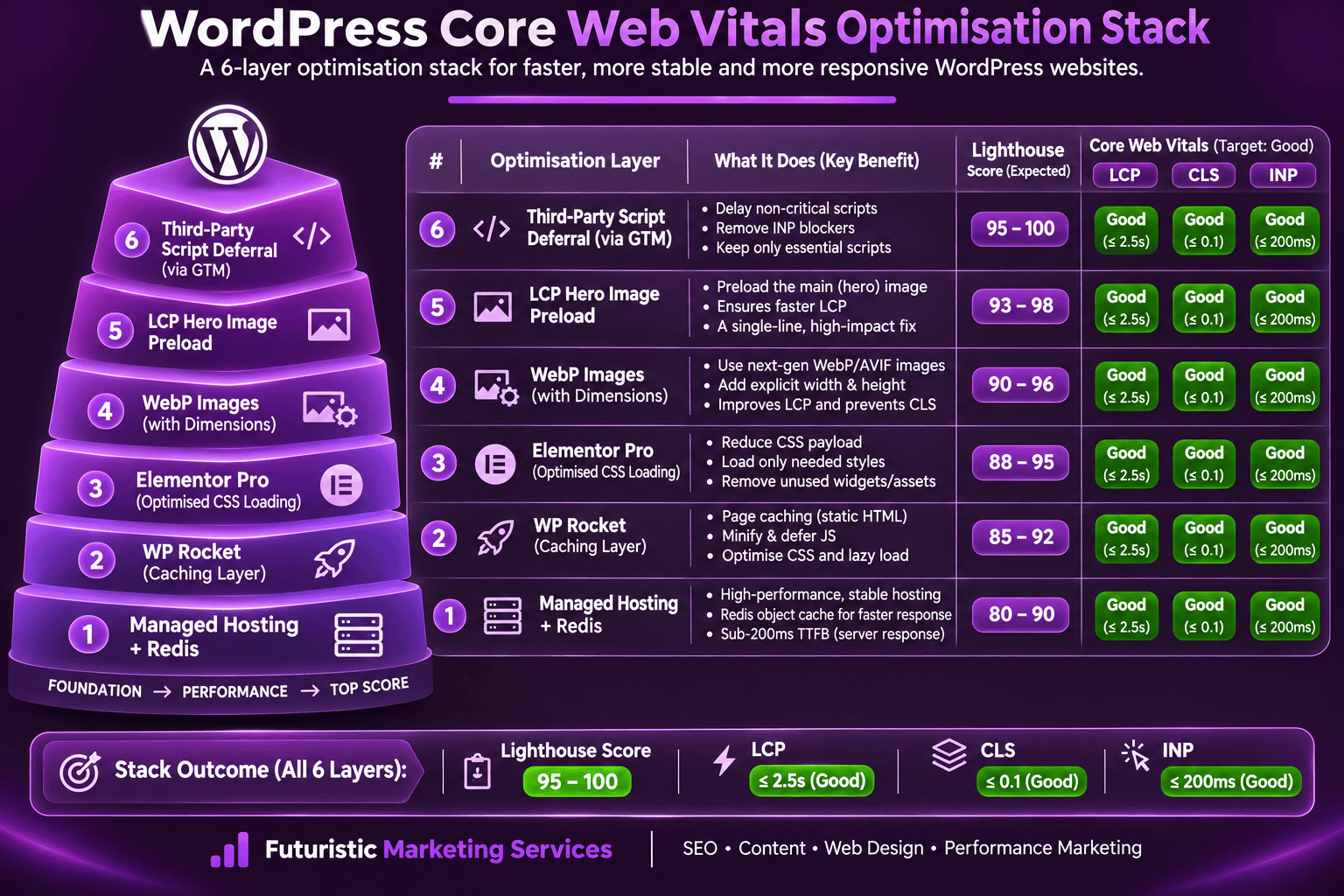
WordPress Core Web Vitals Optimisation Stack
| Stack Component | What It Provides | Impact on CWV | Cost |
|---|---|---|---|
| Managed WordPress hosting (Kinsta or WP Engine) | Sub-200ms TTFB with Redis object caching; server-level full-page caching; global CDN; isolated container | LCP improvement of 0.3 to 1.5s; enables all other optimisations to reach Good status | £25 to £150/month |
| WP Rocket | Page caching; JavaScript deferral; CSS and JS minification; image lazy loading; database optimisation | LCP improvement from caching; INP improvement from JS deferral; typically 10 to 25 Lighthouse point improvement | £40/year |
| Elementor Pro, Optimised CSS Loading | Generates per-page CSS containing only the widgets used on that page, not the full widget library | Reduces page CSS by 40 to 60% on standard pages; directly improves LCP and mobile Lighthouse score | Included in Elementor Pro (£49/year) |
| WebP images with explicit dimensions | WebP is 25 to 35% smaller than JPEG; explicit width and height prevent CLS from image loading | LCP improvement from smaller file; CLS elimination from explicit dimensions | Tool cost: free (Squoosh, cwebp) |
| LCP image preload tag | Tells browser to fetch hero image at highest priority before encountering it in body HTML | Single most impactful LCP fix, 0.3 to 0.8s reduction | Zero cost, one line of HTML |
| Third-party script deferral (GTM delayed trigger) | All analytics, pixel, and chat scripts fire 3 seconds after page load or on first user interaction | INP improvement, main thread unblocked during initial page interaction | Zero cost with GTM |
WordPress Performance
Good Core Web Vitals Status for Your WordPress Site
Futuristic Marketing Services implements the complete WordPress performance stack, managed hosting, WP Rocket, WebP pipeline, LCP preload, and third-party script deferral, achieving Good Core Web Vitals status.
Fix Your Core Web Vitals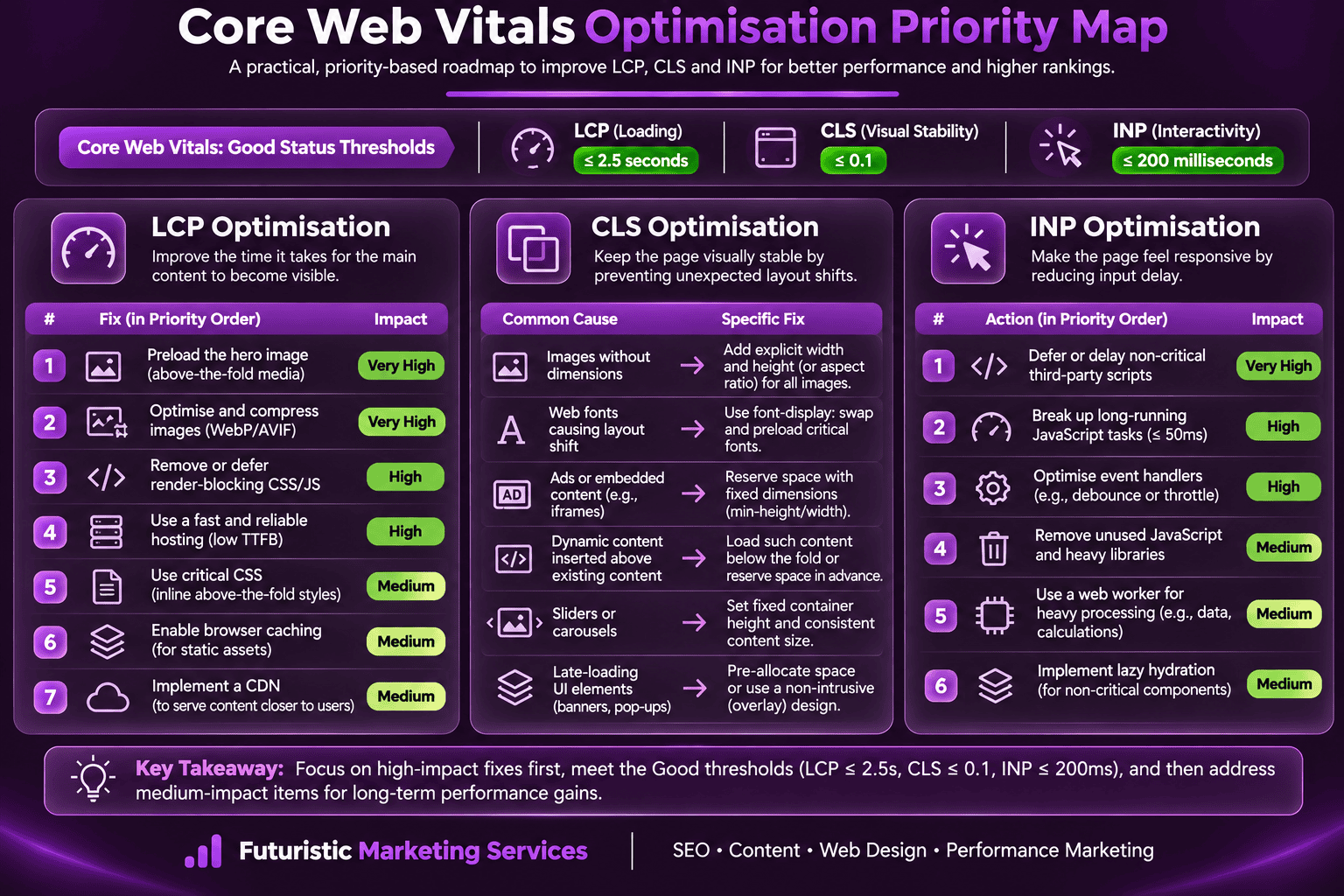
Frequently Asked Questions About Core Web Vitals Optimisation
What are Core Web Vitals?
How do I check my Core Web Vitals?
What causes a bad LCP score?
What causes a bad CLS score?
What causes a bad INP score?
What is a Good Core Web Vitals score?
Does Core Web Vitals affect SEO rankings?
How do I improve Core Web Vitals on WordPress?
What is LCP and how do I optimise it?
What is CLS and how do I fix it?
What is INP and how do I fix it?
How do I monitor Core Web Vitals after fixing them?
Futuristic Marketing Services
Good Core Web Vitals That Hold, Even as the Site Evolves
Futuristic Marketing Services implements and maintains Core Web Vitals Good status, with the managed hosting stack, performance engineering, and monthly monitoring that keeps scores from regressing after plugin updates.
Achieve Good Core Web Vitals