
Website design and SEO are not separate disciplines that are applied independently to a website. Every design decision, how the site is structured, how images are implemented, how pages link to each other, how text is rendered, how fast the page loads, directly determines how Google crawls, indexes, and ranks the website. A website that is designed without SEO considerations can be technically attractive and functionally adequate while being nearly invisible in organic search, regardless of how much content is published to it.
Key Takeaways
- Google primarily uses the mobile version of every website for indexing and ranking, a website designed only for desktop receives ranking penalties for mobile performance failures even on desktop queries
- Core Web Vitals (LCP under 2.5s, INP under 200ms, CLS under 0.1) are direct Google ranking signals, failing these thresholds produces measurable ranking penalties that no amount of content or link building can fully offset
- Site architecture determines how efficiently Google crawls and indexes the site, a flat architecture where every important page is reachable within 3 clicks from the homepage is the design target
- Heading hierarchy (one H1 per page containing the primary keyword; H2 for major sections; H3 for sub-sections) is a crawling signal that tells Google what each page is about and how the content is structured
- Every image on a website requires descriptive alt text, both for accessibility compliance and because alt text is Google's primary mechanism for understanding image content
- Internal links are a design element as much as an SEO element, the placement, anchor text, and visual prominence of internal links within page layouts determines which pages Google considers most important
- Text rendered inside images (hero banner text, button text in image files) is invisible to Google crawlers, all commercially important text must exist as HTML text, not as part of an image file
Need a Website Designed for Both Conversion and Google Rankings?
Futuristic Marketing Services designs websites for Indian businesses with both conversion and SEO built in from the structure up, Core Web Vitals optimised, mobile-first, correct heading hierarchy, and site architecture that Google can crawl and rank efficiently.
Get a Free Website Design ConsultationMobile-First Indexing: The Design Implication Every Business Must Understand
Mobile Design Signals Google Evaluates
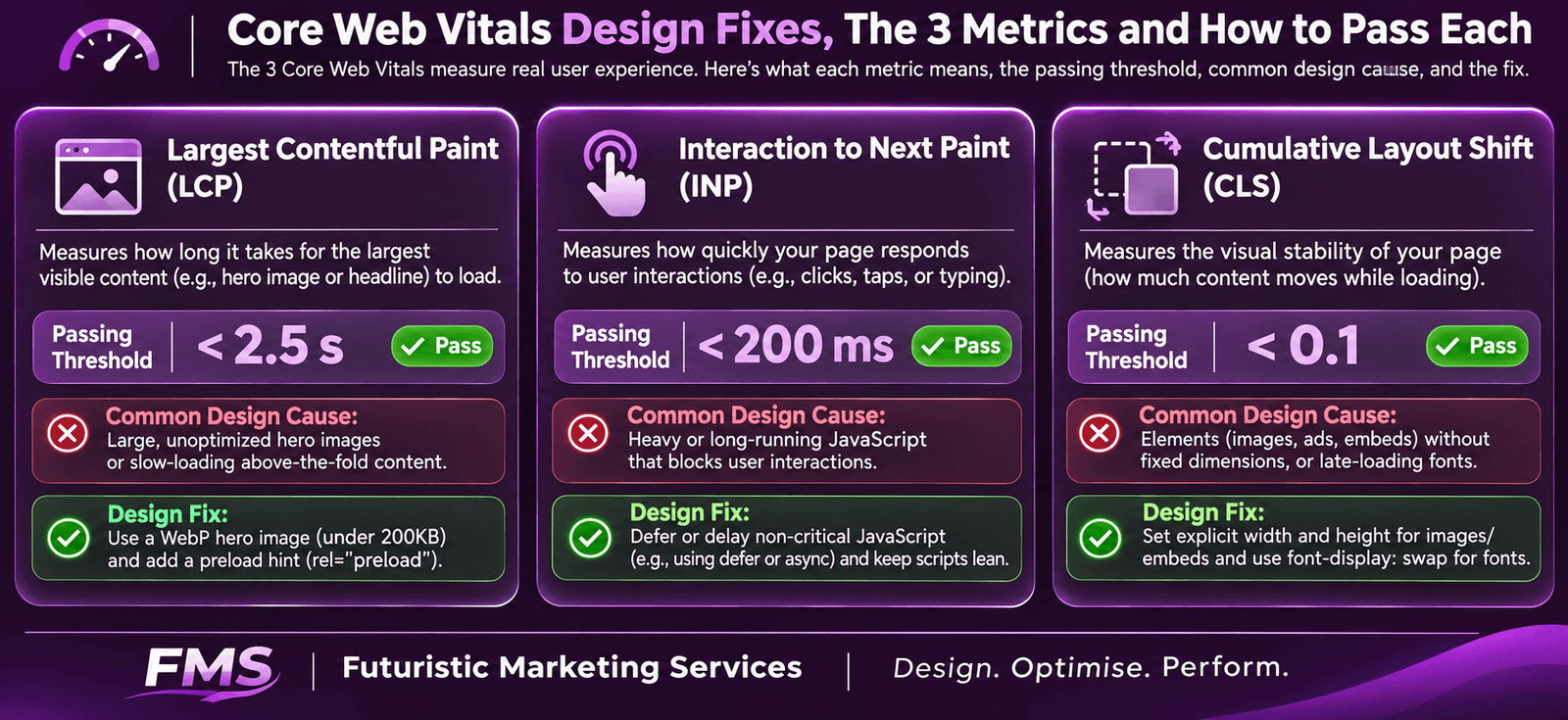
Core Web Vitals: The Performance Metrics That Affect Rankings
| Metric | What It Measures | Passing Threshold | Primary Design Cause of Failure |
|---|---|---|---|
| LCP (Largest Contentful Paint) | Time until the largest visible content element (typically the hero image) finishes loading | Under 2.5 seconds | Uncompressed hero images over 400KB; JPEG or PNG format instead of WebP; no preload hint; desktop-sized image served to mobile |
| INP (Interaction to Next Paint) | Time between a user interaction (button click, form input) and the next visible page update | Under 200 milliseconds | Heavy JavaScript frameworks; third-party scripts (chat widgets, tracking pixels) blocking the main thread; unoptimised animation scripts |
| CLS (Cumulative Layout Shift) | Total amount of unexpected visual layout shift as the page loads | Under 0.1 | Images without explicit width and height attributes; web fonts loaded without font-display:swap; dynamically injected content (ads, banners) without reserved space |
The Design Fix for Each Core Web Vital
Site Architecture for SEO: The Crawlability Framework
The Flat Architecture Principle
URL Structure Design for SEO
| URL Principle | Correct Implementation | SEO Problem to Avoid |
|---|---|---|
| Keyword inclusion | Include the primary keyword in every URL slug: /seo-services-in-delhi/ | Generic or ID-based URLs: /page?id=147 or /services/service1/, tell Google nothing about page content |
| Character format | Lowercase letters only; hyphens to separate words: /graphic-designer-in-indore/ | Uppercase letters (case sensitivity can create duplicate URL issues); underscores instead of hyphens (Google treats underscores as character joiners, not word separators) |
| Length | As short as possible while remaining descriptive; remove stop words (the, a, and, for) unless critical to meaning | Excessively long URLs with session IDs, date parameters, or unnecessary subfolder depth: /blog/2026/01/15/the-best-seo-services-in-delhi-for-small-businesses/ |
| Dates in URLs | Avoid dates in URLs for evergreen content; dates are appropriate only for news articles where recency is a user and ranking signal | Including publication dates in all blog URLs makes evergreen content appear dated in search results, reducing click-through rates as content ages |
Heading Hierarchy: The Design Element Google Reads
The Correct Heading Hierarchy for SEO
Image Optimisation for SEO
| Image SEO Element | Correct Implementation | Common Error |
|---|---|---|
| Alt text | Descriptive text describing what is in the image and its context; include the target keyword naturally where it fits, do not force it: alt="SEO services team reviewing keyword rankings in Indore office" | Empty alt attributes (alt="") on informational images; keyword-stuffed alt text ("SEO services SEO company SEO India"); alt text that just repeats the filename |
| File name | Descriptive, keyword-informed file names with hyphens: seo-services-indore-team.webp | Default camera file names (IMG_0847.jpg, Screenshot_2026.png) that provide no content signal |
| File format | WebP for all web images; provide JPEG fallback for older browser support; SVG for logos and icons | Serving JPEG or PNG without WebP conversion; file sizes above 400KB for any single image on a page |
| Width and height attributes | Add explicit width and height attributes to every img tag: <img width="1200" height="630" ...>, allows the browser to reserve the correct space before the image loads | Omitting width and height attributes, causes the page layout to shift as images load, producing CLS failures |
Text in Images: The Hidden SEO Design Error
Internal Linking Through Design
Internal Linking Design Principles
The 12-Point SEO Design Audit Checklist
| # | Audit Point | How to Check | Impact If Failing |
|---|---|---|---|
| 1 | Meta viewport tag | View page source; confirm <meta name="viewport" content="width=device-width, initial-scale=1"> in the <head> | Mobile-first indexing fails; entire site may be excluded from mobile search results |
| 2 | LCP under 2.5 seconds (mobile) | Run the homepage through Google PageSpeed Insights; check LCP score on Mobile tab | Direct ranking penalty from Core Web Vitals failure; typically hero image is the LCP element |
| 3 | CLS under 0.1 | Google PageSpeed Insights CLS score; check that all images have explicit width and height attributes | Direct ranking penalty; layout shifts reduce UX quality and trigger negative user experience signals |
| 4 | One H1 per page | Inspect page HTML; search for <h1>, there must be exactly one per page containing the primary keyword | Multiple H1s create keyword confusion for Google; missing H1 removes a primary keyword signal |
| 5 | All images have descriptive alt text | Browser developer tools Images panel; check alt attribute on every img tag; empty alt only for purely decorative images | Images are invisible to Google indexing; missed image search visibility; accessibility compliance failure |
| 6 | Images served in WebP format | Check Network tab in browser developer tools; filter by Image type; verify .webp extension or content-type | 25–35% larger image files compared to WebP; slower LCP; potential Core Web Vitals failure |
| 7 | No important text inside image files | Disable CSS in browser; check that all visible text still appears as selectable HTML text without styles | Text in images is not indexed; primary keywords in image-embedded headlines are invisible to Google |
| 8 | URLs contain primary keywords, no dates | Review all page URLs in the sitemap; verify keyword inclusion, lowercase, hyphens, no stop words | Weaker URL keyword signal; lower CTR in search results for non-descriptive URLs |
| 9 | No page deeper than 3 clicks from homepage | Crawl the site using Screaming Frog or similar; check crawl depth report; flag any pages at depth 4+ | Deep pages crawled less frequently; lower authority distribution; potential indexing gaps |
| 10 | Internal links use keyword anchor text | Review in-content links; confirm anchor text describes the destination page's primary keyword rather than "click here" or "read more" | Wasted internal link authority signal; Google receives no topical context about the linked page from generic anchor text |
| 11 | Mobile text size minimum 16px | Chrome DevTools → Rendering → Emulate mobile device; inspect computed CSS font-size on body text | Mobile usability failure in Google Search Console; negative mobile-first indexing signal |
| 12 | XML sitemap submitted and accessible | Access domain.com/sitemap.xml; verify it loads and contains all important pages; confirm submission in Google Search Console | Google must discover pages through link crawling alone; new pages may take weeks to index rather than days |
Need a Website That Passes Every Point on This SEO Design Audit?
Futuristic Marketing Services designs and builds websites for Indian businesses with SEO built in from the structure up, Core Web Vitals optimised, mobile-first, correct heading hierarchy, keyword-informed URL structure, and full image optimisation.
Get a Free SEO Website AuditFrequently Asked Questions
How does website design affect SEO?
What is the most important SEO design decision for a new website?
Does page loading speed affect Google rankings?
What font size is required for SEO-friendly website design?
What is the difference between website design for SEO and technical SEO?
Get a Website Designed for Both Google Rankings and Customer Conversions
Futuristic Marketing Services designs websites for Indian businesses with SEO and conversion optimisation built in together, not bolted on afterwards, producing sites that rank, load fast, and convert the traffic they receive.
See Our Website Design Services