Page Speed SEO: The Complete Guide to Faster Websites and Better Rankings in 2026

page speed seo

Page speed is a confirmed Google ranking factor that affects organic search performance through two mechanisms: directly through Core Web Vitals metrics (LCP, INP, and CLS) that function as explicit ranking signals, and indirectly through user engagement signals, particularly the bounce rates and reduced dwell time caused by slow-loading pages that RankBrain registers as user dissatisfaction. Improving page speed simultaneously improves ranking signals, user experience, and conversion rates.

This guide covers the complete page speed SEO framework for 2026: how speed affects rankings, how to measure speed correctly using field data rather than lab simulations, the 10 highest-impact speed optimisations for most websites, server configuration and CDN setup, JavaScript and CSS optimisation, image compression and format conversion, caching strategy, and the monthly speed monitoring routine that prevents performance regressions from accumulating unnoticed. Use alongside our core web vitals guide for the metric-specific diagnosis and fix process.

Key Takeaways

  • According to Think with Google, 53% of mobile users abandon sites that take over 3 seconds to load, making page speed both a ranking signal and a direct revenue factor
  • According to HTTP Archive Web Almanac, the median mobile page weight is 2.2MB in 2024, most of which is unoptimised images and render-blocking JavaScript that can be reduced by 50 to 70% with standard optimisation
  • Core Web Vitals field data in Google Search Console is the only speed measurement that directly reflects your ranking signal, PageSpeed Insights lab scores are diagnostic tools, not ranking indicators
  • The highest single-impact page speed optimisation for most websites is image compression and WebP conversion, images account for approximately 45% of average page weight and are the primary cause of LCP failures
  • Server response time (TTFB) is the most fundamental speed factor, it affects every element on every page and no client-side optimisation compensates for a server that responds in over 600 milliseconds
  • Page speed optimisation benefits compound: each improvement reduces load time, which improves LCP field data, which improves Core Web Vitals ranking signals, which improves organic rankings, which drives more traffic, all from technical changes that require no new content or links

Is Slow Page Speed Suppressing Your Core Web Vitals Scores and Rankings?

Futuristic Marketing Services diagnoses every page speed failure across your site, from server response time and unoptimised images to render-blocking scripts and missing caching, and implements the specific fixes that improve your Core Web Vitals field data and organic rankings.

Get a Page Speed Optimisation Audit

hello@futuristicmarketingservices.com  |  +91 8518024201

How Page Speed Affects SEO Rankings

Page speed affects organic rankings through two distinct mechanisms that compound each other. The direct mechanism is Core Web Vitals: LCP (Largest Contentful Paint), INP (Interaction to Next Paint), and CLS (Cumulative Layout Shift) are explicit Google ranking signals. Pages with Poor field data classifications in these metrics face a systematic ranking disadvantage compared to equivalent pages with Good classifications. The disadvantage is most pronounced in competitive SERPs where many high-quality pages compete for the same queries.
The indirect mechanism is user behaviour signals. Think with Google research confirms that 53% of mobile users abandon sites taking over 3 seconds to load. This abandonment before the page fully loads produces the highest possible bounce rate signal, users never engaged with the content at all. RankBrain interprets high abandonment rates as dissatisfaction with the result for that query, gradually suppressing the page's ranking. The combination of direct CWV ranking signals and indirect engagement signals makes page speed one of the most multi-layered ranking factors to address.
Speed optimisation also benefits conversion rates independently of rankings, a well-ranked but slow page loses potential customers before they see the content or CTA. Every page speed improvement therefore produces three simultaneous benefits: improved Core Web Vitals ranking signals, improved user engagement signals through reduced abandonment, and improved conversion rates through faster time-to-interactive for users who do engage with the content.

How to Measure Page Speed Correctly for SEO

Page speed has two measurement modes that must not be confused. Using the wrong measurement for ranking decisions produces optimisation efforts that improve scores without improving actual ranking signals.
Measurement TypeWhat It MeasuresToolUse It ForAffects Rankings Directly?
Field data (Real User Monitoring)Actual Chrome user experiences over rolling 28-day CrUX windowGSC Core Web Vitals report; PSI field data sectionDetermining your actual ranking signal status; prioritising pages for optimisationYes, this is what Google uses
Lab data (Simulated testing)Controlled simulation on Google's servers with standardised device and connectionPageSpeed Insights Diagnose section; Lighthouse in Chrome DevToolsIdentifying specific elements causing speed failures; testing fixes before deploymentNo, diagnostic only
Synthetic monitoringAutomated regular testing from a fixed location and device profileWebPageTest; GTmetrix; PingdomDetecting performance regressions introduced by site changes over timeNo, trend monitoring only
Real User Monitoring (RUM)Your actual users' experiences captured via analytics instrumentationGA4 with Web Vitals extension; custom RUM setupConfirming field data trends with your own user data rather than CrUX sampleIndirect, informs field data
Always check your Google Search Console Core Web Vitals report first, filter to mobile, which is the ranking environment under mobile-first indexing. Any URLs classified as Poor require immediate attention. Needs Improvement URLs are the next priority. Only after understanding your field data status should you use PageSpeed Insights or Lighthouse for per-element diagnosis of the specific causes.

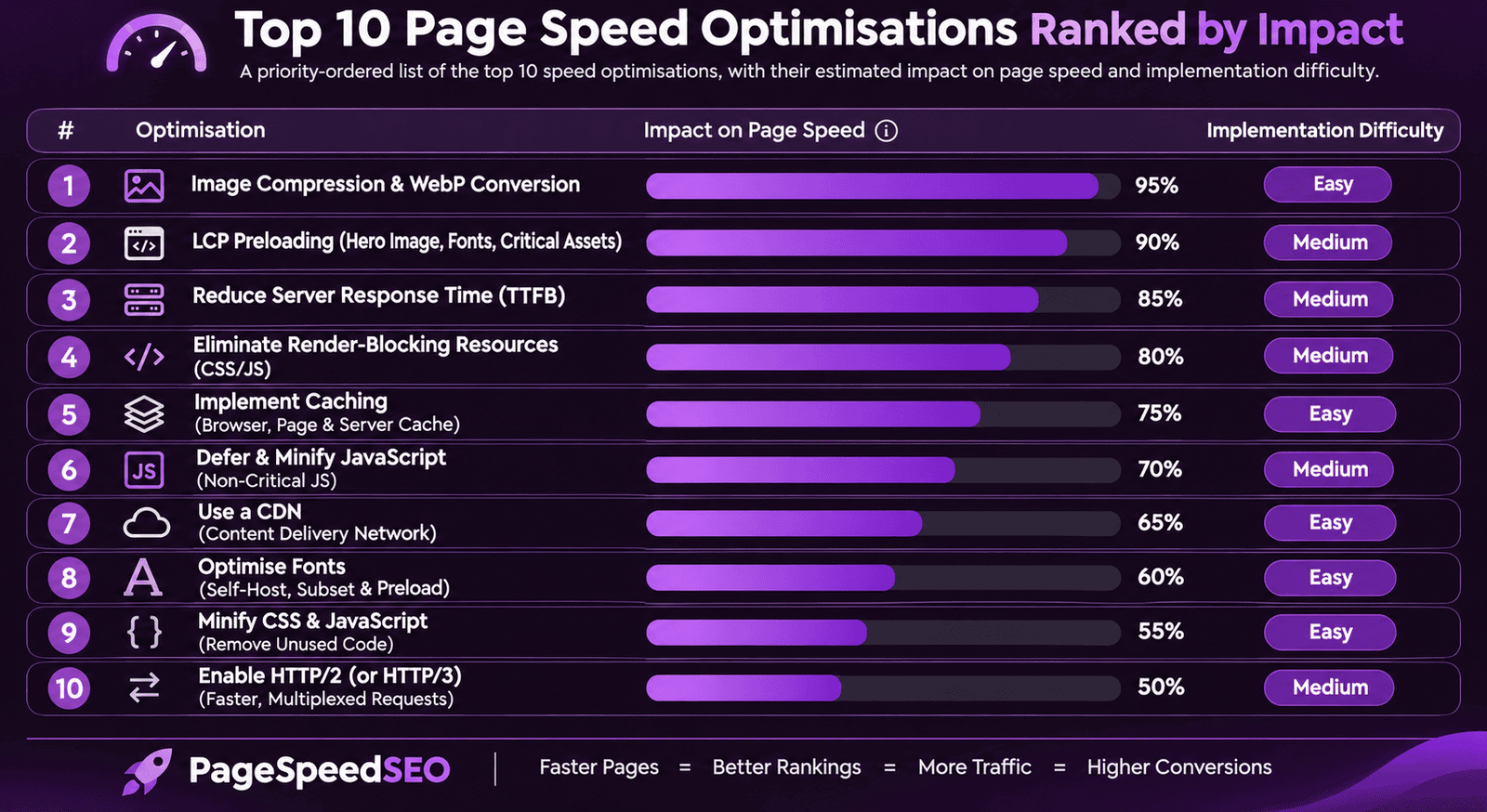
The 10 Highest-Impact Page Speed Optimisations

Ten optimisation actions address the vast majority of page speed failures across most websites. Implement them in priority order, earlier items produce greater impact per unit of effort.
PriorityOptimisationAverage ImpactImplementation Method
1Image compression and WebP conversion30-50% reduction in page weight; direct LCP improvementConvert all images to WebP with Squoosh or Imagemin; compress to under 150KB for hero images; under 80KB for body images
2LCP image preloading0.5-1.5 second LCP improvementAdd link rel=preload as=image href=LCP-image-URL to HTML head; remove lazy loading from LCP element
3Server response time reduction (TTFB)Foundational, affects every elementEnable server-side caching; use a CDN with edge nodes near your primary audience; upgrade hosting tier if TTFB exceeds 600ms
4Render-blocking resource elimination0.3-1 second render time improvementDefer non-critical JavaScript with defer or async attributes; move non-critical CSS to async loading; inline critical above-fold CSS
5Explicit image dimensionsEliminates CLS from image loadingAdd width and height attributes to every img element on every page template
6Browser caching configurationReduces repeat-visitor load times by 50-80%Set cache-control headers: static assets 1 year, HTML 1 hour; use versioned filenames for assets to enable long caching
7Third-party script deferral0.2-0.8 second INP improvementDefer or remove non-essential third-party scripts (chat widgets, analytics, social embeds); load asynchronously where removal is not possible
8CDN implementation20-40% faster TTFB for geographically distributed usersImplement a CDN with edge nodes in your primary audience's regions; ensure static assets are served from CDN not origin server
9Font loading optimisationEliminates text-related CLS; 0.2-0.5 second render improvementUse font-display: optional or swap; preload primary web fonts; use system font fallbacks sized to match web font dimensions
10HTTP/2 or HTTP/3 protocol10-20% overall load time improvementConfirm server supports HTTP/2 at minimum; enable HTTP/3 with QUIC if hosting supports it; check protocol version in Chrome DevTools Network tab
The first three optimisations (image compression, LCP preloading, and server response time) address the most common causes of Poor LCP field data on most websites. Implementing all three together typically moves a page from Poor to Good LCP classification, which is the single most impactful Core Web Vitals improvement available. Our core web vitals guide provides the complete LCP, INP, and CLS diagnosis process for every failure type.

Image Optimisation for Page Speed

Images account for approximately 45% of average page weight according to HTTP Archive data, making image optimisation the single most impactful page speed action for the majority of websites. The image optimisation programme has four components: format conversion (all images to WebP), compression (target under 150KB for hero images, under 80KB for body content images), responsive sizing (srcset attributes serving correctly-sized images for each device), and lazy loading (loading=lazy on all images except the LCP element).
Compress and convert images using Squoosh (free, browser-based tool for individual images), Imagemin (Node.js tool for batch processing during the build step), or your CMS's built-in image optimisation if it supports WebP output. Test the visual quality of each compressed image before publishing, WebP at 80 to 85% quality is visually indistinguishable from full-quality JPEG on most monitors while being 30 to 50% smaller. Our image SEO guide covers the complete image optimisation process including alt text, file naming, and structured data alongside the speed elements.

Server Configuration and CDN Setup

Server response time (Time to First Byte, TTFB) is the most foundational page speed factor because it affects every element on every page. A server taking 1.5 seconds to respond cannot produce a sub-2.5 second LCP regardless of how well-optimised the content and images are, the 1.5 second TTFB alone consumes more than half the target LCP budget. Target a TTFB under 200 milliseconds for Good performance and under 600 milliseconds as the maximum acceptable threshold.
Three server-side actions reduce TTFB most effectively: enable server-side page caching (reduces database and processing time on repeat requests by serving pre-generated HTML), implement a Content Delivery Network with edge nodes geographically close to your primary users (reduces network latency significantly for users distant from your origin server), and upgrade hosting from shared to VPS or dedicated if your site generates consistent organic traffic above 10,000 monthly visits (shared hosting's shared resources create variable and often high TTFB under concurrent load).

Monthly Page Speed Monitoring Routine

Page speed performance degrades over time as new images, scripts, plugins, and content are added without performance review. A monthly monitoring routine prevents the accumulation of regressions that produce field data reclassification from Good to Needs Improvement before they are noticed.
Monthly speed monitoring checklist: check GSC Core Web Vitals report for any new Poor or Needs Improvement URL classifications compared to last month; run PageSpeed Insights on your homepage, top 5 blog posts, and top 5 service pages (these template-representative pages indicate performance across all similar page types); review every new third-party script added to the site since the last check (each new script adds to main thread blocking time and INP score); compare total page weight for key pages against last month's baseline using Chrome DevTools Network panel; and verify that no new large unoptimised images have been published without WebP conversion.

Build the Technical Performance Foundation That Supports Your Rankings Long-Term

Our technical SEO team implements the complete page speed optimisation stack, from image compression and CDN configuration to script deferral and caching strategy, and maintains monthly monitoring to prevent regressions from accumulating.

Start Your Page Speed Optimisation

hello@futuristicmarketingservices.com  |  +91 8518024201

Frequently Asked Questions About Page Speed SEO

Does page speed affect SEO rankings?

Yes. Page speed affects organic rankings through two mechanisms: directly through Core Web Vitals (LCP, INP, and CLS), which are confirmed Google ranking signals where Poor-classified pages face systematic ranking disadvantages, and indirectly through user engagement, Think with Google research confirms 53% of mobile users abandon sites taking over 3 seconds to load, producing high abandonment signals that RankBrain interprets as user dissatisfaction. Both mechanisms compound to make page speed one of the most multi-layered ranking factors in modern SEO.

What is the ideal page load time for SEO?

The ideal page load time for SEO is under 2.5 seconds for Largest Contentful Paint (LCP), Google's primary loading speed metric. LCP measures when the largest visible content element on the page fully loads, which typically corresponds to when users feel the page is usable. Pages achieving LCP under 2.5 seconds are classified as Good in Google's Core Web Vitals field data, which is the classification that avoids the ranking disadvantage applied to Poor and Needs Improvement pages.

What is the difference between PageSpeed Insights score and actual ranking signals?

PageSpeed Insights has two sections: the field data section (showing real Chrome user CrUX measurements, this correlates with your ranking signal) and the lab data Diagnose section (a controlled simulation, useful for diagnosis but not the ranking signal). A perfect 100 lab score does not guarantee a Good CWV field classification if real users on slower devices experience the page differently. Always check your Google Search Console Core Web Vitals report for actual ranking signal status before drawing conclusions from lab scores.

What is TTFB and why does it matter for page speed?

TTFB (Time to First Byte) is the time from a user's browser sending a request to receiving the first byte of the server's response. It is the most foundational page speed metric because it forms the floor time before any content can begin loading. A TTFB of 1.5 seconds means even a perfectly optimised page cannot achieve LCP under 2.5 seconds. Target TTFB under 200ms for Good performance. Improve TTFB by enabling server-side caching, implementing a CDN, and upgrading hosting if necessary.

How do images affect page speed and SEO?

Images account for approximately 45% of average page weight, making them the primary contributor to slow LCP scores on most websites. Unoptimised images delay LCP by increasing the download time of the largest visible content element, typically the hero image. Fix by converting all images to WebP format (25 to 35% smaller than JPEG), compressing to under 150KB for hero images, adding a preload link tag for the LCP image, setting explicit width and height attributes to prevent CLS, and applying lazy loading to all non-LCP images. Our image SEO guide covers the complete image optimisation process.

What is a CDN and how does it improve page speed for SEO?

A CDN (Content Delivery Network) is a distributed network of servers that stores copies of your static assets (images, CSS, JavaScript) in data centres geographically close to your users. When a user loads your page, static assets are served from the nearest CDN edge node rather than your origin server, reducing the network latency that is a significant component of TTFB for users located far from your hosting server's location. CDN implementation typically reduces TTFB by 20 to 40% for users in different geographic regions.

Should I use lazy loading on all images?

Apply lazy loading (loading=lazy) to all images except the LCP element, the first large visible image on the page. Applying lazy loading to the LCP image deliberately delays the metric Google measures for your Core Web Vitals ranking signal, directly producing a Poor LCP classification. Every image below the viewport on page arrival should have loading=lazy to reduce initial page weight and improve above-fold LCP performance. Also avoid lazy loading images within the first 500 pixels of the page, as users may already see these on arrival without scrolling.

How often should I test my page speed?

Test page speed monthly using Google Search Console Core Web Vitals report (field data, which is your actual ranking signal) and PageSpeed Insights lab data on your key page templates (homepage, top blog post template, top service page template). Run an immediate speed test after any major site change, new plugins, theme updates, added third-party scripts, or new image-heavy pages can introduce significant performance regressions. Set up Google Search Console email alerts for Core Web Vitals issues to receive notification when new Poor URLs appear between monthly reviews.

Faster Pages Rank Higher, Convert Better, and Retain More Visitors

At Futuristic Marketing Services, page speed optimisation is a core component of every technical SEO programme, because every millisecond improvement in load time produces simultaneous improvements in Core Web Vitals ranking signals, user engagement metrics, and conversion rates.

Talk to Our Technical Speed Experts

hello@futuristicmarketingservices.com  |  +91 8518024201

Conclusion

Page speed is one of the most consistently impactful technical SEO investments available because its benefits compound across three dimensions simultaneously: improved Core Web Vitals field data (direct ranking signal improvement), improved user engagement through reduced abandonment (indirect RankBrain satisfaction signal improvement), and improved conversion rates from faster time-to-interactive. Unlike many SEO improvements that require months to show measurable impact, image optimisation and server-side caching improvements typically reflect in Core Web Vitals field data within 4 to 6 weeks of implementation.
Start with the three highest-impact actions: convert all images to WebP and compress to target file sizes, add a preload link tag for your LCP image on every key page template, and enable server-side caching if it is not already active. These three actions together address the most common causes of Poor LCP field data classification and produce measurable ranking and traffic improvements within weeks. Combine with our core web vitals guide, technical SEO audit, and mobile SEO guide for the complete technical performance programme.
Share this post :
Picture of Devyansh Tripathi
Devyansh Tripathi

Devyansh Tripathi is a digital marketing strategist with over 5 years of hands-on experience in helping brands achieve growth through tailored, data-driven marketing solutions. With a deep understanding of SEO, content strategy, and social media dynamics, Devyansh specializes in creating results-oriented campaigns that drive both brand awareness and conversion.

All Posts