

Responsive web design is the approach to web development where a site layout, typography, images, and functionality adapt fluidly to any screen size, from a 375px smartphone to a 2560px desktop monitor, using fluid grids, flexible media, and CSS media queries. Over 60 percent of global web traffic comes from mobile devices in 2026, and Google uses the mobile version of every website as its primary indexing and ranking signal. A site that does not perform excellently on mobile is not an optional upgrade, it is a commercial liability affecting both search rankings and conversion rates.
Key Takeaways
- Over 60% of global web traffic comes from mobile devices, according to StatCounter. Google uses mobile-first indexing, ranking based on the mobile version of every site. A poor mobile experience suppresses both rankings and conversion rate simultaneously.
- Mobile-first CSS methodology, writing base styles for small screens and using min-width media queries to add complexity for larger screens, produces better performance than desktop-first because mobile devices only download the base CSS. See our dedicated mobile-first development guide.
- CSS Grid with auto-fill and minmax() creates intrinsically responsive layouts that add and remove columns based on available space, without a single media query. This pattern eliminates the majority of layout breakpoints in modern responsive design.
- CSS clamp() for typography creates fluid type that scales smoothly between viewport sizes without typography-specific media queries: font-size: clamp(16px, 1rem + 2vw, 24px) scales from 16px on mobile to 24px on large desktop automatically.
- All images must have explicit width and height attributes to prevent layout shift (CLS) as they load. Serve images in WebP format with srcset for responsive sizing, this is a Core Web Vitals requirement, not a nice-to-have.
- Touch targets, buttons, links, navigation items, must be minimum 48 by 48 pixels on mobile. Smaller targets cause misclicks, frustration, and accessibility failures. This is one of the most commonly violated responsive design requirements on professionally designed sites.
- Real device testing on iOS Safari and Android Chrome is required, browser emulation in Chrome DevTools is useful during development but does not replicate real device behaviour, particularly for scroll behaviour, custom select styling, and touch interactions. See our website speed guide.
Need a Responsive Website?
Mobile-First Development That Performs on Every Device
Futuristic Marketing Services builds mobile-first responsive websites, every layout tested on real devices, Core Web Vitals engineered, and performance validated before launch.
Get a Free ConsultationMobile-First vs Desktop-First: Why It Matters
| Aspect | Mobile-First | Desktop-First |
|---|---|---|
| CSS methodology | Base styles for small screens; min-width queries add complexity for larger screens | Base styles for large screens; max-width queries reduce complexity for smaller screens |
| Performance | Better, mobile devices load only base CSS; enhanced styles are conditional | Worse, mobile devices download full desktop CSS and override it with max-width rules |
| Design process | Forces prioritisation of essential content and functionality first | Can result in desktop features that are awkward to adapt for smaller screens |
| Google alignment | Aligns with mobile-first indexing, Google evaluates mobile version for ranking | Misaligned, risks mobile experience being a degraded version of desktop |
| Development discipline | Requires upfront planning and content hierarchy decisions | More intuitive for designers accustomed to larger canvas work |
| Content hierarchy | Core content is defined at the start, secondary content is added for larger screens | All content built at desktop scale, may not translate well to mobile constraints |
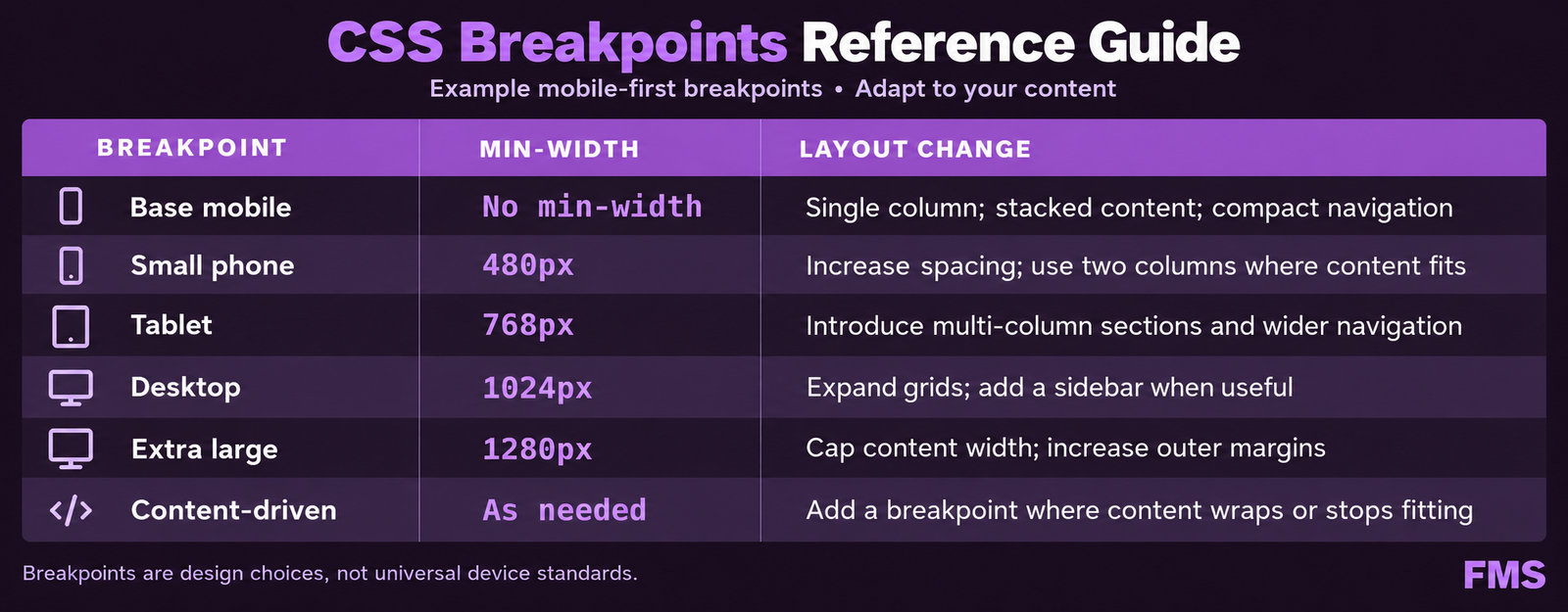
CSS Breakpoints: Best Practices for 2026
| Breakpoint | Min-Width Value | Layout Change |
|---|---|---|
| Base (mobile first) | No min-width, default CSS applies to all sizes | Single column, full-width elements, stacked navigation, 16px body text |
| Small, large phone | min-width: 480px | Minor spacing adjustments, slightly increased typography scale |
| Medium, tablet | min-width: 768px | Two-column layouts, side-by-side content blocks, horizontal feature grids |
| Large, desktop | min-width: 1024px | Full multi-column grid, horizontal navigation, sidebar layouts |
| Extra large | min-width: 1280px | Maximum content width constraints, generous whitespace, larger typography |
| Content-driven breakpoints | Wherever the layout breaks | The most important breakpoints, defined by content behaviour, not device specs |
Modern Layout with CSS Grid auto-fill
.grid { display: grid; grid-template-columns: repeat(auto-fill, minmax(280px, 1fr)); gap: 24px; }Container Queries for Component-Level Responsiveness
Responsive Typography
Responsive Typography Best Practices
Fluid type with clamp()
CSS clamp(min, preferred, max) scales font sizes smoothly between viewport sizes without typography breakpoints. Example: font-size: clamp(16px, 1rem + 2vw, 22px) scales from 16px on small mobile to 22px on large desktop automatically.
Heading scale reduction on mobile
H1 headings at 56 to 64px on desktop should be 36 to 44px on mobile. Very large headings take multiple lines on small screens, pushing critical content below the fold before any user interaction.
Line height standards
Body text: line-height 1.5 to 1.7. Headings: line-height 1.1 to 1.3. Adequate line height is particularly important on mobile where tighter spacing reduces readability and increases eye strain.
font-display: swap for custom fonts
Web fonts without font-display: swap cause layout shift (CLS) as they load, the browser holds space with invisible text, then reflows when the font arrives. Add font-display: swap to all font-face declarations.
Minimum contrast ratio
Body text must achieve 4.5:1 contrast ratio against background for WCAG AA compliance. White text on a light purple background or grey text on white are common responsive design failures, test with a contrast checker.
System font stack fallback
Define a system font fallback stack for custom fonts so the page renders immediately in a system font while the custom font loads, preventing invisible text and layout shift.
Responsive Images
| Technique | How It Works | Impact |
|---|---|---|
| srcset with width descriptors | Provide multiple image sizes; browser selects the correct size for the current viewport and pixel density | Reduces mobile image download size by 50 to 80 percent compared to serving desktop-sized images |
| sizes attribute | Tell the browser the display size of the image at each breakpoint so it can calculate which srcset source to download before the CSS is parsed | Ensures the browser picks the optimal image size, without sizes, it defaults to 100vw which defeats the purpose of srcset |
| WebP format with JPEG fallback | WebP is 25 to 35 percent smaller than JPEG at equivalent visual quality | Reduces image weight by 25 to 35 percent for all browsers that support WebP, all modern browsers since 2020 |
| Explicit width and height attributes | Add width and height to all img elements so the browser reserves the correct space before the image loads | Prevents CLS (layout shift), a Core Web Vitals metric and Google ranking signal. This is required, not optional. |
| loading=lazy for below-fold images | Add loading='lazy' to all images not visible in the initial viewport | Reduces initial page weight by 30 to 60 percent, browser loads these images only when the user scrolls near them |
Responsive Navigation Patterns
Mobile Navigation Pattern Comparison
Hamburger menu
Three-line icon opens a full-screen or off-canvas overlay menu. The universal mobile navigation pattern, recognisable to all users. Limitation: the navigation is hidden by default, reducing discoverability. Prioritise the 3 to 5 most important links.
Bottom navigation bar
Persistent bar with 3 to 5 primary destinations fixed to the viewport bottom. Aligns with natural thumb reach zones. Standard in native mobile apps and increasingly used in mobile-first web design. Best for sites with 3 to 5 primary sections.
Priority plus pattern
Show the most important navigation items horizontally; collapse less important items into a More dropdown. Effective for 8 to 12 navigation items where all have genuine importance and a hamburger would hide too much.
Tap target sizing
All navigation links and interactive elements must be minimum 48 by 48 pixels. Navigation items below this size cause misclicks and frustration. This applies to the hamburger icon itself, all menu items, and all CTA buttons throughout the site.
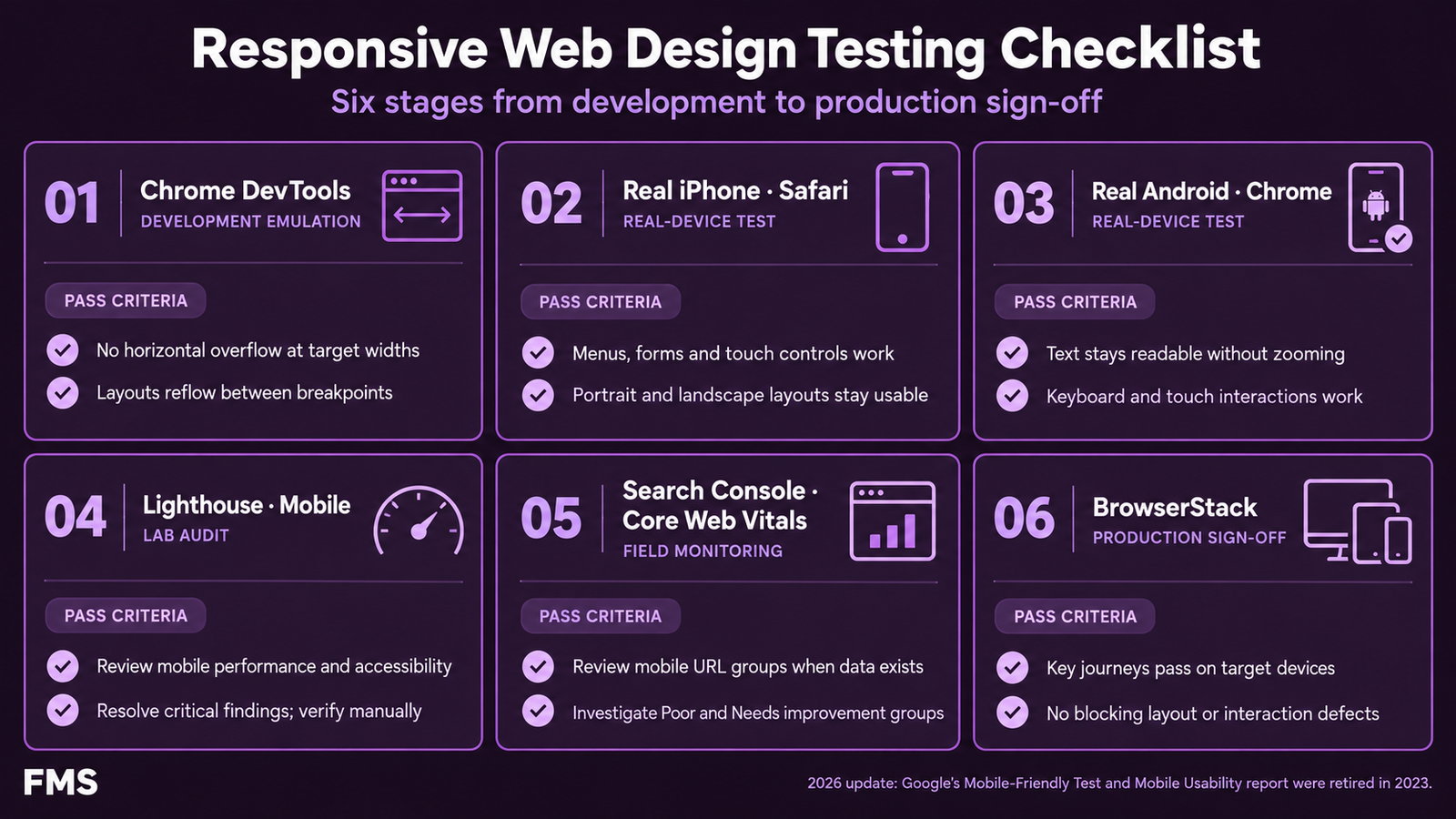
Testing Responsive Design
Responsive Design Testing Toolkit
Chrome DevTools Device toolbar
Press F12, click the device icon, select device presets or enter custom dimensions. Use for layout verification during development. Not sufficient for production sign-off, emulation differs from real device behaviour.
Real iOS device testing
Test on at least one iPhone with Safari. iOS Safari renders form elements, custom selects, and scroll behaviour differently from Chrome DevTools emulation. Safari on iOS is the second-most-used browser globally and has unique CSS rendering characteristics. See our Core Web Vitals guide.
Real Android device testing
Test on at least one Android device with Chrome. Verify touch target sizes, scroll performance, and viewport behaviour on the most common Android screen resolutions.
Google Mobile-Friendly Test
search.google.com/test/mobile-friendly, confirms whether Google considers the page mobile-friendly and shows any mobile usability failures Google has detected.
Google Search Console Mobile Usability
GSC, Experience, Mobile Usability shows real mobile usability failures detected across the site, small text, clickable elements too close together, viewport not configured. The most authoritative source for mobile issues that affect Google rankings.
BrowserStack for cross-device coverage
BrowserStack provides real device testing across hundreds of device and browser combinations without maintaining a physical device library. Essential for pre-launch verification of critical pages on a representative sample of real devices.
Need a Fully Responsive Website?
Mobile-First Design and Development From a Team That Tests on Real Devices
Futuristic Marketing Services builds mobile-first responsive websites with real device testing, Core Web Vitals performance engineering, and full cross-browser verification.
Start Your Responsive ProjectFrequently Asked Questions About Responsive Web Design
What is responsive web design?
What is mobile-first design?
What are CSS breakpoints?
What is the minimum font size for mobile?
How do I make images responsive?
What is mobile-first indexing?
What is CSS clamp() and how does it help with responsive typography?
What are container queries in CSS?
How do I test if my site is responsive?
What causes layout shift on mobile?
What is the difference between responsive design and adaptive design?
How do I make navigation responsive?
Futuristic Marketing Services
Responsive Design That Works on Every Device
Futuristic Marketing Services builds mobile-first responsive websites with real device testing, Core Web Vitals performance engineering, and cross-browser verification, delivered ready to rank and convert.
Get Your Responsive Website