Editing a YouTube Short for maximum engagement requires a different approach from editing long-form video, TikTok, or Instagram Reels — because the YouTube Shorts algorithm rewards a specific combination of behavioural signals that are unique to the platform. Loop rate, scroll-stop rate, and first-half view rate are the three primary signals the algorithm uses to determine distribution reach. All three are directly controlled by editing decisions.
Key Takeaways
- According to YouTube Creator Academy, loop rate is the most important single distribution signal for YouTube Shorts -- a Short with high loop rate receives disproportionately stronger algorithmic distribution than one with equivalent views but low replay rate
- The hook decision happens in the first 1.5 seconds -- those first frames determine whether the viewer scrolls or stays, making the opening the highest-leverage edit point in any Short
- 85% of short-form video is watched with sound off at least some of the time -- making kinetic word-by-word captions not just an accessibility feature but the primary audience retention mechanism for most Short viewers
- According to VidIQ Shorts research, Shorts in the 30-55 second range consistently outperform both very short and near-maximum-length Shorts on loop rate and first-half view rate
- Removing every pause over 0.5 seconds and every filler word from the first half of a Short typically improves first-half view rate by 8-15 percentage points -- one of the highest-ROI single editing interventions available
- For the complete algorithm framework explaining why each editing decision affects distribution -- loop rate mechanics, scroll-stop science, and first-half view rate -- the YouTube Shorts algorithm guide provides the full technical reference
Want Your YouTube Shorts Edited to the Maximum Engagement Standard?
Futuristic Marketing Services edits YouTube Shorts with the complete four-signal optimisation: loop engineering, scroll-stop hook, kinetic captions, and first-half view rate pacing.
Get Professional Shorts Editing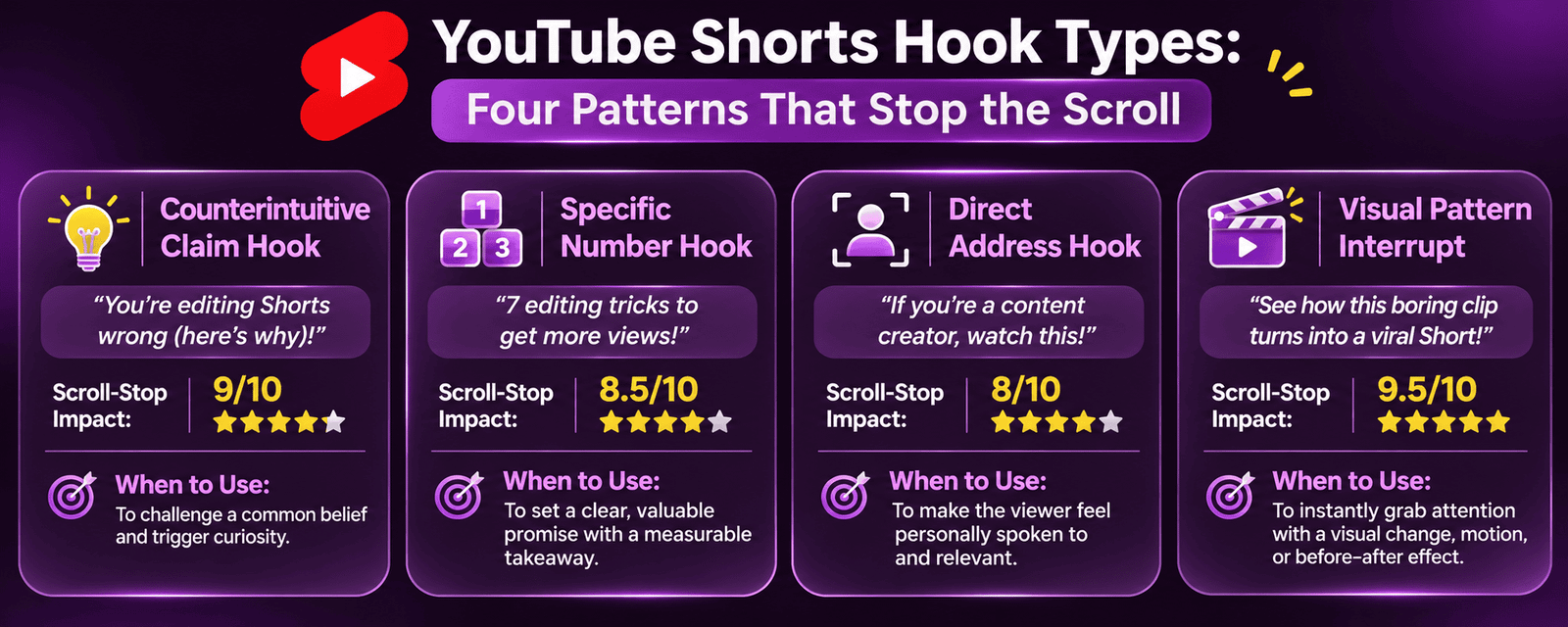
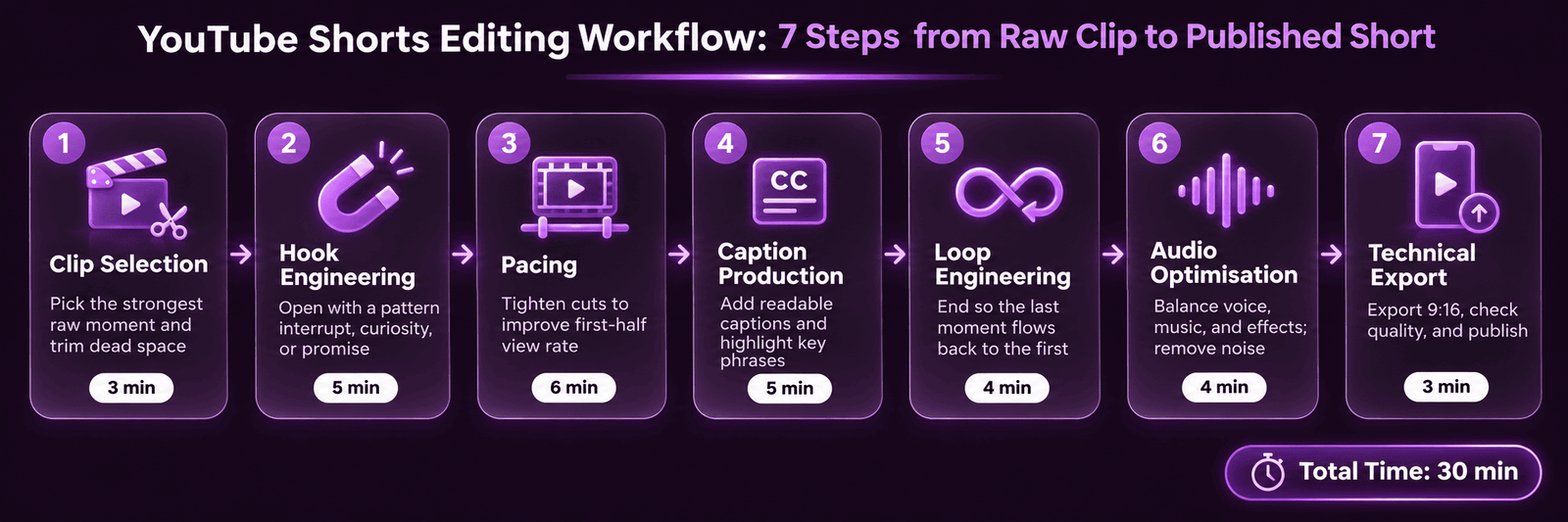
Step 1: Clip Selection -- Choosing the Right Moment
Step 2: Hook Engineering -- The First 1.5 Seconds
Step 3: Pacing for First-Half View Rate
Step 4: Caption Production -- The Sound-Off Retention Tool
Step 5: Loop Engineering -- Maximising Replays
Step 6: Audio Optimisation for Shorts
Step 7: Technical Export and Platform Compliance
| Specification | Requirement | Why It Matters |
|---|---|---|
| Aspect ratio | 9:16 vertical (1080x1920px) | Landscape content does not display in the Shorts Feed -- it plays in a letterbox on a white background |
| Maximum duration | Under 60 seconds | Videos over 60 seconds are classified as standard videos and do not receive Shorts Feed distribution |
| File format | MP4 (H.264 encoding) | Maximum platform compatibility; MOV files can cause upload processing issues |
| Frame rate | 30fps or 60fps | 60fps is recommended for content with fast motion; 30fps is standard for talking-head format |
| Watermarks | Remove all platform watermarks | YouTube explicitly reduces distribution for Shorts containing TikTok or Reels watermarks |
| Title | Include #Shorts in title or description | Helps YouTube classify the video correctly as a Short for Shorts Feed eligibility |
Need Your YouTube Shorts Edited to the Full 7-Step Standard?
Futuristic Marketing Services applies the complete YouTube Shorts editing workflow -- clip selection, hook engineering, loop rate technique, kinetic captions, audio optimisation, and compliant export.
Get Shorts Editing StartedFrequently Asked Questions
Q. How is editing YouTube Shorts different from editing TikTok videos?
Q. What software is best for editing YouTube Shorts?
Q. How many Shorts should be published per week for maximum algorithm growth?
Start Editing YouTube Shorts That the Algorithm Pushes to New Audiences
Futuristic Marketing Services produces YouTube Shorts with every engagement signal optimised -- the editing standard that earns consistent algorithmic distribution to viewers who have never seen your channel.
Get Started with Shorts Editing