

Mobile SEO: The Complete Guide to Optimising for Mobile-First Indexing in 2026

mobile seo

Mobile SEO is the practice of optimising websites to perform well in Google’s mobile-first index. Since Google uses the mobile version of a website for crawling, indexing, and ranking evaluation, mobile SEO is not a secondary concern, it is the primary SEO environment. Mobile optimisation covers responsive design, mobile page speed, touch usability, content parity between mobile and desktop, and Core Web Vitals performance under real mobile network conditions.

This guide covers the complete mobile SEO framework: how mobile-first indexing works and why it makes mobile the primary ranking environment, responsive design versus separate mobile implementations, mobile page speed optimisation priorities, mobile usability requirements and fixes for every common error, Core Web Vitals on mobile, content parity rules, and how to audit your site's mobile SEO performance using Google Search Console and PageSpeed Insights. Combined with our technical SEO audit guide and core web vitals guide, this provides the complete mobile technical foundation.

Key Takeaways

  • According to Statista, over 60% of all global web searches come from mobile devices, making mobile the primary user experience standard
  • Google uses mobile-first indexing for virtually all websites, the mobile version of your site is what Google crawls, indexes, and evaluates for ranking
  • Responsive design is Google's recommended mobile implementation, a single URL adapting to screen size, avoiding duplicate content and canonical complexity
  • Content parity is non-negotiable, content hidden or absent on mobile is not indexed by Google and cannot rank for relevant queries
  • Mobile page speed is more critical than desktop speed, Think with Google confirms 53% of mobile users abandon sites loading over 3 seconds
  • Mobile usability errors in Google Search Console are direct ranking signals, text too small, clickable elements too close, and viewport not configured are the most common failures

Is Your Mobile Site Costing You Rankings in Google's Mobile-First Index?

Futuristic Marketing Services audits and optimises your mobile site for every factor Google evaluates, responsive design, page speed, content parity, and mobile usability, ensuring your mobile experience earns top rankings.

Get a Mobile SEO Audit
How Mobile-First Indexing Works and Why It Changes Everything

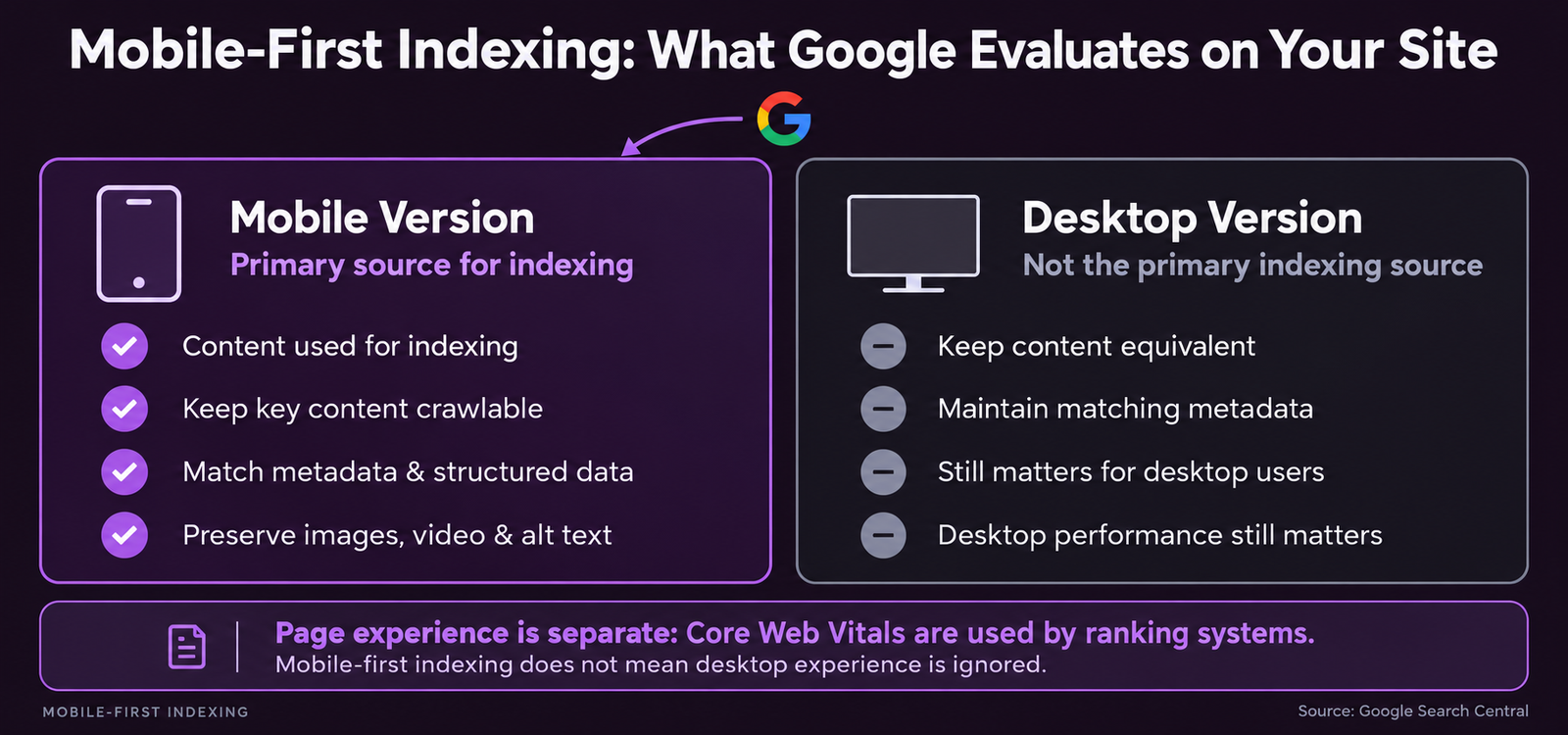
Mobile-first indexing means Google uses the mobile version of a website as its primary source for crawling, indexing, and ranking. When Googlebot visits your site, it uses a smartphone user agent, it sees exactly what a mobile user sees, not what a desktop user sees. The content Google discovers in this mobile crawl is what it indexes. The performance it measures is what affects your Core Web Vitals ranking signals. According to Google Search Central, mobile-first indexing has been the default for virtually all new websites since 2019.
The practical implications are significant. If your mobile site has less content than your desktop site, common with mobile designs collapsing sections into accordions without revealing the content to crawlers, Google does not index the hidden content. If your mobile site loads slower than desktop, that slower speed is the performance Google evaluates for Core Web Vitals. Desktop-only technical fixes produce no ranking improvement when the mobile version remains unoptimised.

Responsive Design, The Correct Mobile Implementation

Google recommends responsive design as the preferred mobile implementation. Responsive design uses a single URL serving the same HTML to all devices, with CSS media queries adapting the layout for different screen sizes. Three advantages over separate mobile sites (m.dot subdomains) and dynamic serving: no duplicate content risk between mobile and desktop versions, no canonical tag complexity across two URL variants, and a single URL accumulating all backlinks regardless of which device the linker uses.
The viewport meta tag is the foundational mobile implementation requirement. Add this to the head of every page: meta name=viewport content=width=device-width, initial-scale=1. Without it, mobile browsers render the page at desktop width and zoom out to fit the screen, producing tiny unreadable text that fails Google's mobile usability tests and causes immediate user bounce. Content parity requires that all content visible on your desktop site also appears and is accessible on your mobile site. Content hidden in desktop-only CSS divs or behind device-detection redirects is not indexed by Google under mobile-first indexing.

Mobile Page Speed, The Most Critical Mobile SEO Factor
Mobile users typically browse on cellular connections with higher latency than WiFi, and on devices with less processing power than desktop computers. The same page loading in 1.2 seconds on desktop may take 4 seconds on a mid-range Android device on 4G, failing Google's LCP target of 2.5 seconds and producing significantly higher bounce rates that RankBrain registers as quality signal failures.
The three most impactful mobile speed improvements for most sites: image optimisation (convert all images to WebP format and compress to under 150KB, images are the single largest contributor to mobile page weight on most sites), render-blocking resource elimination (defer non-critical JavaScript and CSS so the browser displays content before finishing all script execution), and server response time reduction through server-side caching and a CDN with edge servers geographically close to your primary audience.
Test mobile speed with PageSpeed Insights at pagespeed.web.dev using the Mobile tab. Check both field data (the real user CrUX measurements determining your ranking status) and lab data (the simulation identifying specific fixable issues). Our Core Web Vitals guide covers the complete diagnosis and fix process for every LCP, INP, and CLS failure on mobile devices.

Mobile Usability Errors, Google's Technical Requirements

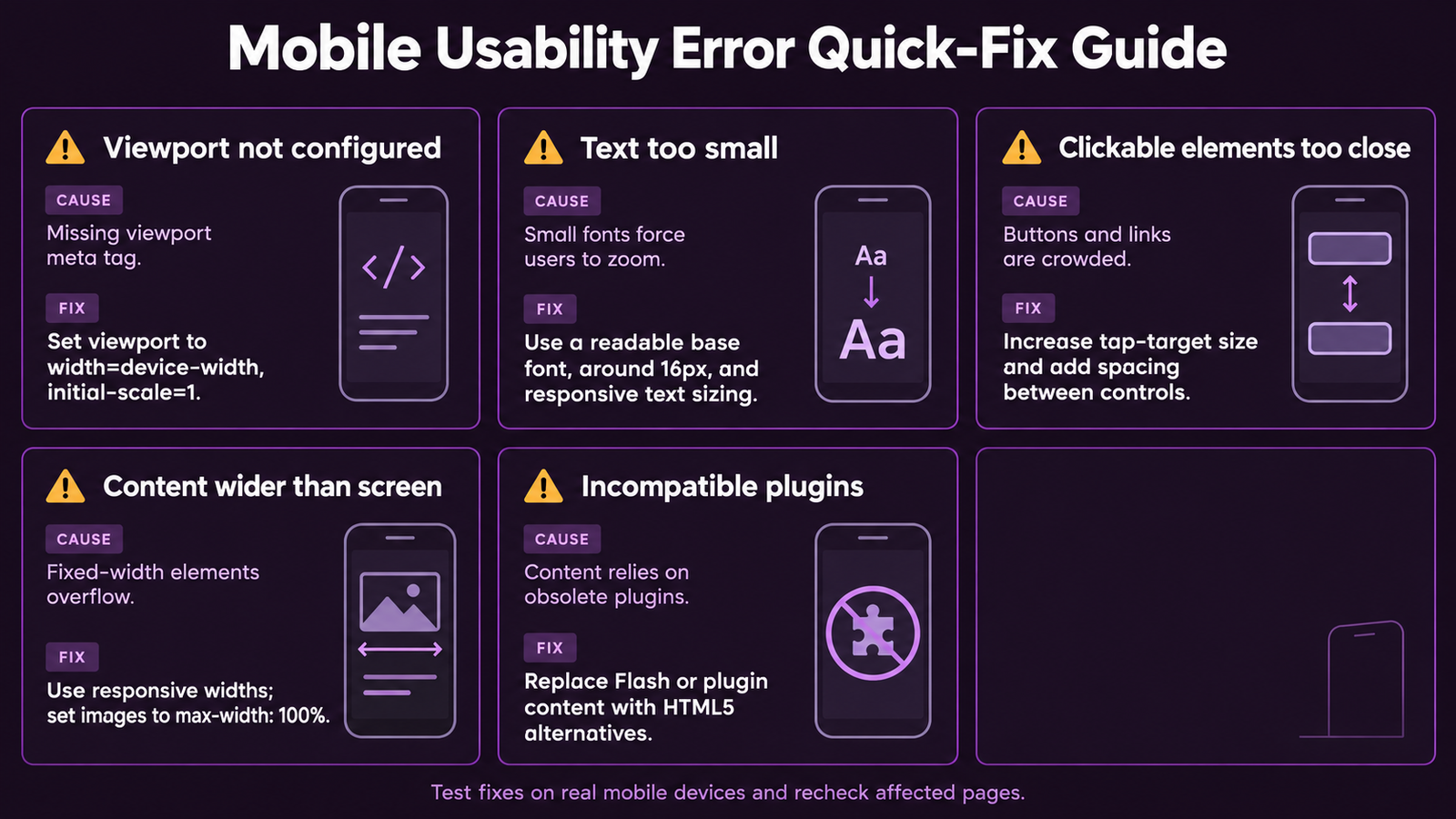
Google Search Console's Mobile Usability report identifies pages with usability errors directly harming user experience on mobile devices. These errors produce systematic ranking disadvantages in mobile search results. Check this report in Google Search Console under Experience and Mobile Usability, zero errors is the target.
Mobile Usability ErrorRoot CauseSpecific FixPriority
Text too small to readFont size below 12px on mobile; missing or incorrect viewport meta tagSet minimum body font size to 16px; add the correct viewport meta tag; avoid fixed small pixel sizes for any body textCritical
Clickable elements too close togetherTouch targets below 48x48 pixels; insufficient padding between links and buttonsIncrease button and link padding to create minimum 48x48px tap target area; add at least 8px spacing between interactive elementsVery High
Content wider than screenFixed-width elements; horizontal scrolling requiredReplace fixed pixel widths with percentage widths or max-width CSS settings; audit all fixed-width tables and imagesHigh
Viewport not configuredMissing meta viewport tag in HTML headAdd exactly: meta name=viewport content=width=device-width initial-scale=1 to every page head sectionCritical
Incompatible pluginsFlash or Java plugin content mobile browsers cannot renderReplace with HTML5 video, CSS animations, or JavaScript equivalents for all affected contentHigh

Mobile Content Optimisation

Optimising content for mobile users requires understanding how mobile reading behaviour differs from desktop. Mobile users scan rather than read linearly, are more likely to be in low-attention contexts, and want quick answers more often than comprehensive exploration on initial page load.
Mobile content principles: keep paragraphs to maximum 3 lines on mobile (long paragraphs are visually overwhelming on small screens), use short active-voice sentences for faster comprehension, front-load the most important information in the first paragraph (mobile users scroll less than desktop users), use informative headings that communicate each section's value so users can skip to relevant content, and ensure CTAs are prominent with large tap-friendly buttons and adequate spacing. Images must have explicit width and height attributes to prevent CLS layout shifts, use responsive srcset attributes to serve appropriately-sized versions for different screen resolutions, and must never exceed the screen width on any device.

Mobile SEO Audit Process

A complete mobile SEO audit covers five dimensions that together determine your mobile search performance. Work through each in sequence, as earlier items often resolve issues appearing as separate problems in later dimensions.
Dimension 1, Mobile Usability: check GSC Mobile Usability report for current errors (target: zero errors). Dimension 2, Core Web Vitals on Mobile: check GSC Core Web Vitals report filtered to mobile (target: all URLs Good). Dimension 3, Content Parity: use Chrome DevTools mobile emulation (F12, device toggle) to compare mobile and desktop versions of key pages for content completeness. Dimension 4, Viewport Configuration: test each key page template using Google's Mobile-Friendly Test at search.google.com/test/mobile-friendly. Dimension 5, Real Device Testing: load your most important pages on an actual mid-range Android device on a cellular connection and evaluate from a real user perspective.

Over 60% of Search Traffic Is Mobile, Is Your Site Fully Optimised?

Our mobile SEO specialists diagnose every mobile performance and usability issue, then provide the specific fixes your development team needs to create a mobile experience that satisfies Google's algorithms and your users.

Start Your Mobile Optimisation

Frequently Asked Questions

Q. What is mobile-first indexing?

A. Mobile-first indexing means Google uses the mobile version of a website for crawling, indexing, and ranking decisions. When Googlebot visits your site, it uses a smartphone user agent and evaluates what mobile users see. The mobile version of your content is what Google indexes. Mobile page speed is what Google measures for Core Web Vitals rankings. Mobile usability issues are the negative signals Google counts. Mobile-first indexing has been Google's default for virtually all websites since 2020.

Q. Does mobile SEO differ from regular SEO?

A. Mobile SEO applies the same fundamental ranking signals, content quality, backlinks, technical performance, E-E-A-T, but with additional mobile-specific requirements. These include: the viewport meta tag (required for correct mobile rendering), touch-friendly design (minimum 48x48px tap targets), mobile page speed evaluated under real mobile conditions, content parity (all desktop content must be present on mobile), and zero mobile usability errors. The mobile experience is now the primary SEO environment because Google uses it for all ranking evaluation.

Q. What is responsive design and why does Google recom

A. Responsive design is a website approach where a single URL serves the same HTML to all devices, with CSS media queries adapting the layout for different screen sizes. Google recommends it because it uses a single URL so all backlinks benefit the same page regardless of which device the linker uses, it eliminates duplicate content risk between mobile and desktop versions, it simplifies canonical tag management, and it requires no separate mobile site to maintain. It is Google's preferred mobile implementation for all websites.

Q. How do I check if my site passes Google's mobile requirements?

A. Check through three sources: Google Search Console Mobile Usability report (Experience tab) shows all URLs with specific mobile usability errors and their type. Google Mobile-Friendly Test checks any individual URL for viewport configuration and basic mobile compatibility. Chrome DevTools mobile emulation (F12, device icon in toolbar) lets you preview any page across different device profiles. For the most authentic assessment, also test key pages on an actual mid-range Android device on a cellular connection.

Q. Why is mobile page speed more important than desktop speed?

A. Mobile page speed is more critical because Google uses mobile performance data for ranking evaluation through CrUX field data, and mobile conditions are inherently more demanding. Mobile users are typically on cellular connections with higher latency and lower bandwidth than WiFi. Mobile devices have less CPU and GPU power than desktops. The same page loading in 1.5 seconds on desktop may take 4 or more seconds on a mid-range mobile device on 4G. Optimising specifically for mobile conditions directly determines your Core Web Vitals ranking signal.

Q. What is content parity in mobile SEO?

A. Content parity means all content available on your desktop site must also be accessible on your mobile site. Under mobile-first indexing, Google only indexes content visible in the mobile crawl. Content hidden behind desktop-only CSS, removed from mobile templates, or accessible only through desktop-specific interactions is not indexed. The SEO value of that missing content is completely lost, it cannot rank for relevant queries because Google does not know it exists. Audit content parity using Chrome DevTools mobile emulation to compare every key page template across mobile and desktop.

Q. How do I fix mobile usability errors in Google Search Console?

A. Fix each error type specifically. For text too small: increase body font size to minimum 16px and verify the viewport meta tag is correctly implemented. For clickable elements too close: increase button padding to create 48x48px minimum tap targets and add spacing between interactive elements. For content wider than screen: replace fixed pixel widths with percentage or max-width CSS values. For viewport not configured: add the viewport meta tag to every page HTML head. After fixing, use GSC Validate Fix button to request re-evaluation. Resolution typically appears in GSC within 2 to 4 weeks.

Build the Mobile Experience That Earns Top Rankings and Converts Visitors

At Futuristic Marketing Services, mobile SEO optimisation improves both search rankings and user experience, because the same fixes that satisfy Google's mobile-first index produce faster, more usable experiences that convert at higher rates.

Talk to a Mobile SEO Specialist


Conclusion

Mobile SEO is not a secondary consideration or an extension of desktop SEO, it is the primary SEO environment in 2026. Google evaluates and ranks based on your mobile experience, making every mobile performance failure a direct ranking issue rather than merely a user experience concern. The good news is that most mobile SEO failures fall into predictable, fixable categories: viewport configuration, content parity, image optimisation, and mobile usability errors are the starting points for the vast majority of sites.
Audit your mobile experience using Google Search Console, fix every identified usability error, optimise mobile page speed targeting Good Core Web Vitals field data, and ensure content parity across all key page templates. Combine this mobile foundation with our technical SEO audit, core web vitals guide, and on-page SEO guide for a complete, compounding technical SEO programme.
Share this post :
Picture of Devyansh Tripathi
Devyansh Tripathi

Devyansh Tripathi is a digital marketing strategist with over 5 years of hands-on experience in helping brands achieve growth through tailored, data-driven marketing solutions. With a deep understanding of SEO, content strategy, and social media dynamics, Devyansh specializes in creating results-oriented campaigns that drive both brand awareness and conversion.

All Posts