
Quick Reference, YouTube Thumbnail Specifications 2026
- Recommended dimensions: 1280×720px (minimum), 1920×1080px (optimal for high-resolution displays)
- Aspect ratio: 16:9 (mandatory, other ratios are automatically letterboxed or stretched)
- Maximum file size: 2MB (YouTube rejects thumbnails above this limit)
- Accepted formats: JPG, PNG, GIF, BMP (JPEG preferred for photographic thumbnails; PNG for text-heavy graphics)
- Colour profile: sRGB (mandatory for correct colour display on screens, CMYK and Adobe RGB display incorrectly)
- Minimum display size: approximately 120×68px (mobile search results), design and test at this scale before finalising
- Text safe zone: keep all critical content at least 150px from all edges at 1280×720px design size
- Eligibility: custom thumbnails require a verified YouTube account (phone verification) and must comply with YouTube's Community Guidelines
Need Professionally Designed YouTube Thumbnails at the Correct Specifications?
Futuristic Marketing Services designs custom YouTube thumbnails at the correct 2026 specifications, 1280×720px or 1920×1080px, sRGB export, brand-consistent, with all text within the safe zone and tested at 120px minimum display size.
Get a Free Thumbnail Design ConsultationCore Dimensions: YouTube Thumbnail Specifications 2026
| Specification | Requirement | Recommended | Notes |
|---|---|---|---|
| Width × Height | 1280×720px minimum | 1920×1080px for maximum sharpness on high-resolution displays | YouTube accepts up to 5120×2880px (5K) but 1920×1080px is sufficient for all current display contexts |
| Aspect Ratio | 16:9 (mandatory) | 16:9 | YouTube always displays thumbnails at 16:9; other ratios are automatically stretched or letterboxed, producing visible distortion |
| Maximum File Size | 2MB (hard limit) | Under 1MB | YouTube rejects thumbnails over 2MB with no warning, always check file size before upload; export JPEG at 85–90% quality to stay under 2MB at 1920×1080px |
| File Format | JPG, PNG, GIF, or BMP | JPG for photo thumbnails; PNG for text-heavy or graphic thumbnails | PNG preserves sharper text edges; JPEG provides better compression for photographic content; GIF and BMP are accepted but not recommended |
| Colour Profile | sRGB | sRGB | Always export in sRGB colour profile; Adobe RGB and ProPhoto RGB images appear with shifted, inaccurate colours on YouTube |
| Resolution (DPI) | 72 DPI (screen standard) | 72–96 DPI | DPI (dots per inch) does not affect screen display quality, only the pixel dimensions matter; exporting at 300 DPI produces no improvement in displayed quality but significantly increases file size |
| Account Eligibility | Verified YouTube account (phone verification required) | Any account with verification | Custom thumbnails are not available on unverified accounts; verify via YouTube Studio → Settings → Channel → Feature eligibility |
The Safe Zone: What Gets Covered by YouTube's Interface
| Area | Risk | Minimum Clearance (at 1280×720px) | What May Cause Obstruction |
|---|---|---|---|
| Outer edges (all sides) | Content cropped in certain playlist, search, and embedded player contexts | 150px from all edges | Playlist thumbnails, video card overlays in watch pages, and some embedded players crop the outer 10–15% of the thumbnail |
| Central area (on hover) | YouTube play button overlay appears at the centre of the thumbnail on hover | Avoid placing critical text elements directly centred in the frame | The YouTube play button (▶) overlay appears at the centre on hover in desktop web view; does not obstruct on mobile or in the search results grid |
| Bottom-right corner | Video duration label (e.g. "12:34") overlays this area in most display contexts | Avoid placing any critical content in the bottom-right 250×50px area | YouTube's video duration label is always displayed in the bottom-right corner of thumbnails in feed, search, and browse contexts |
Safe Zone Design Rule
Keep all logos, text elements, faces, and critical visual content within a central area of approximately 980×520px at 1280×720px design size (leaving 150px of clearance on all sides). For 1920×1080px design files, the equivalent safe zone is approximately 1480×780px. Design the central safe zone first, all elements that must be seen should be within it. The outer areas can carry background visual elements that provide context without being critical to the message.
Where YouTube Displays Thumbnails and at What Size
| Display Context | Approximate Display Width | Device | Design Implication |
|---|---|---|---|
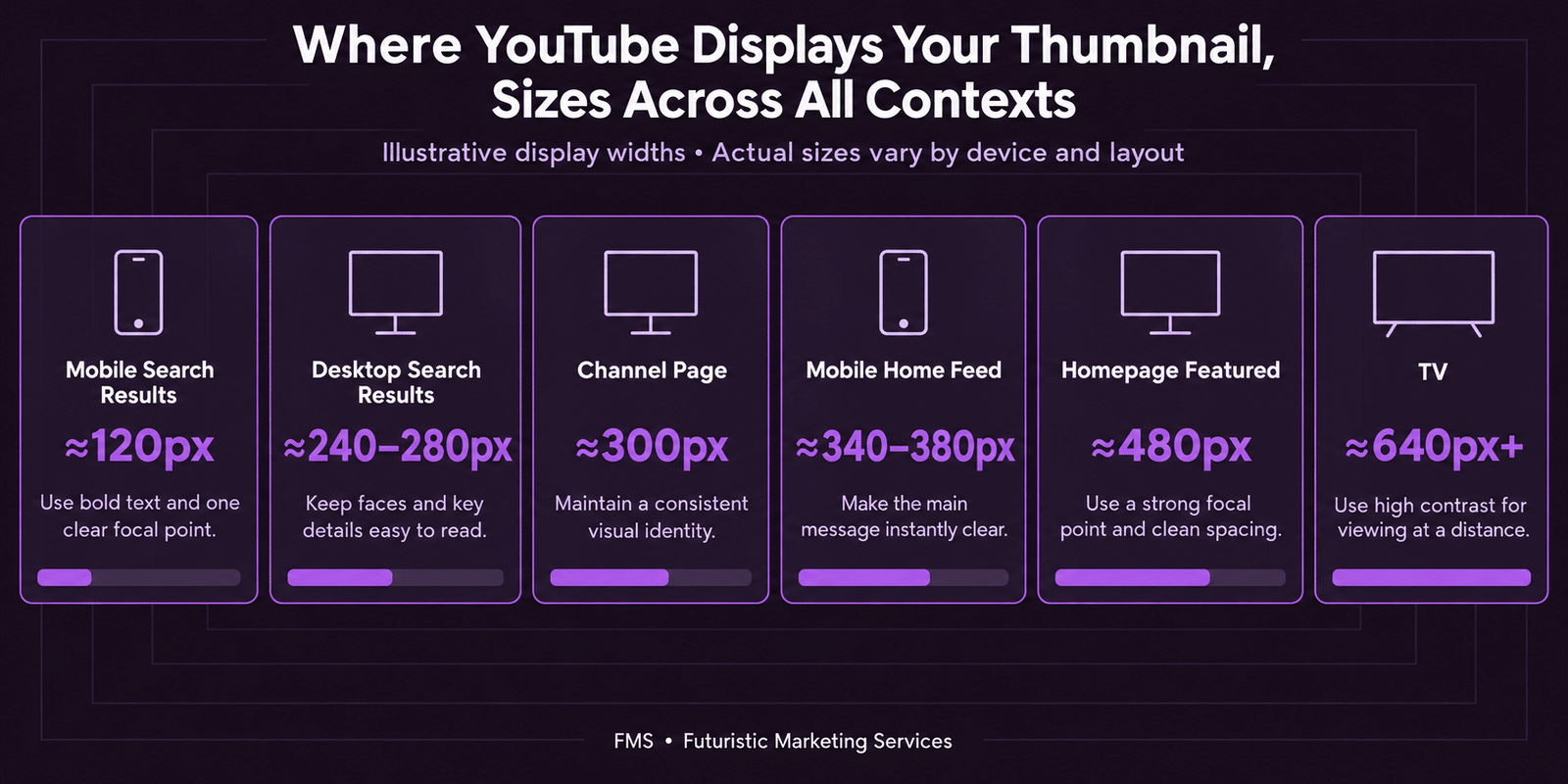
| Mobile Search Results | 120–160px | Mobile (Android/iOS) | The critical minimum. This is the highest-volume display context. All text must be legible and the primary visual element must be recognisable at this size. Test here first. |
| Mobile Home Feed (Recommended) | 340–380px | Mobile (Android/iOS) | The primary browse discovery context. At this size, facial expressions are clearly readable and thumbnail text at 80px+ design size is comfortably legible. |
| Desktop Search Results | 240–280px | Desktop browser | All thumbnail elements should be clearly readable at this size; if they are not, the thumbnail needs simplification. |
| Desktop Watch Page (Related Videos) | 180–220px | Desktop browser | Related video thumbnails in the right-hand column appear at this size; the primary visual hook and text must still be clear. |
| Channel Page (Video Grid) | 260–320px (desktop); 160–200px (mobile) | Both | The channel grid view is how potential subscribers evaluate the channel's content range and visual consistency; brand consistency across all thumbnails is the critical variable at this view. |
| YouTube Homepage (Featured) | 400–640px (desktop); 350–400px (mobile) | Both | Higher priority display context for algorithmically recommended content; excellent legibility at this size for any well-designed thumbnail. |
| YouTube TV / Smart TV | 400–800px (varies by UI section) | TV screen | Large display context where all design elements are clearly visible; 1920×1080px thumbnail resolution is beneficial for sharpness at this scale. |
| Specification / Context | Dimensions | Notes |
|---|---|---|
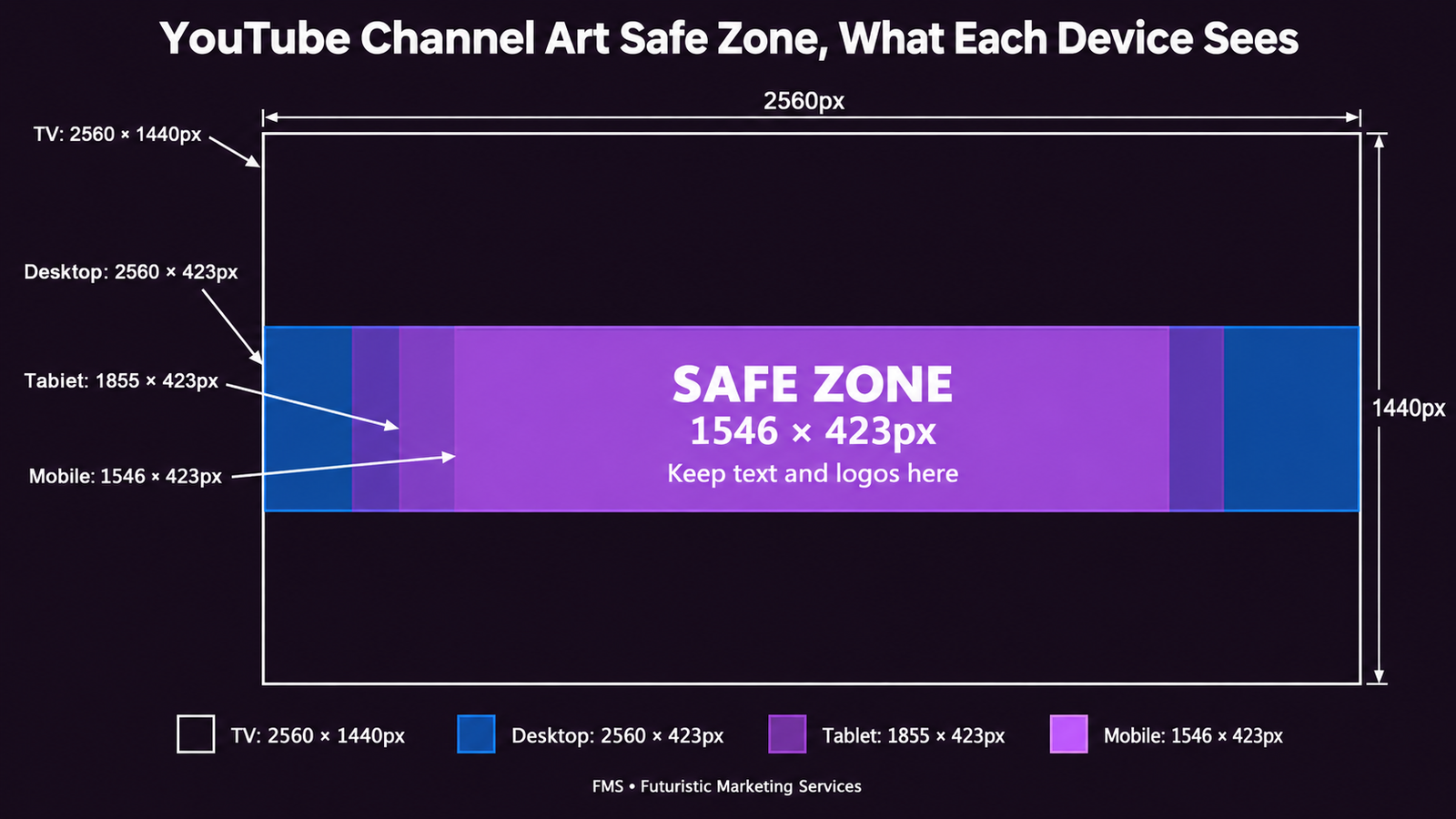
| Total upload size (required) | 2560×1440px | The master file must be this size; YouTube crops it differently for each device type |
| Safe zone, visible on all devices | Central 1546×423px | Design all critical content within this central area. This is the only area guaranteed to be visible on mobile, desktop, tablet, and TV simultaneously |
| Desktop browser display | Approximately 2560×423px (full width; top and bottom heavily cropped) | Only the central horizontal strip is shown on desktop; the top and bottom of the uploaded image are not displayed |
| Mobile display | Approximately 1546×423px (the safe zone area only) | Mobile shows only the safe zone; content outside the safe zone is not displayed on mobile at all |
| TV display | Full 2560×1440px | The only device that shows the full uploaded image; the outer areas (outside the safe zone) should contain background visual elements that are complementary but not critical |
| Maximum file size | 6MB | Export as JPG (for photographic channel art) or PNG (for graphic/typographic channel art) at the correct file size |
YouTube Shorts Thumbnail Dimensions 2026
| Specification | Requirement | Notes |
|---|---|---|
| Aspect ratio | 9:16 (vertical) | The Shorts feed is vertical; horizontal thumbnails display with black bars at the top and bottom, significantly reducing visual impact |
| Recommended dimensions | 1080×1920px | Same as Instagram Reels and TikTok dimensions; the native vertical format for all short-form video platforms |
| Safe zone | Central 1080×1700px (avoid bottom 220px) | The bottom 220px of a Shorts thumbnail is covered by YouTube's Shorts interface (subscribe button, like/dislike, comments, share); all critical content must be above this area |
| How to set a Shorts thumbnail | Select a frame from within the video at upload or in YouTube Studio | As of 2026, YouTube allows custom image thumbnails for Shorts for accounts in the YouTube Partner Programme; for non-YPP accounts, the thumbnail must be a frame from the video itself |
YouTube Profile Picture Dimensions 2026
| Specification | Requirement | Notes |
|---|---|---|
| Upload size | 800×800px minimum | YouTube recommends at least 800×800px for sharpness across all display contexts |
| Display size | 98×98px on most channel page contexts; as small as 36×36px on comments | The profile picture appears at very small sizes in comment sections and subscription feeds; design with a simple, bold, high-contrast brand mark only |
| Display shape | Circular crop (automatic) | Upload a square image; YouTube automatically crops to a circle; keep all critical content within a central circular area of approximately 80% of the image width |
| File format | JPG, PNG, BMP, or non-animated GIF | PNG is recommended for logo-based profile pictures to maintain sharp edges; JPG for photographic profile images |
Export Settings: How to Prepare Thumbnail Files Correctly
| Export Setting | Correct Setting | Common Mistake | Impact of Getting It Wrong |
|---|---|---|---|
| File format | JPEG at 85–90% quality for photographic thumbnails; PNG for graphic/text-heavy thumbnails | JPEG at 100% quality (unnecessarily large file size); PNG for photographic thumbnails (larger than necessary) | JPEG at 100% often produces files over 2MB, causing YouTube rejection; PNG for photographic content produces unnecessarily large files |
| Colour profile | sRGB | Adobe RGB or ProPhoto RGB (common defaults in Photoshop for photography workflows) | Colours appear washed-out, over-saturated, or shifted on YouTube if the wrong colour profile is used; brand colours will not match the designed values |
| Resolution (DPI) | 72 DPI (or any DPI, it makes no difference to screen display) | 300 DPI (standard print resolution, commonly applied unnecessarily to screen exports) | 300 DPI produces no improvement in screen display quality but significantly increases file size, risking the 2MB limit |
| Pixel dimensions | 1280×720px (minimum) or 1920×1080px (recommended) | Any non-16:9 ratio; exporting at smaller dimensions than the design file | Non-16:9 ratios are automatically stretched or letterboxed; smaller dimensions than the design file produces visible pixelation at larger display sizes |
The 10 YouTube Thumbnail Design Best Practices for 2026
Need Thumbnails Designed at the Correct 2026 Specifications?
Futuristic Marketing Services designs YouTube thumbnails at the correct specifications, 1280×720px or 1920×1080px, sRGB export, under 2MB, with all content within the safe zone and tested at 120px minimum display size before delivery.
Get a Free Thumbnail Design ConsultationFrequently Asked Questions
Q1. What is the correct YouTube thumbnail size in 2026?
Q2. What is the YouTube thumbnail safe zone?
Q3. Can I use a PNG file for YouTube thumbnails?
Q4. What are YouTube channel art dimensions?
Q5. How do I keep a YouTube thumbnail under 2MB?
Q6.Do YouTube Shorts use the same thumbnail size as regular videos?
No, YouTube Shorts use a 9:16 vertical aspect ratio (1080×1920px) for thumbnails, which is the inverse of the standard 16:9 (1280×720px or 1920×1080px) used for regular YouTube videos. If a horizontal thumbnail is used for a Short, it is displayed with black bars at the top and bottom, significantly reducing visual impact. As of 2026, custom image thumbnails for Shorts are available to YouTube Partner Programme accounts; non-YPP accounts select a frame from within the video as the Shorts thumbnail.
Q7. What font should I use for YouTube thumbnail text?
Get Thumbnails That Are Specification-Correct and Conversion-Optimised
Futuristic Marketing Services designs YouTube thumbnails at the correct 2026 specifications, every pixel in the right place, every file under 2MB, every element within the safe zone, and every design tested at the 120px minimum display size before delivery.
See Our YouTube Design Services