The Google Display Network (GDN) is the largest advertising network in the world. According to <a href=”https://ads.google.com/home/campaigns/display-ads/” target=”_blank” rel=”noopener”>Google’s advertising documentation</a>, the GDN reaches over 90% of global internet users across more than 35 million websites, apps, and Google properties. For Indian businesses, this reach is particularly significant: with over 750 million internet users accessing content across a vast ecosystem of news sites, entertainment platforms, and utility apps, the GDN provides access to virtually every connected Indian consumer.
Key Takeaways
- The GDN reaches 90%+ of global internet users across 35M+ websites, it is the largest display advertising network in existence, making it essential for Indian brands seeking broad digital reach
- Average GDN CTR is 0.05%; well-designed display ads consistently achieve 0.15–0.35%, a 3–7x improvement from better creative alone
- The 5 highest-performing ad sizes: 300×250 (Medium Rectangle), 728×90 (Leaderboard), 300×600 (Half Page), 336×280 (Large Rectangle), and 320×50 (Mobile Leaderboard), these 5 sizes cover 90%+ of available GDN inventory
- Two creative tracks: static uploaded image ads (full design control, require all sizes) and Responsive Display Ads (Google assembles from assets, simpler production, wider placement coverage)
- Google's Performance Max is the flagship campaign type in 2026, it serves across Display, Search, YouTube, Gmail, Discover, and Maps simultaneously from a single asset group, making asset quality the primary performance lever
- Every display ad must pass the 3-second test: the brand, the primary message, and the CTA must all be immediately readable at any display size without requiring any time to decipher
Need Google Display Ad Creative That Outperforms the GDN Average?
Futuristic Marketing Services designs Google Display Ad creative for Indian businesses, all 5 standard sizes, responsive display asset sets, and Performance Max asset libraries built to give Google's algorithm the quality and variety it needs.
Get a Free Display Ad Design ConsultationThe Two Creative Tracks: Static Uploaded Ads vs Responsive Display Ads
| Dimension | Static Uploaded Image Ads | Responsive Display Ads (RDAs) | Best For |
|---|---|---|---|
| Design Control | Full, every pixel is designed precisely; exact brand colours, typography, and composition | Limited, Google assembles ads from supplied assets; composition may not match the intended design | Static: premium brand campaigns, retargeting where design precision matters; RDA: prospecting campaigns where placement volume is prioritised |
| Production Requirement | Must produce separate design file for each required ad size (minimum 5 sizes); significant design time per campaign | Supply images, logos, headlines, and descriptions; Google generates all size variants automatically | Static: brands with design resource; RDA: brands with limited design resource and needing fast deployment |
| Placement Coverage | Limited to placements that match the exact uploaded sizes; a 300×600 ad cannot serve on a 300×250 placement | Serves across all GDN placements, Google automatically adapts assets to any available format | RDA wins on placement volume; static wins in specific high-value retargeting placements |
| Performance Optimisation | Manual, the advertiser tests different designs and replaces underperformers | Automated, Google's algorithm tests asset combinations and optimises delivery toward the best performers; provides individual asset ratings | RDA's automated optimisation produces better performance data faster; static requires more manual testing |
| Recommended Approach | Use for retargeting campaigns, brand awareness campaigns with specific creative vision, and premium placements where design quality is commercially significant | Use as the primary format for prospecting Display campaigns; use in all Performance Max asset groups | Best results: run both simultaneously, static for retargeting, RDA for prospecting |
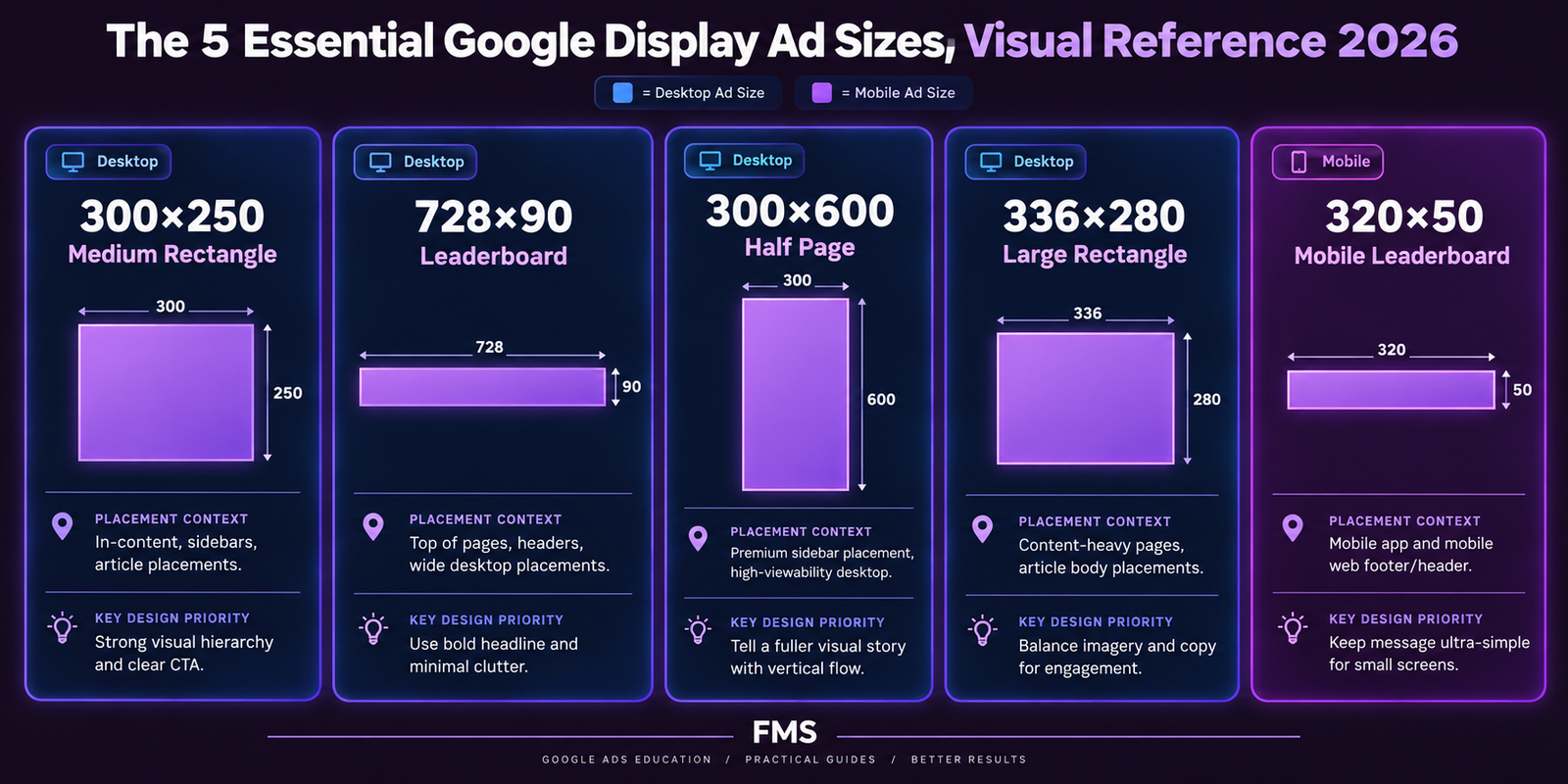
The 5 Highest-Performing GDN Ad Sizes
| Size | Name | Placement Context | Priority Design Elements | Max File Size |
|---|---|---|---|---|
| 300×250 | Medium Rectangle | The most widely available placement on the GDN; appears in sidebars, within article content, and at the end of articles on both desktop and mobile | Brand logo and primary message must be readable at small display size; CTA button visually prominent; single dominant visual element | 150KB |
| 728×90 | Leaderboard | Top of page placement on desktop websites; high visibility premium position; the first display ad seen by most desktop users | Horizontal layout with logo left, message centre, CTA right; the 90px height is very restrictive, every element must earn its space; no complex visuals | 150KB |
| 300×600 | Half Page | Large sidebar placement; also called "Half Page" because it often occupies half the vertical height of the page; premium placement with high visibility | The tallest common display format allows a more complete visual story: headline, supporting image, social proof, and CTA button can all be comfortably included with space for each | 150KB |
| 336×280 | Large Rectangle | Similar placement to 300×250 but slightly larger; performs well in article body and end-of-content positions; high inventory volume on Indian news and content sites | The 16% larger canvas than the 300×250 allows slightly more generous typography and visual space; design similarly to the 300×250 but use the additional space for a more prominent CTA button | 150KB |
| 320×50 | Mobile Leaderboard | The primary mobile banner format; appears at the top or bottom of mobile web pages and within mobile app content; highest-volume mobile placement on the GDN | The most space-constrained format; 50px height allows only a logo, one short message, and a minimal CTA; design at 2× (640×100px) for high-DPI screens; test legibility at actual 320×50px display size | 150KB |
Additional GDN Ad Sizes: Secondary Inventory
| Size | Name | Placement Context | Key Design Note |
|---|---|---|---|
| 160×600 | Wide Skyscraper | Sidebar placement; tall and narrow; typically sits alongside content for extended reading sessions | Vertical layout; product or visual image above, text and CTA below; the narrow width (160px) severely limits typography size |
| 970×90 | Large Leaderboard | Premium top-of-page placement on high-traffic desktop sites; wider than standard leaderboard | The additional 242px width allows an image element alongside the text; use for brand campaigns where visual storytelling matters |
| 320×100 | Large Mobile Banner | Mobile web; double the height of the 320×50; more space for message hierarchy on mobile | The doubled height allows a headline and subtext or a logo plus message; still highly space-constrained by desktop standards |
| 250×250 / 200×200 | Square Formats | Limited inventory; not recommended as primary ad sizes; included mainly for legacy placement compatibility | If these sizes must be produced, design from the 300×250 master and scale down; verify legibility at the reduced size |
The 6 Design Principles That Drive GDN CTR
Responsive Display Ads: Asset Specifications
| Asset Type | Slots Available | Specification | Design Guidance |
|---|---|---|---|
| Headlines | Up to 5 (short); shown individually, not in sequence | Maximum 30 characters each | Each headline must work as a standalone statement; write at least one value proposition, one benefit, one social proof, and one CTA-adjacent headline across the 5 slots |
| Long Headlines | 1 required | Maximum 90 characters | Used as the sole headline in some ad formats; write as a complete, compelling standalone value proposition |
| Descriptions | Up to 5 | Maximum 90 characters each | Each must work as standalone; cover the key benefits, social proof, and offer details across the 5 slots; do not duplicate headline content |
| Images (Landscape) | Up to 15 | 1.91:1 ratio; minimum 1200×628px; maximum 5120×2700px; max 5MB; JPG or PNG; sRGB | Minimal text on image (Google penalises text-heavy images in RDAs); product shots, team photos, or brand lifestyle images; keep all critical content in the central 80% of the image to allow for automatic cropping |
| Images (Square) | Up to 15 | 1:1 ratio; minimum 1200×1200px; max 5MB; JPG or PNG; sRGB | Same guidance as landscape images; the 1:1 format is used in native and Gmail placements; central safe zone is more critical for this format |
| Logo (Square) | 1 required; up to 5 | 1:1; minimum 1200×1200px; solid or transparent background; max 5MB | Use the brand icon/mark only (not full wordmark) for the square logo; it must be legible at very small sizes (approximately 40×40px in some placements) |
Technical Specifications for All GDN Formats
| Specification | Static Image Ads | Animated / HTML5 Ads |
|---|---|---|
| File formats | GIF, JPG, PNG (sRGB colour profile for all) | HTML5 (ZIP file containing HTML, CSS, JS, and assets); animated GIF (see animation limits) |
| Maximum file size | 150KB for all static image formats | 150KB for the initial ZIP load; total asset weight (including loaded assets) up to 2.2MB |
| Animation limits | Animated GIF: maximum 30 seconds total animation; must loop no more than 3 times; maximum 5 frames per second | HTML5: same 30-second, 3-loop limit applies; ads must stop animating after 30 seconds |
| Border requirement | Mandatory visible border (minimum 1px solid in a colour that contrasts with white) if the ad background is white or light (#EEEEEE or lighter) | Same border requirement applies; the border must be visible in the initial frame and throughout animation |
| Colour profile | sRGB (mandatory); CMYK images appear with incorrect colours on screen | All images within HTML5 ZIP must be in sRGB; define CSS colours in RGB or HEX notation |
| Safe zones | Keep all critical content (logo, CTA, primary message) at least 10–15px from all edges; some publisher sites may crop ads slightly at the edges | Same edge clearance applies; ensure the click-through URL is correctly specified in the HTML5 code |
The Multi-Size Production Workflow
- Step 1, Design the master at 300×600px (Half Page): this is the largest common size and provides the most design space; establish the complete visual system here, colour palette, typography hierarchy, image composition, logo position, CTA button design
- Step 2, Adapt to 300×250px (Medium Rectangle): retain the same colour system and typography; reduce the image element; the CTA button and logo must remain at legible sizes; remove any secondary information that was present in the 300×600 but cannot fit without compromising legibility
- Step 3, Adapt to 336×280px (Large Rectangle): this is very similar to 300×250; minor adjustments to element sizing and spacing are typically all that is required
- Step 4, Design the 728×90px (Leaderboard) separately: the extreme horizontal aspect ratio of the leaderboard requires a completely different layout than the vertical and square formats; horizontal flow: logo left, message centre, CTA right; this size cannot be adapted from any of the previous formats, it must be designed for its specific proportions
- Step 5, Adapt to 320×50px (Mobile Leaderboard): reduce from the 728×90 layout; at this size, only the logo, the shortest possible message (3–4 words maximum), and the CTA text can fit; verify legibility at actual 320×50px display size
Need a Complete Display Ad Set That Covers All Major GDN Placements?
Futuristic Marketing Services designs complete Google Display Ad sets for Indian businesses, all 5 primary sizes plus the secondary formats, responsive display asset sets for Performance Max, and the systematic multi-size production workflow that ensures brand consistency across every placement.
Start Your Display Ad Design ProjectFrequently Asked Questions
Q. What is the most effective Google Display ad size?
Q. What is the difference between static and responsive display ads?
Q. What file size should Google Display ads be?
Q. Should Google Display ads be animated?
Q. How do I design Google Display ads for retargeting?
Q. What are Responsive Display Ads and how do I design assets for them?
Complete GDN Ad Sets Designed for Maximum Reach and Brand Consistency
Futuristic Marketing Services designs Google Display Ad sets for Indian businesses, all 5 primary sizes, secondary formats, responsive display asset sets, Performance Max asset libraries, and the brand consistency framework that makes every display impression a compound brand-building investment.
See Our Display Ad Design Services