
WordPress SEO is the process of optimising a WordPress website to rank in organic search results, covering technical configuration, on-page content, Core Web Vitals performance, structured data, and internal linking. WordPress is the most SEO-friendly major CMS because it gives developers complete control over every ranking signal. The key steps are installing an SEO plugin (Yoast or Rank Math), configuring permalink structure, optimising Core Web Vitals, implementing schema markup, and building a structured internal linking system.
Key Takeaways
- WordPress is the most SEO-friendly major CMS, it gives complete control over URL structure, meta data, structured data, and Core Web Vitals performance. No hosted platform (Wix, Squarespace, Shopify) matches this technical SEO ceiling.
- Organic search drives 53% of all website traffic according to BrightEdge research, making SEO the highest-volume acquisition channel for most businesses. WordPress is the optimal platform to capture this traffic.
- Yoast SEO and Rank Math are the two professional standard WordPress SEO plugins. Both automate meta title templates, XML sitemaps, schema markup, and canonical tags. Rank Math Pro is the stronger choice for most professional sites in 2026 due to its automated schema generation and superior free tier.
- Core Web Vitals, LCP, CLS, and INP, are confirmed Google ranking signals. WordPress on managed hosting with WP Rocket consistently achieves Good status. See our Core Web Vitals guide for the full optimisation process.
- The permalink structure must be set to Post Name before any content is published. Changing permalink structure on a live site with existing rankings requires 301 redirects and carries ranking risk. Get this right from day one.
- Schema markup (JSON-LD structured data) enables rich results, star ratings, FAQ accordions, breadcrumbs in SERPs. Rank Math Pro automates schema generation for Article, FAQPage, LocalBusiness, Product, and Review types across all page types.
- Internal linking distributes PageRank from high-authority pages to the commercial pages that need ranking power. Every blog post should link to 3 to 8 related internal pages with descriptive keyword-relevant anchor text. See our website architecture SEO guide.
WordPress SEO Setup
Get Your WordPress SEO Foundation Built Correctly From Day One
Futuristic Marketing Services configures the complete WordPress SEO technical foundation, permalink structure, SEO plugin, schema markup, Core Web Vitals, and Google Search Console setup.
Start Your SEO SetupThe WordPress SEO Technical Foundation
Step 1: Permalink Structure
| Permalink Setting | URL Format | SEO Value | Recommendation |
|---|---|---|---|
| Plain | /?p=123 | Zero keyword signal | Never use, provides no topical context |
| Day and name | /2026/01/15/post-name/ | Low, date creates maintenance burden | Avoid, dates cause evergreen content to appear dated |
| Month and name | /2026/01/post-name/ | Low | Avoid, same maintenance issue |
| Post name | /post-name/ | High, clean keyword-relevant URL | Use for blogs; consider category structure for sites |
| Custom structure | /category/post-name/ | High, adds topical hierarchy signal | Best for sites with clear category structure (eCommerce, media) |
Step 2: Install and Configure an SEO Plugin
| Feature | Yoast SEO Free | Yoast SEO Premium | Rank Math Free | Rank Math Pro |
|---|---|---|---|---|
| Meta title and description | Template-based for all post types | Same plus redirect manager | Template-based plus keyword tracking | Same plus advanced analysis |
| XML sitemap | Automatic | Automatic | Automatic | Automatic |
| Schema markup | Basic Article and Breadcrumb | Article, FAQ, How-To | Article, FAQ, How-To, LocalBusiness, Product | Full schema library including Review, Course, Event |
| Redirection manager | Not included | Included | Included (free) | Included with advanced rules |
| Internal link suggestions | Not included | Included | Not included | Included |
| Annual cost | Free | £99 | Free | £59 |
Step 3: XML Sitemap Submission
WordPress SEO On-Page Optimisation
Meta Title and Meta Description
Meta Title Formula by Page Type
Service pages
Primary Keyword + Outcome or Brand. Example: WordPress Website Development | Futuristic Marketing Services
Blog posts
Primary Keyword: What the Article Covers. Example: WordPress SEO: The Complete Optimisation Guide
eCommerce category
Category Name | Buy Online | Brand. Example: WooCommerce Themes | Buy WordPress Themes | Brand
Location pages
Service + Location + Benefit. Example: WordPress Developer Manchester, Fast, Professional Builds
Comparison content
Keyword A vs Keyword B: Key Differences Explained. Example: Yoast vs Rank Math: Which SEO Plugin Wins?
FAQ and how-to
How to [Achieve Outcome]: Step-by-Step Guide. Example: How to Speed Up WordPress: 8 Proven Methods
Heading Structure
Content and Keyword Optimisation
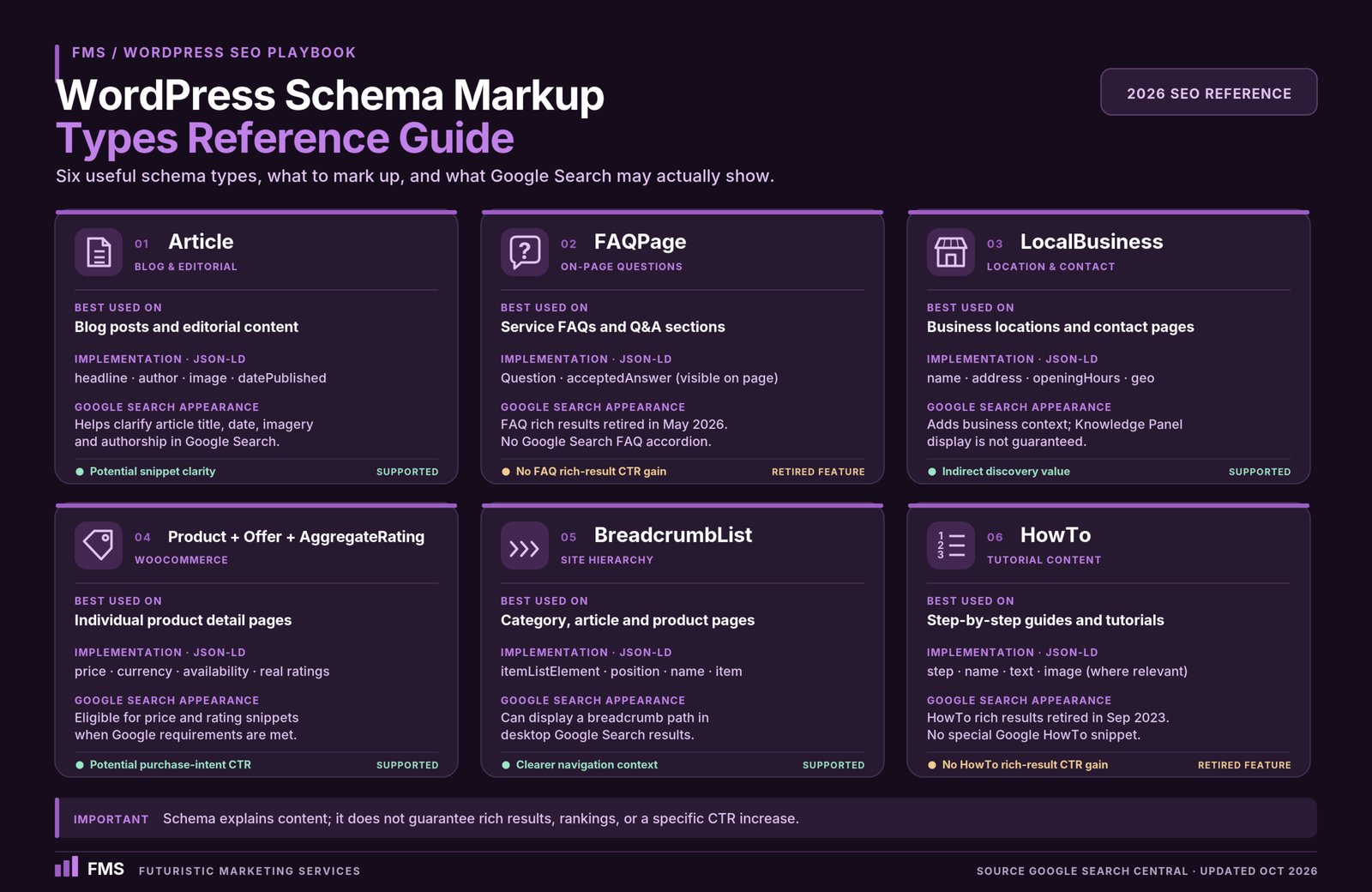
Schema Markup for WordPress
| Schema Type | Pages to Apply | Rich Result | CTR Impact |
|---|---|---|---|
| Article / BlogPosting | All blog posts | Article rich result with author byline | 5 to 15% CTR improvement |
| FAQPage | Service pages and posts with FAQ sections | FAQ accordion in SERPs, adds multiple Q&A pairs below result | 20 to 35% SERP real estate increase |
| LocalBusiness | Homepage and contact page for local businesses | Knowledge Panel and local pack appearance | High for local search visibility |
| Product + Offer + AggregateRating | WooCommerce product pages | Price, availability, and star ratings in SERPs | 20 to 30% CTR improvement |
| BreadcrumbList | All pages with breadcrumb navigation | Breadcrumb path in SERP instead of URL | 5 to 10% CTR improvement |
| HowTo | Step-by-step guide content | HowTo rich result with steps shown | High for tutorial content |
Core Web Vitals and WordPress Performance SEO
The WordPress Performance SEO Stack
Managed hosting (foundation)
Kinsta, WP Engine, or Cloudways, server-level Redis caching, global CDN, sub-200ms TTFB. Shared hosting cannot achieve Good Core Web Vitals regardless of other optimisation. See our website speed guide.
WP Rocket (caching layer)
Page caching, JavaScript deferral, CSS minification, image lazy loading, and database optimisation. The single highest-impact performance plugin for WordPress at £40 per year.
WebP images with preload
Convert all images to WebP; add explicit width and height to all img elements; preload the LCP hero image. These three changes address the majority of LCP and CLS failures.
Defer third-party scripts
Analytics, chat widgets, and marketing pixels add JavaScript that delays INP. Load all third-party scripts after the page is interactive, via tag manager delayed triggers or Partytown library.
Internal Linking Architecture
WordPress SEO Audit
Get a Professional WordPress SEO Audit and Optimisation Plan
Futuristic Marketing Services provides comprehensive WordPress SEO audits, technical foundation review, on-page analysis, Core Web Vitals assessment, schema validation, and a prioritised optimisation roadmap.
Request Your SEO AuditFrequently Asked Questions About WordPress SEO
Q. Is WordPress good for SEO?
Q. What is the best WordPress SEO plugin?
Q. How do I set up WordPress SEO from scratch?
Q. How do I improve WordPress site speed for SEO?
Q. What is schema markup and does WordPress support it?
Q. Does Elementor affect WordPress SEO?
Q. How do I do keyword research for a WordPress blog?
Q. What is keyword cannibalisation in WordPress?
Q. How do I fix duplicate content on WordPress?
Q. How do I submit a WordPress site to Google?
Q. What is E-E-A-T and how does it affect WordPress SEO?
Q. How long does WordPress SEO take to show results?
Futuristic Marketing Services
WordPress SEO That Produces Real Organic Growth
Futuristic Marketing Services implements the complete WordPress SEO stack, technical foundation, schema markup, Core Web Vitals engineering, content framework, and ongoing rank monitoring, for businesses ready to grow through organic search.
Start Your WordPress SEO Programme