
Elementor Pro Review 2026: Is It Worth the Upgrade?

elementor pro review

Elementor Pro is the premium version of the most widely used WordPress page builder, installed on over 12 million WordPress websites worldwide. The upgrade from Elementor Free to Pro adds the Theme Builder (for custom headers, footers, and template parts), the Form Builder with CRM integrations, the Pop-up Builder, the WooCommerce Builder, and 50 or more additional professional widgets. At £49 per year for a single site on the Essential plan, it is the most cost-effective professional toolkit available for WordPress design, and for most professional projects, it is worth upgrading to immediately.

This review covers everything you need to make the Elementor Pro upgrade decision with confidence, the full feature breakdown, an honest performance assessment, real pricing comparison across plans, how it compares to Divi and Gutenberg FSE, and clear guidance on who should and should not upgrade. If you are evaluating whether Elementor Pro is right for your project in 2026, this is the complete honest assessment.

Key Takeaways

  • Elementor Pro at £49 per year for the Essential plan provides the Theme Builder (custom headers and footers), Form Builder (with Mailchimp, HubSpot, Klaviyo integrations), Pop-up Builder, WooCommerce Builder, and 50 or more additional widgets, replacing plugins that individually cost £150 to £340 per year.
  • The Theme Builder is the single most valuable Elementor Pro feature. Without it, headers and footers are controlled by the WordPress theme PHP templates, requiring developer involvement to modify. With it, the entire site visual design is managed from one visual interface without touching PHP.
  • Elementor Pro achieves Good Core Web Vitals status on managed hosting with WP Rocket caching, mobile Lighthouse scores of 70 to 88 are consistently achievable. For sites requiring 90 or higher Lighthouse, a custom theme is more appropriate.
  • The Form Builder with CRM integration is the second most commercially valuable Pro feature for marketing sites, replacing Gravity Forms or WPForms at £79 to £200 per year with a built-in solution that integrates with all major email marketing and CRM platforms.
  • Elementor Pro licence renewal is optional, after the first year, the plugin continues to function without updates or support. Renewing provides security updates, feature additions, and support access. Elementor offers renewal discounts.
  • For WooCommerce sites, Elementor Pro WooCommerce Builder enables fully branded product page layouts, custom shop archive templates, and redesigned cart and checkout pages without any PHP development, a significant commercial value.
  • Gutenberg Full Site Editing (FSE) is the WordPress core alternative to Elementor Pro. FSE produces leaner HTML and better raw performance but is less mature as a complete design system. For most professional sites in 2026, Elementor Pro remains the stronger practical choice, but the gap is narrowing. See our WordPress development guide.

Building With Elementor Pro?

Professional Elementor Development With Performance Engineering

Futuristic Marketing Services builds Elementor Pro websites with custom design systems, Good Core Web Vitals performance, and full SEO foundations, delivered production-ready.

Get a Free Consultation
Elementor Pro Features: The Complete Breakdown

The Elementor Pro feature set is best understood by comparing it to the cost of the individual plugins it replaces and the developer time it saves.
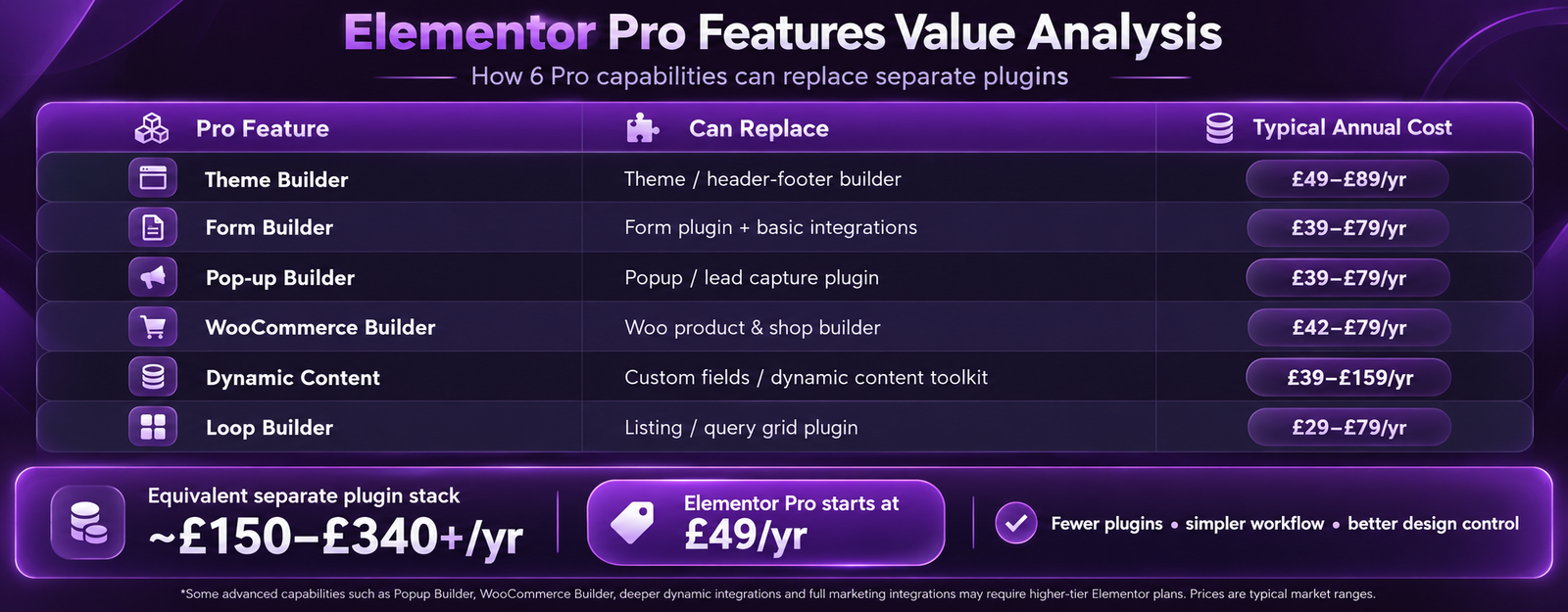
Elementor Pro FeatureWhat It DoesPlugin It ReplacesReplacement Cost
Theme BuilderBuild custom headers, footers, single post templates, archive pages, 404, and search results pages visuallyHeader footer plugin, custom PHP template development£40 to £80 per year plugin or £200 to £800 developer time per change
Form BuilderMulti-step forms, conditional logic, file upload, CRM integrations (Mailchimp, HubSpot, Klaviyo, ActiveCampaign)Gravity Forms, WPForms Pro£79 to £200 per year
Pop-up BuilderExit-intent, scroll-depth, and time-on-page triggered pop-ups with full targeting and frequency controlOptinMonster, Bloom, or Sumo£40 to £100 per year
WooCommerce BuilderCustom product page templates, shop archive, cart, and checkout page layoutsWooCommerce theme customisation or developer time£200 to £1,000 developer time
Dynamic contentDisplay post meta, ACF fields, WooCommerce data in any widgetCustom PHP developmentDeveloper time per implementation
Loop BuilderCustom templates for post grids, product archives, and custom post type listingsCustom PHP loop templatesDeveloper time per post type

Theme Builder Deep Dive

The Theme Builder is the reason most professional WordPress projects upgrade to Elementor Pro. It enables building every structural part of the site, the global header with custom navigation, the footer with widgets and social links, single post templates with author boxes and related posts, and archive pages with custom grid layouts, all in the same visual Elementor editor, with display conditions that allow different templates for different site sections.
The commercial significance: without the Theme Builder, the header and footer are controlled by the active WordPress theme PHP templates. Changing the header navigation layout, adding a sticky CTA to the header, or modifying the footer column structure requires either editing PHP files (which requires a developer and a child theme) or installing a separate header builder plugin. With Elementor Pro Theme Builder, any non-developer team member can make these changes without touching code.

Form Builder with CRM Integration

Elementor Pro Form Builder is a production-grade form system, not just a basic contact form. It supports multi-step forms with progress indicators, conditional logic that shows and hides fields based on user answers, file upload fields for CVs and brief documents, and direct integration with Mailchimp, HubSpot, Klaviyo, ActiveCampaign, ConvertKit, GetResponse, and Zapier. reCAPTCHA v2 and v3 and Cloudflare Turnstile are built in for spam protection.
For most marketing WordPress sites, the Elementor Pro Form Builder replaces the need for a separate form plugin entirely, saving £79 to £200 per year in plugin licence costs while providing equivalent or better functionality for standard lead generation requirements.

Elementor Pro Performance: The Honest Assessment

Performance is the most discussed trade-off in Elementor Pro evaluations, and the honest assessment is nuanced: Elementor adds code overhead compared to a hand-coded theme, but this overhead is manageable with the correct setup and should not prevent Good Core Web Vitals status for standard business pages.
SetupMobile LighthouseCore Web VitalsNotes
Elementor on shared hosting, no optimisation30 to 55PoorNot a viable production configuration, performance must be addressed before any site goes live
Elementor plus WP Rocket on shared hosting50 to 70Needs ImprovementBudget setup, acceptable only for very low-traffic sites
Elementor plus WP Rocket on managed hosting (Kinsta)70 to 88GoodStandard professional configuration, achieves Good CWV consistently for standard pages
Elementor with 60 or more widgets per page plus animations55 to 75Needs ImprovementComplex pages require more aggressive JS optimisation and selective animation use
Hand-coded custom theme on managed hosting85 to 95 or higherGoodPerformance ceiling, appropriate when 90 or higher is a hard requirement. See our custom development guide.
The verdict: Elementor Pro on managed hosting (Kinsta, WP Engine) with WP Rocket configured correctly achieves Good Core Web Vitals status for the vast majority of standard professional pages. Elementor Pro Optimised CSS Loading (enabled in Elementor Settings, Editor Preferences, Improved Asset Loading) reduces the CSS overhead significantly, enable this on all new Pro installations. See our website speed guide and Core Web Vitals guide for the full performance framework.

Elementor Pro Pricing 2026

PlanSitesAnnual PricePer-Site CostBest For
Essential1£49 per year£49 per siteIndividual site owners and small businesses with a single WordPress installation
Advanced3£99 per year£33 per siteFreelancers managing a small portfolio of client WordPress sites
Expert25£199 per year£8 per siteAgencies managing multiple client projects, the best value per site for any team managing 5 or more sites
Agency1,000£399 per year£0.40 per siteLarge agencies or multi-site networks requiring maximum activation coverage

Renewal and Long-Term Cost

All Elementor Pro plans are annual subscriptions. Renewal is optional, if you do not renew, the plugin continues working but stops receiving feature updates and security patches. Elementor offers renewal discounts (typically 25 to 40 percent off). For any production site, renewal is recommended because security updates are commercially important. At £49 per year for renewal versus the £150 to £340 in replacement plugin costs, the renewal economics are strongly positive for most sites.

Elementor Pro vs Divi vs Gutenberg FSE

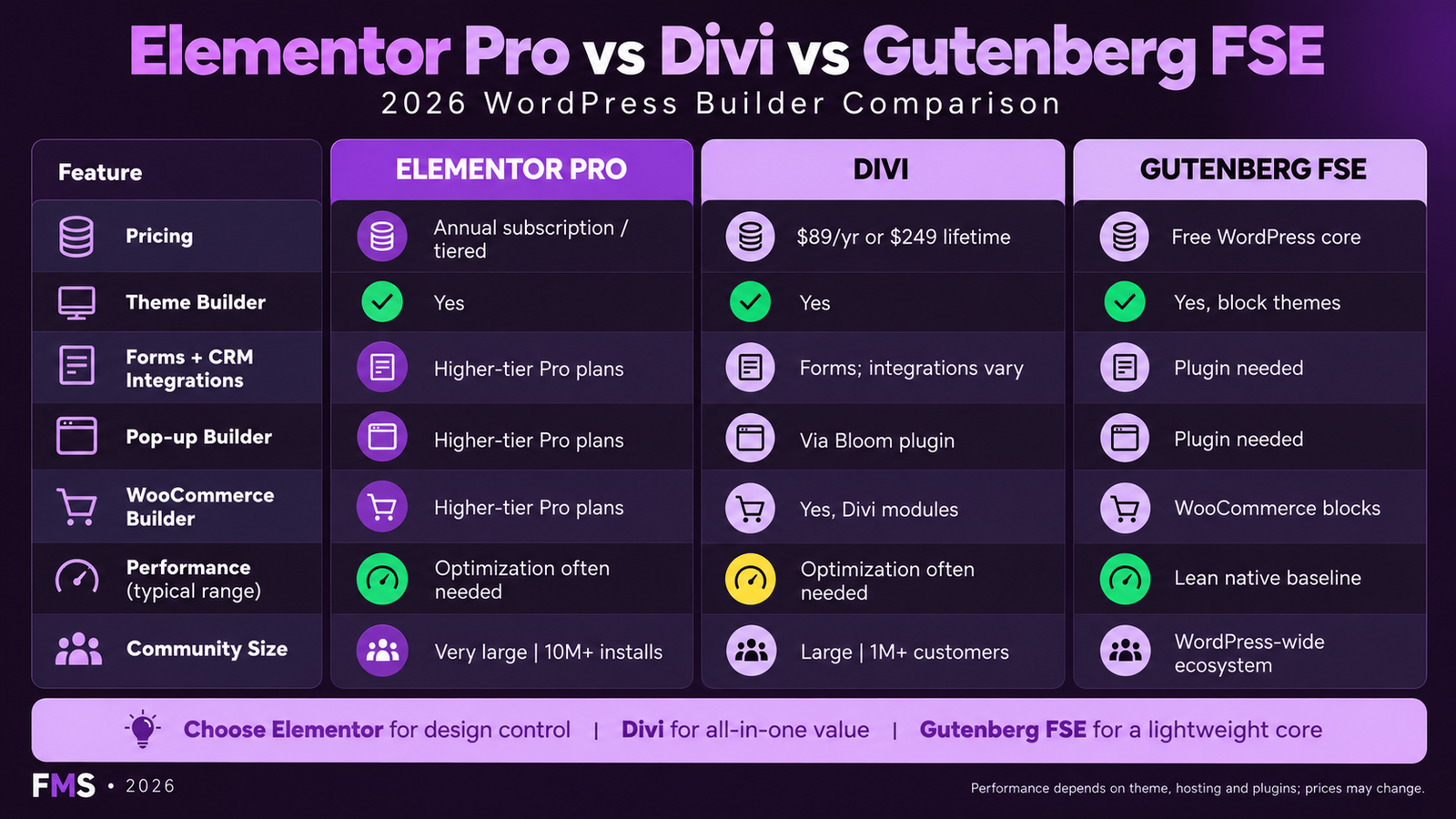
FeatureElementor ProDivi (Elegant Themes)Gutenberg (FSE)
Starting price£49 per year (1 site)$89 per year (unlimited sites)Free, part of WordPress core
Theme BuilderYes, mature, completeYes, mature, completeYes, Full Site Editing (FSE), improving rapidly
Form Builder with CRMYes, built-in, 12 or more integrationsYes, built-in, 10 or more integrationsNo, requires separate plugin
Pop-up BuilderYes, built-inYes, built-inNo, requires separate plugin
WooCommerce BuilderYes, fullYes, fullYes, WooCommerce blocks (less mature)
PerformanceGood with optimisation (70 to 88 Lighthouse)Similar to Elementor (70 to 85)Best, leanest output (80 to 95)
Community and resourcesLargest, 12M or more installationsVery large, established ecosystemLargest globally, WordPress core
A/B testing built inNo, requires separate toolYes, Divi Leads (basic A/B testing)No, requires separate tool
The decision between Elementor Pro and Divi comes down to pricing model and team familiarity. Divi at $89 per year for unlimited sites is better value for agencies managing 5 or more client sites; Elementor Pro Expert at £199 for 25 sites is comparable. For individual site owners, Elementor Pro Essential at £49 is lower cost than Divi. Gutenberg FSE is the correct choice for teams prioritising maximum performance, tightest WordPress integration, and no plugin dependency, but it remains less mature as a complete design system than either paid builder in 2026.

Ready to Build With Elementor Pro?

Elementor Pro Development Delivered With Full Performance Engineering

Futuristic Marketing Services builds professional Elementor Pro websites, custom design, managed hosting configuration, WP Rocket optimisation, and complete SEO foundations.

Start Your Elementor Pro Project

Frequently Asked Questions About Elementor Pro

Q. Is Elementor Pro worth buying?

A. For most professional WordPress projects, yes. At £49 per year for the Essential plan, Elementor Pro provides the Theme Builder (custom headers and footers), Form Builder with 12 or more CRM integrations, Pop-up Builder, WooCommerce Builder, and 50 or more additional widgets. The Theme Builder alone replaces a header builder plugin at £40 to £80 per year. The Form Builder replaces Gravity Forms or WPForms at £79 to £200 per year. The combined replacement value significantly exceeds the £49 annual cost for any marketing site requiring these features.

Q. What is the difference between Elementor Free and Pro?

A. Elementor Free includes 40 basic widgets, 30 or more templates, and the core drag-and-drop editor, sufficient for basic page layouts. Elementor Pro adds: the Theme Builder for custom headers, footers, and template parts; the Form Builder with CRM integrations; the Pop-up Builder; the WooCommerce Builder for product pages and shop layouts; dynamic content display from post meta and ACF fields; 50 or more additional professional widgets; global widget library; and custom CSS per element. Most professional sites require at least the Theme Builder, which alone justifies the upgrade.

Q. How does Elementor Pro affect website performance?

A. Elementor Pro adds CSS and JavaScript overhead compared to a hand-coded theme. With managed WordPress hosting (Kinsta, WP Engine) and WP Rocket caching with Elementor Pro Optimised CSS Loading enabled, sites consistently achieve 70 to 88 on mobile Lighthouse, sufficient for Good Core Web Vitals status. For sites requiring 90 or higher Lighthouse, a custom-coded theme is more appropriate. Performance impact is manageable but real, see our website speed guide.

Q. What is the Elementor Pro Theme Builder?

A. The Elementor Pro Theme Builder enables building the structural templates for every part of a WordPress site, header, footer, single post layout, archive page, 404 page, and search results page, using the same visual Elementor editor. Display conditions allow different header templates for different sections of the site. Without the Theme Builder, these site parts are controlled by the active WordPress theme PHP templates, which require developer involvement to modify. The Theme Builder is the primary reason most professional sites upgrade to Pro.

Q. Can Elementor Pro build WooCommerce pages?

A. Yes, Elementor Pro includes a complete WooCommerce Builder with widgets and templates for product detail pages, the shop archive, the product category archive, the cart page, and the checkout page. Product-specific widgets include product images, product title, price, add-to-cart button, star ratings, related products, and upsell displays. The WooCommerce Builder enables fully branded eCommerce page designs without any custom PHP development, a significant production cost saving on WooCommerce projects.

Q. Is Elementor Pro good for SEO?

A. Elementor Pro itself does not directly affect SEO positively or negatively, its SEO impact is entirely through page speed. Well-optimised Elementor Pro sites achieve Good Core Web Vitals status, which is a confirmed Google ranking signal. Poorly optimised ones can fail Core Web Vitals. The content SEO strategy, keyword research, meta titles, structured data, internal linking, is handled by the SEO plugin (Yoast or Rank Math) independently of Elementor.

Q. How many sites can I use Elementor Pro on?

A. Elementor Pro licence activations depend on the plan: Essential (1 site), Advanced (3 sites), Expert (25 sites), Agency (1,000 sites). Each plan includes the full Elementor Pro feature set, the only difference is the number of WordPress activations. A single activation can be deactivated and moved to a different site at any time within the licensed count.

Q. What is Elementor Pro Optimised CSS Loading?

A. Optimised CSS Loading (also called Improved Asset Loading in some Elementor versions) generates CSS per-page rather than loading the full Elementor CSS bundle on every page. A page using 5 widgets loads CSS only for those 5 widgets, not for all 90 or more Pro widgets. This reduces per-page CSS weight by 40 to 60 percent on most pages, directly improving mobile Lighthouse scores and Core Web Vitals performance. Enable in Elementor, Settings, Performance. This is a mandatory configuration step for any Elementor Pro production site.

Q. Does Elementor Pro work with Gutenberg?

A. Elementor and Gutenberg operate in the same WordPress editing space but do not conflict. When you edit a page with Elementor, the Gutenberg editor is replaced by the Elementor editor for that page. When you edit a page with Gutenberg, Elementor is not involved. Pages can use either editor. Most Elementor Pro sites use Elementor for all front-end page design but may use Gutenberg for back-end post types or content that does not need Elementor layout features.

Q. What happens to my site if I stop renewing Elementor Pro?

A. If you do not renew Elementor Pro, the plugin continues to function, all pages built with Elementor retain their design, and the Theme Builder templates continue to work. You lose access to future feature updates and security patches, and support access ceases. The site does not break. For production sites, renewal is commercially advisable because security updates matter, but the immediate consequence of not renewing is only the loss of updates and support, not site functionality.

Q. Is Elementor better than Divi?

A. Both are mature, capable WordPress page builders. The decision typically comes down to pricing model and team familiarity. Divi is better value for agencies managing many sites ($89 per year for unlimited). Elementor Pro has a larger community and more third-party add-on availability. Elementor interface is generally considered more intuitive for new users. For teams already familiar with one, there is rarely a commercial reason to switch. For new projects, try both on a test site before committing.

Q. How do I get the best performance from Elementor Pro?

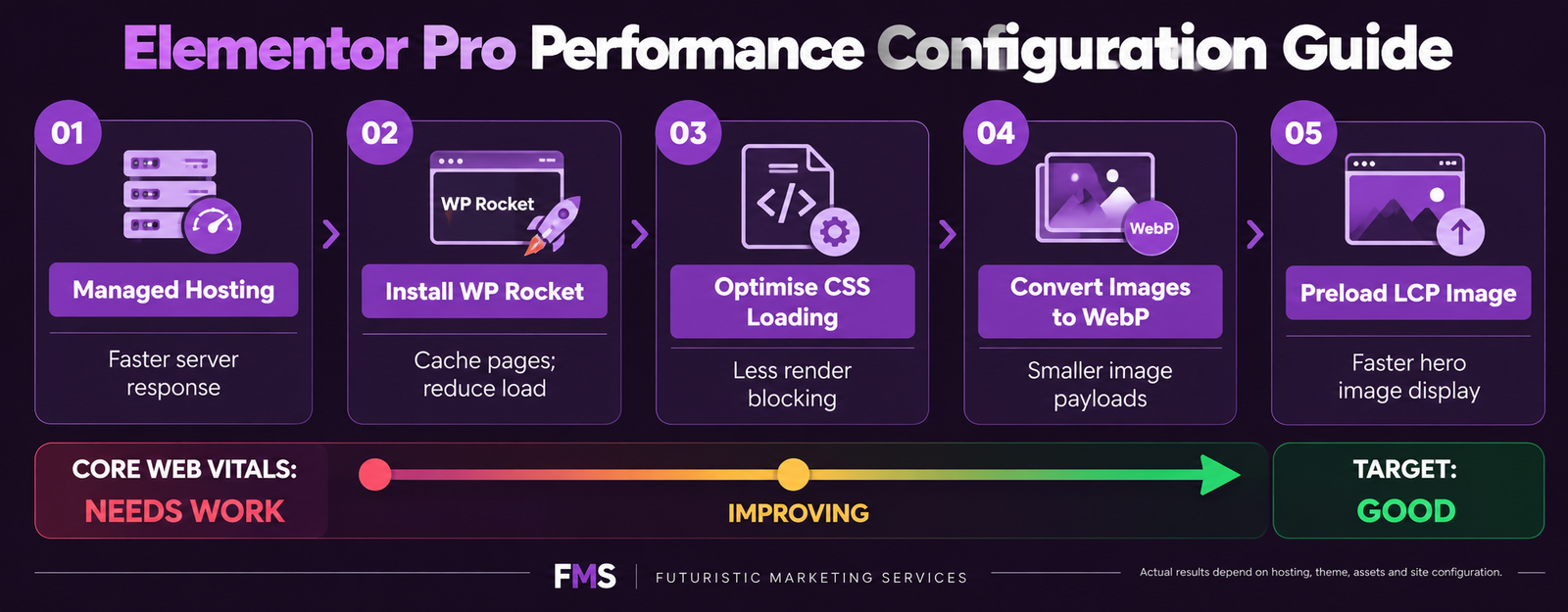
A. Best performance configuration for Elementor Pro: (1) Use managed WordPress hosting on Kinsta or WP Engine with Redis object caching. (2) Install WP Rocket with page caching, CSS and JS minification, and image lazy loading. (3) Enable Optimised CSS Loading in Elementor Settings, Performance. (4) Convert all images to WebP with explicit width and height. (5) Preload the hero LCP image in the page head. (6) Defer all third-party scripts (analytics, chat, pixels) until after page load. This configuration consistently achieves 70 to 88 on mobile Lighthouse and Good Core Web Vitals status. See our website speed guide.

Futuristic Marketing Services

Elementor Pro Development Done Right

Futuristic Marketing Services builds professional Elementor Pro WordPress websites with custom design systems, performance engineering, and full technical SEO foundations, production-ready from day one.

Start Your Elementor Pro Project


Elementor Pro in 2026: The Value Case Is Clear

At £49 per year for the Essential plan, Elementor Pro delivers a Theme Builder, Form Builder, Pop-up Builder, WooCommerce Builder, and 50 or more professional widgets, replacing individual plugins that cost £150 to £340 per year combined. For any WordPress site requiring custom headers and footers, lead capture forms with CRM integration, or WooCommerce page customisation, the upgrade pays for itself against replaced plugin costs and developer time savings within the first month.
The performance trade-off is real but manageable. Managed hosting, WP Rocket, and Elementor Pro Optimised CSS Loading consistently achieve Good Core Web Vitals status on standard business pages, the ranking advantage that Google confirmed in 2021. For sites where 90 or higher Lighthouse is a hard requirement, a custom theme is the correct choice. For the 95 percent of professional WordPress projects where 70 to 88 on mobile is the target, Elementor Pro on managed hosting is the most cost-effective and productive development choice available.
For the full Elementor guide including Free vs Pro comparison and responsive design controls, see our What Is Elementor guide. For the WordPress development context, see our WordPress development guide. To discuss your Elementor Pro project with our team, contact us for a free consultation.
Share this post :
Picture of Devyansh Tripathi
Devyansh Tripathi

Devyansh Tripathi is a digital marketing strategist with over 5 years of hands-on experience in helping brands achieve growth through tailored, data-driven marketing solutions. With a deep understanding of SEO, content strategy, and social media dynamics, Devyansh specializes in creating results-oriented campaigns that drive both brand awareness and conversion.

All Posts