How to Edit YouTube Shorts for Maximum Engagement: Hooks, Captions, and Loop Rate

how to edit YouTube Shorts for engagement

Editing a YouTube Short for maximum engagement requires a different approach from editing long-form video, TikTok, or Instagram Reels — because the YouTube Shorts algorithm rewards a specific combination of behavioural signals that are unique to the platform. Loop rate, scroll-stop rate, and first-half view rate are the three primary signals the algorithm uses to determine distribution reach. All three are directly controlled by editing decisions.

This guide covers the complete editing workflow for YouTube Shorts: how to identify and engineer the hook, the caption production standard that retains sound-off viewers, the loop rate technique that earns replays, the pacing standard that maintains first-half view rate, and the audio optimisation that prevents scroll-away in the first 3 seconds. For the professional editing service that applies all these techniques, the YouTube Shorts editing service guide covers the complete service standard.

Key Takeaways

  • According to YouTube Creator Academy, loop rate is the most important single distribution signal for YouTube Shorts -- a Short with high loop rate receives disproportionately stronger algorithmic distribution than one with equivalent views but low replay rate
  • The hook decision happens in the first 1.5 seconds -- those first frames determine whether the viewer scrolls or stays, making the opening the highest-leverage edit point in any Short
  • 85% of short-form video is watched with sound off at least some of the time -- making kinetic word-by-word captions not just an accessibility feature but the primary audience retention mechanism for most Short viewers
  • According to VidIQ Shorts research, Shorts in the 30-55 second range consistently outperform both very short and near-maximum-length Shorts on loop rate and first-half view rate
  • Removing every pause over 0.5 seconds and every filler word from the first half of a Short typically improves first-half view rate by 8-15 percentage points -- one of the highest-ROI single editing interventions available
  • For the complete algorithm framework explaining why each editing decision affects distribution -- loop rate mechanics, scroll-stop science, and first-half view rate -- the YouTube Shorts algorithm guide provides the full technical reference

Want Your YouTube Shorts Edited to the Maximum Engagement Standard?

Futuristic Marketing Services edits YouTube Shorts with the complete four-signal optimisation: loop engineering, scroll-stop hook, kinetic captions, and first-half view rate pacing.

Get Professional Shorts Editing
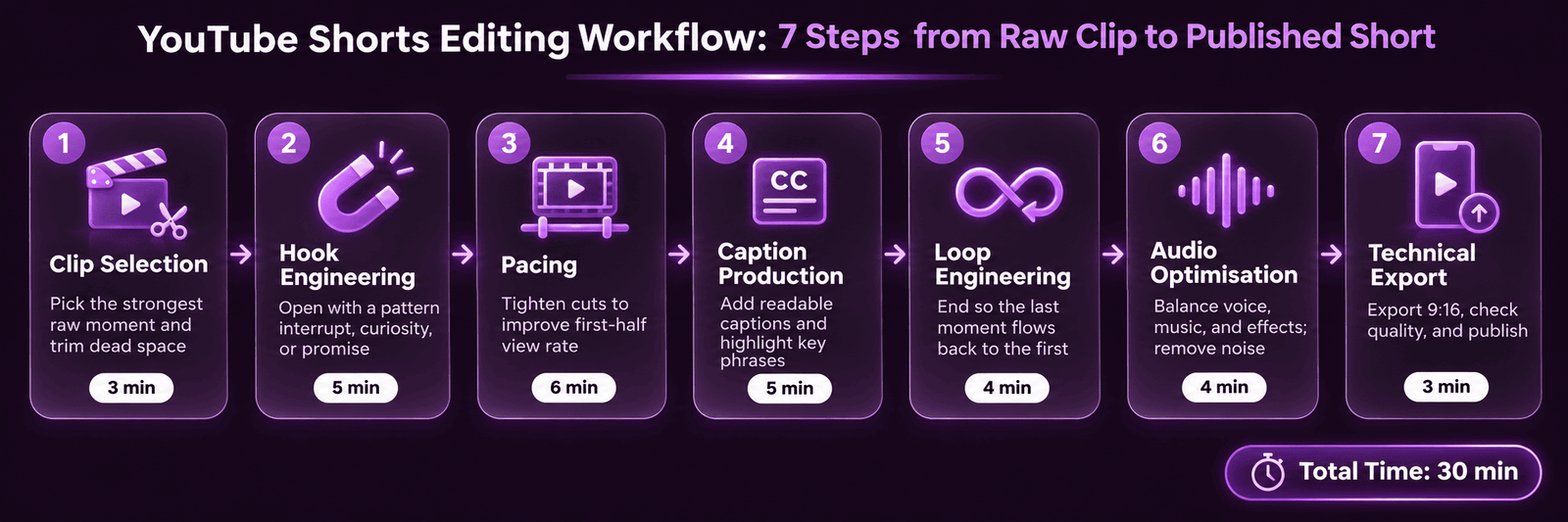
Step 1: Clip Selection -- Choosing the Right Moment

The most important editing decision for a YouTube Short is the clip selection -- identifying which moment from a longer recording will perform as a standalone Short. The right moment has three characteristics: it contains a self-contained, complete idea that delivers value without requiring context from surrounding content; it has an inherently compelling opening -- a surprising statement, a specific data point, a strong opinion, or a practical tip; and it reaches a natural payoff within 30-55 seconds of the opening.
The transcript method is the most efficient clip selection approach: generate a full transcript of the source recording and scan the text for moments matching the three characteristics above. Text scanning is 3-4x faster than video scrubbing and allows keyword searching -- find every instance of a statistic, a direct claim, or a step-by-step structure marker. Mark 15-20 candidates from a 60-minute recording, then select the best 10-12 based on in-context review at each candidate moment.

Step 2: Hook Engineering -- The First 1.5 Seconds

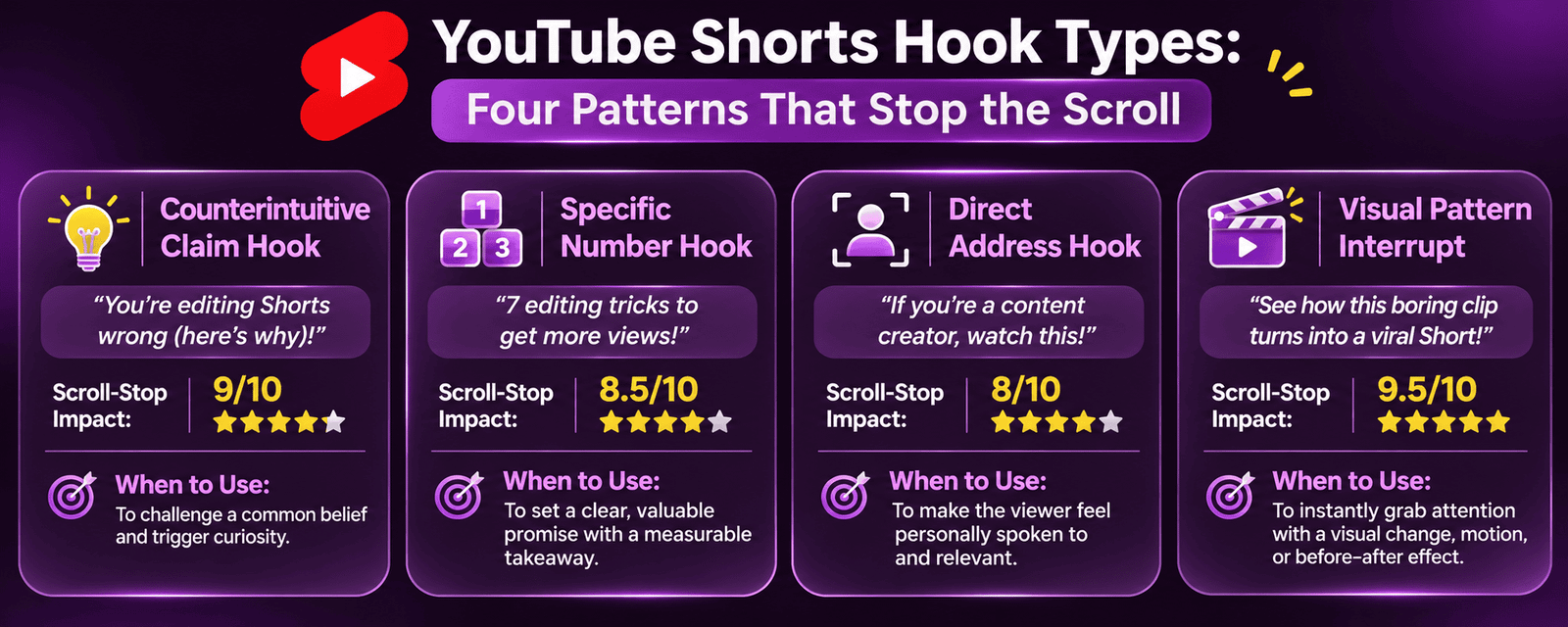
The hook is the first 1-1.5 seconds of the Short and the sole determinant of scroll-stop rate. Four hook types consistently earn high scroll-stop rates:
1. The counterintuitive claim: Open with a statement that contradicts what the viewer expects. The viewer must stop to find out if they are among those doing it wrong. The more specific and relevant to the target audience, the stronger the scroll-stop.
2. The specific number: Open with a concrete statistic or data point. Specificity signals authority, and the implied revelation earns the stop. "93% of YouTube Shorts fail within the first 3 seconds" -- the number and the implied solution both create stopping power.
3. The direct address: Open by directly addressing the target viewer's specific situation or pain point. Direct address creates immediate relevance for the target viewer and rapid self-selection out from non-target viewers who are not the intended audience.
4. The visual pattern interrupt: Open with an unexpected visual -- a dramatic cut, a bold on-screen text card, an unusual framing -- that breaks the visual rhythm of the Shorts Feed scroll. The brain's novelty response to an unexpected visual automatically slows the scroll reflex.

Step 3: Pacing for First-Half View Rate

First-half view rate is the percentage of viewers who watch past the midpoint of the Short. A Short that earns a strong scroll-stop rate from an excellent hook but then loses 60% of its audience at the midpoint sends a negative signal to the algorithm -- the content over-promised and under-delivered.
Pacing techniques that maintain first-half view rate: Remove all pauses over 0.5 seconds from the first half of the clip -- even pauses that feel natural at normal speed become perceptible dead air in the Shorts Feed environment. Remove all filler words (um, uh, like, you know) from the first half. Cut between the last word of each sentence and the first word of the next with zero gap. If the source recording has sections of slower delivery, use pitch-preserving speed adjustment (1.1x-1.15x) to increase perceived energy without an audible pitch change.

Step 4: Caption Production -- The Sound-Off Retention Tool

Captions for YouTube Shorts are the primary content delivery mechanism for approximately 85% of viewers who are watching with sound off at some point in their session. An uncaptioned Short delivers zero content value to this majority.
The caption standard for YouTube Shorts that maximises both accessibility and retention: word-by-word or phrase-by-phrase animation (each word or short phrase appears as it is spoken, creating micro-movement that maintains visual engagement); bold sans-serif font in white with a semi-transparent dark backing for legibility on any background; font size 60-80 points at 1080p (readable without expanding the player on a mobile screen); and automatic caption generation reviewed for accuracy -- particularly proper nouns, industry terms, and numbers where AI transcription error rate is highest.

Step 5: Loop Engineering -- Maximising Replays

Loop rate is the single most important distribution signal for YouTube Shorts. Engineering a high loop rate requires deliberately removing the visual and audio signals that trigger the scroll reflex when a clip ends.
The three-technique loop engineering approach: Cut before the natural ending -- remove the final 1-3 seconds so the clip ends mid-thought rather than at a natural conclusion. End on an upward inflection -- ensure the audio at the cut-out point ends with an upward or flat inflection rather than a downward inflection that signals conclusion. Avoid all visual end signals -- no fade to black, no "like and subscribe" endcap, no visible timer or countdown. The final frame should look identical to any other frame in the clip, providing no visual cue that the content is concluding.

Step 6: Audio Optimisation for Shorts

Audio quality has a disproportionate impact on scroll-stop rate in the first 3 seconds. A viewer who hears audible background noise, inconsistent volume, or muffled speech within the first 2 seconds is significantly more likely to scroll away regardless of the visual quality or the content of what is being said. According to Descript's audio research, improving audio quality alone produces measurably lower early-dropout rates on short-form video.
The Shorts audio standard: noise reduction to remove background hiss and room tone; normalise to -14 LUFS for YouTube Shorts; remove all pauses over 0.5 seconds; and if background music is used, set it at -20 dB or lower below the spoken content so speech is always clearly intelligible without headphones.

Step 7: Technical Export and Platform Compliance

SpecificationRequirementWhy It Matters
Aspect ratio9:16 vertical (1080x1920px)Landscape content does not display in the Shorts Feed -- it plays in a letterbox on a white background
Maximum durationUnder 60 secondsVideos over 60 seconds are classified as standard videos and do not receive Shorts Feed distribution
File formatMP4 (H.264 encoding)Maximum platform compatibility; MOV files can cause upload processing issues
Frame rate30fps or 60fps60fps is recommended for content with fast motion; 30fps is standard for talking-head format
WatermarksRemove all platform watermarksYouTube explicitly reduces distribution for Shorts containing TikTok or Reels watermarks
TitleInclude #Shorts in title or descriptionHelps YouTube classify the video correctly as a Short for Shorts Feed eligibility

Need Your YouTube Shorts Edited to the Full 7-Step Standard?

Futuristic Marketing Services applies the complete YouTube Shorts editing workflow -- clip selection, hook engineering, loop rate technique, kinetic captions, audio optimisation, and compliant export.

Get Shorts Editing Started

Frequently Asked Questions

Q. How is editing YouTube Shorts different from editing TikTok videos?

A. The primary differences are in loop engineering (YouTube Shorts loops continuously; TikTok does not prioritise loop rate in the same way), duration requirements (under 60 seconds for Shorts Feed; TikTok allows up to 10 minutes), and the subscriber conversion mechanism (Shorts drive subscribers to the long-form YouTube channel; TikTok does not have the same cross-format conversion pathway). The caption style conventions also differ -- TikTok audiences are accustomed to high-energy, coloured, animated captions, while YouTube Shorts audiences respond well to cleaner, simpler caption styling. The TikTok video editing service guide covers the TikTok-specific editing differences in detail.

Q. What software is best for editing YouTube Shorts?

A. For professional editing, DaVinci Resolve (free) or Adobe Premiere Pro (subscription) provide the most control over every editing decision. For creators wanting a faster workflow with built-in caption tools, CapCut Pro (approx. £8/mo) is purpose-built for short-form content with automated caption generation, loop editing tools, and one-click platform export. For automated clip extraction from long-form content, Opus Clip produces a ranked list of Short candidates from any long-form recording with automatic caption generation -- requiring a human review pass for clip selection and loop engineering.

Q. How many Shorts should be published per week for maximum algorithm growth?

A. Publishing 5-7 Shorts per week produces the strongest algorithmic momentum for most channels. This frequency provides enough data points for the algorithm to build a consistent distribution profile without overwhelming the subscriber notification feed. Daily publishing (7 per week) from a weekly long-form recording is achievable with professional editing that extracts 7-10 Shorts per recording session. The YouTube Shorts monetisation guide covers how publishing frequency interacts with the monetisation threshold and RPM optimisation.

Start Editing YouTube Shorts That the Algorithm Pushes to New Audiences

Futuristic Marketing Services produces YouTube Shorts with every engagement signal optimised -- the editing standard that earns consistent algorithmic distribution to viewers who have never seen your channel.

Get Started with Shorts Editing

Conclusion

Editing YouTube Shorts for maximum engagement is a technical discipline with specific, measurable outcomes. The seven-step workflow -- clip selection, hook engineering, first-half view rate pacing, caption production, loop engineering, audio optimisation, and compliant export -- directly controls the four algorithm signals that determine how widely YouTube distributes each Short.
For the broader understanding of how the Shorts algorithm uses these signals to make distribution decisions, the YouTube Shorts algorithm guide provides the complete framework. For the professional editing service applying the full 7-step workflow, the YouTube Shorts editing service guide covers the complete service standard and the YouTube Shorts monetisation guide covers the revenue framework.
Share this post :
Picture of Devyansh Tripathi
Devyansh Tripathi

Devyansh Tripathi is a digital marketing strategist with over 5 years of hands-on experience in helping brands achieve growth through tailored, data-driven marketing solutions. With a deep understanding of SEO, content strategy, and social media dynamics, Devyansh specializes in creating results-oriented campaigns that drive both brand awareness and conversion.

All Posts