Logo Design: The Complete Guide to Creating a Logo That Works (2026)

logo design
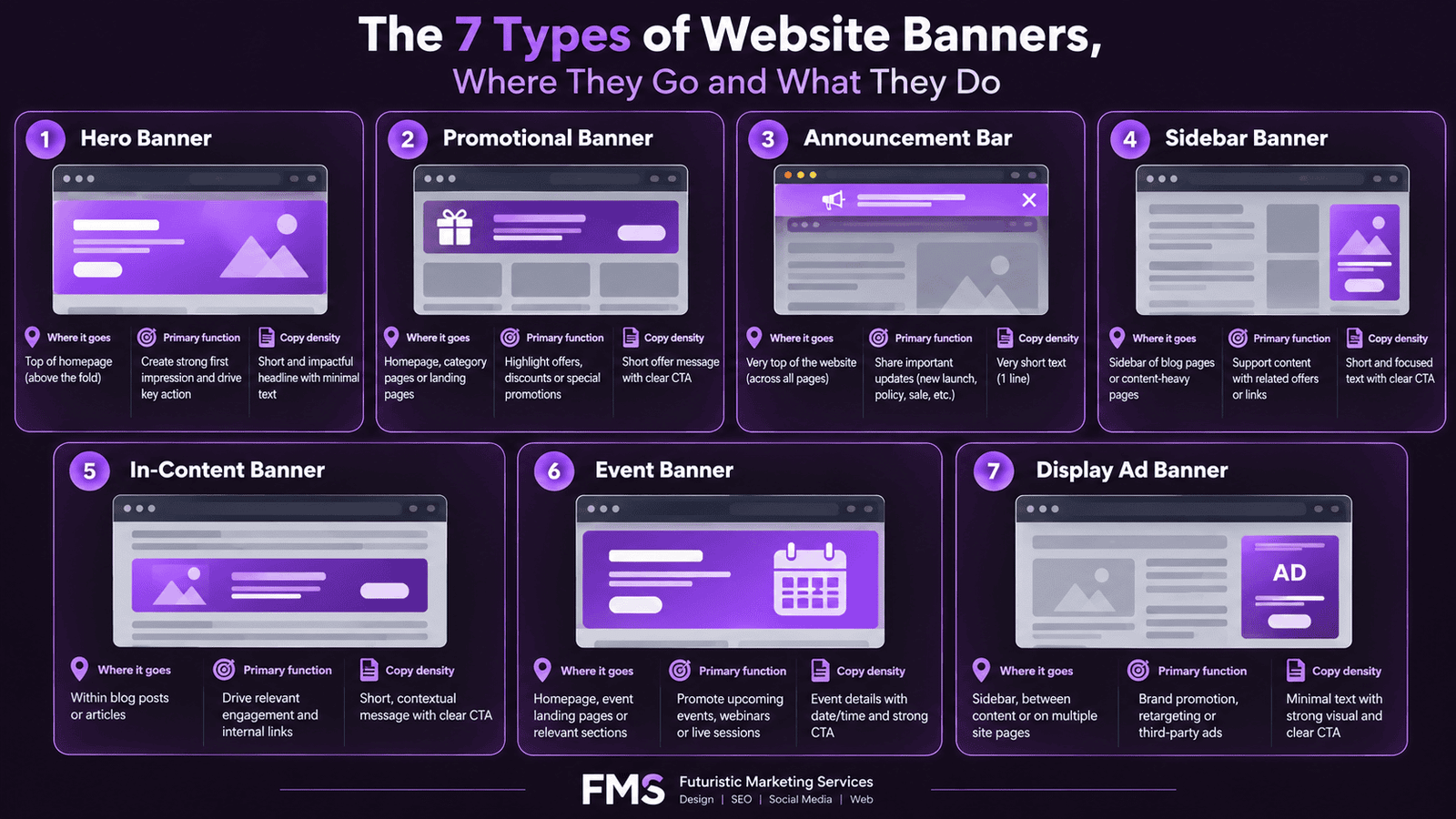
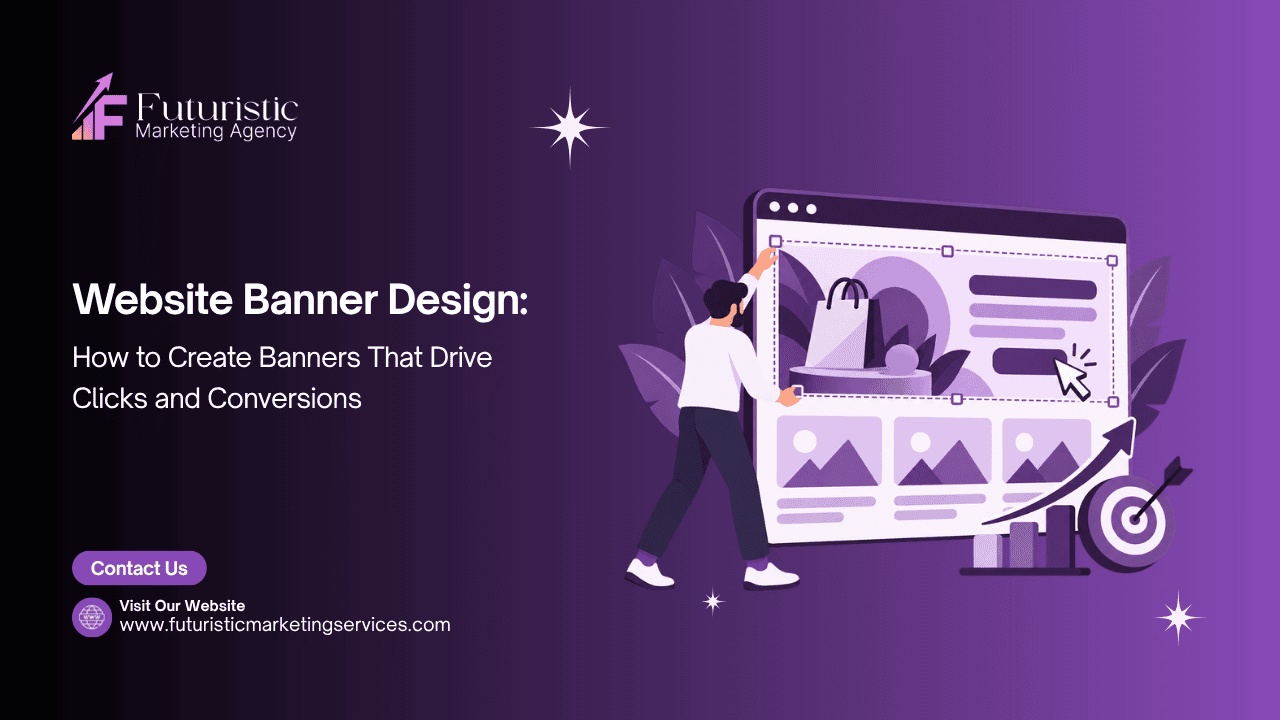
A website banner is a rectangular visual element placed at a prominent position on a web page to communicate a specific message, capture visitor attention, or direct behaviour toward a commercial goal. The banner encompasses everything from the full-width hero image at the top of a homepage to the promotional strip announcing a sale, the sidebar advertisement, and the in-content feature block. Every website uses banners in multiple forms, and the design quality of those banners directly determines whether visitors engage or scroll past.
According to Nielsen Norman Group's eye-tracking research, users spend 57% of their total page-viewing time above the fold, making the hero banner the single most commercially significant design element on most business websites. According to HubSpot's personalisation research, personalised banners produce conversion rates twice as high as generic equivalents. The gap between a well-designed banner and a poorly designed one is measurable, commercially significant, and entirely within the control of whoever makes the design decisions.
This guide covers the complete framework for website banner design: the seven banner types and when to use each, the four laws of visual hierarchy that govern every high-converting banner, typography rules for legibility and authority, CTA design principles, photography versus illustration decisions, mobile-first banner design, technical specifications, and the A/B tests that produce the largest performance improvements. For the complete guide to your most important banner specifically, see our hero banner design guide. For all dimension specifications across every platform, see our website banner sizes guide.

Key Takeaways

  • Users spend 57% of their page-viewing time above the fold (Nielsen Norman Group), the hero banner is the single most important design asset on most websites
  • Personalised or targeted banners convert at twice the rate of generic equivalents, making audience-specific banner design one of the highest-return conversion optimisation investments
  • The four laws of visual hierarchy, one dominant element, deliberate size contrast, directional flow, and contrast and separation, govern every high-performing banner regardless of type or industry
  • Banner text must follow the minimum density rule: hero banners should contain no more than 15 words in the headline zone to maintain visual clarity and immediate message comprehension
  • Mobile-first banner design is not optional: over 60% of website traffic in India arrives on mobile devices, and banners designed only for desktop degrade severely on mobile screens
  • The CTA button is the highest-value single element in any banner, button colour, copy specificity, size, and positioning each independently affect conversion rate and must be tested systematically
  • LCP (Largest Contentful Paint) is directly determined by hero banner image load speed, slow-loading banner images both reduce conversions and harm SEO rankings through Core Web Vitals scoring

Need Professional Website Banner Design That Converts?

Futuristic Marketing Services designs high-converting website banners for Indian businesses, hero banners, promotional banners, and complete banner systems built for desktop and mobile with the correct dimensions, file formats, and conversion-optimised design principles.

Get a Free Banner Design Consultation

The Business Case for Better Banner Design

The performance impact of website banner design quality is documented across multiple credible research sources and A/B testing databases. Understanding the specific commercial stakes involved transforms banner design from a purely aesthetic exercise into a measurable revenue lever.
Design VariablePerformance ImpactResearch Source
Banner visible above the fold80% of visitor attention concentrated in this zone, below-fold banners receive only 20% of total attention regardless of design qualityHotjar scroll-map research, cited in Elementor statistics
First impression formation time50 milliseconds, users form a visual impression of a website faster than conscious thought can evaluate it, making the banner's visual quality a pre-cognitive trust signalGitte Lindgaard, Carleton University study published in Behaviour and Information Technology
Personalised vs generic bannerPersonalised calls to action convert 202% better than generic equivalents across HubSpot's analysed customer datasetHubSpot personalisation research
Above-fold time share57% of total page-viewing time spent above the fold; attention declines consistently with scroll depth regardless of content quality below the foldNielsen Norman Group eye-tracking research

The Seven Types of Website Banners and When to Use Each

Not all website banners serve the same function. Treating every banner type as interchangeable leads to design decisions that are appropriate for one context being applied incorrectly to another, producing banners that either fail to communicate their message or actively work against the user experience. Understanding which banner type to use for which purpose is the first design decision.
Banner TypePlacementPrimary FunctionCopy Density Rule
Hero BannerHomepage top, above the foldBrand story, primary value proposition, first impression, main conversion entry pointMaximum 15 words in the headline zone; sub-headline under 20 words
Promotional BannerHomepage, category pages, landing pagesAnnounce offer, drive purchase, promote time-limited discount or seasonal campaignMedium density, offer, discount value, deadline, and CTA must all be present
Announcement BarSite-wide top bar above navigationInform about shipping, policy changes, new services, or time-sensitive newsVery low, one short sentence maximum; dismissible design preferred
Sidebar BannerRight or left column on blog pages, articlesPromote a related service or product to users engaged in reading content; lead magnet promotionLow density, one hook and one CTA; no body copy
In-Content BannerWithin article or page body, between paragraphsContextually relevant promotion that matches the topic of the surrounding content; highest-intent placementMedium density, relevance to surrounding content is more important than brevity
Event BannerHomepage, email headers, social profilesPromote a specific event, webinar, sale, launch, or conference, with a clear deadline and registration CTADate, time, event name, and CTA are mandatory elements; everything else is optional
Display Ad BannerGoogle Display Network, third-party websitesDrive awareness or conversions for paid advertising campaigns; served to targeted audiences on external websitesVery low, one message, one visual, one CTA; complexity destroys performance at small display sizes

The Four Laws of Visual Hierarchy in Website Banner Design

Visual hierarchy is the design system that tells a viewer's eye what to look at first, what to look at second, and what action to take. Every high-converting banner applies the same four hierarchy laws, regardless of banner type, industry, or brand aesthetic. Violating any of these laws produces a banner that either fails to communicate or fails to convert, even if every individual element is well-designed in isolation.

Law 1: One Dominant Element

Every banner must have a single element that is unambiguously the most visually dominant. This is the first thing the viewer's eye lands on, and it must communicate the banner's primary message either through the image itself (a face, a product, a dramatic visual) or through the headline text. When multiple elements compete for dominance, the viewer's eye scans without settling, processes nothing clearly, and moves on without taking the intended action.
The dominant element in a hero banner is typically the headline or the primary image, depending on whether the banner's conversion mechanism relies more on the emotional impact of the visual (for aspirational brands) or the clarity of the value proposition (for service businesses and B2B companies). The decision should be driven by what the target audience responds to, not by personal aesthetic preference.

Law 2: Deliberate Size Contrast

Visual hierarchy is created through size differentiation. The primary element must be substantially larger than the secondary elements, and the secondary elements substantially larger than the tertiary elements. "Substantial" means a meaningful visible size difference, not a marginal one. A headline at 80px and a sub-headline at 70px creates no hierarchy. A headline at 80px and a sub-headline at 28px creates clear, immediate hierarchy that the eye processes without effort.
The typography system in website banner design follows a three-size hierarchy: the primary headline at maximum size, the supporting sub-headline at 35 to 50% of the headline size, and any body copy or label text at 30 to 40% of the headline size. For the complete typography framework that governs banner headline font selection and sizing, see our typography in design guide.

Law 3: Directional Flow

Every banner composition creates a reading path that the eye follows from the first-seen element to the final CTA. In left-to-right reading cultures, the natural path follows a Z pattern (top-left to top-right, diagonal to bottom-left, then bottom-right) or an F pattern (two horizontal scans, then a vertical). High-converting banner designs place elements along this natural path: dominant visual or headline at the entry point of the Z or F, supporting copy in the middle of the path, and the CTA at the end of the path.
The gaze-following effect amplifies directional flow when a human face is included in the banner: research consistently shows that viewers follow the gaze direction of a face in an image. A presenter looking toward the headline text directs viewer attention to the headline. A presenter looking toward the CTA button directs viewer attention to the CTA. This effect is pre-conscious and operates without any deliberate effort on the viewer's part.

Law 4: Contrast and Separation

Every element in a banner must be visually distinct from everything surrounding it. Text must contrast with its background to a minimum 4.5:1 ratio as defined by WCAG 2.1 accessibility standards. The CTA button must contrast with both the banner background and any adjacent colours. The banner as a whole must have a visible boundary separating it from the page background, either through a colour difference or a visible border. For the complete colour psychology framework governing these contrast decisions, see our colour theory in design guide.

Typography for Website Banner Headlines

Typography in website banner design is not a stylistic choice. It is a functional communication decision with direct commercial consequences. Banner headlines must be readable at a glance, convey the brand's personality, and scale correctly across desktop, tablet, and mobile viewports. These three requirements create specific constraints that narrow the range of appropriate font choices.
Typography ElementDesktop SpecificationMobile SpecificationCritical Rule
Primary Headline48–80px; Bold or ExtraBold weight; maximum 10–15 words28–44px; same weight; line breaks must be controlled so no word wraps awkwardlyNever use a font weight below Bold for primary headline text; thin weights lose legibility on low-brightness mobile screens
Sub-Headline18–28px; Regular or Medium weight; maximum 20 words; different colour or weight from headline16–20px; same weight; often hidden on very small screens if it duplicates information from the headlineSub-headline must add specific information not already communicated by the headline, not restate the headline in different words
CTA Button Text14–18px; Bold weight; imperative verb opening; maximum 4 words14–16px; Bold; button must be minimum 44×44px touch targetCTA text must start with an action verb and specify what happens when clicked; "Click Here" is not a CTA, "Get Your Free Quote" is
Supporting Label / Badge11–14px; Bold or uppercase; high-contrast background11–13px minimum; never smaller than 11px on any screenLabels below 11px are invisible on low-DPI screens; if the label content is important enough to include, it must be readable

CTA Button Design: The Highest-Return Single Element in Any Banner

The CTA button converts banner attention into measurable action. Every other design element in the banner exists to bring the viewer to this single point of decision. A well-designed button in a mediocre banner consistently outperforms a mediocre button in an otherwise excellent banner, because the button is the revenue-generating mechanism and everything else is preparation.
According to Unbounce's A/B testing data, CTA button colour changes alone produce conversion rate improvements of 20–35% in controlled tests, making it one of the highest-return tests a business can run. The critical variable is contrast: the button must stand out from both the banner background and any competing visual elements in the banner composition. In most cases, the CTA button colour should be the brand's accent colour, the colour that appears least frequently in the palette and therefore creates the strongest visual contrast when used.
CTA copy that specifies a concrete outcome outperforms generic copy in every documented test. "Get Your Free SEO Audit" outperforms "Submit" or "Click Here" because it answers the question the viewer is subconsciously asking: "What will I receive when I click this?" The most effective CTA copy follows the formula: Imperative Verb + Specific Benefit + Optional Qualifier.
Banner TypeHigh-Converting CTA CopyWeak CTA Copy to AvoidWhy the Strong Version Works
Service / B2B HeroGet a Free Strategy CallLearn More / Contact UsSpecifies the exact offer (strategy call), confirms it is free, implies immediate availability
E-Commerce PromotionalShop the Sale, Ends SundayShop Now / Buy HereAdds deadline urgency directly into the CTA, reinforcing the promotional banner's time-limited framing
Content / Lead MagnetDownload the Free ChecklistDownload / Submit / ClickNames the specific asset (checklist), confirms the cost (free), specifies the action (download)
Event / WebinarSave My Free SeatRegister / Sign UpFirst-person phrasing ("My") increases personal commitment; "Free" removes financial friction; "Seat" creates mild scarcity

Photography vs Illustration in Website Banners

The choice between photography and illustration is one of the most consequential visual decisions in banner design. Both approaches work in the right context, and both fail in the wrong context. The decision framework is based on the specific commercial goal the banner must achieve and the audience's trust and emotional response requirements.
Photography communicates authenticity and trust most effectively. A banner featuring a real team member, a real product, or a real client outcome conveys credibility that illustration cannot replicate. For service businesses where the primary sales challenge is building trust in a real person or team, photography consistently outperforms illustration. For product businesses where the product itself is the hero, high-quality product photography against a clean background is the most effective visual approach.
Illustration and custom graphic design communicate brand personality and differentiation most effectively. When a business wants to stand out from a photographic-dominant competitive category, a distinctive illustration style creates stronger visual memorability. Illustration also handles concepts that cannot be photographed, data visualisations, process explanations, and abstract value propositions. For the animated vs static banner comparison that is relevant when considering animated illustrations, see our animated vs static banner guide.

Mobile-First Website Banner Design Principles

Over 60% of website traffic in India arrives on mobile devices, and the proportion is higher in consumer-facing and local service categories. Designing a banner for desktop and then adapting it for mobile is structurally the wrong approach. Mobile-first banner design creates the mobile version first, verifies it communicates effectively on a 375px screen, and then adapts that design for the additional canvas space available on desktop.
  • Vertical stacking on mobile: most desktop banners use horizontal layouts (text left, image right or vice versa); on mobile, these elements must stack vertically with the headline first, image second, and CTA button third, ensuring the message sequence is maintained even when the layout changes dramatically
  • Image safe zones: on mobile, only the central portion of a banner image is visible; elements placed at the edges of a banner designed at 1920px width will be cropped on 375px mobile screens; design at mobile width first, then extend the background for desktop without adding critical content to the extended areas
  • Touch target sizing: all CTA buttons in mobile banners must be minimum 44×44px to meet Apple and Google human interface guidelines; buttons smaller than this are difficult to tap accurately and produce high mobile abandonment rates even when the banner design is otherwise strong
  • Image file size for mobile: mobile users on 4G networks are disproportionately affected by large image files; hero banner images must be served in WebP format and compressed to under 150KB for mobile viewports without visible quality degradation
  • Text size on mobile: the minimum readable text size on a mobile screen is 16px at 1x resolution; any text smaller than this in a banner is either invisible or requires pinch-to-zoom to read, both of which represent complete communication failures

Technical Specifications for Website Banners

SpecificationRecommended StandardWhy It Matters
File formatWebP (primary); PNG as fallback for browsers without WebP support; JPEG for photographic banners with no transparency requirementWebP provides 25–35% smaller file sizes than JPEG at equivalent quality; directly improves Core Web Vitals LCP score
Desktop hero size1920×600–1080px depending on banner height proportion; minimum 1280px widthEnsures sharp display on 1920px monitors without serving unnecessarily large files to smaller viewports
Mobile hero size800×1000–1200px (portrait orientation) for vertical mobile hero; 768×400px for horizontal mobile heroServing desktop-sized images to mobile devices wastes bandwidth and dramatically slows load time for mobile users
Maximum file sizeUnder 200KB for mobile-served banner images; under 400KB for desktop hero imagesGoogle's Core Web Vitals requires LCP under 2.5 seconds; a 1MB+ hero image on a mobile 4G connection routinely produces LCP above 4 seconds
Colour profilesRGB for all web-published banner imagesAdobe RGB and CMYK profiles display with incorrect colours in browsers; sRGB is the universal web standard
Alt textDescriptive alt text for every banner image; maximum 125 characters; describes the image and its function without stuffing keywordsAlt text is required for screen reader accessibility compliance and contributes to Google Image Search visibility for relevant visual queries

A/B Testing Website Banners: The Tests That Move the Needle

A/B testing banner design is the process of showing two or more variants of a banner to equal portions of website traffic and measuring which variant produces the highest conversion rate. It is the only reliable method for resolving design decisions that intuition cannot settle definitively, and it consistently reveals that designer preference and user behaviour diverge in ways that surprise even experienced design teams.
The tests that produce the largest measurable improvements, ordered by typical impact magnitude:
  • Headline copy test: test two different value propositions, one focused on the outcome the customer receives, one focused on the problem the business solves, with all other elements identical; this consistently produces the largest conversion differences because the headline determines whether the banner is relevant to the viewer
  • CTA button colour test: test the brand's accent colour against a complementary high-contrast alternative; button colour is the highest-return single visual element test because it directly affects how visible the conversion mechanism is against the banner background
  • CTA copy test: test a specific outcome-oriented CTA ("Get My Free Website Audit") against a more generic equivalent ("Contact Us"); specific copy consistently wins, but the margin of improvement reveals how much the generic copy was hurting conversion
  • Image vs no image test: for service businesses, test a banner with a human face (team member, founder, or client) against a version with a product or abstract visual; the relative performance reveals whether the audience is buying the person or the service
  • Social proof placement test: test a trust signal (number of clients served, years in business, specific result achieved for a client) positioned above vs below the CTA; the position that converts higher reveals where in the decision sequence the audience needs social proof

Need a Professional Banner Design System for Your Website?

Futuristic Marketing Services designs complete website banner systems, hero banners, promotional banners, announcement bars, sidebar banners, and in-content banners, all designed to work together as a unified visual system across desktop and mobile with the correct specifications for your platform.

Start Your Banner Design Project

Frequently Asked Questions

Q. What is a website banner?

A. A website banner is a rectangular visual design element positioned prominently on a web page to communicate a specific message, capture attention, or direct visitor behaviour toward a goal. Banner types include the full-width hero banner at the top of a homepage, promotional banners announcing offers, announcement bars across the top of every page, sidebar banners alongside content, and in-content banners embedded between paragraphs. Each type has distinct design requirements, optimal copy density, and conversion mechanics. For the complete dimension specifications for every banner type, see our website banner sizes guide.

Q. What is the ideal size for a website banner?

A. There is no single ideal size, different banner types and placements require different dimensions. The most common hero banner dimensions are 1920×600 to 1920×1080px for desktop and 800×1000 to 1200px for mobile. The banner must be designed responsively, with mobile and desktop versions that each communicate effectively within their respective dimensions. Using a single desktop image scaled down to mobile produces a banner that either loses critical content when cropped or becomes too large for efficient mobile loading.

Q. How do I design a banner that converts visitors into leads?

A. A high-converting banner combines four elements: a specific, benefit-led headline that addresses the target audience's primary goal or problem; a supporting sub-headline that adds specificity to the promise; a high-quality visual that creates emotional resonance (ideally a human face or a compelling product shot); and a CTA button with specific, outcome-oriented copy in a colour that creates strong contrast against the banner background. The most common conversion failure in website banners is generic CTA copy, replacing "Contact Us" or "Learn More" with "Get Your Free [Specific Offer]" typically produces the fastest measurable improvement.

Q. Should a hero banner be an image or a video?

A. For most businesses, a high-quality static image outperforms video because static images load instantly while videos introduce load time delays that directly affect Core Web Vitals LCP scores and conversion rates. Video hero banners are most appropriate when the product or experience is difficult to communicate without motion (software demos, physical products in use, services with a strong visual process component) and when the business has the technical infrastructure to serve the video as a properly compressed background file that begins loading instantly without affecting LCP. For the complete comparison, see our animated vs static banner guide.

Q. What file format should website banners be?

A. WebP is the recommended format for all website banners published in web contexts. WebP provides 25–35% smaller file sizes than JPEG at equivalent visual quality, directly improving page load speed and Core Web Vitals LCP scores. PNG should be used as a fallback for browsers that do not support WebP, and for banners that require transparency (such as logos or cut-out product images on transparent backgrounds). JPEG remains appropriate for photographic banners in environments that do not yet support WebP delivery. All formats should be exported in sRGB colour profile, not CMYK or Adobe RGB, which display with incorrect colours on screen.

Q. How important is the landing page my banner links to?

A. The landing page destination is equally important as the banner itself. A high-converting banner that links to a poorly designed or generic landing page produces high click-through rates with low final conversion rates, wasting the traffic generated by the banner's design investment. The landing page must deliver on the specific promise made in the banner's CTA and headline, maintaining visual and message continuity so the visitor's experience is seamless rather than disorienting. For the complete guide to designing the page your banner leads to, see our landing page design best practices guide.

Build a Complete Website Banner System That Converts

Futuristic Marketing Services designs website banner systems for Indian businesses, every banner type designed to the correct specifications, with the correct hierarchy, mobile-first, and built for systematic A/B testing from day one.

See Our Website Design Services

Share this post :
Picture of Devyansh Tripathi
Devyansh Tripathi

Devyansh Tripathi is a digital marketing strategist with over 5 years of hands-on experience in helping brands achieve growth through tailored, data-driven marketing solutions. With a deep understanding of SEO, content strategy, and social media dynamics, Devyansh specializes in creating results-oriented campaigns that drive both brand awareness and conversion.

All Posts