WordPress Plugin Development: When to Build Custom and What It Costs

wordpress plugin development

WordPress plugin development is the process of building a package of PHP code that extends or modifies WordPress functionality through the platform hook system. With over 60,000 free plugins in the WordPress repository and thousands more available commercially, custom plugin development is justified for a specific and relatively small subset of requirements, those where no existing plugin meets the business need at acceptable quality, or where a unique system integration requires bespoke code. This guide clarifies when custom development is the right answer and what to expect from the process.

This guide covers the full plugin development framework: the decision matrix for when custom plugins are genuinely needed versus when existing plugins cover the requirement, how WordPress plugins work technically, the development process from specification to documentation, the four security principles every plugin must implement, performance best practices, realistic cost benchmarks, and the questions to ask when evaluating a plugin developer.

Key Takeaways

  • With 60,000 or more plugins in the WordPress repository, the correct first question when evaluating any custom plugin requirement is: does an existing plugin already solve this problem? Custom development is justified only when the answer is genuinely no.
  • Custom plugin development is required when: the functionality needs to integrate with a proprietary internal system no plugin can know about; the business logic is unique enough that no generic plugin implements it; or the combination of required existing plugins creates unacceptable performance, security, or maintenance overhead.
  • WordPress plugins work through a hook system, action hooks fire at specific events (page load, post save, user login) and filter hooks modify data before it is used. Understanding this system is the foundation of WordPress development at any level.
  • Plugin security requires four non-negotiable practices: sanitise all input with WordPress sanitisation functions, escape all output with WordPress escaping functions, verify nonces on all form submissions, and check user capabilities before any privileged action. Skipping any of these creates exploitable vulnerabilities. See our WordPress security guide.
  • Custom plugin development costs range from £800 for a simple single-function plugin to over £80,000 for a mission-critical enterprise workflow. The most important cost driver is specification clarity, an ambiguous brief produces scope creep that multiplies cost.
  • Plugins should load their CSS and JavaScript only on pages where they are needed, not globally across every page. A contact form plugin loading its scripts on every page of a 200-page site adds unnecessary weight to 199 pages that have no form.
  • After a custom plugin is built, it becomes a maintenance responsibility. Factor in ongoing maintenance costs, WordPress core updates can break plugin functionality, requiring developer time to test and update with each major release.

Need a Custom WordPress Plugin?

Bespoke Plugin Development With Security-First Engineering

Futuristic Marketing Services builds custom WordPress plugins, from simple API integrations to complex business logic applications, with security-first development and complete documentation.

Get a Free Consultation
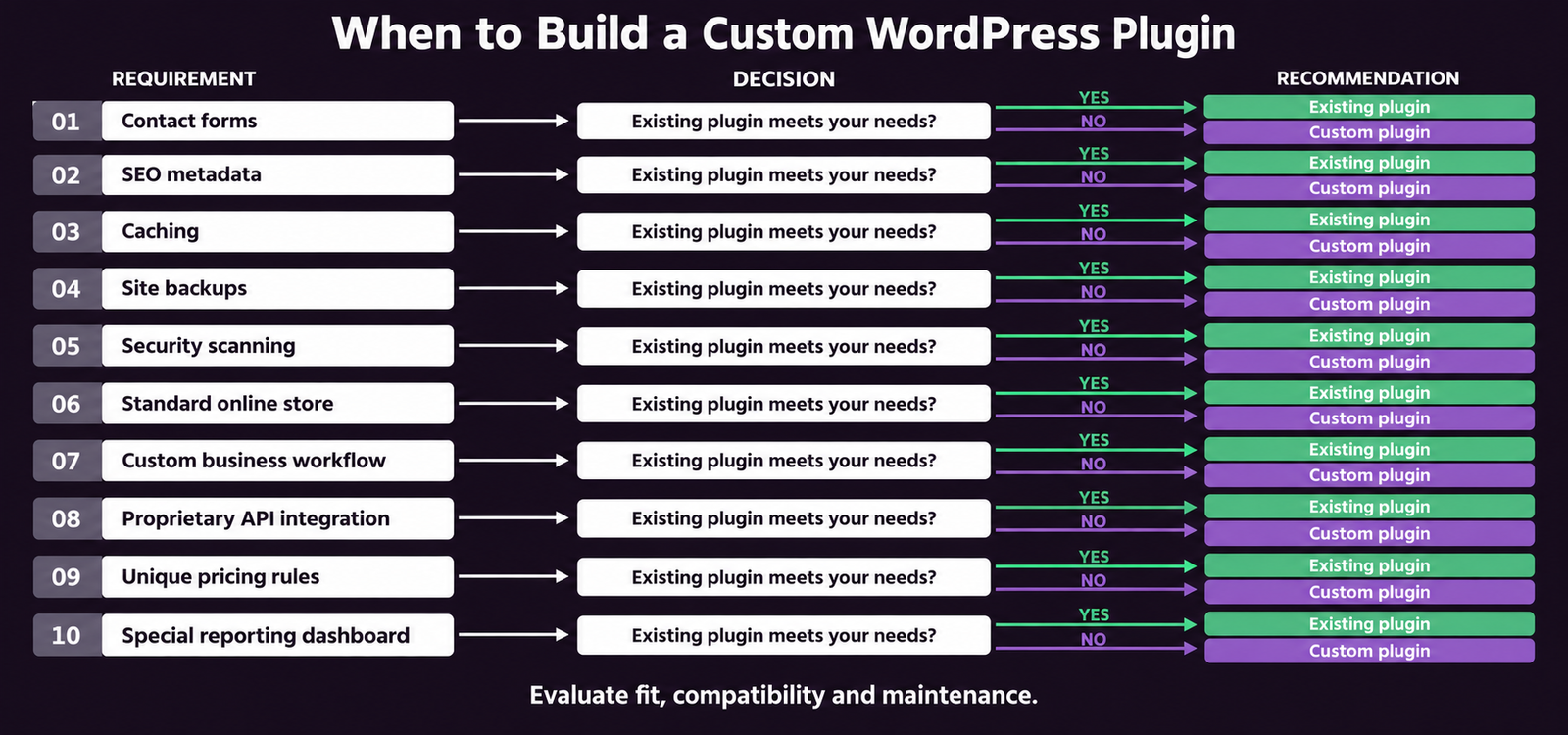
When Do You Need a Custom WordPress Plugin?

The decision to build a custom WordPress plugin should be made only after confirming that no existing plugin meets the requirement. The WordPress ecosystem is extraordinarily broad, 60,000 or more plugins cover an enormous range of functionality. Most business requirements are already solved. Custom development is the right answer for the specific subset of cases where the requirement is genuinely unique.
Requirement Custom Plugin Needed? Better Alternative
Contact form with email notification No Gravity Forms, WPForms, or Elementor Pro Form Builder cover this completely
Product catalogue with standard variants No WooCommerce with Product Add-Ons extension handles all standard configurations
CRM integration (HubSpot, Salesforce, Pipedrive) No Official integration plugins exist for all major CRMs
Email marketing integration (Mailchimp, Klaviyo) No Official WordPress plugins for all major email platforms
Custom user registration and profile fields Probably not User Meta Manager, Ultimate Member, or ProfilePress cover most requirements
Complex pricing logic specific to your business Maybe Evaluate WooCommerce Dynamic Pricing extension first; custom if logic is genuinely unique
Integration with your proprietary internal ERP Yes No generic plugin can know your internal system API
Multi-step approval workflow for your specific business process Yes Your process is specific, no generic workflow engine implements it
REST API endpoints for your mobile application Yes Your app data contract is specific to your application
Custom reporting from your WordPress data model Yes Your data structure is unique, custom query and display logic required

How WordPress Plugins Work

WordPress communicates with plugins through a hook system, two types of hooks allow plugins to interact with the WordPress execution cycle at specific moments without modifying core files. Understanding hooks is the fundamental concept of all WordPress plugin and theme development.

Action Hooks and Filter Hooks

Action hooks fire at specific events in the WordPress lifecycle. The add_action function registers a callback to run when a specific hook fires, for example, add_action('init', 'my_setup_function') runs my_setup_function every time WordPress initialises a page load. Common action hooks include init (WordPress initialisation), wp_enqueue_scripts (registering scripts and styles), save_post (when any post is saved), and wp_head (outputting content in the page head).
Filter hooks modify data before it is used. The add_filter function registers a callback that receives data, optionally modifies it, and returns it. For example, add_filter('the_content', 'my_content_filter') passes every post body through my_content_filter before displaying it on the page, the function can add content before or after the post, modify specific elements, or transform the content entirely.

Custom Post Types and Taxonomies

Custom post types extend the WordPress content model beyond default Posts and Pages. A property listing website registers a property post type; a recipe site registers a recipe post type; a job board registers a job post type. Each custom post type gets its own admin interface, archive URL, single template, and REST API endpoint. Custom taxonomies add classification systems to any post type, categories and tags are built-in taxonomies; a plugin can register industry taxonomy for jobs, cuisine taxonomy for recipes, or location taxonomy for properties.

The REST API

WordPress REST API exposes all WordPress data as JSON at the /wp-json/wp/v2/ endpoint. Custom plugins can register additional REST API routes at /wp-json/{namespace}/v1/{endpoint}, enabling WordPress to serve as a data back-end for mobile applications, React front-ends, or third-party system integrations. REST API endpoints use register_rest_route with permission callbacks, schema validation, and response formatting.

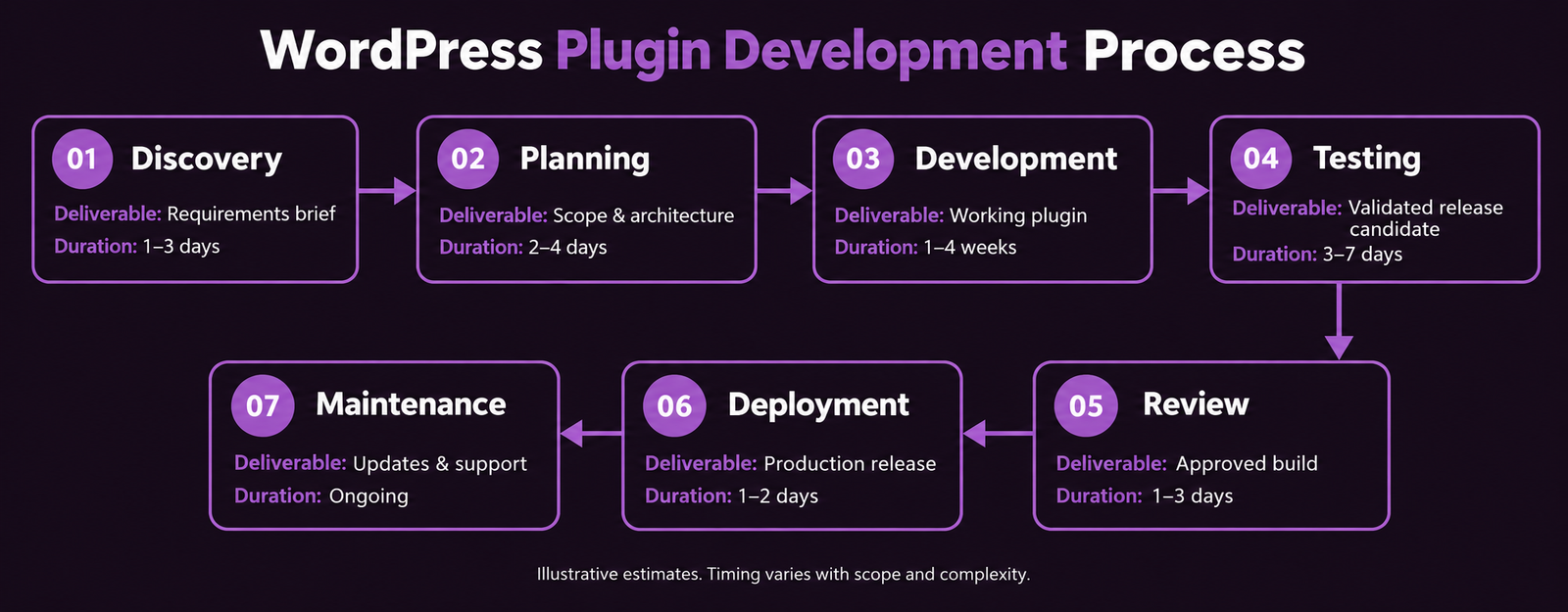
The Plugin Development Process

Phase Deliverables Duration Key Considerations
Requirements specification Functional specification documenting all inputs, outputs, integrations, and edge cases 3 to 10 days Ambiguous requirements are the primary cause of cost overruns, invest time here
Plugin scaffold Main plugin file with plugin header, activation and deactivation hooks, autoloader, and namespace structure 1 to 2 days Namespacing prevents conflicts with other plugins using identical function names
Database schema Custom table creation via dbDelta() if the plugin stores data beyond WordPress default tables 1 to 3 days Define the schema carefully, changes require migration scripts
Core functionality Hook registrations, custom post types, settings API pages, REST API endpoints, or integration code 2 to 8 weeks Most of the development time, complexity depends on specification scope
Security hardening Nonce verification, capability checks, input sanitisation, output escaping across all endpoints 2 to 5 days Cannot be retrofitted cheaply, must be built in from the start
Testing Unit tests with WP_UnitTestCase, integration testing, manual QA across plugin combinations 3 to 7 days Test with the specific theme and plugin combination of the production site
Documentation PHPDoc comments, readme.txt, API endpoint documentation if applicable 1 to 3 days Documentation determines how maintainable the plugin is for future developers

Plugin Security: The Four Non-Negotiable Practices

Plugin security failures are responsible for the majority of WordPress site compromises. A vulnerable plugin creates a vulnerability in every site it is installed on. The four security practices that every custom plugin must implement without exception are sanitise all input, escape all output, verify nonces, and check capabilities.

WordPress Plugin Security Requirements

Sanitise all input

Use WordPress sanitisation functions on all data received from users or external sources before storing or using it. sanitize_text_field() for text, absint() for integers, wp_kses_post() for HTML content. Never trust any input from outside the plugin.

Escape all output

Use WordPress escaping functions on all data before outputting it to the browser. esc_html() for plain text, esc_attr() for HTML attributes, esc_url() for URLs, wp_kses() for allowed HTML. Prevents cross-site scripting (XSS) attacks.

Verify nonces

Add wp_nonce_field() to all forms and verify with check_admin_referer() or wp_verify_nonce() before processing any form submission. Prevents cross-site request forgery (CSRF) attacks where a malicious site tricks users into submitting forms.

Check capabilities

Verify current_user_can('manage_options') or the appropriate capability before any admin action. A subscriber-level user must never be able to trigger actions that require administrator privileges, regardless of how the request is made.

For the broader WordPress security framework including plugin security monitoring, see our WordPress security guide.

Custom Plugin Development Cost

Plugin Complexity Description Typical Cost Timeline
Simple plugin Single function: custom shortcode, admin settings page, basic data transformation or display £800 to £3,000 1 to 3 weeks
Medium plugin API integration, custom post type with admin interface, data storage in custom database tables £3,000 to £10,000 3 to 7 weeks
Complex plugin Multi-function, custom REST API routes, complex data model, external system integrations, admin reporting £8,000 to £30,000 6 to 14 weeks
Enterprise plugin Mission-critical workflow, high-volume data processing, security-sensitive operations, multi-role access £20,000 to £80,000 or more 3 to 6 months

Ready to Commission a Custom Plugin?

Security-First Plugin Development With Full Documentation

Futuristic Marketing Services builds custom WordPress plugins, precise specification, security-hardened implementation, comprehensive testing, and developer documentation included.

Discuss Your Plugin Requirements

Frequently Asked Questions About WordPress Plugin Development

What is a WordPress plugin?

A WordPress plugin is a package of PHP code that extends or modifies the functionality of WordPress through its hook system. Plugins add features, integrations, and custom business logic without modifying WordPress core files, they hook into specific moments in the WordPress execution cycle to add, modify, or intercept behaviour. There are over 60,000 free plugins in the WordPress plugin repository covering almost every common requirement. Custom plugin development is justified when no existing plugin meets a specific unique business requirement.

When should I build a custom WordPress plugin?

Build a custom plugin when: the functionality integrates with a proprietary system no existing plugin can connect to; the business logic is specific enough that no generic plugin implements it; or the combination of existing plugins needed creates unacceptable performance or maintenance overhead. For standard requirements, contact forms, eCommerce, SEO, backups, caching, CRM integrations, existing plugins are almost always the better choice. They are maintained by dedicated teams, tested across thousands of WordPress environments, and cost a fraction of custom development. See our decision matrix in Section 2.

How much does custom WordPress plugin development cost?

Custom WordPress plugin development in the UK costs £800 to £80,000 or more depending on complexity. A simple single-function plugin costs £800 to £3,000. A medium plugin with API integration and a custom admin interface costs £3,000 to £10,000. Complex multi-function plugins with REST API routes and external integrations cost £8,000 to £30,000. Enterprise plugins for mission-critical workflows cost £20,000 or more. The most important cost driver is specification clarity, a plugin built from a precise specification costs significantly less than one that expands during development.

How do WordPress plugins work technically?

WordPress plugins use a hook system to interact with WordPress at specific points in the execution cycle. Action hooks fire at events (page load, post save, user login) and plugins register callback functions to run at these points using add_action(). Filter hooks allow plugins to intercept and modify data before it is used, add_filter('the_content', 'my_function') passes every post body through my_function before display. Plugins can also register custom post types, add REST API routes, create database tables, and add admin interface pages, all through WordPress documented APIs.

What is the difference between a WordPress theme and a plugin?

A WordPress theme controls visual presentation, layout, typography, colours, and template structure for different page types. A WordPress plugin adds functionality, features, integrations, custom data structures, and business logic. The practical rule: if removing it would change how the site looks or what page templates render, it belongs in the theme. If removing it would remove a feature while leaving the site design intact, it belongs in a plugin. This separation keeps codebases maintainable over time.

How long does WordPress plugin development take?

A simple plugin takes 1 to 3 weeks. A medium plugin with API integration and admin interface takes 3 to 7 weeks. Complex plugins take 6 to 14 weeks. Enterprise plugins take 3 to 6 months. The specification phase, documenting all functionality requirements before writing any code, typically takes 3 to 10 days and is the highest-leverage investment in any custom plugin project. Ambiguous specifications cause scope creep that multiplies both timeline and cost.

What security practices are required for WordPress plugins?

Four security practices are mandatory in every custom WordPress plugin: (1) Sanitise all input using WordPress sanitisation functions before storing or using user-provided data. (2) Escape all output using esc_html(), esc_attr(), or esc_url() before displaying any data in the browser. (3) Verify nonces on all form submissions using wp_verify_nonce() to prevent CSRF attacks. (4) Check user capabilities with current_user_can() before any privileged action. Skipping any of these creates an exploitable vulnerability. See our WordPress security guide.

Can a WordPress plugin slow down my site?

Yes, plugins that load unnecessary CSS and JavaScript on every page, make unoptimised database queries, or execute synchronous external HTTP requests on page load can significantly affect performance. The correct approach: load plugin scripts only on pages where the plugin is active (using WordPress conditional tags); cache expensive database query results using the WordPress transient API; and use asynchronous background processing for any external HTTP requests. See our website speed guide for the full performance framework.

What is the WordPress REST API and can plugins extend it?

WordPress REST API provides JSON endpoints at /wp-json/wp/v2/ for all WordPress content types. Custom plugins can register additional REST API routes at custom namespaces, for example, /wp-json/myplugin/v1/orders, using register_rest_route() with permission callbacks, schema validation, and formatted responses. This enables WordPress to serve as a data back-end for mobile applications, React single-page applications, or third-party system integrations. The REST API is the standard approach for headless WordPress and decoupled architecture patterns.

Do I need to maintain a custom WordPress plugin?

Yes, a custom plugin becomes a long-term maintenance responsibility. WordPress core updates (particularly major releases) can break plugin functionality. PHP version upgrades require compatibility testing. Security vulnerabilities discovered in third-party libraries used by the plugin require patching. Plan for an ongoing development resource to maintain custom plugins, typically 3 to 8 hours per major WordPress release for testing and compatibility fixes. Factor maintenance costs into the total cost of ownership when evaluating whether custom development is justified. See our WordPress maintenance guide.

What is a WordPress shortcode and can I create custom ones?

A WordPress shortcode is a small code tag that users can insert into post or page content to output dynamic content generated by a plugin. For example, [contact-form] might be a shortcode that outputs a contact form wherever it is placed. Custom shortcodes are registered with add_shortcode('shortcode-name', 'callback_function'), when WordPress encounters the shortcode in content, it calls the callback function and replaces the shortcode with the function output. While shortcodes are widely used, Gutenberg blocks and Elementor widgets are the more modern approach for injecting custom content into pages.

How do I hire a good WordPress plugin developer?

Evaluate a WordPress plugin developer by: reviewing code samples or repositories (look for consistent use of namespaces, PHPDoc comments, nonce verification, and capability checks); asking how they approach security (a developer who cannot explain the four security practices is a risk); reviewing documentation from previous plugins (good documentation signals professional practice); and checking that they use version control and staging environments. See our hire a WordPress developer guide for the complete evaluation framework and interview questions.

Futuristic Marketing Services

Custom Plugin Built Exactly to Your Specification

Futuristic Marketing Services delivers custom WordPress plugins from precise specification, security-hardened, performance-optimised, fully documented, and supported with ongoing maintenance.

Commission Your Custom Plugin


Custom Plugins: The Right Tool for the Right Problem

Custom WordPress plugin development is one of the most powerful tools available in the WordPress ecosystem, and one of the most frequently commissioned unnecessarily. The discipline of evaluating existing plugins rigorously before commissioning custom development is the highest-leverage decision a business can make before a plugin project begins. 60,000 or more plugins in the WordPress repository means the bar for custom development should be high.
When custom development is justified, proprietary system integrations, unique business logic, specific REST API endpoints, the investment is well-spent. A well-built custom plugin, security-hardened and documented, becomes a durable business asset. A poorly specified or insecurely built plugin becomes a maintenance liability and a security risk. Specification quality and developer security competence are the two variables that determine which outcome you get.
For the broader WordPress development context, see our WordPress development guide. For the theme development complement to plugin development, see our WordPress theme development guide. For developer evaluation, see our hire a WordPress developer guide.
Share this post :
Picture of Devyansh Tripathi
Devyansh Tripathi

Devyansh Tripathi is a digital marketing strategist with over 5 years of hands-on experience in helping brands achieve growth through tailored, data-driven marketing solutions. With a deep understanding of SEO, content strategy, and social media dynamics, Devyansh specializes in creating results-oriented campaigns that drive both brand awareness and conversion.

All Posts