Hiring a WordPress developer in the UK requires evaluating three things: technical competence (performance engineering, security practices, and staging workflow), commercial reliability (portfolio of live sites, references, clear contract terms), and fit for your specific project type (Elementor design work, WooCommerce eCommerce, custom theme development, or plugin development). UK WordPress developer rates range from £30 per hour for junior freelancers to £150 per hour for senior agency specialists.
Key Takeaways
- WordPress developers specialise in distinct areas: theme and visual development, WooCommerce eCommerce, custom plugin and application development, and performance engineering. Hiring a designer for a complex WooCommerce build, or a developer without eCommerce experience for a subscription store, produces poor results. Match the developer specialism to the project requirement.
- UK WordPress freelancer rates in 2026 range from £30 to £50 per hour (junior), £50 to £85 per hour (mid-level), and £85 to £150 per hour (senior specialist). Agency rates range from £75 to £150 per hour. Day rates range from £350 to £800. Fixed-price project quotes are preferable to hourly for defined-scope projects.
- The three non-negotiable technical practices that separate professional from amateur WordPress developers: a staging environment for all development and testing before live deployment; Git version control with a documented deployment process; and child themes for all theme customisations, never direct modification of parent theme files.
- Portfolio evaluation must include live URL testing: run every live site in the developer portfolio through Google PageSpeed Insights on the mobile tab. Any professional WordPress build should score 65 or higher on mobile Lighthouse. Sites scoring below 50 indicate a developer who does not engineer for performance.
- Contract terms that protect the client: (1) Client owns all code and credentials from day one. (2) All source code committed to a Git repository in the client account. (3) Milestone-based payment, never 100% upfront. (4) Staging environment included. (5) 30-day post-launch bug-fix warranty. Missing any of these is a red flag.
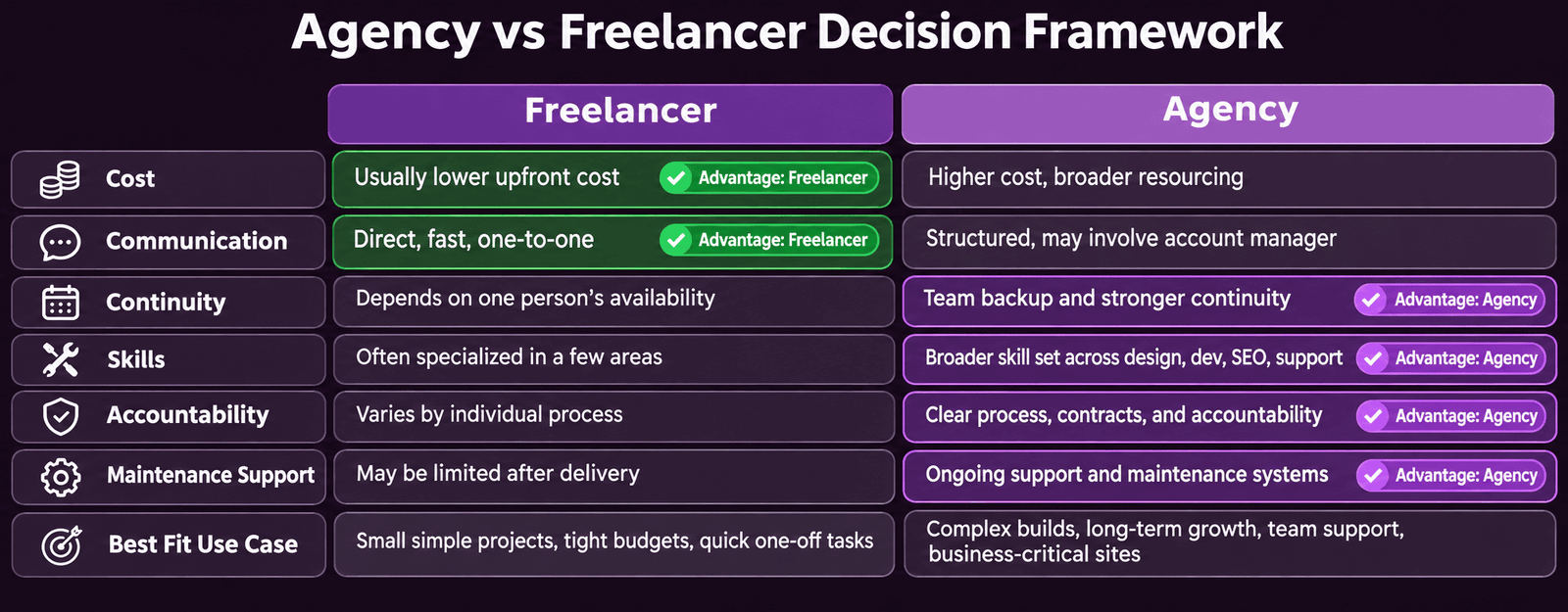
- Agency versus freelancer is a trade-off: agencies provide team continuity (no single point of failure), broader skillsets (designer, developer, SEO in one team), account management, and maintenance support. Freelancers typically provide lower cost, faster communication, and a more personal relationship. For complex projects requiring multiple disciplines, an agency is usually the stronger choice.
- The WordPress maintenance relationship post-launch is as important as the build relationship. Clarify before signing: who manages updates, who is the first point of contact for emergency issues, what is the response time SLA, and what is the monthly retainer cost. Sites without a defined maintenance arrangement accumulate technical debt systematically.
Hire WordPress Developer
Work With a WordPress Team That Engineers for Performance and Longevity
Futuristic Marketing Services builds professional WordPress websites, custom design, Core Web Vitals engineering, full SEO foundations, and a documented development process with staging, Git, and post-launch support.
Start Your Project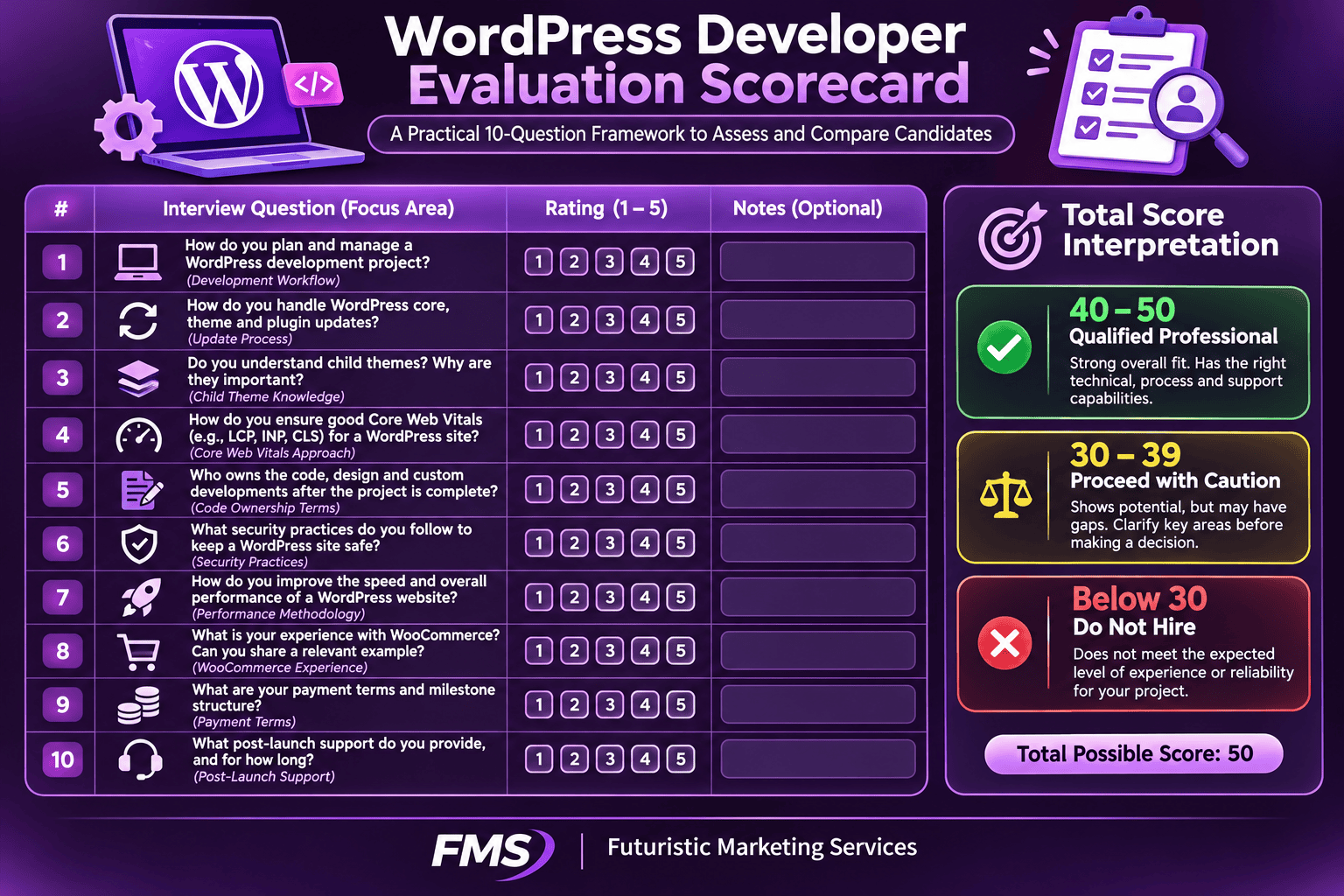
The Four WordPress Developer Specialisms
| Specialism | What They Build | Core Skills | Hire This Type For |
|---|---|---|---|
| Theme and visual developer | Custom WordPress themes, Elementor page designs, Full Site Editing block themes, child theme customisations | PHP template hierarchy, HTML, CSS, JavaScript, Elementor Pro, Figma design implementation | Brand-led marketing sites, custom landing pages, page builder design systems, responsive layouts |
| WooCommerce developer | Online stores, product catalogues, payment gateway integrations, subscription setups, WooCommerce customisation | WooCommerce architecture, payment API integration, product data models, checkout flow, eCommerce UX | New eCommerce stores, WooCommerce migrations, subscription products, B2B pricing configurations |
| Plugin developer | Custom WordPress plugins, REST API endpoints, third-party system integrations, custom post types and taxonomies | WordPress hooks (actions and filters), PHP OOP, REST API, JavaScript, external API integration | Proprietary system integrations, unique business logic applications, mobile app back-ends, custom workflows |
| Performance engineer | Speed optimisation, Core Web Vitals remediation, hosting migration, caching configuration, image pipeline setup | Lighthouse diagnostics, caching architecture, CDN configuration, JavaScript optimisation, image delivery | Sites with Poor Core Web Vitals status, pre-launch performance validation, technical SEO audit remediation |
UK WordPress Developer Rate Benchmarks
| Experience Level | Hourly Rate | Day Rate | Fixed-Price Site (5 to 10 pages) | Best For |
|---|---|---|---|---|
| Junior (0 to 2 years) | £25 to £45 per hour | £200 to £350 per day | £1,500 to £5,000 | Simple brochure sites, content updates, minor customisations, not complex builds |
| Mid-level (2 to 5 years) | £45 to £75 per hour | £350 to £550 per day | £5,000 to £15,000 | Professional marketing sites, standard WooCommerce builds, Elementor Pro design systems |
| Senior specialist (5 or more years) | £75 to £150 per hour | £550 to £1,000 per day | £12,000 to £40,000 | Complex custom development, performance engineering, enterprise WooCommerce, plugin development |
| Small agency (2 to 10 person) | £75 to £130 per hour | £550 to £950 per day | £8,000 to £35,000 | Projects needing design, development, and account management from one team |
| Mid-size agency (10 to 50 person) | £100 to £200 per hour | £750 to £1,500 per day | £20,000 to £100,000 | Enterprise builds, eCommerce at scale, complex integrations, multi-disciplinary team requirements |
Fixed-Price vs Hourly Billing
The Ten Essential Evaluation Questions
Ten WordPress Developer Interview Questions
1. What is your development workflow for a new WordPress site?
Expected answer: local development environment (LocalWP or DDEV), Git version control with a repository from day one, staging server for pre-launch testing, documented deployment process. Any developer who says they develop directly on the live server is disqualified immediately.
2. How do you approach WordPress updates on a client site?
Expected answer: all updates tested on staging first; backup taken before every update batch; post-update verification of key pages, forms, and checkout; client notified of any issues found. A developer who applies updates directly to live without staging testing is creating ongoing risk. See our WordPress maintenance guide.
3. What is a child theme and when would you use one?
Expected answer: a child theme inherits from the parent theme and holds all customisations in separate files that are never overwritten by parent theme updates. The correct answer is always, any customisation to a theme should be in a child theme. Developers who modify parent theme files directly disqualify themselves. See our WordPress theme development guide.
4. What is your process for achieving Good Core Web Vitals?
Expected answer: test on Google PageSpeed Insights mobile tab from the start; target managed hosting with Redis caching; optimise hero LCP image (WebP, preload, correct dimensions); configure WP Rocket; defer third-party scripts. A developer who says they will optimise it if it is slow after launch has missed the point. See our Core Web Vitals guide.
5. Who owns the code, hosting credentials, and domain after the project?
Expected answer: the client owns 100% of all code, all credentials, and all access. The developer has access but not ownership. The source code repository should be in a client-owned Git account from day one. Any developer who retains ownership of the site on their accounts after the project is a hostage risk.
6. How do you handle security for WordPress sites you build?
Expected answer: install Wordfence or Sucuri Security; implement HTTPS correctly; use strong unique admin credentials with two-factor authentication; keep all plugins and themes updated; configure offsite automated backups. A developer who does not mention 2FA and automated backups has not implemented a complete security framework. See our WordPress security guide.
7. What is your approach to WordPress site performance?
Expected answer: managed hosting with server-level caching; WP Rocket for page caching and JavaScript optimisation; WebP images with explicit dimensions; preload the LCP image; defer non-critical JavaScript. Developers who mention only caching plugins without managed hosting are missing the performance foundation. See our website speed guide.
8. Can you walk me through a WooCommerce project you have delivered?
For WooCommerce projects: expected answer covers product catalogue structure, payment gateway integration and testing process, shipping configuration, tax setup for UK VAT, transactional email configuration, and performance approach for the checkout page. Vague answers about having built WooCommerce sites without specifics indicate surface-level experience. See our WooCommerce guide.
9. What payment terms do you require?
Professional answer: project deposit (25 to 40% of project value) on signing; development milestone payment (30 to 40%) at agreed midpoint; final payment on launch. Developers requiring 100% upfront payment before any work begins should be avoided, you lose all commercial leverage if the relationship breaks down. Developers requiring 0% upfront are a financial risk to themselves and less committed.
10. What is included in post-launch support?
Expected answer: a defined warranty period (typically 30 days) for bug fixing at no additional cost; a clear description of what constitutes a bug versus a change request; a transition to a maintenance retainer for ongoing support. A developer with no defined post-launch process leaves the client without support immediately after the highest-risk phase of the project.
Red Flags: Developers to Avoid
| Red Flag | Why It Is Dangerous | What to Look For Instead |
|---|---|---|
| Develops directly on the live site | Every change risks breaking production with no safety net. A single PHP error white-screens the site for all visitors | Separate local development environment and staging server. All changes tested on staging before live deployment |
| Modifies parent theme files directly | Parent theme updates overwrite all customisations. Every theme update destroys previous work. See our theme development guide | Child theme created for all customisations. Zero modifications to parent theme files |
| Cannot explain Core Web Vitals | Core Web Vitals are confirmed Google ranking signals. A developer unaware of them delivers sites that underperform in search from launch | Specific mobile Lighthouse target quoted before project start. Performance testing process described clearly |
| Retains control of hosting and domain credentials | If the relationship ends, the client may be locked out of their own website. Recovery requires legal intervention or complete rebuild | Client owns all accounts from day one. Developer listed as a team member with appropriate role, not as account owner |
| Requires 100% payment upfront | Once paid in full, the developer has no commercial incentive to complete the project to the agreed standard or timeline | Milestone payment structure: deposit on signing, development milestone payment, final payment on launch approval |
| No references from previous clients | Inability to provide references indicates either a very limited portfolio or previous clients unwilling to recommend | Three or more contactable references from previous clients who can speak to workflow, communication, and delivered quality |
| No version control or backup process | Without Git and backups, any incident on the site results in potential permanent loss of code and content. See our WordPress maintenance guide | Git repository in client account from day one. Automated daily backups to offsite storage configured before launch |
| Vague or verbal-only project scope | Without a written specification, scope disputes arise at every decision point. The client has no recourse when expectations differ from delivery | Written project specification signed by both parties before development begins. Change request process defined in writing |
Agency vs Freelancer: Making the Right Choice
| Factor | Freelancer | Agency |
|---|---|---|
| Cost | Lower, no agency overhead; rates typically 20 to 40% below agency equivalent | Higher, team overhead, account management, and profit margin built into rates |
| Communication | Direct, one point of contact, fast responses typically | Indirect, account manager intermediary; communication quality varies significantly |
| Team continuity | Single point of failure, illness, availability, or relationship breakdown loses the resource | Team continuity, multiple developers can pick up any project; no single point of failure |
| Skillset breadth | Deep in specialism; may need to subcontract for design, SEO, or copywriting | Multiple disciplines in-house, designer, developer, SEO, copywriter in one team |
| Accountability | Personal relationship; high motivation on individual reputation | Formal account management; SLA contracts; established processes |
| Maintenance support | Available for established relationships; risk of availability gaps during busy periods | Structured maintenance programmes; defined SLA; team-managed response |
| Best for | Well-defined single-discipline projects; budget-conscious clients; strong communication preference | Complex multi-discipline projects; eCommerce; ongoing relationship with service level commitment |
Find Your WordPress Developer
Work With a WordPress Team With a Documented Process and Performance Standards
Futuristic Marketing Services builds professional WordPress websites with a transparent development process, written specification, staged development, Git version control, Core Web Vitals engineering, and a structured post-launch maintenance programme.
Discuss Your WordPress ProjectContract Terms That Protect You
Non-Negotiable Contract Terms
IP and code ownership
All intellectual property, including all code, designs, content, and databases, transfers to the client on final payment. The developer retains no rights to reuse project-specific code in other client work without explicit written permission.
Credential ownership
All hosting accounts, domain registrar accounts, Google Analytics, Search Console, and any third-party service accounts are registered in the client name with the client email as the primary account owner. Developer access is granted as a team member role, not owner.
Git repository in client account
All source code is committed to a Git repository owned by the client (GitHub, GitLab, or Bitbucket) from the first day of development. The client can pull the current codebase at any point during or after the project.
Milestone payment structure
Payment schedule: project deposit (25 to 40%) on contract signing; development milestone payment (30 to 40%) at defined midpoint; final payment on client approval of the launched site. No scenario where 100% is paid before launch approval.
Staging environment included
A staging environment is set up and used for all development and testing. All deliverables are reviewed and approved on staging before deployment to production. Staging costs are included in the project fee, not billed separately.
30-day bug-fix warranty
The developer provides a minimum 30-day post-launch period during which genuine bugs, functionality not working as specified in the project brief, are fixed at no additional charge. The warranty explicitly distinguishes bugs from change requests (new functionality not in the original specification).
Frequently Asked Questions About Hiring WordPress Developers
Q. How much does it cost to hire a WordPress developer in the UK?
Q. What should I look for when hiring a WordPress developer?
Q. Should I hire a WordPress freelancer or agency?
Q. How do I evaluate a WordPress developer portfolio?
Q. What questions should I ask a WordPress developer before hiring?
Q. What is the difference between a WordPress developer and a WordPress designer?
Q. How long does a WordPress project take?
Q. What are the red flags when hiring a WordPress developer?
Q. What should a WordPress development contract include?
Q. How do I brief a WordPress developer?
Q. Should I hire a WordPress developer near me or remote?
Q. What is a discovery phase and do I need one?
Futuristic Marketing Services
Hire a WordPress Team That Delivers
Futuristic Marketing Services builds professional WordPress websites with a transparent process, written specification, Git version control, Core Web Vitals engineering, staged development, and a structured post-launch maintenance programme that keeps your site performing.
Start Your WordPress Project