

Duplicate Content SEO: How to Find, Fix and Prevent Duplicate Pages in 2026

duplicate content seo

Duplicate content in SEO refers to substantial blocks of content that appear on multiple URLs, either within the same website or across different domains. When Google encounters multiple pages with identical or near-identical content, it must choose which version to index and rank, often splitting ranking authority between the duplicates or selecting a different canonical version than the one you intended to rank.

This guide covers the complete duplicate content SEO framework: how Google handles duplicate pages, the five most common sources of internal duplication on most websites, how to implement canonical tags correctly, when to use 301 redirects versus canonicals, how to manage URL parameters that create duplicate content at scale, how to handle syndicated content without losing ranking authority, and the Google Search Console audit process for identifying every duplicate affecting your site today.

Key Takeaways

  • According to Google Search Central, Google automatically tries to identify the canonical version of duplicate pages, but its choice may not match the page you want ranked, making explicit canonical implementation essential
  • Duplicate content does not cause a direct penalty, but it dilutes ranking authority by splitting PageRank between URL variants and wastes crawl budget on low-value pages, according to Ahrefs
  • The five most common internal duplication sources are: HTTP versus HTTPS variants, www versus non-www, URL parameters, trailing slash inconsistency, and printer-friendly or session-ID page versions
  • The canonical tag (rel=canonical) is the correct tool for declaring your preferred URL version, every page should have a self-referencing canonical tag as a foundational technical SEO audit requirement
  • Syndicated content published on external sites should include a canonical tag pointing back to your original URL to ensure ranking authority flows to your version rather than the syndication partner
  • URL parameters are the most common source of large-scale duplication on e-commerce and filtered content sites, the URL structure guide covers the complete parameter handling framework

Does Your Site Have Hidden Duplicate Content Suppressing Rankings?

Futuristic Marketing Services runs complete duplicate content audits using Screaming Frog, Ahrefs, and Google Search Console, identifying every duplicate URL, missing canonical tag, and parameter-generated page variant suppressing your organic performance.

Get a Duplicate Content Audit

hello@futuristicmarketingservices.com  |  +91 8518024201

How Google Handles Duplicate Content
When Google encounters multiple URLs containing identical or near-identical content, it runs a canonicalisation process to select one preferred version, the canonical URL, to index and rank. Google looks at several signals to determine canonicity: self-referencing canonical tags, 301 redirect destinations, the URL appearing in sitemaps, which version receives the most internal links, the HTTPS versus HTTP preference, and which version was discovered first historically.
The critical issue is that Google's automatic canonical selection may not match your intended ranking URL. Google might select the www version when you prefer non-www, choose the HTTP version of a page that also exists over HTTPS, or pick a parameter-laden URL variant instead of the clean canonical. When this happens, ranking authority accumulates on a URL you did not intend to rank, and your preferred page receives no organic traffic despite having the best content. Explicit canonical implementation overrides Google's automatic selection and ensures authority concentrates where you intend it.
The ranking impact of duplicate content operates through authority dilution rather than direct penalty. Ahrefs research confirms that duplicate content does not trigger a spam penalty, but it splits the PageRank, backlink authority, and crawl budget that would otherwise concentrate on a single strong URL. Two duplicate pages each with 50% of the authority they should share consistently underperform a single consolidated page receiving 100% of that authority.

The Five Most Common Sources of Internal Duplicate Content

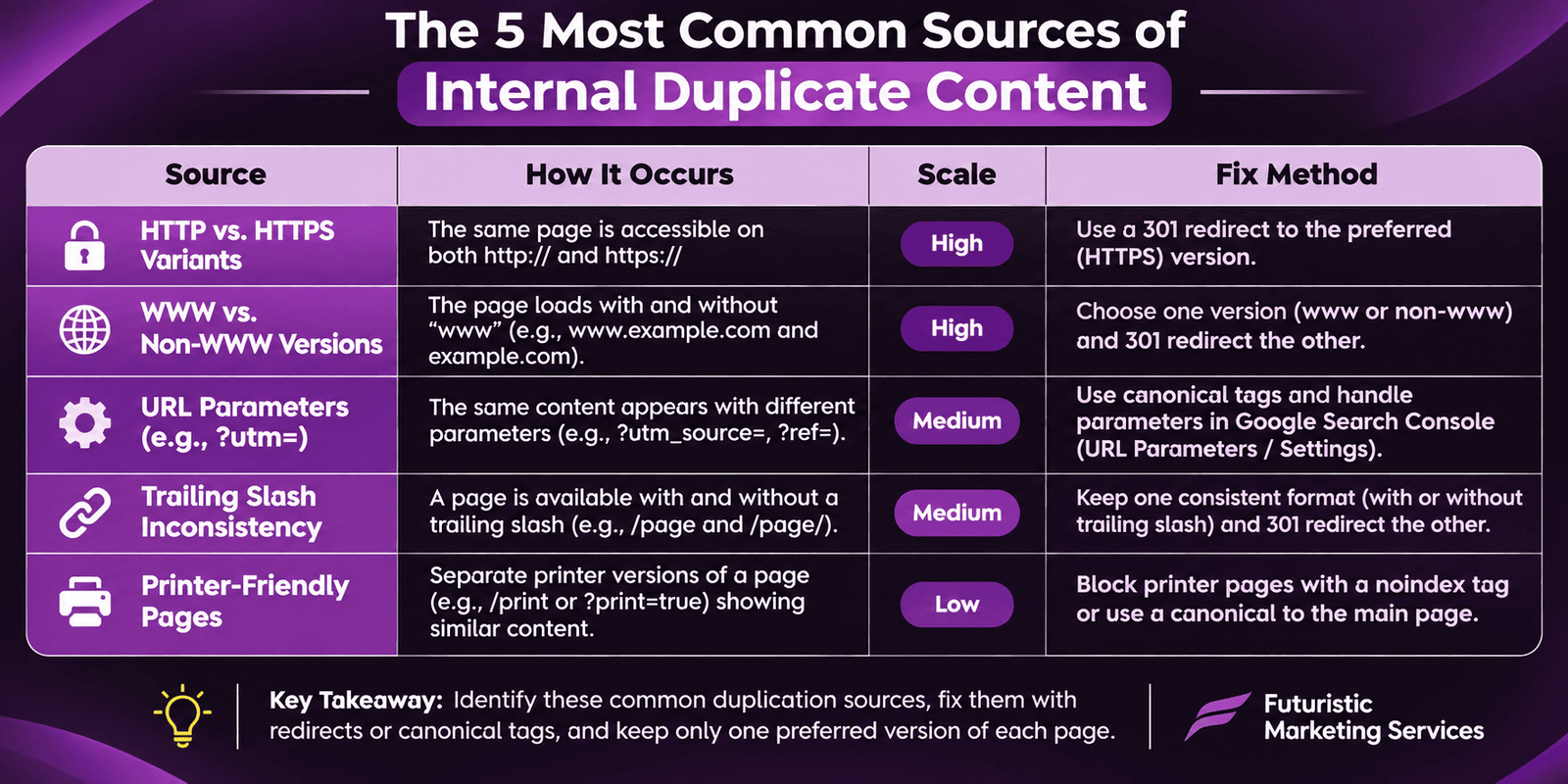
Internal duplicate content, duplication within your own site, accounts for the majority of duplicate content issues discovered during technical SEO audits. Five sources create the vast majority of internal duplication across most websites.
Duplication SourceHow It OccursScale of DuplicationFix Method
HTTP versus HTTPS variantsSite migrated to HTTPS but HTTP version still accessible without redirectEvery indexed page has a duplicate HTTP version301 redirect all HTTP to HTTPS; add HTTPS canonical tags
www versus non-www variantsBoth www.domain.com and domain.com serve identical contentEvery indexed page has a duplicate www or non-www versionChoose preferred version; 301 redirect the other; set canonical
URL parametersTracking, sort, filter, and session parameters create new URLs for the same contentCan produce thousands of duplicates on e-commerce sitesUse canonical tags on parameter pages; configure GSC parameter handling; block low-value variants in robots.txt
Trailing slash inconsistencydomain.com/page/ and domain.com/page serve the same contentEvery page has a duplicate with or without trailing slashChoose one format; 301 redirect the other; ensure internal links are consistent
Printer-friendly or mobile pagesLegacy printer-friendly versions or separate mobile URLs still indexedDoubles the indexed page count for affected pagesCanonical tags pointing to main version; or 301 redirect to main URL

How to Implement Canonical Tags Correctly
The canonical tag is the primary technical solution for duplicate content. It tells Google which URL is the preferred, authoritative version of a page and where ranking authority should concentrate. Implement the canonical tag in the HTML head section of every page, including pages that are themselves the canonical version (a self-referencing canonical).
The canonical tag implementation: link rel=canonical href=https://yourdomain.com/preferred-url/. Every page on your site should have a canonical tag. Pages that are the preferred version should have a self-referencing canonical (the canonical pointing to their own URL). Duplicate or parameter variant pages should have a canonical pointing to the clean preferred URL. Validate canonical implementation using the URL Inspection tool in Google Search Console and Screaming Frog's canonical report.
Five canonical tag implementation rules to follow without exception: always use the absolute URL (never relative paths), always include the correct protocol (https:// not http://), never point a canonical at a redirected URL (canonicals and 301 redirects should not chain), ensure the canonical destination is indexable (never canonical to a noindexed page), and never use canonical tags as a substitute for proper URL structure, fixing duplication at the source is always preferable to managing it with tags.

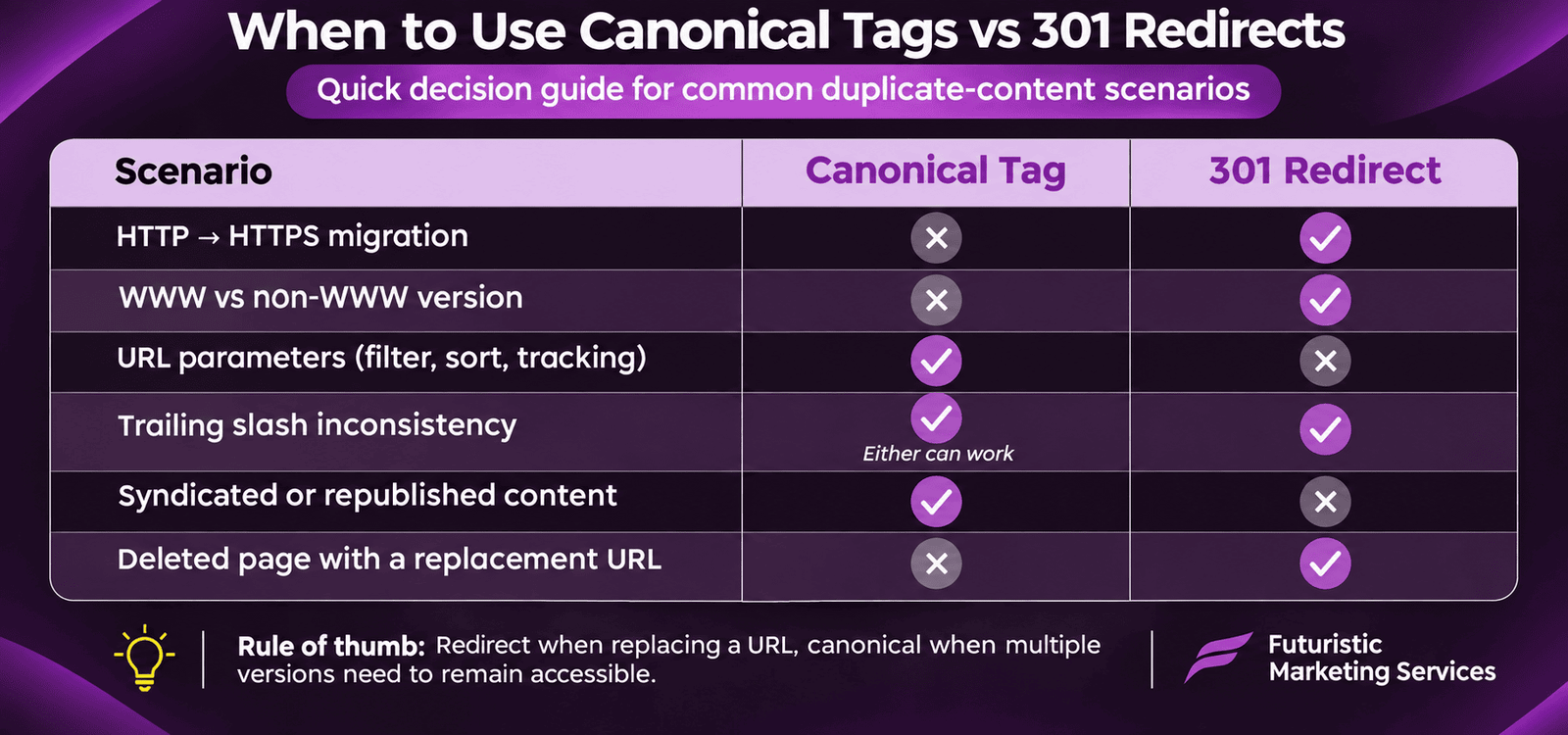
When to Use 301 Redirects Versus Canonical Tags

SituationUse 301 RedirectUse Canonical TagReasoning
HTTP to HTTPS migrationYes, 301 every HTTP URL to HTTPSNot sufficient alone301 consolidates authority and removes HTTP from index
www to non-www consolidationYes, 301 the non-preferred variantNot sufficient alone301 provides definitive URL consolidation
URL parameter variantsNo, too many to redirect individuallyYes, canonical on each parameter page to clean URLCanonical manages dynamic variants without creating redirect chains
Trailing slash variantsYes for the specific alternate versionEither approach works301 is cleaner; canonical is acceptable for small-scale inconsistency
Syndicated content on external sitesN/A, cannot redirect external contentYes, external canonical pointing to your originalCanonical asks Google to attribute ranking to your original URL
Near-duplicate or very similar pagesNo, keep both pages if they serve different intentsYes, if both serve same intent; consider consolidatingNear-duplicates serving different search intents should remain separate

Handling URL Parameters at Scale

URL parameters are the largest source of duplicate content on e-commerce and filtered-content websites. A product listing page with 10 filter options and 3 sort options can generate over 30 parameter-URL variants of the same page, all indexed as separate pages, all splitting authority, and all consuming crawl budget that Googlebot could spend on genuinely valuable content.
The three-tool approach to parameter management: Google Search Console URL Parameters tool (tells Google whether specific parameters change page content or just change presentation, setting tracking parameters as 'no content change' instructs Google to ignore them for canonicalisation), canonical tags on all parameter pages pointing to the clean base URL, and robots.txt Disallow for parameters that create genuinely low-value pages with no indexation benefit. Our URL structure guide covers the complete parameter handling framework with specific implementation steps for each approach.

Syndicated Content and Duplicate Content Across Domains

Syndicated content, your original articles published on third-party platforms like Medium, LinkedIn Articles, or industry publications, creates cross-domain duplication. Google must choose which version to rank: your original or the syndicating partner's. Without explicit canonical instructions, Google often selects the higher-authority domain's version, directing ranking authority away from your site even when your article was published first.
The correct syndication strategy: publish your original article on your own site first and allow Google at least 48 hours to discover and index it before syndicating. When the syndication partner publishes the article, request that they add a canonical tag pointing to your original URL. If canonical tags are not supported by the partner platform (as is the case on LinkedIn), add a clear attribution note at the start of the syndicated version linking back to your original with the anchor 'originally published on [your site]'. This link, even without canonical support, helps Google trace the original source.

Let Our Technical SEO Team Find and Fix Every Duplicate Content Issue on Your Site

Our specialists run complete duplicate content audits, identifying parameter duplication, missing canonicals, HTTP variants, and cross-domain syndication issues, then implement every fix with proper redirect mapping and canonical architecture.

Start Your Technical SEO Audit

hello@futuristicmarketingservices.com  |  +91 8518024201

Frequently Asked Questions About Duplicate Content SEO

What is duplicate content in SEO?

Duplicate content in SEO refers to substantial blocks of identical or near-identical content appearing on multiple URLs, either within the same website or across different domains. When Google encounters duplicate URLs, it must choose which version to index and rank, often splitting ranking authority between duplicates. Common sources include HTTP versus HTTPS variants, www versus non-www URLs, URL parameter pages, and syndicated articles. Our technical SEO audit guide covers the complete discovery process.

Does duplicate content hurt SEO rankings?

Duplicate content does not trigger a direct Google penalty in most cases, but it does hurt rankings through authority dilution. When the same content exists on multiple URLs, backlinks, PageRank, and ranking signals split between them instead of concentrating on one strong page. Google may also index a different version than you intended to rank. According to Google Search Central, using canonical tags and redirects to consolidate duplicates resolves this dilution.

What is a canonical tag and how does it work?

A 301 redirect is a server-level permanent redirect that sends users and crawlers from one URL to another, consolidating authority completely. A canonical tag is a page-level hint that tells Google your preference without removing the original URL from access. Use 301 redirects when you want to permanently consolidate two URLs into one (HTTP to HTTPS migration, www to non-www). Use canonical tags when you need to indicate the preferred version while keeping multiple URLs accessible, such as URL parameter variants.

How do URL parameters create duplicate content?

URL parameters are the characters added to a URL after a question mark, such as ?sort=price&colour=blue, that filter, sort, or track page variants. Each unique parameter combination generates a technically different URL pointing to essentially the same content. An e-commerce category page with 10 filter options and 5 sort values can generate over 50 parameter URLs, all indexed as duplicates splitting authority and wasting crawl budget. Our URL structure guide covers the three-tool parameter management framework.

How do I find duplicate content on my site?

Find duplicate content through four methods: run a Screaming Frog crawl and check the Page Titles and H1 reports for identical values appearing on multiple URLs (a common indicator of template-generated duplicates); use Google Search Console Coverage report to check for pages flagged as Duplicate without user-selected canonical; search Google for site:yourdomain.com plus a unique phrase from your pages to see how many URLs Google has indexed with that text; and use Ahrefs Site Audit's Duplicate Content report for the most comprehensive automated detection.

Should I worry about duplicate content from pagination?

Paginated content (page 1, page 2, page 3 of a list or article) is generally not treated as problematic duplicate content by Google because each paginated URL has distinct content, different products or different article sections on each page. Google's current guidance is to ensure paginated pages are crawlable and allow Google to discover and index all pages in the sequence. Avoid using canonical tags on all paginated pages pointing to page 1, as this incorrectly consolidates all pagination authority into one page and prevents pages 2 onwards from ranking for their specific content.

What happens if I have accidental duplicate content?

Accidental duplicate content, created by CMS auto-generated URLs, parameter variants, or misconfigured redirects, dilutes ranking authority without generating a manual penalty. Audit your site regularly using Screaming Frog and Google Search Console to catch accidental duplicates before they accumulate. Fix them by implementing self-referencing canonical tags on preferred pages, 301 redirecting non-preferred variants, and consolidating parameter-generated pages through the URL Parameters tool in GSC. Early detection prevents months of authority dilution.

Fix the Duplicate Content Issues Silently Diluting Your Rankings

At Futuristic Marketing Services, we identify and resolve every duplicate content source on your site, from parameter duplication and missing canonicals to cross-domain syndication issues, restoring the ranking authority that duplication has been splitting across your URL variants.

Talk to Our Technical SEO Specialists

hello@futuristicmarketingservices.com  |  +91 8518024201

Conclusion

Duplicate content is a technical SEO issue that operates silently, no penalty notification, no obvious traffic drop, just a gradual dilution of ranking authority that prevents your best pages from performing at their full potential. The correct approach is prevention through correct URL architecture and canonical implementation from the start, combined with regular audits to catch any new duplication introduced by platform updates, parameter handling, or content syndication decisions.
Start with a Screaming Frog crawl and Google Search Console Coverage report audit to identify your current duplicate inventory. Implement self-referencing canonical tags on all preferred pages as a foundational step. Fix the highest-impact duplicates (HTTP versus HTTPS, www versus non-www) through 301 redirects. Then address parameter variants and syndication through the appropriate canonical and parameter handling framework. Combine duplicate content management with our URL structure guide and complete technical SEO audit for a fully consolidated technical foundation.
Share this post :
Picture of Devyansh Tripathi
Devyansh Tripathi

Devyansh Tripathi is a digital marketing strategist with over 5 years of hands-on experience in helping brands achieve growth through tailored, data-driven marketing solutions. With a deep understanding of SEO, content strategy, and social media dynamics, Devyansh specializes in creating results-oriented campaigns that drive both brand awareness and conversion.

All Posts