The banner design tools available in 2026 have genuinely closed the gap between amateur and professional output for straightforward banner types. A small business owner with no formal design training can produce a technically correct, visually competent promotional banner, social media announcement, or event banner using any of the tools in this guide, provided they understand what each tool does well, where each one fails, and when the output from self-serve tools reaches the limits of what non-designers can reliably produce.
Key Takeaways
- The best banner design tool for any business depends on 5 decision criteria: design experience level, banner type and output format, brand consistency requirements, team collaboration needs, and budget, there is no universally best tool
- Canva is the most appropriate starting point for most Indian SMEs: 220M+ monthly users, an extensive free plan, the largest template library, and the lowest learning curve of any tool in this guide
- Adobe Express provides the strongest Adobe ecosystem integration (Photoshop, Illustrator, Creative Cloud assets) and is the best choice for businesses already using Adobe tools
- Creatopy is the only tool in this guide specifically built for advertising banner production, it is the right choice for businesses running multi-platform display advertising campaigns that require many size variants from one design
- Self-serve design tools produce their best results for standardised, template-based banner types; they consistently underperform professional design for hero banners, brand identity banners, and complex multi-element promotional banners that require original composition
- The hidden cost of self-serve banner design is not the tool subscription, it is the time investment; a business owner spending 3 hours per week on DIY banner design is spending more on design than a professional retainer would cost
Want Professional Banners Without the DIY Compromise?
Futuristic Marketing Services designs professional website banners for Indian businesses, the quality, originality, and brand consistency that self-serve tools cannot reliably produce, at pricing that competes with the time cost of doing it yourself.
Get a Free Banner Design Consultation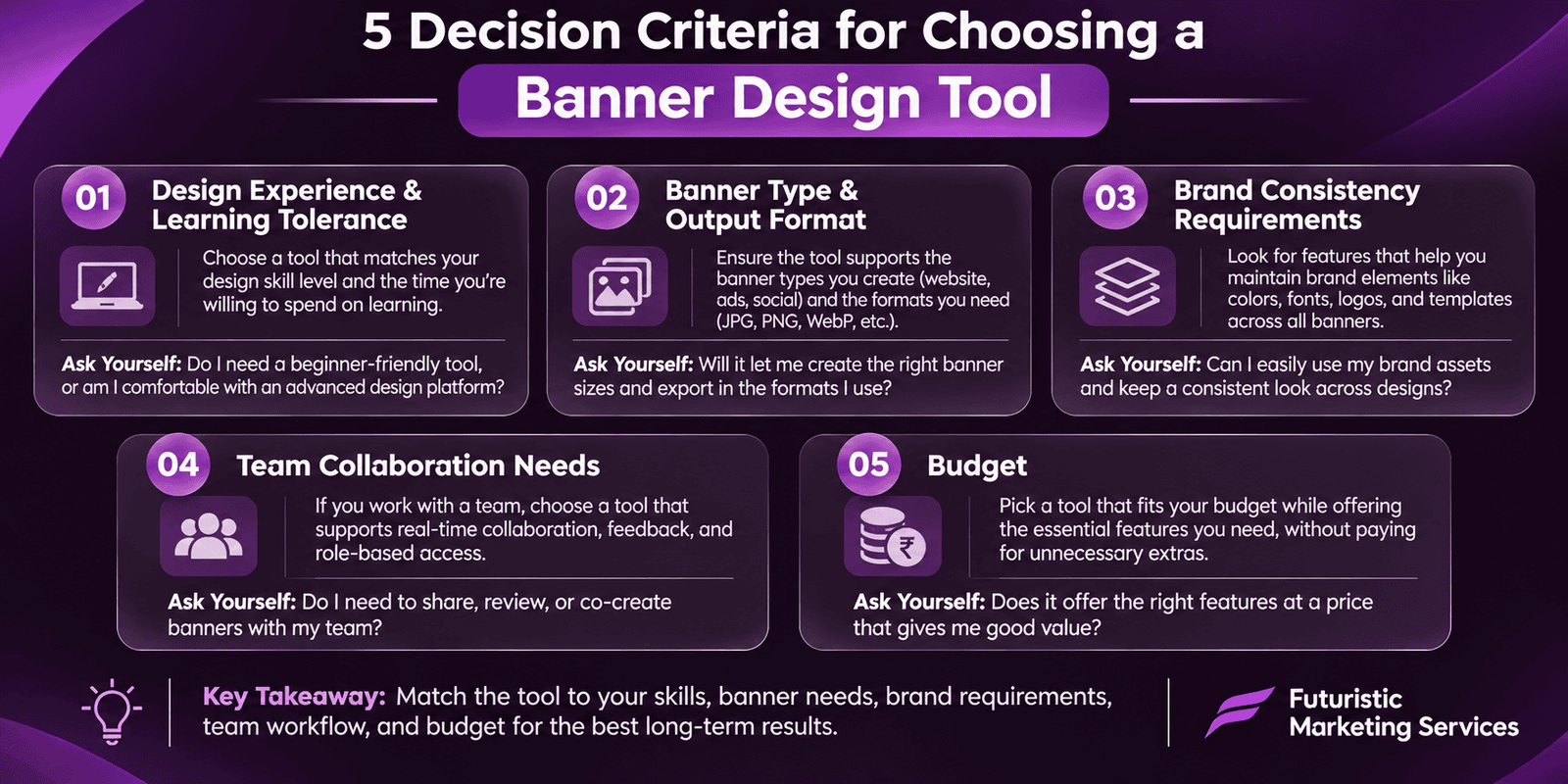
Five Decision Criteria for Choosing a Banner Design Tool
Criterion 1: Design Experience and Learning Tolerance
Criterion 2: Banner Type and Output Format
Criterion 3: Brand Consistency Requirements
Criterion 4: Team Collaboration Needs
Criterion 5: Budget
Tool 1: Canva, Best Overall for Non-Designers
| Category | Details |
|---|---|
| Free Plan | Yes, extensive free plan includes most templates, standard elements, basic photo library, and PNG/JPEG export; limited to 5 Brand Kit colours and no Brand Kit font upload |
| Paid Plan (Canva Pro) | Approximately INR 500 to 800 per month; unlocks Brand Kit (full colour palette, custom fonts, logo upload), Background Remover, Magic Resize (resize one design to all formats simultaneously), larger stock photo library, and animated export formats |
| What Canva Does Best | Social media promotional banners, email headers, event announcements, sale banners, any template-based banner format where a pre-designed starting point produces a satisfactory result with minor customisation |
| Canva Limitations | Templates are used by millions of businesses globally, a Canva template banner will be visually identical to thousands of other businesses' banners unless significantly customised; limited control over precise pixel positioning; not suitable for HTML5 animated ad banner production |
| Best For | Non-designers producing high-volume standard banners; social media managers; small businesses with limited design budgets needing frequent design output |
| Rating | Ease of use: 9/10, Template quality: 8/10, Brand control: 7/10 (Pro) / 4/10 (Free), Animation: 6/10 |
Tool 2: Adobe Express, Best for Adobe Ecosystem Users
| Category | Details |
|---|---|
| Free Plan | Yes, functional free plan with core templates, Adobe Fonts access (a significant advantage over competitors), and basic export options; included in all Creative Cloud subscriptions |
| What Adobe Express Does Best | Access to Adobe's complete font library (thousands of professional typefaces); seamless import of assets from Photoshop and Illustrator; Adobe Stock integration for high-quality licensed photography; clean, professional template aesthetic that reflects Adobe's design heritage |
| Adobe Express Limitations | Smaller template library than Canva; less intuitive interface for users with no prior Adobe experience; collaboration features less mature than Canva Teams; animation features less extensive than VistaCreate |
| Best For | Businesses already using Adobe Creative Cloud; users who want access to professional typefaces beyond the limited font libraries of other tools; businesses that need to incorporate Photoshop or Illustrator assets directly into banner designs |
Tool 3: VistaCreate (formerly Crello), Best for Animated Banners
| Category | Details |
|---|---|
| Animation Capability | Strongest among template-based tools; thousands of pre-built animation styles applicable to text, images, and background elements; exports as animated GIF, MP4 video, or HTML5 (Pro plan) |
| Free Plan | Yes, generous free plan includes animated templates; watermark-free for most formats |
| VistaCreate Limitations | Smaller user base than Canva means a smaller community resource (fewer tutorials, fewer third-party integrations); Brand Kit available on paid plan only; stock photo library smaller than Canva or Adobe Express |
| Best For | Businesses that want animated social media banners, animated email headers, or animated promotional banners without hiring a motion designer |
Tool 4: Visme, Best for Data-Rich and Interactive Banners
| Category | Details |
|---|---|
| Unique Strength | Charts, graphs, maps, and data visualisation elements natively integrated; banners can embed live data that updates automatically; interactive elements that respond to user behaviour |
| Free Plan | Limited, free plan has significant restrictions on downloads; most useful functionality requires a paid subscription |
| Visme Limitations | Learning curve higher than Canva for users with no data visualisation experience; less appropriate for simple promotional banners where data elements are not needed; higher subscription cost than most competitors |
| Best For | B2B marketing banners with statistics and data; infographic-style web banners; LinkedIn advertising banners for professional audiences where data credibility is a key conversion driver |
Tool 5: Creatopy, Best for Multi-Size Ad Campaign Banners
| Category | Details |
|---|---|
| Defining Feature | Ad set production: one design automatically resized to all IAB standard display ad sizes (300×250, 728×90, 300×600, 320×50, 160×600, etc.); HTML5 animated ad export that meets Google's animation requirements |
| Free Plan | Limited free plan; most advertising-specific features require a paid subscription; worth the investment for any business spending INR 20,000+ per month on display advertising |
| Creatopy Limitations | Not appropriate for general banner design outside the advertising context; more complex interface than Canva or VistaCreate; template library less extensive for non-advertising formats |
| Best For | Businesses running Google Display Network, Meta display, or programmatic advertising campaigns that require multiple ad sizes from each creative; marketing agencies producing ad campaigns for multiple clients |
The Complete Tool Comparison: Side-by-Side
| Feature | Canva | Adobe Express | VistaCreate | Creatopy |
|---|---|---|---|---|
| Free plan quality | Excellent | Good (better with CC subscription) | Good | Limited |
| Ease of use | Highest | High | High | Moderate |
| Template library size | Largest | Moderate | Large | Ad-focused templates |
| Brand Kit | Pro plan only | Premium/CC only | Pro plan only | All paid plans |
| Animation capability | Basic to moderate | Moderate | Strongest (template-based) | HTML5 animation |
| Multi-size ad production | Magic Resize (Pro) | Manual resizing | Manual resizing | Automated ad set production (best in class) |
| India pricing estimate | INR 500–800/month (Pro) | Included in Adobe CC (INR 1,800–4,000/month) | INR 800–1,200/month (Pro) | INR 2,500–5,000/month |
The Decision Framework: Which Tool for Which Situation
| Your Situation | Recommended Tool | Reason |
|---|---|---|
| Starting out, no design experience, tight budget | Canva (Free) | Lowest learning curve, excellent free plan, largest template library for social media and promotional banner formats |
| Already using Adobe Creative Cloud | Adobe Express | Already included in the subscription; Adobe Fonts access is a significant advantage; seamless asset sharing with Photoshop and Illustrator |
| Need animated social media banners | VistaCreate | Best animation template library among non-professional tools; animated GIF and MP4 export on free plan |
| Running Google Display or Meta display ad campaigns | Creatopy | The only tool built specifically for ad banner production; automated multi-size export saves hours of manual resizing per campaign |
| Brand consistency across a team is critical | Canva Pro (Teams plan) | Most mature team collaboration and Brand Kit implementation of any tool in this guide; approval workflows and shared asset libraries |
| Hero banner, brand identity banner, or custom promotional campaign | Professional designer | These formats consistently exceed what template-based tools can produce; original composition, brand-specific typography, and conversion-optimised design require professional expertise |
When to Hire a Professional Designer Instead
Ready for Professional Banner Design That Self-Serve Tools Cannot Match?
Futuristic Marketing Services designs professional website banners for Indian businesses, hero banners, promotional banners, complete ad sets, and ongoing banner retainers that eliminate the time cost of DIY design and deliver conversion-optimised creative.
Start Your Banner Design ProjectFrequently Asked Questions
What is the best free tool to design website banners?
Can Canva produce professional-quality website banners?
How do I design a banner for Google Display ads in Canva?
What is the difference between Canva and Adobe Express for banner design?
When should I hire a professional designer instead of using a tool?
Get Professional Banner Design Without the DIY Time Cost
Futuristic Marketing Services offers professional banner design services for Indian businesses, hero banners, promotional sets, Google Display ad sets, and monthly design retainers that eliminate the time cost of DIY and deliver professional quality consistently.
See Our Design Services