
URL structure is the format and organisation of the web addresses that identify every page on your website. For SEO, the URL serves two functions: it is a direct ranking signal (Google reads the URL to understand what the page is about before crawling its full content) and it is a user trust signal (a clean, descriptive URL in the search result increases click-through rate because users can see exactly what the page covers before clicking).
This guide covers the complete URL structure SEO framework for 2026: the exact rules for writing SEO-friendly URL slugs, the URL hierarchy that supports site architecture, how to handle HTTPS and canonical URL consistency, the redirect strategy for changing URLs without losing rankings, common URL structure mistakes that create crawl and indexation problems, and how to audit your current URL structure using Google Search Console and Screaming Frog. Use this guide alongside our technical SEO audit and meta tags guide for the complete on-page technical foundation.
Key Takeaways
- According to Google Search Central, simple, descriptive URLs that reflect your site structure are preferable, Google reads URLs as context for understanding page content before crawling
- The primary keyword must appear in the URL slug, it is a direct ranking signal and a user trust signal visible in the SERP before clicking
- According to Ahrefs research, shorter URLs tend to perform better than longer ones in competitive SERPs, target under 75 characters for the full URL including domain
- Use hyphens to separate words in URL slugs, Google treats hyphens as word separators; underscores are treated as connecting characters, not separators, creating a different word signal
- Never change a URL without implementing a 301 redirect from the old URL to the new one, URL changes without redirects destroy all the ranking authority accumulated by the original URL
- HTTPS is both a ranking signal and a browser security requirement, every page must serve over HTTPS with valid SSL, with HTTP variants 301 redirecting to the HTTPS equivalent
Want Your Site's URL Structure Audited and Optimised for SEO?
Futuristic Marketing Services audits your full URL structure, identifies crawl issues, duplicate content problems, and ranking-destroying URL mistakes, then implements the corrected architecture with proper redirects.
Get a URL Structure Audit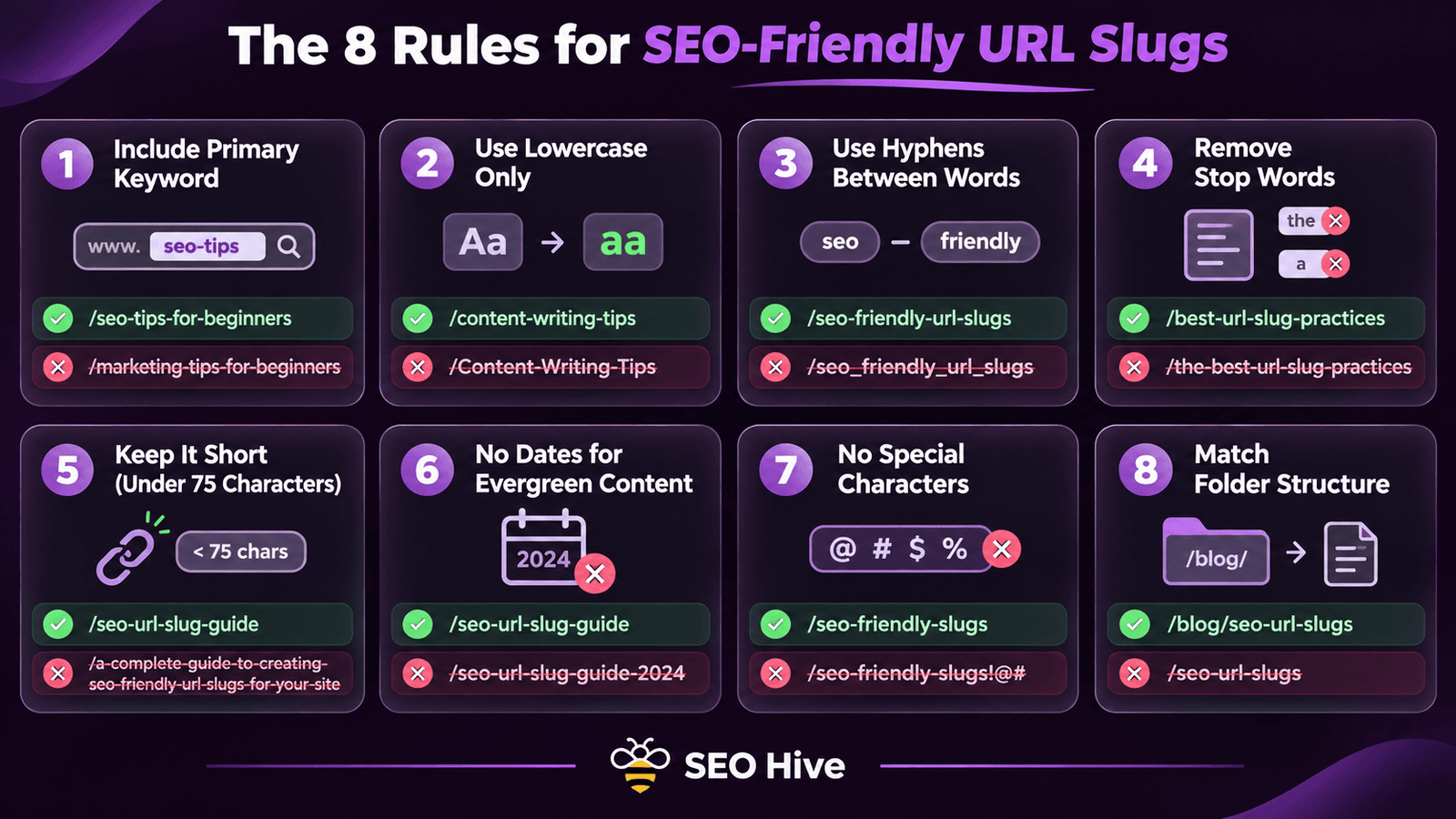
The 8 Rules for Writing SEO-Friendly URL Slugs
A URL slug is the part of the URL after the domain and folder path that identifies a specific page. Writing slugs correctly is one of the most frequently mishandled on-page SEO tasks because many CMS platforms auto-generate slugs from page titles without applying the filtering rules that make URLs SEO-friendly. According to Moz, URL structure is a confirmed on-page SEO ranking factor, optimising slugs correctly costs nothing and earns a permanent ranking benefit.
| Rule | What It Requires | Correct Example | Incorrect Example |
|---|---|---|---|
| Include the primary keyword | The target keyword must appear in the slug | seo-content-strategy | blog-post-6-marketing |
| Use lowercase only | No uppercase letters in any part of the slug | core-web-vitals-guide | Core-Web-Vitals-Guide |
| Hyphens between words | Words separated by hyphens not underscores or spaces | keyword-research-guide | keyword_research_guide |
| Remove stop words | Remove a, an, the, and, for, is, in unless essential to meaning | on-page-seo-checklist | a-checklist-for-on-page-seo |
| Keep it short | Target under 5 words in the slug; under 75 chars for full URL | local-seo-guide | the-complete-guide-to-local-seo-for-small-businesses-2026 |
| No dates for evergreen content | Exclude year and date unless the content is time-sensitive news | link-building-strategies | link-building-strategies-2024 |
| No special characters | No symbols, punctuation, or encoded characters in the slug | technical-seo-audit | technical%20seo%20audit! |
| Match the folder structure | The URL path should reflect your site's topic hierarchy | Blogs/seo/keyword-research-guide | new-page/random-folder/keyword-guide |
URL Hierarchy and Site Architecture
Your URL structure should reflect your site's content hierarchy, the relationship between your homepage, categories, subcategories, and individual pages. A logical URL hierarchy helps Google understand your site's topic structure and helps users understand where they are on your site at a glance. It also supports the silo internal linking architecture that concentrates topical authority in your highest-priority pages.
The recommended URL hierarchy for most business websites: domain.com (homepage) → domain.com/category/ (main topic category) → domain.com/category/sub-category/ (subtopic) → domain.com/category/sub-category/specific-page/ (individual page). For a marketing services site: futuristicmarketingservices.com → futuristicmarketingservices.com/Blogs/seo/ → futuristicmarketingservices.com/Blogs/seo/keyword-research-complete-guide/. This hierarchy is readable by both users and Google and communicates topic structure through the URL itself.
Keep URL hierarchy to a maximum of 3 to 4 levels deep for most content. Pages buried at 5 or more folder levels deep receive reduced crawl frequency and less authority flow through internal links. If your site requires deep hierarchy due to large product catalogues or complex topic structures, ensure important pages are also accessible within 3 clicks from the homepage through internal navigation regardless of their URL depth.
HTTPS and URL Security Requirements
HTTPS (HyperText Transfer Protocol Secure) is a confirmed Google ranking factor and a prerequisite for browser security indicators. Chrome displays Not Secure warnings on HTTP pages, significantly increasing bounce rate and suppressing the user engagement signals RankBrain uses to evaluate page quality. Every page must serve over HTTPS with a valid SSL certificate, and every HTTP variant of every URL must 301 redirect to its HTTPS equivalent.
HTTPS URL consistency requirements: your site should have one canonical HTTPS version of every URL, choose either www.yourdomain.com or yourdomain.com (not both) and redirect all variants to the chosen canonical form. This means four redirect rules are required for a complete HTTPS migration: http://domain.com redirects to https://domain.com, http://www.domain.com redirects to https://www.domain.com, https://www.domain.com redirects to https://domain.com (or vice versa depending on your preferred canonical form), and all internal links must use the canonical HTTPS URL, never mixing HTTP and HTTPS in your own internal link structure
How to Change URLs Without Losing Rankings
Changing a URL without a redirect is one of the most reliably ranking-destroying actions available, the old URL loses all accumulated authority, the new URL starts from zero, and all existing backlinks pointing to the old URL become broken links providing no ranking benefit. Despite this, URL changes are sometimes necessary: fixing a poor URL structure, removing dates from evergreen content URLs, consolidating duplicate-content pages, or migrating from HTTP to HTTPS.
The correct URL change process: implement a 301 (permanent) redirect from the old URL to the new URL, update all internal links to point directly to the new URL (not relying on the redirect chain), submit the new URL to {ilink('Google Search Console',37)} using the URL Inspection tool and request indexing, update your XML sitemap to reference the new URL, and update any backlinks you control (social media profiles, directory listings, other sites you own). Monitor GSC for 4 to 8 weeks after the change to confirm the new URL has inherited the ranking position of the old URL, any ranking drop that does not recover within 8 weeks indicates a redirect implementation problem requiring investigation.
Common URL Structure Mistakes That Suppress Rankings
| URL Mistake | How It Suppresses Rankings | How to Fix It |
|---|---|---|
| Using auto-generated numeric or random slugs (e.g. /p=1234) | Provides no keyword or topic signal to Google; wastes the URL as a ranking opportunity | Manually set descriptive slugs containing the primary keyword for every new page before publication |
| Including dates in evergreen content URLs (e.g. /2024/seo-guide/) | Content becomes dated in the URL itself; harder to rank as the year changes; requires URL changes annually | Remove dates from evergreen content URLs and redirect old dated versions to the clean permanent URL |
| Multiple URL versions of the same page (www/non-www, trailing slash/no slash) | Splits PageRank and authority between URL variants; creates duplicate content signals | Choose one canonical form and 301 redirect all variants to it; add self-referencing canonical tags to all pages |
| Parameters in indexable URLs (e.g. /products?sort=price&filter=blue) | Creates thousands of duplicate pages with different parameters; wastes crawl budget; dilutes authority | Add URL parameters to Google Search Console parameter handling; use canonical tags; block low-value parameter URLs in robots.txt |
| Keyword stuffing in slugs (e.g. /best-seo-services-cheap-seo-services-india) | Appears spammy to both Google and users; can trigger manual action for unnatural optimisation | Use one concise primary keyword in the slug; remove keyword repetition and unnecessary modifiers |
Fix URL Structure Issues That Are Silently Suppressing Your Rankings
Our technical SEO team identifies every URL structure problem on your site, parameter issues, missing redirects, duplicate URL variants, and auto-generated slugs, and implements the corrected structure with full redirect mapping.
Start Your URL Structure AuditFrequently Asked Questions
Q. What is a URL slug in SEO?
A. A URL slug is the part of a web address that identifies a specific page, appearing after the domain and any folder structure. For the URL futuristicmarketingservices.com/Blogs/seo/keyword-research-guide/, the slug is 'keyword-research-guide'. The slug is a direct SEO ranking signal, Google reads it to understand what the page is about before crawling the content. A good slug contains the primary keyword, uses hyphens between words, is all lowercase, and contains no stop words or special characters.
Q. Should I include keywords in URLs?
A. Yes, the primary keyword should always appear in the URL slug. The URL is a direct ranking signal that Google reads before crawling the page's full content, making keyword inclusion in the slug a free ranking opportunity. The keyword should match the primary keyword target for that page as determined by your keyword research and keyword map. Keep the slug concise, include only the essential keywords and remove stop words like 'a', 'the', 'and', 'for', and 'in' unless they are critical to the meaning.
Q. Should I use hyphens or underscores in URLs?
A. Always use hyphens to separate words in URL slugs. Google treats hyphens as word separators, 'keyword-research-guide' is read as three separate words (keyword, research, guide) by Google's crawlers. Underscores are treated as connecting characters, not separators, 'keyword_research_guide' is read as one combined unit rather than three separate words, significantly weakening the keyword signal. This distinction has been confirmed by Google's John Mueller and is consistent with best practice recommendations from Google Search Central's URL structure guidelines.
Q. How long should a URL be for SEO?
A. Keep URL slugs as short as possible while remaining descriptive. Target a maximum of 5 words in the slug itself and under 75 characters for the complete URL including the domain. Shorter URLs rank better in competitive SERPs according to Ahrefs correlation data, not because URL length is a direct ranking factor, but because shorter URLs tend to have more targeted, relevant slug content rather than strings of stop words and unnecessary modifiers. Remove all stop words, dates (for evergreen content), and keyword repetition from slugs to achieve clean, short, descriptive URLs.
Q. What happens if I change a URL?
A. Changing a URL without a 301 redirect causes the original URL to lose all accumulated ranking authority and the original URL returns a 404 error, destroying all existing backlinks' value. Always implement a 301 permanent redirect from the old URL to the new URL before or simultaneously with the URL change. Update all internal links to point to the new URL directly. Submit the new URL to Google Search Console for indexing. The 301 redirect passes approximately 90 to 99% of the ranking authority from the old URL to the new URL, but it takes Google 4 to 8 weeks to fully process the change and restore the original ranking position.
Q. What is HTTPS and why does it matter for SEO?
A. HTTPS (HyperText Transfer Protocol Secure) encrypts data transmitted between a user's browser and your server. For SEO, Google confirmed HTTPS as a direct ranking signal in 2014, and Chrome displays Not Secure warnings on HTTP pages that increase bounce rate and suppress RankBrain engagement signals. Every page must serve over HTTPS with a valid SSL certificate. Every HTTP URL variant must 301 redirect to its HTTPS equivalent. Check HTTPS implementation in our technical SEO audit guide and validate SSL status using SSL Labs at ssllabs.com/ssltest/.
Q. How do I handle URL parameters for SEO?
A. URL parameters (the ?key=value strings added to URLs by tracking codes, filters, sort options, and session IDs) create duplicate content by generating multiple unique URLs for the same page. Manage URL parameters through four methods in combination: add canonical tags to parameterised pages pointing to the clean canonical URL, use Google Search Console URL Parameters tool to tell Google how to handle specific parameters, add consistently low-value parameter patterns to robots.txt to prevent crawling, and where possible configure your CMS to not generate indexable URLs for parameter variants at all.
Build the URL Architecture That Supports Rankings Across Your Entire Site
At Futuristic Marketing Services, we design and implement URL structures aligned with your site's content hierarchy and SEO goals, with complete redirect mapping, canonical tag implementation, and HTTPS verification.
Talk to a Technical SEO ExpertConclusion
URL structure is a foundational technical SEO element that is both free to optimise and permanent in its ranking benefit. A clean, keyword-containing URL slug tells Google what a page covers before a single line of content is read, builds user trust that increases click-through rate, and supports the site architecture that concentrates topical authority in your highest-priority pages.
Apply the eight slug rules to every new page before publication as a standard production step, this prevents the URL structure problems that compound over time into major technical debt. For existing pages with poor URL structure, implement 301 redirects from old URLs to new ones and update internal links to point directly to the corrected URLs. Combine URL structure optimisation with our meta tags guide, internal linking strategy, and technical SEO audit for the complete on-page technical foundation.