Key Takeaways
- According to Wordfence, over 4 billion malicious requests are blocked across WordPress sites monthly. WordPress is targeted because of its market share, not because it is inherently insecure. A correctly secured WordPress site is highly resistant to attack.
- 43% of WordPress compromises exploit outdated plugins, according to WPScan. Weekly updates, applied within 48 hours for security patches, eliminate the primary attack vector responsible for nearly half of all WordPress hacks.
- Wordfence (free tier) or Sucuri Security provides a Web Application Firewall (WAF) that blocks malicious requests before they reach WordPress, malware scanning, and brute force protection. One of these two plugins is mandatory on every production WordPress site.
- Two-factor authentication (2FA) on all admin accounts is the single most effective protection against brute force and credential theft attacks. Even if a password is compromised, 2FA prevents unauthorised access.
- HTTPS with a valid SSL certificate is both a security requirement and a Google ranking signal. All WordPress traffic must be served over HTTPS. HTTP sites display "Not Secure" in Chrome, a direct trust and conversion killer. See our WordPress SEO guide for the full technical context.
- Daily database backups and weekly full-file backups to offsite cloud storage (not on the same server as the site) are the security safety net that enables recovery from any compromise within minutes. Without offsite backups, a successful attack can result in permanent data loss. See our WordPress maintenance guide.
- Managed WordPress hosting on Kinsta or WP Engine includes server-level security, isolated containers, automatic malware scanning, and DDoS protection, that shared hosting cannot provide. See our WordPress hosting guide for the comparison.
WordPress Security
Get Your WordPress Site Security Audit and Hardening
Futuristic Marketing Services provides WordPress security audits and hardening, plugin configuration, 2FA setup, firewall implementation, and a monitored maintenance programme.
Request a Security AuditWhy WordPress Sites Get Hacked
| Attack Vector | Share of Compromises | Prevention |
|---|---|---|
| Outdated plugins with known vulnerabilities | 43% | Weekly plugin updates; security monitoring alerts for new CVEs; remove unused plugins |
| Outdated WordPress core | 26% | Enable automatic minor version updates; apply major updates within 1 week of release |
| Weak or compromised admin passwords | 16% | Strong unique passwords (16+ characters); two-factor authentication; limit login attempts |
| Outdated or vulnerable themes | 15% | Regular theme updates; remove inactive themes; use themes from reputable sources only |
The Automated Attack Reality
The WordPress Security Stack
| Security Layer | Tool | Cost | What It Provides |
|---|---|---|---|
| Firewall and malware scanning | Wordfence Security or Sucuri Security | Free (Wordfence Premium from $99/year) | Web Application Firewall blocks malicious requests; real-time malware scanner; brute force protection; live traffic monitoring |
| Two-factor authentication | WP 2FA or Google Authenticator plugin | Free | Requires a time-based one-time code in addition to password, prevents account takeover even if password is compromised |
| Automated backups | UpdraftPlus or hosting backup | Free (Premium from £70/year) | Daily database and weekly full-file backups to Google Drive, Dropbox, or S3, offsite storage ensures recovery even if server is compromised |
| SSL and HTTPS | Hosting provider (Let's Encrypt free) | Free via most managed hosts | Encrypts all traffic between browser and server; required for Google ranking; prevents data interception |
| Login protection | Limit Login Attempts Reloaded | Free | Blocks IP addresses after configurable failed login attempts; prevents brute force credential attacks |
| Activity logging | WP Activity Log | Free (Premium from £79/year) | Records every admin action, plugin installs, post edits, user changes, essential for post-incident forensics |
Wordfence Configuration for Maximum Protection
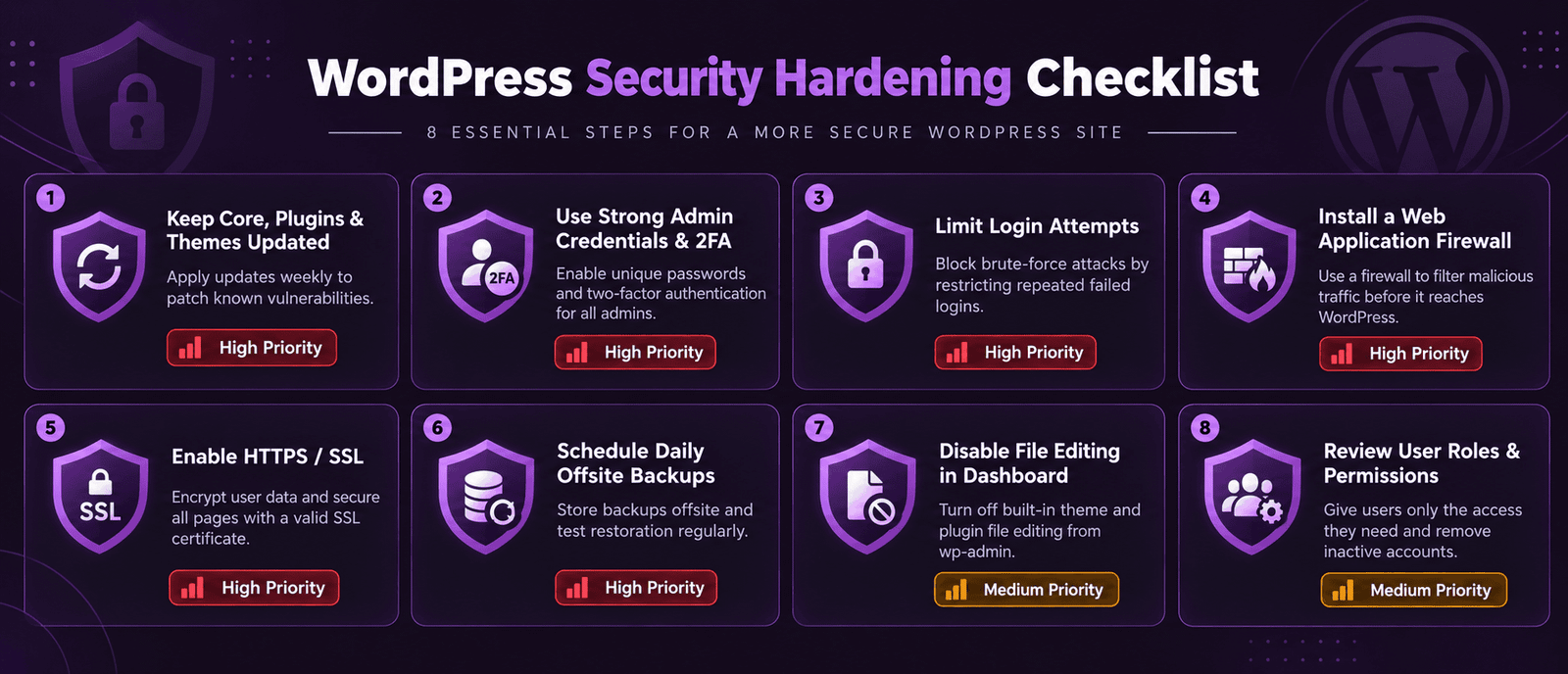
The WordPress Security Hardening Checklist
Essential WordPress Security Hardening
Change default admin username
WordPress historically defaulted to 'admin' as the username, a known target for brute force attacks. Create a new administrator account with a unique username, assign all content to it, then delete the 'admin' account.
Use strong unique passwords
Admin passwords must be minimum 16 characters with mixed case, numbers, and symbols. Use a password manager (1Password, Bitwarden), never reuse passwords across sites. Every admin account must have a unique strong password.
Enable two-factor authentication
Install WP 2FA or Google Authenticator and enforce 2FA on all administrator and editor roles. A compromised password cannot be used to log in without the 2FA device, the most effective single security measure available.
Limit login attempts
Install Limit Login Attempts Reloaded and configure lockout after 5 failed attempts. This prevents brute force attacks that try thousands of password combinations automatically.
Keep everything updated
Update WordPress core, all plugins, and all themes weekly. Apply security patches within 24 to 48 hours of release. Enable automatic minor version updates for WordPress core. Use the WordPress maintenance schedule to manage this systematically.
Remove unused plugins and themes
Every inactive plugin and theme is a potential attack surface, even deactivated plugins can be exploited if they contain vulnerabilities. Delete (not just deactivate) any plugin or theme not actively in use.
Disable XML-RPC if not needed
WordPress XML-RPC endpoint is a common brute force target. If you are not using the WordPress mobile app or Jetpack, disable XML-RPC by adding 'add_filter( xmlrpc_enabled, __return_false );' to functions.php in your child theme.
Implement HTTPS correctly
All traffic must be served over HTTPS. Check for mixed content (HTTP resources on HTTPS pages) using Chrome DevTools Console. Implement HSTS (HTTP Strict Transport Security) header. See our WordPress SEO guide for the technical implementation.
Infographic
WordPress Security Hardening Checklist
Alt text: Eight item WordPress security hardening checklist showing change default admin username, use strong unique passwords minimum 16 characters, enable two-factor authentication on all admin accounts, limit login attempts to block brute force attacks, keep WordPress core plugins and themes updated weekly with security patches within 24 hours, remove unused plugins and themes, disable XML-RPC if not in use, and implement HTTPS with HSTS header, with priority rating for each item
WordPress Database Security
| Database Security Practice | How to Implement | Why It Matters |
|---|---|---|
| Change the default table prefix | Set a custom table prefix (e.g. wp_abc123_) in wp-config.php during installation or using a plugin post-installation | Default wp_ prefix makes SQL injection attacks easier, changing it adds a layer of obscurity |
| Restrict database user permissions | Grant the WordPress database user only SELECT, INSERT, UPDATE, DELETE, CREATE, DROP, INDEX, ALTER, not GRANT or SUPER | Principle of least privilege, a compromised WordPress installation cannot create new database users |
| Regular database backups | UpdraftPlus daily database backup to Google Drive or S3, separate from file backups | Database contains all content and user data, it is the most critical backup target |
| Protect wp-config.php | Add 'deny from all' rule for wp-config.php in .htaccess or move it one directory above the web root | wp-config.php contains database credentials, it must not be publicly accessible |
WordPress Security Programme
Ongoing Security Monitoring and Maintenance for WordPress Sites
Futuristic Marketing Services provides monthly WordPress maintenance and security monitoring, updates, backups, firewall management, and malware scanning to keep your site protected.
Start Your Security ProgrammeFrequently Asked Questions About WordPress Security
Q. Is WordPress secure?
Q. What is the best WordPress security plugin?
Q. How do I know if my WordPress site has been hacked?
Q. How do I clean a hacked WordPress site?
Q. Do I need SSL for my WordPress site?
Q. How often should I update WordPress plugins?
Q. What is two-factor authentication and do I need it for WordPress?
Q. Should I disable WordPress XML-RPC?
Q. How do I protect my WordPress login page?
Q. What are the most important WordPress security settings?
Q. Is managed WordPress hosting more secure?
Q. What should I do immediately after a WordPress hack?
Futuristic Marketing Services
WordPress Security That Protects Your Business Asset
Futuristic Marketing Services provides WordPress security hardening and ongoing monitored maintenance, weekly updates, daily backups, firewall configuration, and malware scanning, for businesses that cannot afford site downtime or data loss.
Secure Your WordPress Site