WordPress SEO: The Complete Optimisation Guide

wordpress seo

WordPress SEO is the process of optimising a WordPress website to rank in organic search results, covering technical configuration, on-page content, Core Web Vitals performance, structured data, and internal linking. WordPress is the most SEO-friendly major CMS because it gives developers complete control over every ranking signal. The key steps are installing an SEO plugin (Yoast or Rank Math), configuring permalink structure, optimising Core Web Vitals, implementing schema markup, and building a structured internal linking system.

This guide covers the complete WordPress SEO framework for 2026, from the technical foundation every WordPress site needs before any content work begins, through to the on-page optimisation process, schema markup implementation, Core Web Vitals performance requirements, the Yoast versus Rank Math comparison, WordPress-specific technical SEO issues and how to fix them, the internal linking architecture that distributes PageRank across the site, and the ongoing measurement framework that tracks ranking progress. Whether you are setting up WordPress SEO from scratch or auditing an existing site, this guide gives you the complete framework.

Key Takeaways

  • WordPress is the most SEO-friendly major CMS, it gives complete control over URL structure, meta data, structured data, and Core Web Vitals performance. No hosted platform (Wix, Squarespace, Shopify) matches this technical SEO ceiling.
  • Organic search drives 53% of all website traffic according to BrightEdge research, making SEO the highest-volume acquisition channel for most businesses. WordPress is the optimal platform to capture this traffic.
  • Yoast SEO and Rank Math are the two professional standard WordPress SEO plugins. Both automate meta title templates, XML sitemaps, schema markup, and canonical tags. Rank Math Pro is the stronger choice for most professional sites in 2026 due to its automated schema generation and superior free tier.
  • Core Web Vitals, LCP, CLS, and INP, are confirmed Google ranking signals. WordPress on managed hosting with WP Rocket consistently achieves Good status. See our Core Web Vitals guide for the full optimisation process.
  • The permalink structure must be set to Post Name before any content is published. Changing permalink structure on a live site with existing rankings requires 301 redirects and carries ranking risk. Get this right from day one.
  • Schema markup (JSON-LD structured data) enables rich results, star ratings, FAQ accordions, breadcrumbs in SERPs. Rank Math Pro automates schema generation for Article, FAQPage, LocalBusiness, Product, and Review types across all page types.
  • Internal linking distributes PageRank from high-authority pages to the commercial pages that need ranking power. Every blog post should link to 3 to 8 related internal pages with descriptive keyword-relevant anchor text. See our website architecture SEO guide.

WordPress SEO Setup

Get Your WordPress SEO Foundation Built Correctly From Day One

Futuristic Marketing Services configures the complete WordPress SEO technical foundation, permalink structure, SEO plugin, schema markup, Core Web Vitals, and Google Search Console setup.

Start Your SEO Setup

The WordPress SEO Technical Foundation

The technical SEO foundation is the baseline configuration every WordPress site must have before any content work begins. Without these foundations in place, even the best content and most authoritative backlinks will underperform because Google cannot crawl, index, and understand the site correctly.

Step 1: Permalink Structure

Set WordPress to post-name permalink structure in Settings, Permalinks before publishing any content. This produces clean, keyword-relevant URLs (/services/wordpress-seo/) rather than numeric or date-based URLs (/page?p=142). Numeric URLs provide no keyword signal to Google. Post-name URLs are the universal professional standard. Changing permalink structure on a live site with existing rankings requires 301 redirects for every URL, get this right from day one.
Permalink SettingURL FormatSEO ValueRecommendation
Plain/?p=123Zero keyword signalNever use, provides no topical context
Day and name/2026/01/15/post-name/Low, date creates maintenance burdenAvoid, dates cause evergreen content to appear dated
Month and name/2026/01/post-name/LowAvoid, same maintenance issue
Post name/post-name/High, clean keyword-relevant URLUse for blogs; consider category structure for sites
Custom structure/category/post-name/High, adds topical hierarchy signalBest for sites with clear category structure (eCommerce, media)

Step 2: Install and Configure an SEO Plugin

Install either Yoast SEO or Rank Math immediately after WordPress setup. Both plugins automate the technical SEO infrastructure, meta title and description templates, XML sitemap generation, canonical tag management, Open Graph tags for social sharing, and robots.txt configuration. Without an SEO plugin, meta titles default to the site name on every page, canonical tags are absent, and sitemaps are not generated, all significant ranking handicaps.
FeatureYoast SEO FreeYoast SEO PremiumRank Math FreeRank Math Pro
Meta title and descriptionTemplate-based for all post typesSame plus redirect managerTemplate-based plus keyword trackingSame plus advanced analysis
XML sitemapAutomaticAutomaticAutomaticAutomatic
Schema markupBasic Article and BreadcrumbArticle, FAQ, How-ToArticle, FAQ, How-To, LocalBusiness, ProductFull schema library including Review, Course, Event
Redirection managerNot includedIncludedIncluded (free)Included with advanced rules
Internal link suggestionsNot includedIncludedNot includedIncluded
Annual costFree£99Free£59
Rank Math is the recommended choice for most professional WordPress sites in 2026. Its free tier includes a redirection manager and broader schema support than Yoast Free, and Rank Math Pro at £59 per year provides a more complete automated schema library than Yoast Premium at £99.

Step 3: XML Sitemap Submission

Both Yoast SEO and Rank Math generate an XML sitemap automatically at yoursite.com/sitemap.xml. Submit this URL to Google Search Console immediately after launch via Indexing, Sitemaps. The sitemap ensures Googlebot discovers every page on the site, critical for sites with pages that are not yet linked internally. Monitor the sitemap in Search Console for pages that are submitted but not indexed, which signals crawlability or content quality issues requiring investigation.

WordPress SEO On-Page Optimisation

On-page SEO is the process of optimising each page's content, structure, and meta data to rank for its target keyword. WordPress and its SEO plugins make on-page optimisation accessible without technical expertise, but the fundamentals must be applied correctly on every published page.

Meta Title and Meta Description

The meta title is the blue clickable text shown in Google search results. It is one of the strongest on-page ranking signals and the primary driver of click-through rate from search results. Every WordPress page and post must have a unique meta title of 50 to 60 characters containing the primary keyword, a clear benefit, and the brand name. The meta description (140 to 155 characters) does not directly affect ranking but significantly affects CTR, write it as a mini-advertisement for the page.

Meta Title Formula by Page Type

Service pages

Primary Keyword + Outcome or Brand. Example: WordPress Website Development | Futuristic Marketing Services

Blog posts

Primary Keyword: What the Article Covers. Example: WordPress SEO: The Complete Optimisation Guide

eCommerce category

Category Name | Buy Online | Brand. Example: WooCommerce Themes | Buy WordPress Themes | Brand

Location pages

Service + Location + Benefit. Example: WordPress Developer Manchester, Fast, Professional Builds

Comparison content

Keyword A vs Keyword B: Key Differences Explained. Example: Yoast vs Rank Math: Which SEO Plugin Wins?

FAQ and how-to

How to [Achieve Outcome]: Step-by-Step Guide. Example: How to Speed Up WordPress: 8 Proven Methods

Heading Structure

Every WordPress page must have exactly one H1 containing the primary keyword. H2 headings divide the page into major sections, two or more should naturally include the primary keyword. H3 headings are sub-sections within H2 areas. Never skip heading levels, no H3 directly after H1. Headings serve dual purpose: they provide keyword signals to Google and create the document structure that search engines use to understand content organisation. Gutenberg and Elementor both make correct heading implementation straightforward.

Content and Keyword Optimisation

Primary keyword density should be 0.8 to 1.2% of total word count, never force keywords beyond what reads naturally. Use semantic variations and related terms throughout, Google's natural language understanding means variations count toward topical relevance as effectively as exact keyword repetition. The first 150 words should include the primary keyword at least twice. Every significant factual claim should be supported by a statistic or source. For eCommerce SEO, product descriptions must be unique, manufacturer copy creates duplicate content across all retailers using the same text.

Schema Markup for WordPress

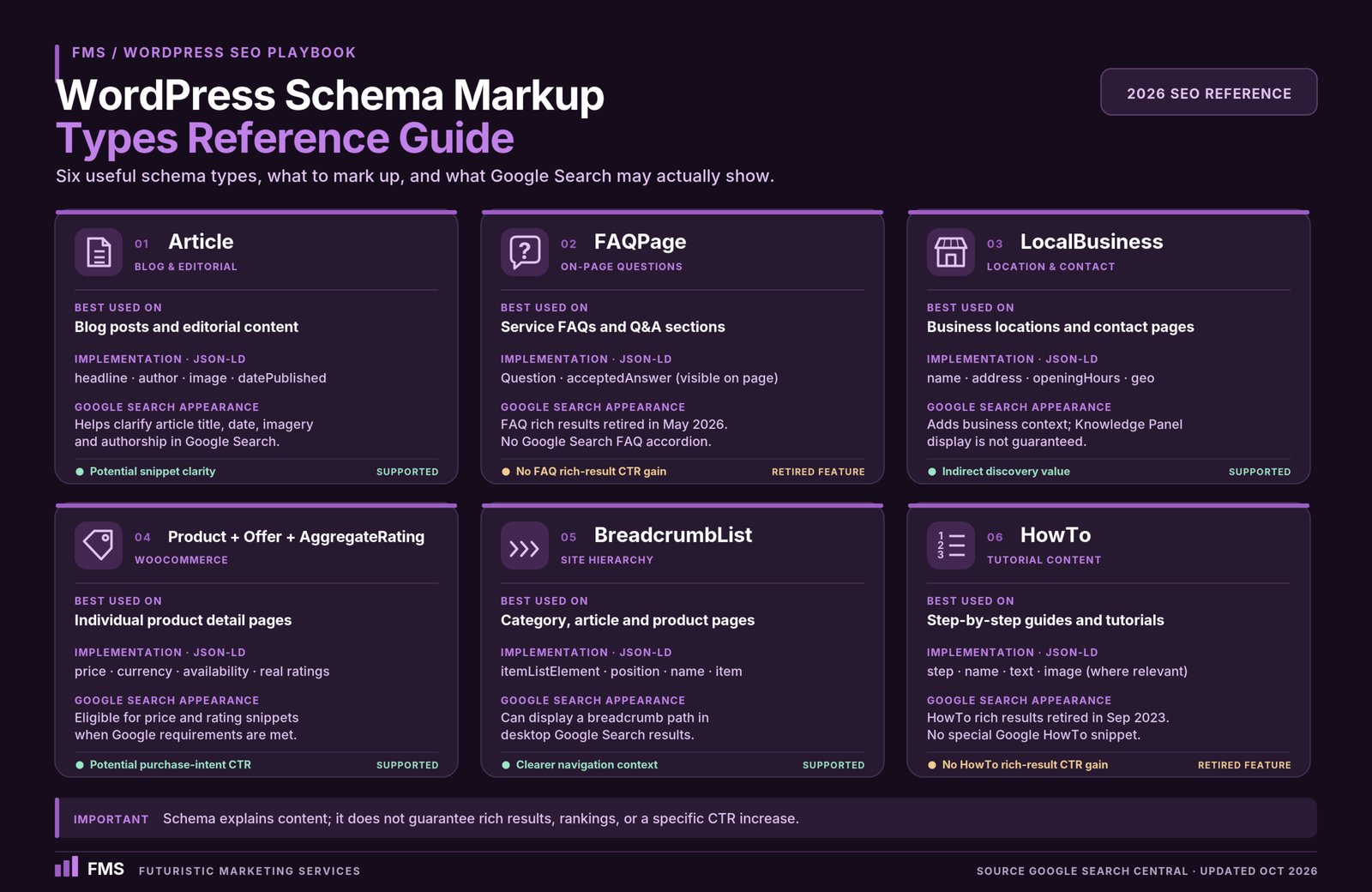
Schema markup (JSON-LD structured data based on schema.org vocabulary) communicates explicit factual information about page content to Google in machine-readable format. Correctly implemented schema enables rich results, enhanced SERP appearances that significantly increase click-through rate.
Schema TypePages to ApplyRich ResultCTR Impact
Article / BlogPostingAll blog postsArticle rich result with author byline5 to 15% CTR improvement
FAQPageService pages and posts with FAQ sectionsFAQ accordion in SERPs, adds multiple Q&A pairs below result20 to 35% SERP real estate increase
LocalBusinessHomepage and contact page for local businessesKnowledge Panel and local pack appearanceHigh for local search visibility
Product + Offer + AggregateRatingWooCommerce product pagesPrice, availability, and star ratings in SERPs20 to 30% CTR improvement
BreadcrumbListAll pages with breadcrumb navigationBreadcrumb path in SERP instead of URL5 to 10% CTR improvement
HowToStep-by-step guide contentHowTo rich result with steps shownHigh for tutorial content
Rank Math Pro automates schema generation for all major types across WordPress page types. Validate all schema with Google Rich Results Test before and after implementation. Monitor for schema errors and warnings in Google Search Console under Enhancements.

Core Web Vitals and WordPress Performance SEO

Core Web Vitals, LCP (Largest Contentful Paint), CLS (Cumulative Layout Shift), and INP (Interaction to Next Paint), are confirmed Google ranking signals. Pages with Good status on all three have a ranking advantage over Needs Improvement or Poor pages in competitive niches. WordPress on the correct hosting stack consistently achieves Good status, but it requires deliberate implementation.

The WordPress Performance SEO Stack

Managed hosting (foundation)

Kinsta, WP Engine, or Cloudways, server-level Redis caching, global CDN, sub-200ms TTFB. Shared hosting cannot achieve Good Core Web Vitals regardless of other optimisation. See our website speed guide.

WP Rocket (caching layer)

Page caching, JavaScript deferral, CSS minification, image lazy loading, and database optimisation. The single highest-impact performance plugin for WordPress at £40 per year.

WebP images with preload

Convert all images to WebP; add explicit width and height to all img elements; preload the LCP hero image. These three changes address the majority of LCP and CLS failures.

Defer third-party scripts

Analytics, chat widgets, and marketing pixels add JavaScript that delays INP. Load all third-party scripts after the page is interactive, via tag manager delayed triggers or Partytown library.

For the complete Core Web Vitals optimisation process, LCP fixes, CLS fixes, INP fixes, and hosting benchmarks, see our Core Web Vitals guide and website speed guide. For the full technical audit process, see our technical SEO audit guide.

Internal Linking Architecture

Internal linking distributes PageRank (link authority) from high-authority pages to the commercial pages that need ranking power. A well-structured internal linking system is one of the highest-leverage SEO activities available for an established WordPress site, yet it is the most commonly neglected.
Every new blog post should link to 3 to 8 related internal pages with descriptive anchor text that includes the target page primary keyword. Service pages should receive internal links from multiple blog posts covering related topics. The homepage and primary service pages should be within 2 to 3 clicks of every page on the site. Orphan pages, pages with no internal links pointing to them, are under-crawled and under-ranked. Audit internal links quarterly using Screaming Frog to identify orphans and under-linked priority pages. For the complete architecture framework, see our website architecture SEO guide.

WordPress SEO Audit

Get a Professional WordPress SEO Audit and Optimisation Plan

Futuristic Marketing Services provides comprehensive WordPress SEO audits, technical foundation review, on-page analysis, Core Web Vitals assessment, schema validation, and a prioritised optimisation roadmap.

Request Your SEO Audit

Frequently Asked Questions About WordPress SEO

Q. Is WordPress good for SEO?

A.style="color:rgba(255,255,255,0.85);font-size:15px;line-height:1.8;">WordPress is the best SEO platform of any major CMS. It provides complete control over URL structure, meta data, structured data, and Core Web Vitals performance, the technical factors that determine organic ranking potential. WordPress sites consistently outrank competitors built on constrained platforms like Wix or Squarespace in competitive niches, primarily because of the performance ceiling advantage and the technical SEO control available via plugins like Rank Math and Yoast SEO.

Q. What is the best WordPress SEO plugin?

A.style="color:rgba(255,255,255,0.85);font-size:15px;line-height:1.8;">Rank Math Pro is the recommended WordPress SEO plugin for most professional sites in 2026. Its free tier includes features that Yoast charges £99 per year for (redirection manager, broader schema support), and Rank Math Pro at £59 provides a more comprehensive automated schema library. Both are professionally maintained with active development. Yoast SEO remains a strong choice for teams already using it, no migration is required unless there is a specific capability gap.

Q. How do I set up WordPress SEO from scratch?

A. style="color:rgba(255,255,255,0.85);font-size:15px;line-height:1.8;">The setup sequence: (1) Set permalink structure to Post Name in Settings, Permalinks before publishing any content. (2) Install Rank Math or Yoast SEO and run the setup wizard. (3) Configure meta title templates for posts, pages, and archive types. (4) Enable XML sitemap and submit to Google Search Console. (5) Install WP Rocket and configure caching. (6) Upgrade to managed hosting if on shared hosting. (7) Verify the site in Google Search Console and Bing Webmaster Tools. This sequence takes 2 to 4 hours and produces a technically sound SEO foundation.

Q. How do I improve WordPress site speed for SEO?

A. style="color:rgba(255,255,255,0.85);font-size:15px;line-height:1.8;">WordPress speed improvements with the highest SEO impact: upgrade to managed hosting on Kinsta or WP Engine; install WP Rocket for page caching and JavaScript optimisation; convert hero images to WebP and preload them; add explicit width and height to all images; defer all third-party scripts. These five changes consistently improve mobile Lighthouse scores from 40 to 60 range to 75 to 90 range, the difference between Poor and Good Core Web Vitals status and the associated ranking advantage.

Q. What is schema markup and does WordPress support it?

A. style="color:rgba(255,255,255,0.85);font-size:15px;line-height:1.8;">Schema markup is JSON-LD structured data added to page HTML that tells Google explicitly what the content is about, enabling rich results like FAQ accordions, star ratings, and breadcrumbs in SERPs. WordPress supports full schema implementation via Rank Math Pro (automated for all major types) or custom JSON-LD blocks in Gutenberg. Validate all schema at Google Rich Results Test and monitor for errors in Google Search Console under Enhancements.

Q. Does Elementor affect WordPress SEO?

A. style="color:rgba(255,255,255,0.85);font-size:15px;line-height:1.8;">Elementor itself does not directly affect SEO content, keyword targeting, meta data, and internal linking are managed separately by the SEO plugin. Elementor impacts SEO through page speed: poorly optimised Elementor sites fail Core Web Vitals and suppress rankings. Correctly optimised (managed hosting, WP Rocket, Optimised CSS Loading enabled) Elementor sites achieve Good Core Web Vitals status and the associated ranking advantage. See our Elementor guide for the performance configuration.

Q. How do I do keyword research for a WordPress blog?

A. style="color:rgba(255,255,255,0.85);font-size:15px;line-height:1.8;">Use Google Search Console (free, shows queries the site already gets impressions for), Semrush or Ahrefs for keyword volume and difficulty data, and Google Search autocomplete and People Also Ask for long-tail and question-based keyword discovery. For each target keyword: confirm the search intent (informational, commercial, transactional), verify the difficulty versus domain authority, and map it to a specific page on the site. One primary keyword per page, never compete two pages for the same keyword (keyword cannibalisation).

Q. What is keyword cannibalisation in WordPress?

A. style="color:rgba(255,255,255,0.85);font-size:15px;line-height:1.8;">Keyword cannibalisation occurs when two or more pages on the same WordPress site compete for the same keyword, splitting ranking signals between them rather than concentrating them on one authoritative page. Common causes: separate service and blog pages both targeting the same keyword; multiple blog posts on the same topic; product and category pages targeting identical terms. Fix by: consolidating overlapping pages into one comprehensive page with a 301 redirect from the removed page; or differentiating them by targeting distinct long-tail variants of the keyword.

Q. How do I fix duplicate content on WordPress?

A. style="color:rgba(255,255,255,0.85);font-size:15px;line-height:1.8;">Common WordPress duplicate content causes and fixes: category and tag archive pages duplicating post content (add noindex to all archives in Rank Math or Yoast unless they rank for valuable queries); paginated pages (/page/2/) without correct canonical tags (ensure canonical tags point to the base URL or are self-referencing); www versus non-www serving content without redirect (enforce one canonical domain in WordPress Settings, General); HTTP versus HTTPS without server-level redirect (configure HTTPS redirect at hosting level). See our technical SEO audit guide for the full duplicate content audit process.

Q. How do I submit a WordPress site to Google?

A. style="color:rgba(255,255,255,0.85);font-size:15px;line-height:1.8;">Submit your WordPress site to Google via Google Search Console (free): (1) Add and verify the property (domain or URL prefix). (2) Submit the XML sitemap URL (yoursite.com/sitemap.xml, generated by Yoast or Rank Math) in Indexing, Sitemaps. (3) Use the URL Inspection tool to request indexing of priority pages. Google discovers and indexes sites via links and sitemaps, Search Console speeds this up and provides the performance data to track ranking progress.

Q. What is E-E-A-T and how does it affect WordPress SEO?

A. style="color:rgba(255,255,255,0.85);font-size:15px;line-height:1.8;">E-E-A-T stands for Experience, Expertise, Authoritativeness, and Trustworthiness, the four criteria Google quality raters use to evaluate content quality. High E-E-A-T signals for WordPress include: named author bylines with credentials; accurate statistics cited with authoritative sources; regular content updates; external links to credible sources; About pages that establish professional credentials; and customer reviews or case studies demonstrating real-world outcomes. Rank Math Pro and Yoast SEO Premium both support Author schema and Article schema that communicate author expertise signals to Google.

Q. How long does WordPress SEO take to show results?

A. style="color:rgba(255,255,255,0.85);font-size:15px;line-height:1.8;">WordPress SEO results follow a consistent pattern: technical foundation work (weeks 1 to 4) produces no visible traffic improvement but removes ranking barriers. Initial ranking movement (months 2 to 4) appears for long-tail and lower-competition queries. Meaningful organic traffic growth (months 4 to 9) emerges as rankings for primary target keywords establish. Compounding growth (months 9 to 24) as domain authority builds through content and link acquisition. New sites with no existing authority require 6 to 12 months for meaningful organic traffic. Sites with existing authority but technical or content issues can see improvement in 8 to 12 weeks after correct fixes are implemented.

Futuristic Marketing Services

WordPress SEO That Produces Real Organic Growth

Futuristic Marketing Services implements the complete WordPress SEO stack, technical foundation, schema markup, Core Web Vitals engineering, content framework, and ongoing rank monitoring, for businesses ready to grow through organic search.

Start Your WordPress SEO Programme


Conclusion: WordPress SEO in 2026

WordPress SEO in 2026 is a multi-layer discipline, technical foundation, on-page content, performance, schema markup, and internal linking all contribute to organic ranking performance. No single element dominates; they compound. A site with excellent content but a slow mobile load time will be outranked by a technically optimised competitor on the same topic. A technically perfect site with thin content will never rank for competitive queries regardless of its technical health.
The correct investment sequence: technical foundation first (permalink structure, SEO plugin, XML sitemap, canonical tags), performance second (Core Web Vitals on managed hosting with WP Rocket), content third (keyword-targeted pages addressing the full search intent), and authority fourth (internal linking and external link acquisition). This sequence produces compounding organic growth that no paid channel can replicate at equivalent cost. See our technical SEO audit guide and website architecture SEO guide for the complete implementation frameworks.
For the platform context that makes WordPress SEO possible, see our WordPress development guide. For the eCommerce extension of this framework, see our eCommerce SEO guide. For the ongoing maintenance that keeps the technical foundation sound, see our WordPress maintenance guide.
Share this post :
Picture of Devyansh Tripathi
Devyansh Tripathi

Devyansh Tripathi is a digital marketing strategist with over 5 years of hands-on experience in helping brands achieve growth through tailored, data-driven marketing solutions. With a deep understanding of SEO, content strategy, and social media dynamics, Devyansh specializes in creating results-oriented campaigns that drive both brand awareness and conversion.

All Posts