
Google Search Console (GSC) is Google’s free SEO diagnostic and monitoring platform that gives website owners direct visibility into how Google crawls, indexes, and ranks their pages. It is the most authoritative SEO data source available because it shows Google’s actual experience of your site rather than simulated third-party estimations, making it the essential starting point for every SEO audit, performance analysis, and ranking improvement decision.
Key Takeaways
- According to Google Search Central, Google Search Console is the only tool showing your site's performance data directly from Google's search index, making it more authoritative than any third-party SEO tool for diagnosing ranking and crawl issues
- The Performance report is the highest-value GSC report for ranking improvements, filtering to pages with high impressions and below-average CTR reveals the exact title tag rewrites that produce immediate traffic gains
- According to Ahrefs, keywords where your pages rank in positions 11 to 20 represent the fastest ranking improvement opportunities, minor on-page optimisation and internal linking frequently moves these to page one
- The Coverage report is the authoritative source for indexation failures, GSC shows problems Google has actually encountered on your site, not simulated crawl issues from third-party tools
- Core Web Vitals field data in GSC is what Google actually uses for ranking signals, not the lab simulation scores from PageSpeed Insights, as detailed in our core web vitals guide
- Submitting new URLs through the URL Inspection tool after publication accelerates discovery by days compared to waiting for Googlebot to discover the page through normal crawling
Want Your Google Search Console Data Turned Into Actionable Ranking Improvements?
Futuristic Marketing Services analyses your GSC data monthly, identifying quick-win ranking opportunities, indexation failures, Core Web Vitals issues, and CTR improvement targets, then implements the fixes that produce measurable organic growth.
Get a GSC-Based SEO Audithello@futuristicmarketingservices.com | +91 8518024201
Setting Up Google Search Console Correctly
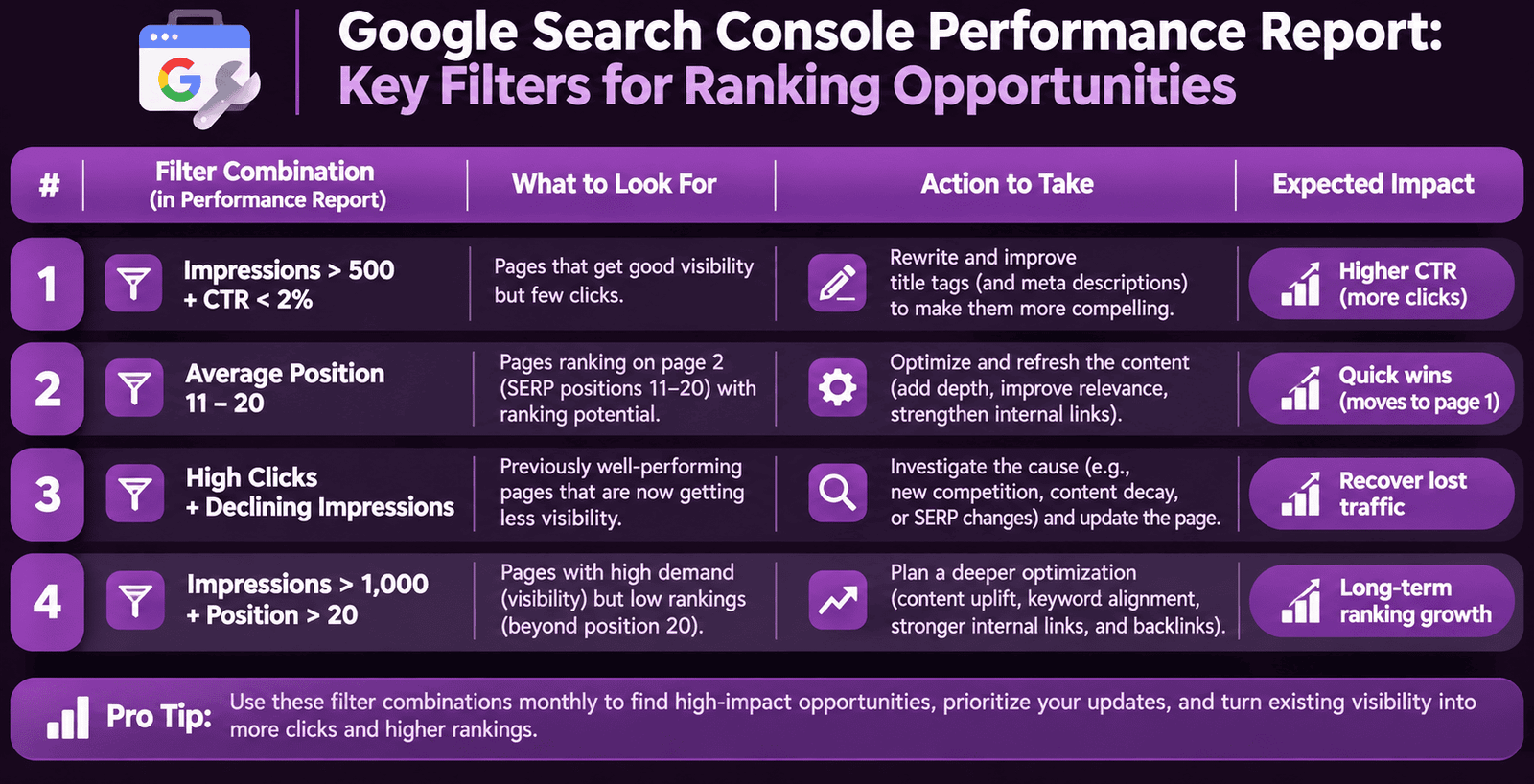
The Performance Report: Finding Ranking Opportunities
| Performance Filter Combination | What to Look For | Action to Take | Expected Impact |
|---|---|---|---|
| Queries with impressions over 500 and CTR below 2% | Pages ranking in positions 1-5 that users are not clicking, title tag or meta description failing to communicate value | Rewrite title tag and meta description for affected pages; apply page-type formula from meta tags guide | Immediate CTR improvement; sustained ranking gains through improved RankBrain satisfaction signal |
| Queries where average position is 11 to 20 | Pages one optimisation action away from page-one rankings, existing authority needs small boost | Add 2-3 internal links from relevant high-authority pages; refresh content with updated information; improve on-page keyword signals | Most reliable quick-win in SEO; page-one moves produce 3-5x traffic increase |
| Queries with high clicks and declining impressions | Pages losing SERP visibility, potential algorithm impact or technical issue developing | Check for recent content changes, crawl errors, or cannibalization from newly published similar content | Diagnose and reverse traffic loss before it compounds further |
| Brand queries returning unexpected landing pages | Google sending brand searches to wrong pages, site architecture or canonical issue | Check GSC URL Inspection for the affected brand query; verify canonical tags on homepage and key brand pages | Correct brand traffic to intended landing pages; improve brand query conversion |
The Coverage Report: Diagnosing Indexation Failures
URL Inspection Tool: Per-Page Diagnosis
Core Web Vitals and Mobile Usability Reports
Schema Markup and Enhancements Reports
The Weekly and Monthly GSC Review Routine
| Review Cadence | Reports to Check | What to Look For | Time Required |
|---|---|---|---|
| Weekly | Coverage report, Core Web Vitals mobile report, Manual Actions and Security Issues | New indexation errors, new Poor CWV URLs, any manual action or security alerts | 10 to 15 minutes |
| Monthly | Performance report (queries and pages), Enhancements/Schema report, Mobile Usability, Sitemaps | Position 11-20 ranking opportunities, CTR below benchmark, schema errors, new mobile usability errors | 45 to 60 minutes |
| Quarterly | Full Performance export, link report, URL Inspection of top 20 pages, Settings review | Trend analysis across 3 months, lost links, canonical confirmations on highest-traffic pages | 2 to 3 hours |
| After any site change | Coverage report, URL Inspection for changed pages, Core Web Vitals | New crawl errors, indexation changes, CWV regressions introduced by the update | 30 minutes minimum |
Get Your GSC Data Reviewed and Turned Into a Prioritised Action Plan
Our SEO specialists run comprehensive GSC audits, identifying every ranking opportunity, indexation failure, CWV issue, and schema error, then deliver a prioritised fix list that produces measurable organic growth.
Start Your GSC SEO Audithello@futuristicmarketingservices.com | +91 8518024201
Frequently Asked Questions About Google Search Console SEO
How do I use URL Inspection in Google Search Console?
What is the difference between GSC field data and PageSpeed Insights lab data?
GSC Core Web Vitals field data uses real Chrome user measurements from the 28-day CrUX dataset, this is the data Google uses as ranking signals. PageSpeed Insights lab data is a controlled simulation run on Google's servers using a standardised device and connection. A page can have a perfect PageSpeed Insights lab score while still having Poor GSC field data if real users experience worse conditions. Always check your GSC Core Web Vitals field data status first when evaluating ranking signal performance. Our core web vitals guide explains the complete distinction and when to use each.
How do I submit a new page to Google in GSC?
What are manual actions in Google Search Console?
Manual actions are penalties applied by Google's human review team to sites or pages that violate Google's spam policies. They appear in the Manual Actions report under Security and Manual Actions. Types include: unnatural links to your site (excessive paid or manipulative backlinks), thin content with little or no added value, cloaking or sneaky redirects, spammy structured markup, and user-generated spam. A manual action directly suppresses the affected pages in search results. Resolve the issue, document the remediation steps, and submit a reconsideration request through the Manual Actions report.
How often should I check Google Search Console?
Turn Your Google Search Console Data Into Consistent Organic Growth
At Futuristic Marketing Services, we monitor your GSC data weekly, identify every ranking opportunity and technical failure, and implement the fixes that produce compounding organic traffic improvements month after month.
Talk to Our SEO Specialists Todayhello@futuristicmarketingservices.com | +91 8518024201