Best UGC Video Editing Software for Brands and Creators: Complete Guide

best UGC video editing software

The software you use to edit UGC video directly affects the quality, speed, and scalability of your content programme — and the right choice depends on who is editing, at what volume, and for which platform. A professional editor at a performance marketing agency needs different tools from a brand marketing manager producing UGC in-house, and both need different tools from a solo creator editing their own TikTok content.

This guide covers the best UGC video editing software across four categories: professional desktop tools for agencies, creator-friendly apps for UGC-specific workflows, AI-assisted platforms that automate the most time-consuming elements, and free options covering essential UGC editing functions at no cost. Each tool is evaluated on the capabilities that matter most for UGC: caption production, hook engineering flexibility, mobile-first export quality, and the ability to produce at the volume a performance marketing programme requires. For the complete UGC editing workflow these tools support, the UGC video editing service guide covers the 7-step production standard.

Key Takeaways

  • The right UGC editing software depends on who is editing and at what volume: professional desktop tools (Adobe Premiere Pro, DaVinci Resolve) for agencies; creator-friendly apps (CapCut, Descript) for brand teams and solo creators; AI-assisted platforms (Opus Clip, Captions.ai) for high-volume automated workflows
  • CapCut Pro at approximately £8/month is the most purpose-built UGC editing tool, combining automatic caption generation, kinetic text templates matching TikTok native conventions, 9:16 export presets, and a template library designed for short-form content
  • Descript at £24/month is the most time-efficient tool for dialogue-heavy UGC content -- transcribing the creator's audio and allowing cuts to be made by editing the text rather than the video timeline
  • DaVinci Resolve (free) and Adobe Premiere Pro (subscription) provide professional-grade control over every editing decision but require more time investment and technical knowledge for UGC-specific workflows
  • Opus Clip at £19-40/month is the most efficient tool for extracting multiple short-form UGC clips from longer creator recordings, using AI to identify high-potential moments and automatically generating captions
  • For brands editing UGC at volume, the two-tool stack of Descript (dialogue editing) and CapCut Pro (caption styling and export) at approximately £32/month covers 80% of the UGC editing workflow for most use cases

Want Professional UGC Editing Without Managing the Software Stack Yourself?

Futuristic Marketing Services manages the complete UGC editing workflow using the full professional tool stack -- delivering hook-engineered, captioned, platform-optimised content without the tool management overhead.

Get Professional UGC Editing
Category 1: Professional Desktop Editing Tools

Professional desktop tools provide the most granular control over every editing decision at the cost of requiring more time investment and technical knowledge. These are the right choice for agencies and experienced editors managing high-stakes UGC campaigns where maximum quality control is required.
Adobe Premiere Pro (from £26/mo): The industry-standard professional editing tool. For UGC specifically, Premiere Pro's primary advantages are its integration with Adobe's suite (Audition for audio processing, After Effects for motion graphics), its granular audio processing capability for cleaning inconsistent creator recordings, and its support for any output format and platform specification. The learning curve is significant for non-specialist users. Recommended for: agencies and experienced editors managing large UGC programmes.
DaVinci Resolve (free / Studio £295 one-off): The most capable free professional editing tool, with professional-grade colour grading, audio mixing, and a full effects toolset in the free version that matches or exceeds Premiere Pro's base subscription capabilities. DaVinci Resolve's Fairlight audio module is particularly strong for cleaning creator audio with inconsistent recording quality. Recommended for: editors willing to invest in the learning curve who want professional-grade capabilities without ongoing subscription costs.

Category 2: Creator-Friendly UGC Editing Apps

ToolBest ForMonthly CostKey UGC FeatureCaption Quality
CapCut ProTikTok and Reels-native UGC editing~£8/moKinetic caption templates matching TikTok conventionsExcellent -- auto-gen + style library
DescriptDialogue-heavy UGC with text-based editing£24/moTranscript-based editing -- cut text to cut videoVery Good -- auto-gen with review
Canva VideoSimple UGC formatting with brand templates~£13/mo ProBrand kit integration, quick text overlaysBasic -- manual only
InShotMobile-first quick UGC editingFree / ~£4/mo ProMobile native, quick aspect ratio conversionGood -- auto-gen available
VN Video EditorFree CapCut alternative for mobileFree9:16 export, basic caption toolsBasic -- manual caption
CapCut Pro is the most purpose-built UGC editing tool for TikTok and Instagram Reels content. Its caption template library includes styles designed to match TikTok native conventions -- the kinetic, high-energy, word-by-word animations that performing UGC ads use -- which would require significant custom motion graphics work in Premiere Pro or DaVinci. The 9:16 export presets and direct platform publishing integration make it the fastest tool for brands producing UGC at high volume for social platforms.
Descript is the most time-efficient tool for UGC content where the creator speaks for most of the clip's duration. Rather than editing on a video timeline, Descript transcribes the creator's audio and presents the content as a text document -- editing the text removes the corresponding video, making dialogue-based editing as fast as deleting words from a script. This approach is significantly faster than frame-level timeline editing for removing dead air, filler words, and off-topic tangents from creator recordings.

Category 3: AI-Assisted Editing Platforms

ToolPrimary AI FunctionMonthly CostOutput QualityHuman Review Required?
Opus ClipAI clip extraction and ranking from long-form source£19-40/moGood -- ranked candidates need human selectionYes -- for hook quality and loop engineering
Captions.aiAI caption generation with platform-specific styling£14-24/moVery Good -- auto-gen with brand style optionsYes -- for accuracy and key word emphasis
Runway Gen-3AI-generated B-roll to supplement UGC footage£12-76/moExcellent -- cinematic quality B-rollYes -- for brand and content fit
Adobe Podcast AIAI audio enhancement for creator recordingsIncluded in Creative CloudExcellent -- significant audio quality improvementMinimal -- one-click process
Opus Clip is the most commercially useful AI tool for brands working with long creator recordings. Uploading a 30-60 minute creator session produces a ranked list of 10-15 short-form clip candidates with automatic captions within 30 minutes. The AI ranking uses audio signal analysis to identify potentially high-engagement moments -- but human review remains essential for evaluating hook quality, loop potential, and commercial message clarity. Time saving versus manual clip identification is typically 60-75%.

The Recommended Tool Stack by User Type

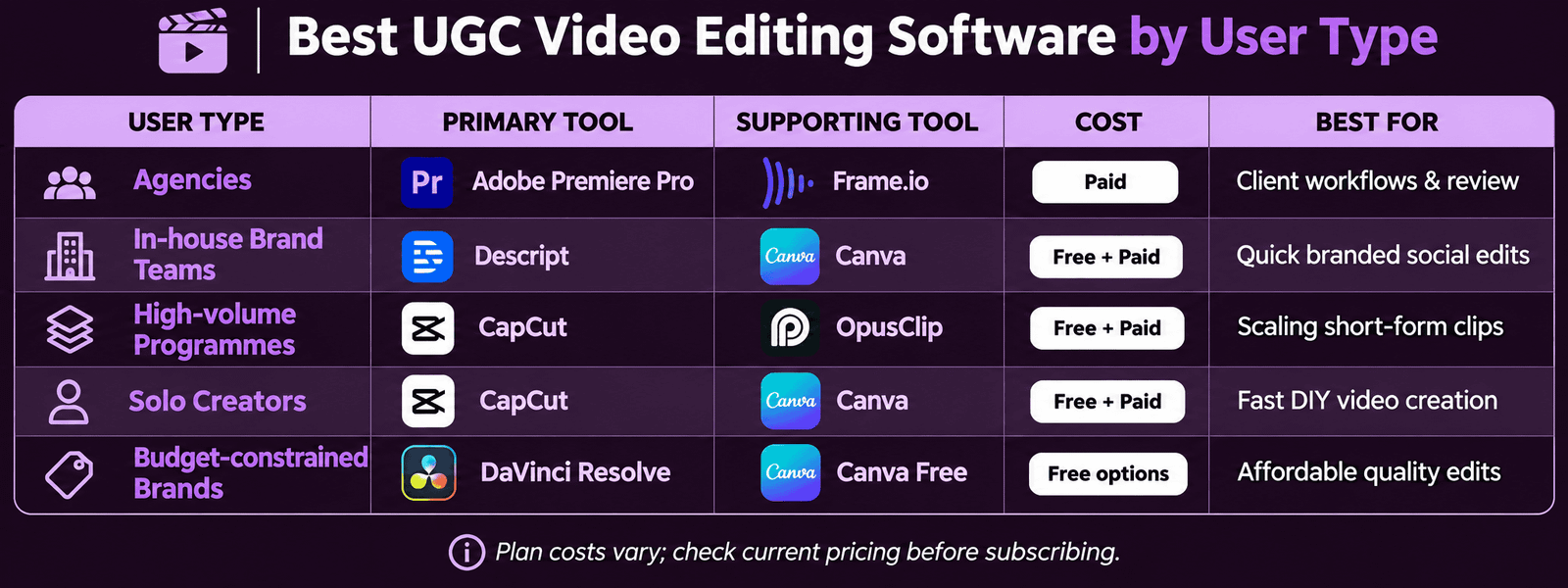
User TypePrimary ToolSupporting ToolMonthly CostBest For
Performance marketing agencyAdobe Premiere ProCapCut Pro (TikTok exports)£26-34/moFull control, professional quality, multi-platform
Brand marketing team (in-house)DescriptCapCut Pro£32/moFast dialogue editing, TikTok-native captions
High-volume UGC programmeOpus ClipCapCut Pro£27-48/moAI extraction at scale, human quality review
Solo creator (mobile-first)CapCut ProInShot (backup)£8/moMobile-first, TikTok-native, fast workflow
Budget-constrained brandDaVinci Resolve (free)CapCut (free tier)£0Professional quality at zero software cost

Want Your UGC Edited by a Professional Service Instead of In-House?

Futuristic Marketing Services manages the complete UGC editing workflow using the full professional tool stack -- no tool licensing, no learning curve, and no quality control overhead required from your team.

Get Professional UGC Editing

Frequently Asked Questions

Is CapCut free to use for commercial UGC content?

CapCut has a free tier covering basic editing, caption generation, and export functions -- sufficient for evaluation and initial UGC production. The Pro version (approximately £8/month) unlocks the full caption style library, including the kinetic TikTok-native styles that are the primary reason to use CapCut for UGC over other tools. For commercial use, checking CapCut's current terms of service regarding commercial content rights is recommended, as these terms have evolved as the platform has grown. The best AI video generation tools guide covers CapCut's AI features alongside the broader landscape of AI-assisted editing tools.

Can UGC video editing software replace the need for a professional editor?

Creator-friendly tools and AI-assisted platforms reduce the skills barrier for UGC editing significantly -- a brand marketing manager with no prior editing experience can produce commercially acceptable UGC content using CapCut or Descript after 2-4 weeks of practice. However, the commercially significant editing decisions -- hook engineering for specific audiences, loop engineering for maximum replay rate, caption accuracy review, and CTA optimisation -- still benefit substantially from human editorial judgment and platform-specific expertise. The tools accelerate production; the editorial knowledge determines commercial performance.

What is the fastest tool stack for producing 30 UGC ad variants per month?

For high-volume UGC production (30+ variants per month), the most time-efficient stack is: Descript for transcription and dialogue editing (approximately 1 hour per 30-minute creator recording), Opus Clip for clip extraction from the Descript exports (30 minutes per recording, producing 10-15 ranked candidates), and CapCut Pro for caption styling and multi-platform export (15-20 minutes per clip). Total: approximately 3-4 hours to produce 10-15 publishable clips from a single 30-minute creator session. At 2-3 creator sessions per month, this stack sustainably produces 30+ unique UGC assets monthly.

Scale Your UGC Production with a Professional Editing Service

Futuristic Marketing Services uses the complete professional UGC tool stack to produce high-volume, high-quality UGC content -- without the tool management overhead or learning curve of running the workflow in-house.

Start Your UGC Editing Programme


Conclusion

The right UGC video editing software matches the editor's skill level, the content volume required, and the platform the content is being produced for. CapCut Pro and Descript at £32/month combined cover the UGC editing requirements for most brands managing their own content production. Opus Clip adds AI-assisted clip extraction for high-volume programmes. Professional desktop tools provide the quality ceiling required for agency-grade UGC production at scale.
For brands wanting UGC content produced to the professional standard without managing the tool stack in-house, the UGC video editing service guide covers the complete managed editing service. For the platform-specific editing requirements, the how to edit UGC for TikTok ads guide covers the TikTok standard and the ad creative video editing guide covers the Meta performance creative framework.
Share this post :
Picture of Devyansh Tripathi
Devyansh Tripathi

Devyansh Tripathi is a digital marketing strategist with over 5 years of hands-on experience in helping brands achieve growth through tailored, data-driven marketing solutions. With a deep understanding of SEO, content strategy, and social media dynamics, Devyansh specializes in creating results-oriented campaigns that drive both brand awareness and conversion.

All Posts