
Google Search Console SEO: The Complete Guide to Using GSC for Rankings in 2026

google search console seo

Google Search Console (GSC) is Google’s free SEO diagnostic and monitoring platform that gives website owners direct visibility into how Google crawls, indexes, and ranks their pages. It is the most authoritative SEO data source available because it shows Google’s actual experience of your site rather than simulated third-party estimations, making it the essential starting point for every SEO audit, performance analysis, and ranking improvement decision.

This guide covers the complete Google Search Console SEO framework for 2026: how to set up and verify your property, the six most important GSC reports and exactly what to look for in each, how to use the Performance report to find quick-win ranking opportunities, how the Coverage report reveals indexation failures suppressing rankings, how to use URL Inspection for individual page diagnosis, the Core Web Vitals and Mobile Usability reports for technical monitoring, and the weekly and monthly GSC review routine that surfaces ranking opportunities before your competitors find them. Use this guide alongside our technical SEO audit and core web vitals guide for the complete site monitoring framework.

Key Takeaways

  • According to Google Search Central, Google Search Console is the only tool showing your site's performance data directly from Google's search index, making it more authoritative than any third-party SEO tool for diagnosing ranking and crawl issues
  • The Performance report is the highest-value GSC report for ranking improvements, filtering to pages with high impressions and below-average CTR reveals the exact title tag rewrites that produce immediate traffic gains
  • According to Ahrefs, keywords where your pages rank in positions 11 to 20 represent the fastest ranking improvement opportunities, minor on-page optimisation and internal linking frequently moves these to page one
  • The Coverage report is the authoritative source for indexation failures, GSC shows problems Google has actually encountered on your site, not simulated crawl issues from third-party tools
  • Core Web Vitals field data in GSC is what Google actually uses for ranking signals, not the lab simulation scores from PageSpeed Insights, as detailed in our core web vitals guide
  • Submitting new URLs through the URL Inspection tool after publication accelerates discovery by days compared to waiting for Googlebot to discover the page through normal crawling

Want Your Google Search Console Data Turned Into Actionable Ranking Improvements?

Futuristic Marketing Services analyses your GSC data monthly, identifying quick-win ranking opportunities, indexation failures, Core Web Vitals issues, and CTR improvement targets, then implements the fixes that produce measurable organic growth.

Get a GSC-Based SEO Audit

hello@futuristicmarketingservices.com  |  +91 8518024201
Setting Up Google Search Console Correctly

Google Search Console is free and available to any website owner at search.google.com/search-console. Setting it up correctly ensures you receive complete data across all URL variants of your site. Two property types are available: Domain properties (the recommended option, covers all protocols, subdomains, and paths under a root domain) and URL-prefix properties (covers only one URL variant starting with a specific protocol).
Always use a Domain property if possible, it consolidates data from https://yourdomain.com, https://www.yourdomain.com, http://yourdomain.com, and all subdomain variants into a single view. Verification is done via DNS TXT record for Domain properties. URL-prefix properties can be verified through an HTML tag in the page head, an HTML file upload, or Google Analytics/Tag Manager. If you are using Google Analytics on your site, linking GA4 to your GSC property enriches both tools with combined data across organic search and on-site behaviour.
After verification, submit your XML sitemap at Settings and Sitemaps. GSC uses your sitemap as a crawl priority signal, pages in your sitemap receive more frequent crawling than pages discoverable only through internal links. Ensure your sitemap is current and lists only indexable, canonical URLs, never include noindexed pages, redirect URLs, or pages blocked by robots.txt in your sitemap.

The Performance Report: Finding Ranking Opportunities

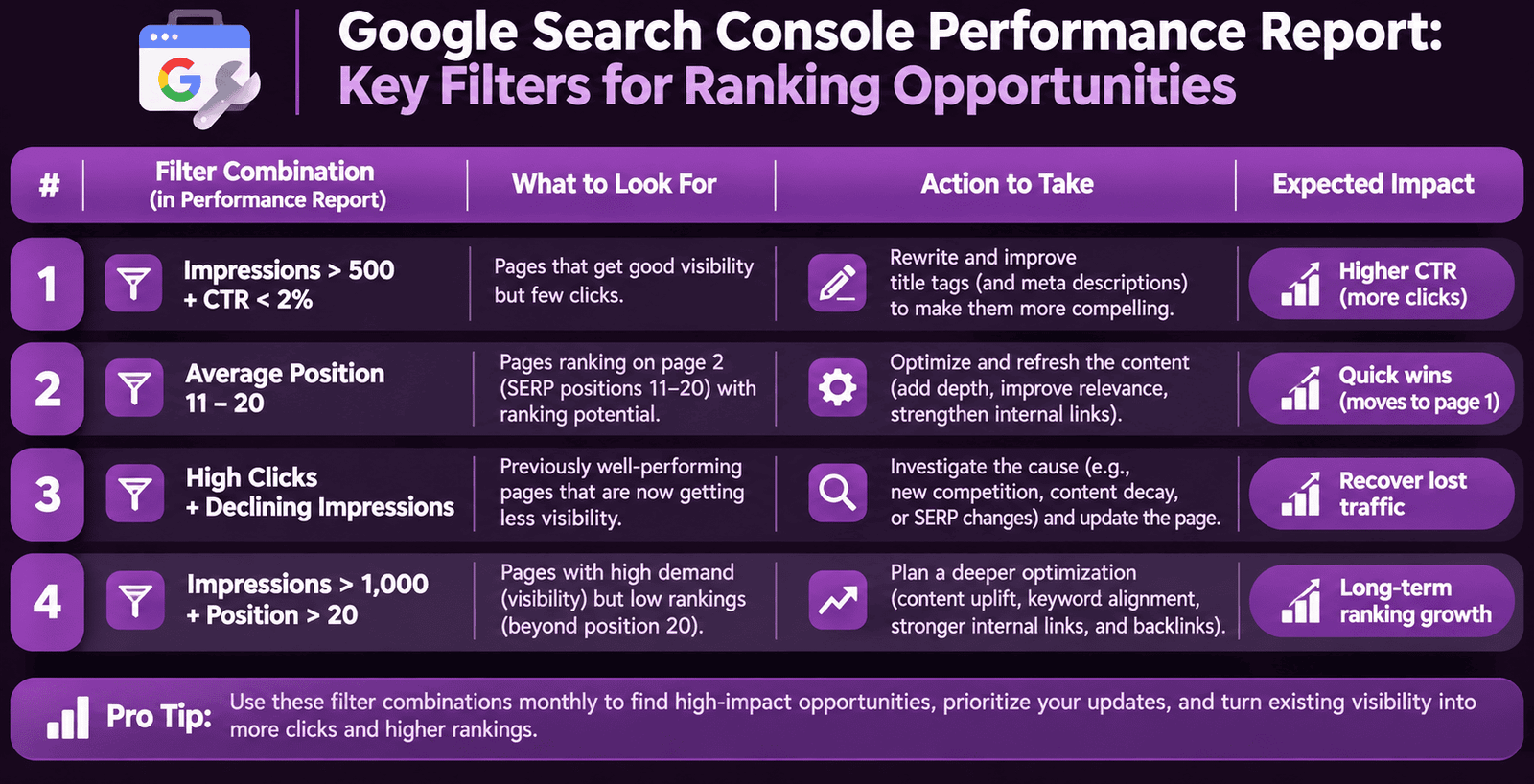
The Performance report is the most valuable GSC report for actionable SEO improvements. It shows every query your site receives impressions for, with click count, impression count, click-through rate (CTR), and average position for each. This data reveals exactly which of your pages are ranking but not earning the clicks their position should generate, the clearest possible signal of a title tag or meta description that needs rewriting.
Performance Filter CombinationWhat to Look ForAction to TakeExpected Impact
Queries with impressions over 500 and CTR below 2%Pages ranking in positions 1-5 that users are not clicking, title tag or meta description failing to communicate valueRewrite title tag and meta description for affected pages; apply page-type formula from meta tags guideImmediate CTR improvement; sustained ranking gains through improved RankBrain satisfaction signal
Queries where average position is 11 to 20Pages one optimisation action away from page-one rankings, existing authority needs small boostAdd 2-3 internal links from relevant high-authority pages; refresh content with updated information; improve on-page keyword signalsMost reliable quick-win in SEO; page-one moves produce 3-5x traffic increase
Queries with high clicks and declining impressionsPages losing SERP visibility, potential algorithm impact or technical issue developingCheck for recent content changes, crawl errors, or cannibalization from newly published similar contentDiagnose and reverse traffic loss before it compounds further
Brand queries returning unexpected landing pagesGoogle sending brand searches to wrong pages, site architecture or canonical issueCheck GSC URL Inspection for the affected brand query; verify canonical tags on homepage and key brand pagesCorrect brand traffic to intended landing pages; improve brand query conversion

The Coverage Report: Diagnosing Indexation Failures

The Coverage report (also called the Indexing report in newer GSC interfaces) shows the complete indexation status of your site's pages across four categories: Valid (indexed and eligible to appear in search), Valid with warnings (indexed but with issues to review), Error (not indexed due to a specific problem), and Excluded (not indexed intentionally or due to a decision by Google).
Error pages are the highest priority, they represent pages Google has attempted to crawl but failed to index due to technical problems. Common error types: server errors (5xx status codes meaning your server failed to respond), redirect errors (redirect chains too long or redirect loops), URL not found (404 errors for pages that should exist), and submitted URL blocked by robots.txt (pages in your sitemap that your robots.txt accidentally prevents from being crawled).
Excluded pages require careful analysis, not all exclusions are problems. Pages legitimately excluded include: noindexed pages (intentionally excluded by your meta robots tag), duplicate pages where Google has selected a different canonical, pages blocked by robots.txt (intentionally), and pages with no content. Problematic exclusions to investigate: valid pages appearing as Crawled but not indexed (Google crawled the page but decided not to index it, usually a quality or thin content signal), and pages appearing as Discovered but not yet indexed (in the crawl queue but not yet processed, common for new large sites). Our duplicate content guide covers how to resolve canonical-related exclusions.

URL Inspection Tool: Per-Page Diagnosis

The URL Inspection tool is the most granular diagnostic tool in GSC, it shows the exact status of any individual URL including its indexation status, last crawl date, crawled content, canonical URL as determined by Google, structured data detected, and any specific errors affecting that page. It is the tool to use whenever a specific page is underperforming unexpectedly, when a newly published page is not appearing in search, or when a page's ranking declined following a site update.
Use URL Inspection to confirm three things after publishing any new page: that Google has discovered and indexed the page (status shows URL is on Google), that Google has selected the correct canonical URL (confirm it matches your intended canonical), and that structured data has been detected correctly (schema errors appear here if they are preventing rich result eligibility). For newly published pages, use the Request Indexing button after inspection to accelerate discovery, this typically reduces the indexation delay from days or weeks to hours for pages that pass quality evaluation.
A critical URL Inspection use case: diagnosing why a page is not ranking despite having strong content and backlinks. Inspect the URL to confirm it is indexed, check whether Google has selected a different canonical than your intended one (indicating a duplicate content issue), verify that structured data is implemented correctly, and check the last crawl date, a page not crawled in over 30 days may be deprioritised due to crawl budget allocation. Our technical SEO audit covers the full crawl budget investigation process.

Core Web Vitals and Mobile Usability Reports

The Core Web Vitals report under the Experience section is the most authoritative source for your ranking signal status across LCP, INP, and CLS metrics. It shows field data, real Chrome user measurements over the rolling 28-day window, which is the data Google uses for ranking decisions. This is categorically different from the lab simulation data in PageSpeed Insights and should always be checked in GSC before making CWV prioritisation decisions.
The report shows URLs classified as Good, Needs Improvement, or Poor for each metric, with separate reports for mobile and desktop. Desktop performance does not affect your ranking signal under mobile-first indexing, focus on the mobile report. Any URLs classified as Poor require immediate diagnosis and remediation. Our core web vitals guide covers the complete fix process for every LCP, INP, and CLS failure type.
The Mobile Usability report shows pages with specific mobile usability errors that directly affect rankings: text too small to read, clickable elements too close together, content wider than screen, and viewport not configured. These errors are direct ranking signal failures, not UX suggestions. Each error has a Validate Fix button that allows you to submit the corrected pages for re-evaluation after implementing the fixes covered in our mobile SEO guide.

Schema Markup and Enhancements Reports

The Enhancements section of GSC shows the status of all structured data implementations across your site, broken down by schema type. Each enhancement type (FAQ, Article, Product, etc.) shows how many pages have valid schema, how many have errors, and how many have warnings. This report is the monitoring tool that catches schema errors introduced by site updates, plugin changes, or template modifications that break existing implementations.
Check the Enhancements report monthly alongside your schema markup guide implementation. Any new errors in the report since your last check indicate a schema-breaking change requiring immediate investigation and fix. Use the URL Inspection tool for specific pages showing errors to see the exact schema error message and which property is causing the eligibility failure.

The Weekly and Monthly GSC Review Routine

Review CadenceReports to CheckWhat to Look ForTime Required
WeeklyCoverage report, Core Web Vitals mobile report, Manual Actions and Security IssuesNew indexation errors, new Poor CWV URLs, any manual action or security alerts10 to 15 minutes
MonthlyPerformance report (queries and pages), Enhancements/Schema report, Mobile Usability, SitemapsPosition 11-20 ranking opportunities, CTR below benchmark, schema errors, new mobile usability errors45 to 60 minutes
QuarterlyFull Performance export, link report, URL Inspection of top 20 pages, Settings reviewTrend analysis across 3 months, lost links, canonical confirmations on highest-traffic pages2 to 3 hours
After any site changeCoverage report, URL Inspection for changed pages, Core Web VitalsNew crawl errors, indexation changes, CWV regressions introduced by the update30 minutes minimum

Get Your GSC Data Reviewed and Turned Into a Prioritised Action Plan

Our SEO specialists run comprehensive GSC audits, identifying every ranking opportunity, indexation failure, CWV issue, and schema error, then deliver a prioritised fix list that produces measurable organic growth.

Start Your GSC SEO Audit

hello@futuristicmarketingservices.com  |  +91 8518024201

Frequently Asked Questions About Google Search Console SEO

How do I use URL Inspection in Google Search Console?

Use URL Inspection by entering any URL from your site into the search bar at the top of GSC. The tool shows whether the URL is indexed, when Google last crawled it, the canonical URL Google has selected, any structured data detected, and any specific errors affecting the page. After fixing a technical issue on a page, use URL Inspection and Request Indexing to accelerate Google's re-evaluation. For newly published content, use Request Indexing to reduce the time before Google discovers and indexes the page from days or weeks to hours.

What is the difference between GSC field data and PageSpeed Insights lab data?

GSC Core Web Vitals field data uses real Chrome user measurements from the 28-day CrUX dataset, this is the data Google uses as ranking signals. PageSpeed Insights lab data is a controlled simulation run on Google's servers using a standardised device and connection. A page can have a perfect PageSpeed Insights lab score while still having Poor GSC field data if real users experience worse conditions. Always check your GSC Core Web Vitals field data status first when evaluating ranking signal performance. Our core web vitals guide explains the complete distinction and when to use each.

How do I submit a new page to Google in GSC?

Submit a new page to Google using the URL Inspection tool: enter the page's full URL, click the result showing the URL is not on Google or has not been crawled recently, and click Request Indexing. This places the URL in a priority crawl queue. Google typically processes requested URLs within hours for sites with good crawl health and quality signals. Also ensure the new page is included in your XML sitemap (submit sitemaps under Settings in GSC) and has at least 2 to 3 internal links pointing to it from existing pages, Googlebot discovers pages by following links, making internal linking critical for new page discovery.

What are manual actions in Google Search Console?

Manual actions are penalties applied by Google's human review team to sites or pages that violate Google's spam policies. They appear in the Manual Actions report under Security and Manual Actions. Types include: unnatural links to your site (excessive paid or manipulative backlinks), thin content with little or no added value, cloaking or sneaky redirects, spammy structured markup, and user-generated spam. A manual action directly suppresses the affected pages in search results. Resolve the issue, document the remediation steps, and submit a reconsideration request through the Manual Actions report.

How often should I check Google Search Console?

Check GSC on a weekly basis for critical issues: new indexation errors in the Coverage report, new Poor Core Web Vitals URLs in the mobile report, and any Manual Actions or Security Issues alerts. Conduct a full monthly review of the Performance report for ranking opportunities and CTR improvements, the Enhancements report for schema errors, and the Mobile Usability report for new errors. Run a comprehensive quarterly audit exporting Performance data for trend analysis across 90 days. Also run an immediate check after any major site change, platform updates, template changes, and URL restructuring frequently introduce new technical issues.

Turn Your Google Search Console Data Into Consistent Organic Growth

At Futuristic Marketing Services, we monitor your GSC data weekly, identify every ranking opportunity and technical failure, and implement the fixes that produce compounding organic traffic improvements month after month.

Talk to Our SEO Specialists Today

hello@futuristicmarketingservices.com  |  +91 8518024201

Conclusion

Google Search Console is the most direct window into how Google evaluates, crawls, and ranks your website, and it is entirely free. The Performance report reveals which pages are ranking but not earning clicks, identifying the exact title tags and meta descriptions that need rewriting. The Coverage report shows every indexation failure suppressing your organic reach. The Core Web Vitals report shows your actual ranking signal status across LCP, INP, and CLS. The URL Inspection tool diagnoses individual page issues with the precision no third-party tool can match.
The GSC review routine, weekly for critical issues, monthly for opportunities, quarterly for trend analysis, and immediately after site changes, ensures you identify and address problems before they compound into significant traffic losses. Combine GSC monitoring with our technical SEO audit, core web vitals guide, and on-page SEO guide for a complete, proactive SEO monitoring and improvement programme that keeps your organic performance growing consistently.
Share this post :
Picture of Devyansh Tripathi
Devyansh Tripathi

Devyansh Tripathi is a digital marketing strategist with over 5 years of hands-on experience in helping brands achieve growth through tailored, data-driven marketing solutions. With a deep understanding of SEO, content strategy, and social media dynamics, Devyansh specializes in creating results-oriented campaigns that drive both brand awareness and conversion.

All Posts