
Website speed is a direct commercial variable, not a technical vanity metric. A 1-second improvement in mobile load time increases conversion rate by 7 to 12 percent. 53 percent of mobile visitors abandon pages that take more than 3 seconds to load. Google uses Core Web Vitals, LCP, CLS, and INP, as confirmed ranking signals, meaning slow sites rank lower in search results and then convert the traffic they do receive at a lower rate. Speed improvement produces compounding returns: better rankings attract more traffic, higher conversion rates produce more revenue from existing traffic, and lower bounce rates increase every visit’s commercial value.
Key Takeaways
- Core Web Vitals, LCP (Largest Contentful Paint), CLS (Cumulative Layout Shift), and INP (Interaction to Next Paint), are confirmed Google ranking signals. Pages with Good status on all three metrics have a ranking advantage over pages with Needs Improvement or Poor status. Check your status at Google Search Console under Experience, Core Web Vitals.
- According to Google and Deloitte research, improving mobile site speed by 0.1 seconds increases retail conversion rate by 8 percent. A 1-second improvement typically produces 7 to 12 percent conversion rate improvement.
- The LCP element, the largest visible element on load, usually the hero image, is the most commercially important performance fix on most sites. Preloading the LCP image, converting to WebP, and serving at viewport-correct size addresses the majority of LCP failures. See our Core Web Vitals guide.
- CLS (layout shift) is caused by images without explicit width and height attributes, dynamically injected content (cookie banners, chat widgets), and custom fonts without font-display: swap. Each is preventable with correct implementation, CLS failures are almost always avoidable.
- Managed WordPress hosting on Kinsta or WP Engine with Redis object caching achieves under 200ms TTFB, the performance foundation that all other optimisation depends on. Shared hosting with 400ms to 2 second TTFB cannot be optimised to Good Core Web Vitals status regardless of other improvements.
- WP Rocket is the highest-impact single plugin investment for WordPress performance, page caching, JavaScript deferral, CSS and JS minification, image lazy loading, and database optimisation in one installation. Combined with managed hosting, it consistently achieves Good Core Web Vitals status for standard WordPress sites.
- eCommerce pages loading in 1 second convert 3 times higher than pages loading in 5 seconds, according to Portent Research. For any eCommerce site, page speed investment has the highest and most measurable commercial ROI of any development activity.
Is Your Site Too Slow?
Get a Free Website Speed Audit From a Performance Engineering Team
Futuristic Marketing Services provides website speed audits with specific, prioritised fixes, Core Web Vitals analysis, hosting assessment, and a complete optimisation roadmap.
Get a Free ConsultationH2: Why Should You Get Certified?
| Metric | What It Measures | Good Threshold | Poor Threshold | Primary Cause of Failure |
|---|---|---|---|---|
| LCP, Largest Contentful Paint | Time from navigation until the largest visible element (typically the hero image) fully renders | Under 2.5 seconds | Over 4.0 seconds | Unpreloaded hero image; wrong format (JPEG not WebP); oversized for viewport; slow server TTFB |
| CLS, Cumulative Layout Shift | Total unexpected movement of page elements after initial load | Under 0.1 | Over 0.25 | Images without explicit dimensions; dynamic content injection; late-loading custom fonts |
| INP, Interaction to Next Paint | Time from user interaction (click, tap, keypress) until the browser paints the visual response | Under 200 milliseconds | Over 500 milliseconds | Heavy JavaScript on the main thread; large JavaScript bundles; unoptimised event handlers; third-party scripts |
Field Data vs Lab Data
Diagnosing Performance Problems: The Tools
| Tool | Cost | Primary Use | Key Data |
|---|---|---|---|
| Google PageSpeed Insights | Free | Primary performance diagnostic, run on mobile tab first | Field and lab data for LCP, CLS, INP; specific improvement recommendations ordered by Estimated Savings |
| Google Search Console | Free | Monitor Core Web Vitals across all site pages | Real-user field data grouped by URL pattern; Good, Needs Improvement, and Poor page counts; trend over time |
| Chrome DevTools Lighthouse | Free (built into Chrome) | Development-phase performance testing | Lighthouse score (0 to 100); resource-level diagnostics; render-blocking resources; unused JavaScript |
| WebPageTest | Free | Advanced waterfall analysis and multi-location testing | Full resource load waterfall; time-to-first-byte breakdown; render sequence; real Chrome on real device |
How to Read a PageSpeed Insights Report
Fixing LCP: Largest Contentful Paint
LCP Fix Priority Order
1. Preload the LCP image
Add in the page head. This tells the browser to fetch the LCP image at the highest priority, it starts downloading before the browser reaches it in the HTML body. This single change reduces LCP by 0.3 to 0.8 seconds on most sites.
2. Convert to WebP
WebP provides 25 to 35 percent smaller file sizes than JPEG at equivalent visual quality. Smaller file means faster download means lower LCP time. Use WebP as the primary format with JPEG as a fallback for very old browsers (negligible traffic share in 2026).
3. Serve at viewport-correct size
A 1920px hero image served to a 375px mobile screen downloads 5 to 10 times more data than necessary. Use srcset with width descriptors to serve correctly sized images for each viewport. The mobile size should be 375 to 828px wide.
4. Improve server TTFB
LCP cannot complete until the server responds. Under 600ms TTFB is the target. Managed WordPress hosting with Redis object caching achieves under 200ms. Shared hosting achieving 1 to 2 second TTFB makes Good LCP status almost impossible. See our Core Web Vitals guide.
5. Use a CDN
A global CDN serves the LCP image and all other assets from the nearest edge server rather than the origin. This reduces both TTFB and resource download time for users geographically distant from the origin server.
6. Remove render-blocking resources
CSS and JavaScript in the page head that block rendering delay LCP. Inline critical CSS; load non-critical CSS with media='print' and onload; add defer to all non-essential JavaScript. Each render-blocking resource adds to LCP time.
Fixing CLS: Cumulative Layout Shift
| CLS Cause | Why It Causes Shift | Fix |
|---|---|---|
| Images without explicit dimensions | Browser cannot reserve space for the image before it loads, when it loads, it pushes content down | Add width and height attributes to every img element. The browser uses these to reserve space via the intrinsic aspect ratio before the image loads. |
| Dynamically injected content | Ads, cookie banners, chat widgets, and marketing tools that appear above existing content push everything below them down | Reserve the space these elements will occupy using a min-height container or aspect-ratio CSS before the JavaScript executes |
| Custom fonts without font-display: swap | Browser holds space with invisible text while the custom font loads, then reflows when the font arrives, causing text to resize | Add font-display: swap to all @font-face declarations. Browser shows system font immediately, swaps to custom font when loaded, visual shift is minimal |
| Embeds (YouTube, maps) without dimensions | Embeds load their content after initial page render, if no space is reserved, they cause shift | Set explicit width and height or a padding-based aspect ratio container for all iframes and embeds |
Fixing INP: Interaction to Next Paint
INP Optimisation Actions
Identify long tasks
Chrome DevTools Performance tab shows the main thread timeline. Tasks over 50ms that block the main thread prevent the browser from responding to user interactions. Identify the worst offenders by recording a page session and looking for red bars in the main thread.
Break up long JavaScript tasks
Large JavaScript functions that execute synchronously block the main thread for their full duration. Break them into smaller chunks using setTimeout(callback, 0) or scheduler.postTask() to yield to the browser between chunks, allowing it to handle user interactions.
Defer third-party scripts
Analytics, chat widgets, heatmaps, and marketing pixels all add JavaScript that blocks the main thread. Use a tag manager with delayed triggers (load after user interaction or after 3 seconds) or Partytown library to move third-party scripts off the main thread. This is the highest-impact INP fix for most sites. See our technical SEO audit for the full audit process.
Optimise event handlers
Click and input event handlers that perform expensive DOM operations or calculations block the main thread during execution. Profile expensive handlers in DevTools and optimise or move computation to a Web Worker.
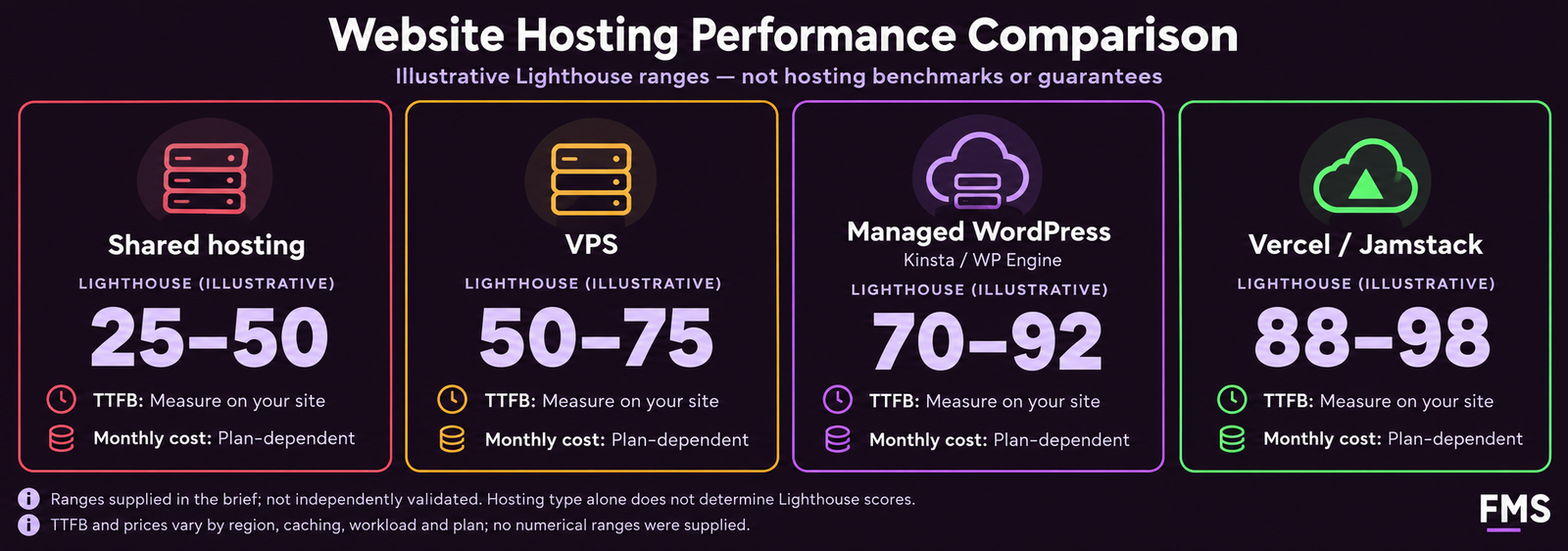
Hosting and Performance Infrastructure
| Hosting Type | Typical TTFB | Mobile Lighthouse | Monthly Cost | Best For |
|---|---|---|---|---|
| Shared hosting (GoDaddy, Bluehost basic) | 400ms to 2,000ms | 25 to 50 | £3 to £15 | Personal blogs and low-traffic informational sites only, not appropriate for any commercial site where performance matters |
| VPS (DigitalOcean, Linode) | 150ms to 600ms | 50 to 75 | £15 to £80 | Technically capable teams who can manage server configuration, strong performance possible with correct setup |
| Managed WordPress (Kinsta, WP Engine) | 80ms to 300ms | 70 to 92 | £25 to £200 | Professional WordPress and WooCommerce sites, managed infrastructure with Redis caching, CDN, and automated backups |
| Vercel or Netlify (Jamstack) | 30ms to 150ms | 88 to 98 | Free to £150 | Next.js, Gatsby, Astro, or static site builds, edge-served static HTML for maximum performance |
Frequently Asked Questions About Website Speed
Q. What are Core Web Vitals?
Q.How do I improve my website Google PageSpeed score?
Q. What causes a slow website?
Q. What is LCP and how do I fix it?
Q. What is CLS and why does my site fail it?
Q. What is the best WordPress caching plugin?
Q. How important is web hosting for page speed?
Q. Does page speed affect SEO rankings?
Q. How do I optimise images for website speed?
Q. What is TTFB and why does it matter?
Q. How do I speed up a WooCommerce store?
Q. What is Largest Contentful Paint?
Futuristic Marketing Services
Make Your Website Fast Enough to Rank and Convert
Futuristic Marketing Services provides complete website speed optimisation, Core Web Vitals fixes, hosting migration, image optimisation pipeline, and performance engineering that produces Good status on all three metrics.
Get Your Performance RoadmapSpeed Is the Investment That Pays on Every Single Visit
For the full Core Web Vitals implementation guide, the responsive design framework that underpins mobile performance, and the WordPress development guide for the platform context, all three guides are available in this resource library.