
Core Web Vitals: The Complete Guide to Passing Google’s Performance Standards in 2026

core web vitals

Core Web Vitals are Google’s three standardised page experience metrics that function as direct search ranking signals: LCP (Largest Contentful Paint, measuring loading speed with a target of under 2.5 seconds), INP (Interaction to Next Paint, measuring interactivity responsiveness with a target of under 200 milliseconds), and CLS (Cumulative Layout Shift, measuring visual stability with a target of under 0.1). Pages with Poor scores face a systematic ranking disadvantage in competitive search results.

This guide covers everything practitioners need to know about Core Web Vitals in 2026: exactly what each metric measures, the Good, Needs Improvement, and Poor thresholds, the critical difference between field data (what Google uses for rankings) and lab data (what PageSpeed Insights simulates), specific diagnosis steps for each metric using Google Search Console and PageSpeed Insights, and the most effective fixes for every common failure type, all in a format you can hand directly to your developer for immediate action.

Key Takeaways

  • Core Web Vitals are direct Google ranking signals, not just performance suggestions, making them an SEO priority, not only a developer concern
  • LCP measures how quickly the largest visible element loads, target: under 2.5 seconds for 75% of real Chrome user page loads
  • INP replaced FID in March 2024 and measures responsiveness to all user interactions throughout the page session, target: under 200 milliseconds
  • CLS measures how much content unexpectedly shifts during loading, target: under 0.1 for 75% of real user page loads
  • Field data from the Chrome User Experience Report (CrUX) is what Google uses for rankings, check it in Google Search Console under Experience, not only in PageSpeed Insights lab simulation
  • According to Google Web Almanac 2024, pages with Good CWV scores have 24% lower abandonment during loading compared to pages with Poor scores

Are Poor Core Web Vitals Costing You Rankings and Revenue?

Futuristic Marketing Services diagnoses and fixes Core Web Vitals failures across every page type, from LCP image compression and preloading to INP JavaScript optimisation and CLS layout shift elimination.

Get a Core Web Vitals Audit
Why Core Web Vitals Are a Direct Ranking Signal

Google introduced Core Web Vitals as ranking signals with the Page Experience update in 2021. Unlike most performance recommendations that are best practice without direct algorithmic weight, CWV scores directly affect where your pages rank when other ranking factors are similar between competing pages. According to Think with Google, 53% of mobile users abandon sites that take over 3 seconds to load, directly reducing the engagement signals RankBrain uses to evaluate page quality.
The critical distinction for SEO practitioners: Google uses field data from the Chrome User Experience Report (CrUX), real measurements from actual Chrome users on your site, not the lab simulation data from PageSpeed Insights. A page can score 95 in PageSpeed Insights while still having Poor field data if real users on slower mobile devices and cellular connections have worse experiences. Always check your field data status first in Google Search Console under Experience and Core Web Vitals before diagnosing with lab tools.
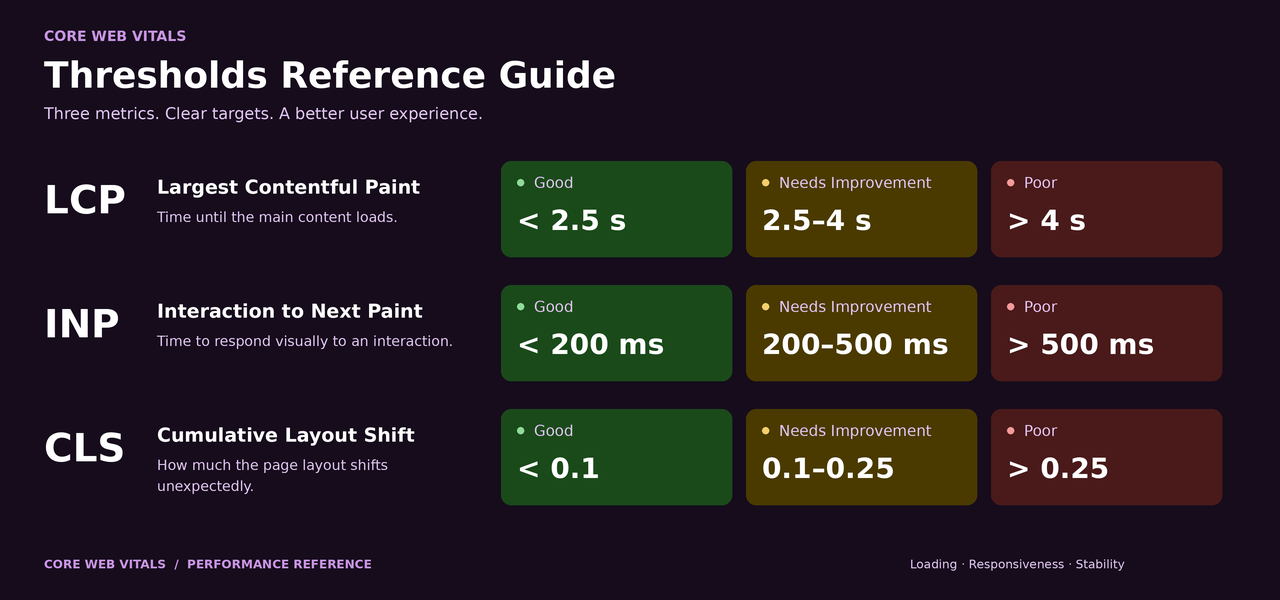
MetricWhat It MeasuresGood TargetNeeds ImprovementPoor
LCP (Largest Contentful Paint)How quickly the largest visible content element loads, hero image, large text block, or video posterUnder 2.5 seconds2.5 to 4.0 secondsOver 4.0 seconds
INP (Interaction to Next Paint)How quickly the page responds to all user interactions, clicks, taps, keyboard input, throughout the sessionUnder 200 ms200 to 500 msOver 500 ms
CLS (Cumulative Layout Shift)How much visible content unexpectedly moves or shifts during loading and interactionUnder 0.10.1 to 0.25Over 0.25

LCP, Largest Contentful Paint: Diagnosis and Fixes

LCP measures how quickly the largest visible content element on a page loads. For most pages, the LCP element is the hero image, a large heading text block, or a video poster frame. Improving LCP directly reduces the time users wait to see meaningful content, one of the strongest signals of a fast, user-respecting page load experience.
LCP IssueRoot CauseSpecific FixExpected Impact
Slow server response (TTFB over 600ms)Unoptimised server, shared hosting with no caching, no CDNEnable server-side caching with appropriate TTL settings; use a CDN with edge servers near your audience; upgrade hosting tier if TTFB exceeds 1 secondVery High, TTFB is the most fundamental LCP factor
Unoptimised hero imageLarge JPEG or PNG without compression or modern format conversionConvert to WebP format (25 to 35% smaller at equivalent quality); compress with Squoosh or Imagemin; target under 150KB for hero imagesVery High, images are the LCP element on the majority of pages
LCP image not preloadedBrowser discovers LCP image late in the load sequence after CSS is parsedAdd link rel=preload as=image href=LCP-image-URL in HTML head; advances image discovery to the earliest possible pointHigh, moves image discovery from after CSS parse to immediate
Render-blocking resourcesCSS and JavaScript files loading before content can renderMove non-critical CSS to async loading; add defer attribute to non-critical JS files; inline critical above-fold CSSHigh, unblocking the render path allows content to appear sooner

INP, Interaction to Next Paint: Diagnosis and Fixes

INP replaced First Input Delay as a Core Web Vital in March 2024. Where FID measured only the first interaction delay, INP measures the responsiveness of all user interactions throughout the entire page session, every click, tap, and keyboard event. A page that loads quickly but becomes sluggish during user interaction has poor INP regardless of its excellent LCP score.
The most impactful INP fixes: break up long JavaScript tasks using setTimeout or scheduler.yield() to yield control to the browser between chunks, defer or remove non-critical third-party scripts (chat widgets, analytics, ad scripts are the most common INP culprits), reduce DOM size (pages with over 1,500 DOM nodes are significantly harder for the browser to process interaction events), and use CSS transitions instead of JavaScript animations for visual effects wherever possible.

CLS, Cumulative Layout Shift: Diagnosis and Fixes
CLS measures the total unexpected movement of visible page content during loading and interaction. High CLS means content jumps as the page loads, text reflows when images appear, buttons shift when fonts swap, content moves when ads inject above it. These unexpected movements cause accidental clicks on the wrong elements and create a jarring, unprofessional page experience that suppresses engagement and increases bounce rate.
The four most common CLS causes with specific fixes: images without explicit width and height attributes (the browser cannot reserve space before the image loads, fix by adding width and height to every img element), web fonts causing text reflow (system font shows first, web font loads and text reflows, fix with font-display: optional or carefully matched fallback sizing), dynamically injected content above existing elements (ads or banners injecting above page content shift everything below, fix by reserving explicit height space with CSS before injection occurs), and late-loading iframes without size constraints (YouTube embeds, map iframes without explicit dimensions, fix by adding explicit aspect-ratio CSS to all iframe elements).

Field Data vs Lab Data, What Determines Your Ranking Status

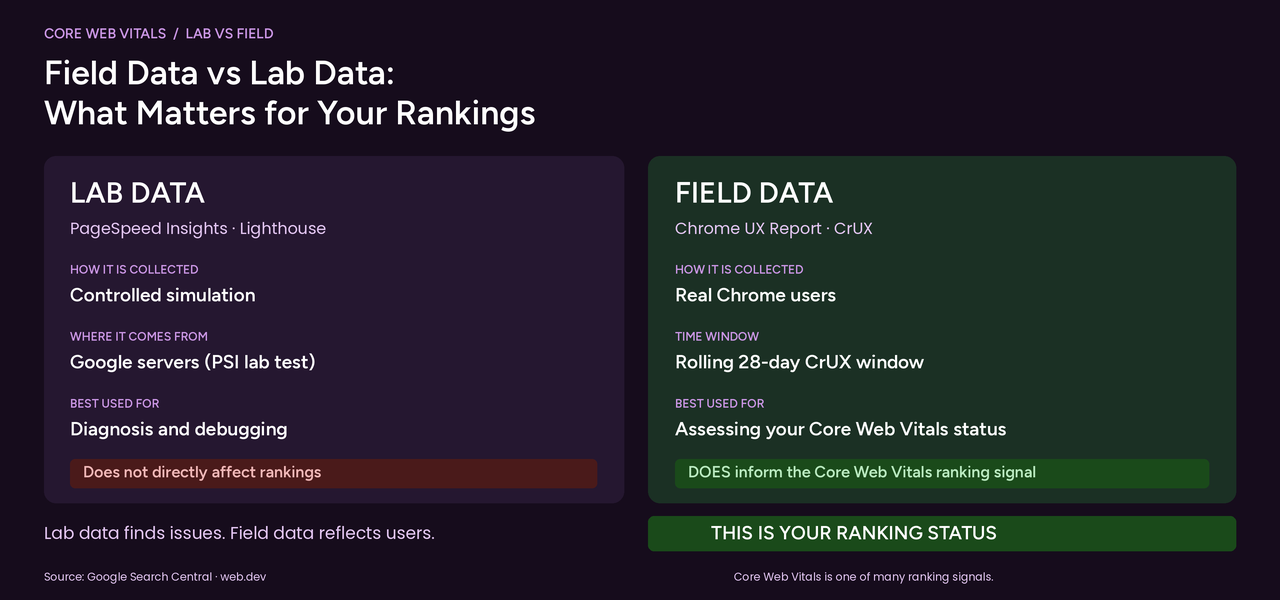
CWV measurement has two distinct modes that are frequently conflated, leading to optimisation efforts that improve lab scores without improving actual rankings. Field data (Real User Monitoring) uses actual Chrome user measurements collected over a rolling 28-day window in the CrUX dataset. This is the data Google uses for ranking. Access it in Google Search Console (Experience, Core Web Vitals report) and the top section of PageSpeed Insights when CrUX data is available for that URL. If your URL shows field data as Poor, that is your ranking status regardless of your lab score.
Lab data (Simulated Testing) is the PageSpeed Insights score in the Diagnose Performance Issues section, a simulation on Google servers using a controlled device and connection speed. Lab data is excellent for diagnosing specific issues and verifying that fixes work before deployment. But a perfect 100 lab score does not guarantee Good field data if real users are on slower devices or congested networks. Always prioritise field data for ranking assessment and use lab data for diagnosis only.

Core Web Vitals Monthly Monitoring Programme

CWV scores are not static. Site updates, new plugins, theme changes, additional images, and new third-party scripts regularly introduce performance regressions. A monthly monitoring routine catches degradation before it affects rankings. Monthly CWV maintenance: check GSC Core Web Vitals report for any new Poor or Needs Improvement URLs (filter to mobile, the primary ranking environment), run PageSpeed Insights on your homepage, top 5 blog posts, and top 5 service pages, and review every new third-party script added to the site since the last check.

Fix Your Core Web Vitals Before Your Next Ranking Review

Our technical SEO team provides specific, implementable fix recommendations for every CWV failure, exact code changes, compression settings, and configuration updates your developer can action immediately.

Start Your Performance Optimisation

Frequently Asked Questions

What are Core Web Vitals?

Core Web Vitals are Google's three standardised page experience metrics that measure real-world user experience and function as direct ranking signals. They are LCP (Largest Contentful Paint) measuring loading speed with a target under 2.5 seconds, INP (Interaction to Next Paint) measuring page responsiveness with a target under 200 milliseconds, and CLS (Cumulative Layout Shift) measuring visual stability with a target under 0.1. Pages with Good scores across all three have a ranking advantage over pages with Poor or Needs Improvement scores in competitive search results.

Do Core Web Vitals directly affect SEO rankings?

Yes. Google confirmed Core Web Vitals as direct ranking signals with the Page Experience update. They function as a tiebreaker in competitive SERPs, when content quality, relevance, and authority are similar between competing pages, the page with better CWV scores ranks higher. According to Google Search Central, the page experience signal combines Core Web Vitals with mobile-friendliness, HTTPS, and absence of intrusive interstitials. Even in lower-competition niches, Good CWV removes a systematic ranking disadvantage.

What is the difference between LCP, INP, and CLS?

LCP (Largest Contentful Paint) measures how quickly the largest visible content element loads, the user's perception of page loading speed. INP (Interaction to Next Paint) measures how quickly the page responds to user input throughout the entire session, whether the page feels interactive and responsive during use. CLS (Cumulative Layout Shift) measures how much visible content unexpectedly moves during loading, whether the page is visually stable and non-disruptive. All three must be Good for a page to receive the full Page Experience ranking benefit.

What replaced First Input Delay (FID)?

INP (Interaction to Next Paint) replaced FID as a Core Web Vital in March 2024. FID measured only the delay before the browser could respond to the first user interaction after page load, a useful but incomplete metric. INP is more comprehensive: it measures the responsiveness of all user interactions throughout the entire page session, not only the first. INP captures the worst-case interaction delay from all click, tap, and keyboard events, providing a much more accurate picture of how interactive a page actually feels during real use.

How do I check my Core Web Vitals scores?

Check through three sources. Google Search Console (Experience, Core Web Vitals): shows all site URLs classified as Good, Needs Improvement, or Poor based on real Chrome user field data, with separate mobile and desktop reports. PageSpeed Insights at pagespeed.web.dev: shows both field data for the specific URL and lab simulation data with specific fix recommendations. Chrome DevTools Performance tab: enables real-time profiling during page load and interaction to identify specific failing elements. Always prioritise field data for ranking status assessment.

What is a Good Core Web Vitals score?

Google's thresholds: LCP under 2.5 seconds is Good, 2.5 to 4.0 seconds Needs Improvement, over 4.0 seconds Poor. INP under 200 milliseconds is Good, 200 to 500ms Needs Improvement, over 500ms Poor. CLS under 0.1 is Good, 0.1 to 0.25 Needs Improvement, over 0.25 Poor. These thresholds apply to the 75th percentile of real user measurements, meaning 75% of page loads for real Chrome users must meet the threshold for a Good classification. One slow outlier experience does not fail the metric, but consistent poor performance does.

How do I fix LCP issues?

The most effective LCP fixes are: compress and convert hero images to WebP format (30 to 50% smaller at equivalent quality), add a preload link tag in your HTML head for the LCP image element so the browser discovers it immediately, reduce server response time with server-side caching and a CDN, eliminate render-blocking CSS and JavaScript by deferring non-critical files, and remove any lazy-loading attribute from your specific LCP element since lazy loading deliberately delays loading. Use PageSpeed Insights to identify your specific LCP element and exact cause of delay before implementing fixes.

Faster Pages Rank Higher and Convert Better, Fix Both Problems at Once

At Futuristic Marketing Services, Core Web Vitals optimisation improves both your Google ranking signals and your user experience, because the same fixes that satisfy Google's metrics produce faster, more stable pages that convert at higher rates.

Talk to a Technical Performance Expert

Conclusion

Core Web Vitals are now a non-negotiable part of technical SEO. Pages consistently failing LCP, INP, or CLS thresholds face a systematic ranking disadvantage that cannot be compensated for by content quality or backlink authority alone. The good news is that CWV failures are fixable with specific technical interventions, image optimisation, script deferral, and explicit element sizing address the majority of failures on most websites.
Check your field data status in Google Search Console first (this is your actual ranking signal), then use PageSpeed Insights to diagnose specific failing elements, and implement fixes in order of impact. Combine CWV optimisation with our technical SEO audit and mobile SEO guide for a complete technical performance foundation that supports all your content and link building investments.
Share this post :
Picture of Devyansh Tripathi
Devyansh Tripathi

Devyansh Tripathi is a digital marketing strategist with over 5 years of hands-on experience in helping brands achieve growth through tailored, data-driven marketing solutions. With a deep understanding of SEO, content strategy, and social media dynamics, Devyansh specializes in creating results-oriented campaigns that drive both brand awareness and conversion.

All Posts