
WordPress theme development is the process of creating or customising the templates, stylesheets, and PHP functions that control a WordPress site visual appearance and layout. It ranges from adding CSS overrides in a child theme, a 30-minute task, to building a fully bespoke PHP theme from scratch with custom post types, ACF field groups, and performance-engineered templates, a 6 to 12 week project. The approach chosen determines the site performance ceiling, design freedom, and long-term maintenance complexity.
This guide covers the full spectrum of WordPress theme development: the decision framework for choosing between a premium theme, a page builder approach, and a custom theme; the child theme standard that all professional WordPress developers follow; the custom theme development process; performance considerations; Full Site Editing and block themes; and realistic cost benchmarks for each approach in 2026.
Key Takeaways
- The theme is the architectural foundation of every WordPress site, the decision made here determines the performance ceiling, design freedom, and long-term maintenance overhead of the entire project.
- Using a child theme for all customisations is the non-negotiable professional standard. Direct modifications to a parent theme are overwritten on every theme update, destroying all custom work.
- A page builder approach using Elementor Pro over a minimal base theme (Hello Elementor or GeneratePress) provides high design flexibility at a fraction of custom theme development cost and is the correct approach for most SME sites.
- Custom PHP theme development (£8,000 to £30,000) is justified when: design requirements cannot be met in any page builder; 85 to 95 or higher mobile Lighthouse is a hard requirement; or the site has complex custom post types and data structures.
- WordPress Full Site Editing (FSE) with block themes is the long-term direction of WordPress core, new projects in 2026 with teams comfortable in Gutenberg should evaluate FSE seriously for the performance and native WordPress integration advantages.
- Theme performance is primarily determined by hosting quality and CSS and JavaScript architecture. A custom theme on managed hosting achieves 85 to 95 or higher. An Elementor Pro site on managed hosting with WP Rocket achieves 70 to 88. Both can achieve Good Core Web Vitals status.
- The most common and most expensive WordPress mistake is making CSS and PHP customisations directly in a parent theme file. Always use a child theme. Always. See our hire a WordPress developer guide for the red flags to screen for.
Need a Custom WordPress Theme?
Bespoke Theme Development Built for Performance and Growth
Futuristic Marketing Services builds custom WordPress themes and Elementor Pro sites, designed to your brand, optimised for performance, and maintained with ongoing support.
Get a Free ConsultationChoosing Your WordPress Theme Approach
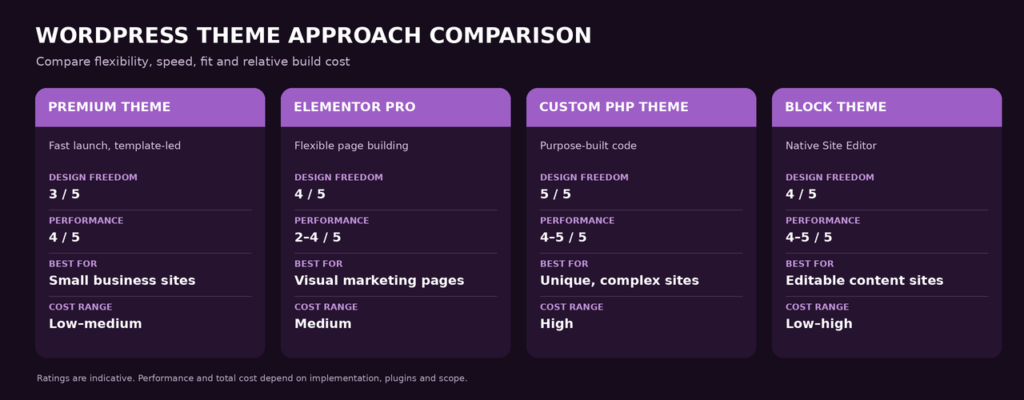
The theme approach decision is the highest-leverage decision in a WordPress project because it determines what all subsequent work is building on. Choose the wrong foundation and constraints compound over time, you pay for them in limited design flexibility, poor performance, or expensive rebuilds. Choose correctly and the foundation supports everything the site needs to grow.
| Approach | Design Freedom | Performance | Best For | Cost |
|---|---|---|---|---|
| Premium theme (ThemeForest, Envato) | Low to medium, constrained by theme design system | Variable, many premium themes are bloated | Tight budget, simple sites, tight timelines | £0 to £100 theme plus development time |
| Elementor Pro over minimal base theme | High, almost any visual layout without custom code | Good with optimisation, 70 to 88 mobile Lighthouse | Most SME marketing sites requiring custom design | £49 to £200 per year plugin plus £3,000 to £15,000 development |
| Custom PHP theme from scratch | Unlimited, complete control over every element | Excellent, 85 to 95 or higher achievable | Enterprise builds, unique UX, maximum performance | £10,000 to £40,000 |
| Block theme (Full Site Editing) | High, full design control using WordPress core blocks | Excellent, leaner than page builders | New projects with teams comfortable in Gutenberg | £4,000 to £20,000 |
The Minimal Base Theme Approach
The professional standard for Elementor-based development is pairing Elementor Pro with a minimal base theme, Hello Elementor (free, made by Elementor) or GeneratePress (free with premium option). These themes have almost no styling of their own, they provide the WordPress structure while Elementor Pro controls 100% of the visual design through the Theme Builder. This approach avoids CSS conflicts between the theme and Elementor, produces cleaner HTML output, and gives the developer full control without maintaining a custom PHP theme.
Child Themes: The Professional Non-Negotiable
A child theme inherits all functionality and styling of a parent theme while keeping customisations in a separate set of files that are never overwritten when the parent theme updates. Using a child theme for all WordPress customisations is not optional for professional development, it is the baseline standard, and its absence is a red flag that disqualifies any developer from serious consideration.
Why Child Themes Are Mandatory
When a parent theme updates, which it does regularly for security patches and feature improvements, any modifications made directly to the parent theme files are overwritten and permanently lost. A developer who added CSS rules to the parent style.css, modified the header.php template, or added functions to functions.php directly in the parent theme will lose all of that work at the next update. A child theme stores all customisations in its own files, the parent updates safely because the child files are never touched by the update process.
What Goes in a Child Theme
Child Theme Customisation Locations
style.css
All CSS overrides and additions, class-specific styles, responsive adjustments, brand colours, go here, never in the parent theme stylesheet.
functions.php
Additional WordPress hooks, custom functions, enqueue additional stylesheets or scripts, register custom post types or sidebars specific to the project.
Template files
Copy any parent theme template file (header.php, footer.php, single.php) to the child theme folder and modify it, the child version takes priority over the parent.
New template files
Create new page templates in the child theme that do not exist in the parent, they appear as template options in the WordPress page editor.
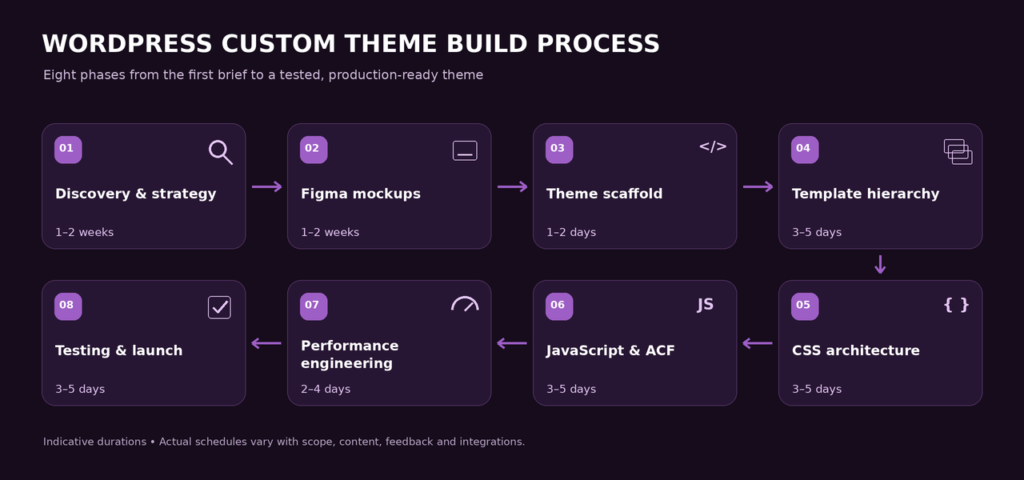
The Custom PHP Theme Development Process
Custom PHP theme development, building a bespoke WordPress theme from scratch, is the highest-investment, highest-output approach. It is justified for enterprise builds, sites with complex data structures, and projects where maximum performance is a hard requirement that no page builder can meet.
| Phase | Deliverables | Duration | Key Tools |
|---|---|---|---|
| Discovery and design | Wireframes, Figma mockups, component library, responsive designs for all page types | 2 to 5 weeks | Figma, Adobe XD |
| Theme scaffold | Folder structure, style.css metadata, functions.php, body_class hooks, basic template files | 2 to 4 days | Local WP, VS Code, Git |
| Template hierarchy | index.php, single.php, page.php, archive.php, 404.php, search.php, taxonomy templates | 1 to 2 weeks | WordPress template hierarchy documentation |
| CSS architecture | CSS custom properties for design system, BEM naming convention, SCSS compilation, responsive breakpoints | 1 to 2 weeks | SCSS, PostCSS, Webpack or Vite |
| JavaScript | Navigation behaviour, smooth scroll, lazy load, animations, all deferred or async | 3 to 7 days | Vanilla JS or Alpine.js for minimal overhead |
| ACF integration | Custom field groups for flexible content blocks, repeater fields, relationship fields, see ACF documentation | 1 to 2 weeks | Advanced Custom Fields Pro |
| Performance engineering | Inline critical CSS, WebP images, explicit image dimensions, preload LCP image, defer scripts, targeting 85 plus Lighthouse | 3 to 5 days | Lighthouse, PageSpeed Insights |
| Testing and launch | Cross-browser, cross-device, form testing, speed testing, GSC verification | 1 to 2 weeks | BrowserStack, Lighthouse, GSC |
Performance Anti-Patterns in Custom Themes
Frequently Asked Questions About WordPress Theme Development
What is a WordPress theme?
What is a WordPress child theme and why is it important?
When do I need a custom WordPress theme instead of a page builder?
How much does custom WordPress theme development cost?
What is Full Site Editing in WordPress?
Can I retake the Google Ads Search Certification exam if I fail?
How long does WordPress theme development take?
What is ACF (Advanced Custom Fields) and why is it used in theme development?
How do I make my WordPress theme faster?
What is the WordPress template hierarchy?
Can I build a WordPress theme without coding?
What is the difference between a WordPress theme and a plugin?
How do I update a WordPress theme safely?
How to Change my Photo from Admin Dashboard?
Futuristic Marketing Services
Custom WordPress Theme Built for Your Brand
Futuristic Marketing Services builds bespoke WordPress themes, custom design, performance engineering to 85 or higher Lighthouse, ACF integration, and full SEO foundations included as standard.
Start Your Theme Project